- Date
What `strict-origin-when-cross-origin` Means for Referral Analytics
 Andrii Romasiun
The strict-origin-when-cross-origin policy tells a web browser exactly how much of a source page's URL to share when a visitor clicks a link or loads an external resource. If someone clicks a link on a secure HTTPS site to visit another secure HTTPS site, the browser strips away the specific page path and query parameters, sending only the source origin, including its scheme, host, and port, in the Referer header. Because this behavior acts as the default standard for modern web browsers, analytics platforms like Swetrix often report the referring website domain but cannot show the exact article or source page a visitor came from. Understanding the information passing between websites helps you correctly interpret your traffic sources so you can rebuild your campaign attribution strategy around the data browsers send rather than the data they withhold.
How the strict-origin-when-cross-origin Policy Works
When a browser requests a new page, it traditionally sends an HTTP header identifying the page the user just left. You will see this HTTP header spelled Referer. While this historical typo from the early web was never fixed in the official specification to maintain backwards compatibility, the policy governing how much information that header contains uses the correct spelling: Referrer-Policy.
The strict-origin-when-cross-origin directive is a specific value you can assign to your site's Referrer-Policy. Even if you omit this value, modern browsers enforce it automatically as their baseline behavior. The name describes how the policy applies different rules based on the link's destination. The "strict" portion dictates security downgrades, meaning if a visitor moves from a secure HTTPS page to an insecure HTTP page, the browser drops the referrer entirely to prevent a secure site from leaking information over an unencrypted connection. Meanwhile, the "origin-when-cross-origin" portion handles movement between secure sites. When a visitor moves from one website to an entirely different website, the browser sends only the origin, which includes the protocol and the domain but drops the subfolders, file names, and any query parameters attached to the URL.
This policy preserves the source path and query string for same-origin requests but limits cross-origin referrers to the source origin, as Mozilla's `Referrer-Policy` reference explains. A full URL in the Referer header can expose sensitive information in its path or query string, so, on cross-origin requests under this policy, the browser omits those components from the header.
An analytics platform can only work with the referral, campaign, and on-site signals it receives. If a browser scrubs the file path from the header before sending the request, no analytics software can recover those missing URL details. Swetrix reports the domain while respecting the privacy boundary established by the browser.
Information Sent Under the Browser Policy
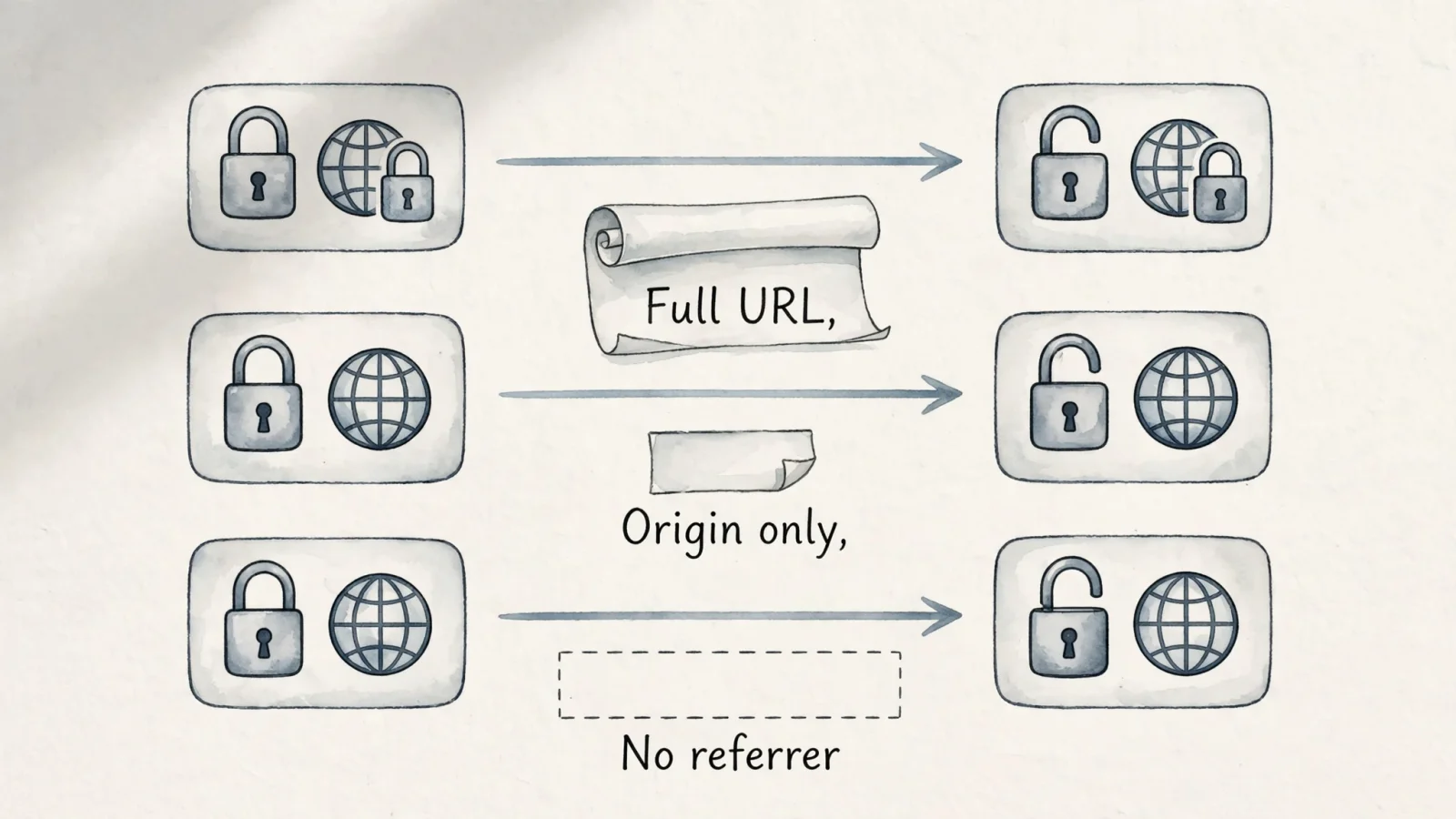
The amount of referral data you receive depends on the relationship between the referring page and your landing page. Browsers categorize these relationships by evaluating the scheme, the host, and the port of both URLs. If all three match, the request is same-origin, whereas a difference in any of the three makes the request cross-origin. The policy on the referring page governs the transaction, leaving the destination site with no control over what the visitor's browser chooses to send.
| Request from a page using this policy | Referrer sent |
|---|---|
Same origin, such as one page on https://blog.example linking to another page on that same origin | Full referrer URL, including path and query string; URL fragments and user information are not included. |
Cross-origin HTTPS to HTTPS, such as https://blog.example/post linking to https://partner.example/ | Source origin only, such as https://blog.example/; path and query string are omitted. |
| HTTPS to HTTP | No Referer header is sent. |
A subdomain to another subdomain, such as https://blog.example to https://shop.example | Cross-origin: the host differs, so the destination normally gets only the source origin for HTTPS-to-HTTPS requests. |
The same-origin allowance means internal tracking remains highly detailed. If a visitor reads five different articles on your publication, their browser passes the specific URL of the previous article with every internal click so your analytics tool can map that flow. The cross-origin restrictions engage the moment the visitor crosses a domain boundary, and subdomains count as domain boundaries. A link pointing from a company's main domain to its subdomain store triggers a cross-origin event, prompting the browser to truncate the referrer and pass only the domain level of the main site to the store's analytics.
Domain-Level Reporting in Analytics
This browser behavior directly shapes how your traffic reports look. Marketers frequently notice a discrepancy between the detailed traffic paths they expect and the broad domain aggregates they receive, a gap occurring because the referring site's browser policy trims the data before it reaches your server. Consider a concrete HTTPS example where a visitor reads a post located at https://blog.example/marketing/story?campaign=spring. This page contains a promotional link pointing to https://partner.example/. When the visitor clicks the link, the browser checks the origin. The scheme is HTTPS for both, but the host changes from blog.example to partner.example. Because the hosts do not match, the browser applies the cross-origin rule by stripping away /marketing/story and deleting ?campaign=spring. It constructs a new, shortened Referer header containing only https://blog.example/ and sends this truncated version alongside the request to the partner site.
Chrome planned to make strict-origin-when-cross-origin its default in version 85 for sites without an explicit policy. For cross-origin requests that stay at the same security level, the policy sends only the source origin, so the Referer header omits the path and query string. As Chrome's 2020 default-policy rollout explains, this reduces the detail available to server-side logging and analytics that rely on full referrer URLs.
A shortened referrer differs from an empty referrer. Some visits arrive with no referral data whatsoever, as an HTTPS-to-HTTP transition sends no header under this policy. Stricter page-level controls, ad blockers, or specific browser privacy modes can also suppress the header. Treat an unattributed visit in your dashboard as a missing signal rather than proof that a person manually typed your URL into their address bar. Dark social shares, messaging apps, and email clients frequently drop the referrer, sending traffic that analytics platforms categorize as direct.
If you use a privacy-first platform like Swetrix as your Google Analytics alternative, the software handles this domain-level data by reporting the referrer information it receives. It organizes incoming domains to show which partnerships and external publications drive your growth. Since no analytics tool can infer an omitted source-page path from a shortened header, the platform focuses on delivering accurate aggregated metrics based on established browser standards.
Setting and Verifying the Referrer Policy
Before you modify how your server handles referral data, inspect the active policy on your referring pages. Browsers already default to strict-origin-when-cross-origin, and you generally do not need to loosen this standard to obtain more referral detail, as doing so introduces unnecessary security risks for your users. You have three primary methods for controlling the policy. A response header sets the default, a <meta> element can set a page-wide policy if the header is unavailable, and an element-level attribute can set a policy for an individual request.
Scope Configuration Methods
The clearest configuration happens at the server level using an HTTP response header. When your server delivers a web page, it sends instructions ahead of the HTML document. Setting the policy here ensures every page on your site applies the rule consistently.
Referrer-Policy: strict-origin-when-cross-origin
If you can't set a Referrer-Policy header, you can instead use an HTML <meta> element to set a page-wide policy. Mozilla's guidance on URL-disclosure risks says it should be the first <meta> element in the document <head>.
<meta name="referrer" content="strict-origin-when-cross-origin">
You can also apply granular control to an individual request using an element-level attribute. If you have a specific outgoing link that requires a stricter policy, add a referrerpolicy attribute directly to the anchor tag.
<a href="https://partner.example" referrerpolicy="no-referrer">Visit our partner</a>
Applying rel="noreferrer" to a link achieves a similar result by suppressing all referrer information for that single click regardless of the page's broader policy.
Verifying Network Requests
Testing your configuration requires watching the raw network traffic leave your browser, as the visual layout of a page reveals nothing about the headers traveling underneath it. Open your browser's developer tools, navigate to the Network panel, and load the source page. Find an outgoing link to test, click it, and watch the new requests populate the panel. By selecting the primary document request for the new page and looking at the Request Headers section, you can locate the Referer header to see what string the browser transmitted. Test the three major transition types: click a link pointing to another page on your own domain to verify same-origin behavior, click a link to a secure external site to confirm the browser trims the path to the origin, and test an HTTPS-to-HTTP transition to ensure the browser drops the header to protect the secure context. You can also use an HTTP Headers Checker to verify that your server outputs the correct Referrer-Policy response header in production.
Never switch your site-wide policy to unsafe-url in an attempt to provide better data to downstream analytics tools. That setting forces the browser to send the full path and query string to every origin, regardless of security. If your application relies on URL parameters for password resets, email verification links, or session tokens, unsafe-url broadcasts those secrets to every third-party script and external link on the page. Stick to the default standard and keep personal information out of your URLs.
Campaign Attribution Using Destination URLs
The browser's decision to trim the referring URL does not mean you lose the ability to track marketing campaigns. You must shift your tracking strategy away from the source URL and onto the destination URL.

A referrer describes the origin that sent the visitor, belonging to the referring page. UTM parameters, conversely, attach directly to your own landing page URL. When someone appends ?utm_source=newsletter&utm_campaign=spring_sale to a link, those tags travel with the click and land on the destination server. The strict-origin-when-cross-origin policy limits what the browser sends about the past, but it does not touch the destination URL. Because the UTM parameters reside on the URL the browser requests, they survive the cross-origin transition intact as the browser asks your server for the full destination URL. This separation of signals keeps attribution highly accurate: the referring page policy dictates the domain data, while your UTM structure provides the campaign granularity. This works well unless an intermediate redirect breaks the chain. If a marketing link passes through several routing hops before hitting the final page, a poorly configured server might drop the query string along the way. Use an SEO Migration Redirect Validator to map the hop chain and ensure your UTM parameters survive the journey to the final destination.
Swetrix handles these signals concurrently by collecting the referrer field to identify organic linking domains while simultaneously capturing the UTM fields from the active landing page to populate source, medium, and campaign reports. When a visitor arrives without a referrer due to strict browser settings or mobile app transitions, Swetrix employs fallback mechanisms. According to the Swetrix tracking script reference, the software actively parses the URL for supported ad and social click IDs, such as gclid and fbclid. By extracting known click IDs, the platform recovers the specific traffic source and maps the acquisition data to bypass the missing header. To maintain privacy standards, the software parses the required values but does not store the raw query string.
You connect this acquisition data to the broader analytics workflow by tracking user behavior after the landing page load. Once the campaign source is filed, you map the session using custom event tracking and conversion funnels. The initial domain referral or UTM source remains attached to the user session, which allows you to attribute a successful checkout or signup back to the specific marketing effort.
Search engines present a slightly different attribution challenge. Years ago, search engines passed the user's specific search query in the Referer header, but today, major search engines route traffic through intermediate redirects and enforce strict referrer policies, so webmasters only see the search engine's root domain. Since no analytics platform can extract search keywords from a header that no longer contains them, you must merge your on-site tracking with external search data. Swetrix integrates with Google Search Console through a dedicated SEO dashboard. This API connection pulls authenticated search queries, click volumes, impressions, and ranking positions from Google and places that data alongside your referral analytics. This gives you complete visibility into organic search performance without relying on outdated header mechanics.
Multiple signals support a modern attribution strategy. You rely on the domain-level Referer header for broad partnership tracking, UTM parameters for specific campaign targeting, and click IDs for paid acquisition. Because each system serves a distinct role, acknowledging the boundaries of the strict-origin-when-cross-origin policy prevents you from chasing page-level referral data that browsers intentionally discard. You can build reliable reports on the signals you control, keeping your tracking accurate and your visitors' privacy intact.
Looking for a privacy-first analytics platform that captures deep product insights? Swetrix provides cookieless tracking, conversion funnels, and integrated SEO dashboards without requiring intrusive cookie banners. Start building compliant, accurate reports today at Swetrix.com.