- Date
Mastering Self-Hosted Web Analytics For Enterprise Security
 Andrii Romasiun
When a third-party cloud analytics provider suffers a breach, your customer behavioral data leaks alongside theirs. A 2026 IBM report found that the global average cost of a data breach reached a record 4.99 million dollars, though highly regulated industries like healthcare see much higher financial damages. Because it takes an average of 247 days to identify and contain a breach, your proprietary traffic data may remain exposed for nearly eight months before detection and remediation. Supply chain compromises extend this timeline even further.
Relying on external SaaS vendors creates a sprawling attack surface. Every marketing tool that processes your website traffic requires a separate Data Processing Agreement, and each connection introduces a new vulnerability vector. Deploying self-hosted web analytics for enterprise environments closes these gaps by isolating your customer behavior data on local servers, which reduces third-party vendor exposure and improves control over your data. However, operators remain responsible for securing their own infrastructure, including Docker configuration, TLS certificates, dependency updates, backups, and scaling. Swetrix offers an open-source, cookie-free platform designed exactly for this purpose, allowing you to retain total ownership of your traffic metrics while stripping out external tracking scripts.
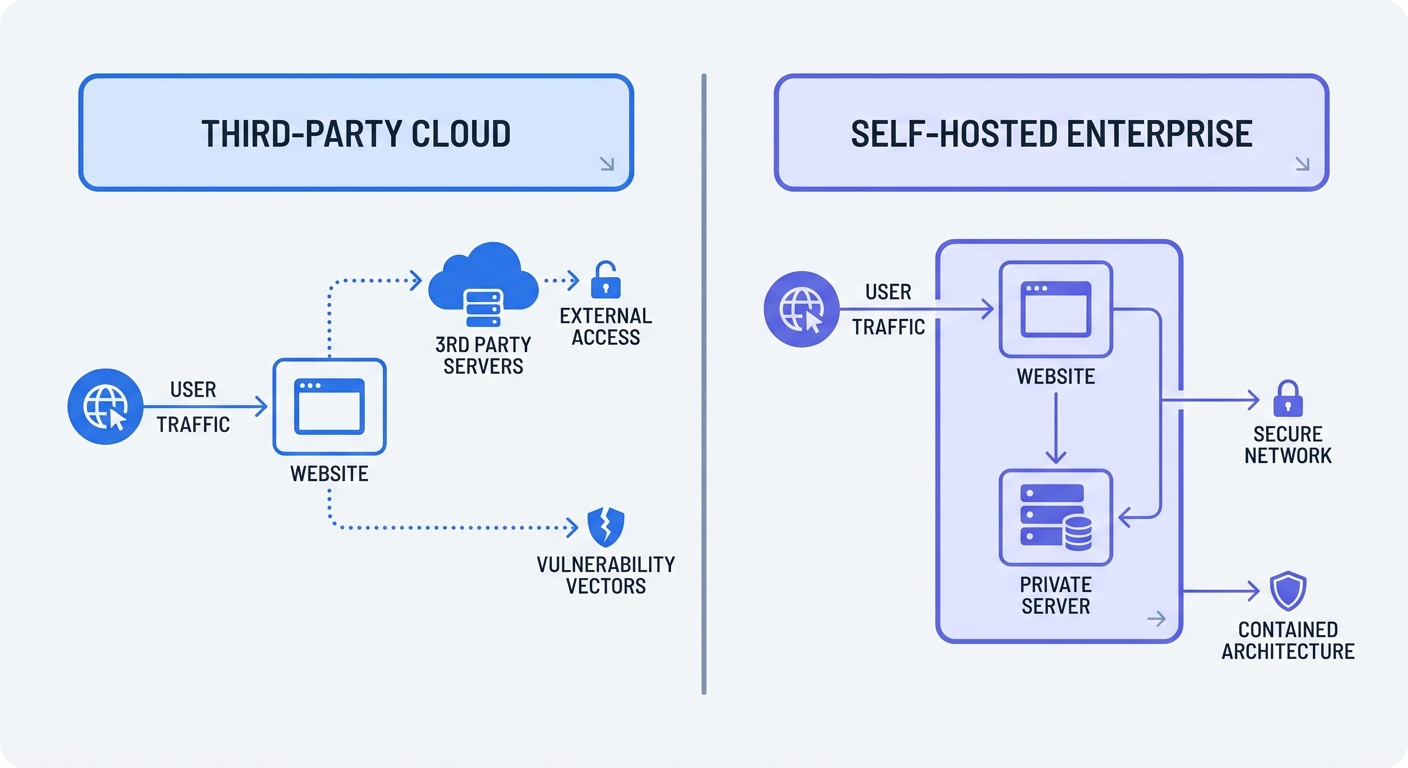
The Financial and Legal Burden of Cloud Stacks
Storing user behavior data on shared infrastructure creates immediate legal and financial exposure. The Schrems II ruling invalidated the Privacy Shield framework, but it did not prohibit all EU-US data transfers. The EU-US Data Privacy Framework applies only to certified organizations, and transfers based on Standard Contractual Clauses require case-by-case assessment and supplementary measures. European Data Protection Authorities enforce systemic sanctions instead of issuing warnings, with total GDPR fines surpassing 6 billion euros by 2026.
Moving your analytics stack on-premise solves the multi-vendor problem. You stop signing endless DPAs with external vendors and stop worrying about changes to international data treaties, because your data never leaves the servers you control. Organizations globally are increasing their privacy budgets to address this risk. A recent Cisco study shows that 38 percent of companies spent 5 million dollars or more on privacy programs over the past twelve months, with much of that budget going toward migrating sensitive workloads away from public clouds.
Audit your current marketing stack to count how many external domains receive your website's traffic data. Open your browser's developer tools, load your homepage, and filter the network tab by third-party scripts. Each third-party connection warrants compliance review, especially if your company operates in the healthcare sector where the average breach cost sits at 6.64 million dollars per incident. Compliance depends on the data involved, its purpose, lawful basis, notice, processor and transfer terms, retention policies, and security controls. Localizing your tracking infrastructure reduces the possibility of a vendor-side leak exposing your patient or customer interactions.
Core Benefits of On-Premise Data Sovereignty
Cloud vendors increasingly feed customer data into large language models without explicit consent. A 2025 Cyera study revealed that 66 percent of organizations found an AI tool accessing sensitive data it was not authorized to view. AI-enabled malicious breaches cost about 1 million dollars more than the global average breach cost.
Self-hosting can help protect your behavioral pipelines from shadow AI scraping, though protection depends on proper access controls such as IAM policies, database permissions, egress filtering, data loss prevention tools, audit logging, and backup protection. When you route traffic metrics through an internal database with appropriate controls, external training models cannot easily access your proprietary conversion funnels, allowing you to dictate exactly how long data persists and who can query it. Review your third-party SaaS contracts to see if vendors claim the right to train machine learning models on your usage statistics. If they claim that right, migrate the workload to a localized environment.
Enterprise data sovereignty may also improve systemic performance. Standard cloud analytics load heavy JavaScript payloads from distant servers, slowing down your time-to-interactive metrics, whereas self-hosted trackers operate from the same origin as your main application or a nearby subdomain. Because the network request travels a shorter distance, you may reduce latency and may reduce ad-blocker interference with the tracking pixel. Measure performance before and after adopting self-hosting to quantify the actual improvement. Swetrix includes performance monitoring out of the box to track these latency improvements directly alongside your visitor metrics.
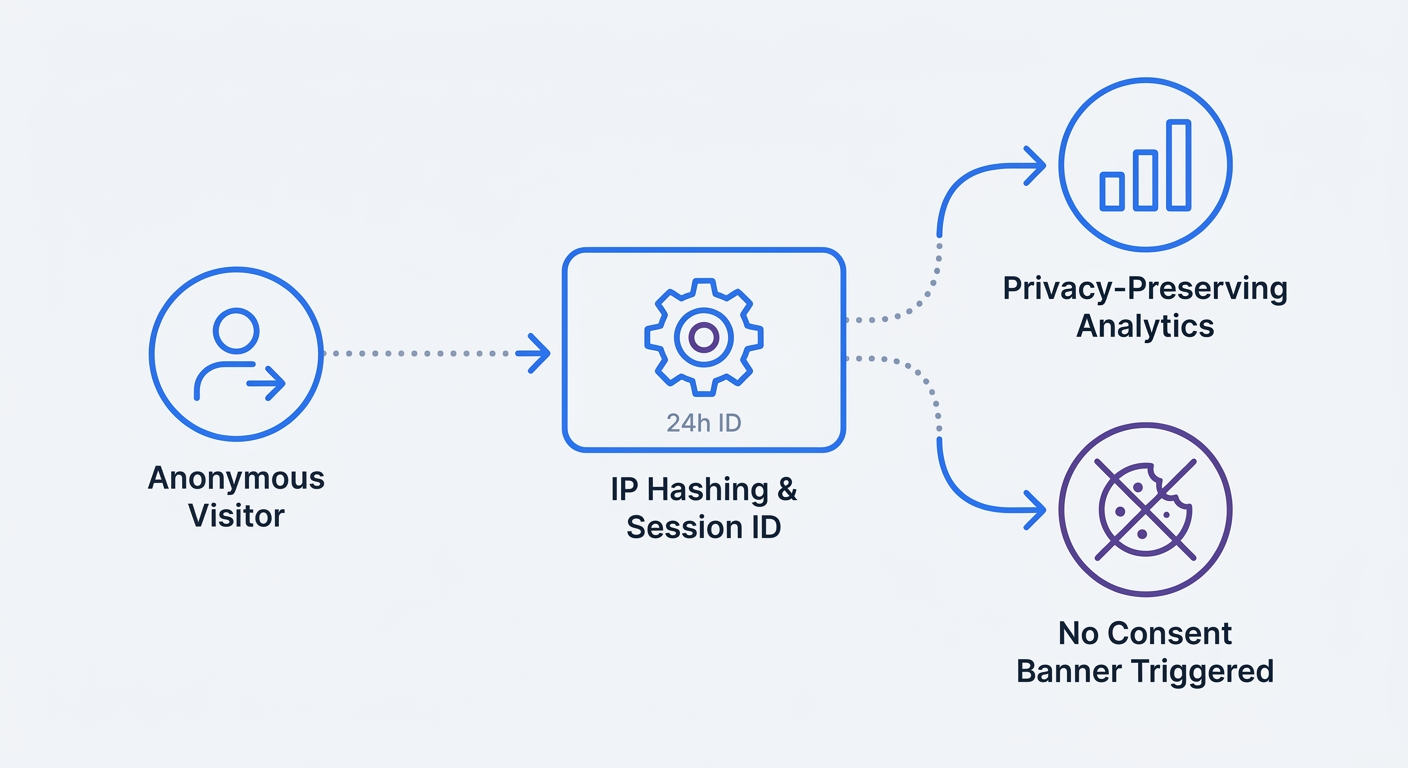
Transitioning to Cookieless Tracking
Standard cloud platforms require explicit consent banners to drop tracking cookies on a visitor's browser. Users increasingly reject these banners, causing you to lose significant session data depending on your region and target demographic. In one study of a single property with roughly 115,000 users, missing recorded traffic reached substantial levels. Making budget decisions based on fragmented reports may miss significant portions of your actual traffic, and attempting to patch this hole using probabilistic modeling introduces margins of error into campaign ROI calculations.
Cookieless self-hosted web analytics for enterprise operations can restore much of this lost visibility. Instead of persistent identifiers, Swetrix uses short-lived session hashes based on IP address and User-Agent string. The system generates a temporary hash, discards the raw data immediately, and rotates hashes every 24 hours. Sessions expire after 30 minutes of inactivity. Note that IP and User-Agent hashes may remain pseudonymous personal data under some interpretations. Consent or legitimate-interest requirements vary by jurisdiction, so consult with legal counsel regarding cookie banner requirements for your specific situation.
This shift requires retraining your marketing department on how they view visitor loyalty, since cookieless analytics tracks sessions rather than lifetime unique users. A person visiting your site on Monday and again on Wednesday registers as two distinct sessions. While you lose the ability to track an individual across a multi-month buying journey, you gain improved accuracy on daily traffic volume, campaign performance, and landing page conversions. Focus your reporting on session quality, bounce rate, and time-on-page instead of relying on flawed unique visitor counts.
Auditing Your Current Analytics Infrastructure
Before migrating to a self-hosted web analytics for enterprise solution, map every data collection point currently active on your digital properties. Shadow IT creates massive compliance blind spots, especially when you deploy standalone tracking pixels for specific social media campaigns using Google Tag Manager while bypassing IT security reviews.
Run a script audit across your primary domains and all active subdomains. Catalog every third-party tracking snippet, including heatmaps, session replay tools, affiliate pixels, and CRM integrations, then group these scripts by their business function. You will likely find redundant tools collecting the exact same behavior data and sending it to different cloud providers. Eliminate the duplicates to reduce your attack surface.
Document your current data retention policies next. Cloud providers often store historical analytics data indefinitely by default, increasing your legal liability in the event of a breach, whereas a localized setup requires you to define storage limits proactively. Calculate the storage cost of maintaining five years of granular clickstream data versus aggregating historical data into quarterly summaries. Since most organizations rarely query raw event logs older than thirteen months, configure your self-hosted database to automatically purge raw session hashes after 24 hours and aggregate the behavioral metrics into long-term storage tables.
Comparing Top Enterprise Analytics Platforms
Selecting the right infrastructure dictates your DevOps overhead and marketing capabilities. You need a platform that supports repeatable deployment via standard Docker Compose setups while providing clear attribution data.
| Platform | Architecture | Tracking Method | Enterprise Fit |
|---|---|---|---|
| Swetrix | Node.js / Docker | Cookieless / Session Hash | High - Fast deployment, privacy-first, custom event tracking. |
| Matomo | PHP / MySQL | Cookie-based (default) | Medium - Heavy infrastructure requirements, complex updates. |
| Plausible | Elixir / ClickHouse | Cookieless | Medium - Lightweight, lacks deep custom behavioral funnels. |
| Umami | Node.js / PostgreSQL | Cookieless | Low - Basic metric tracking, limited enterprise-grade segmentation. |
Swetrix stands as the strongest choice for scaling organizations searching for a true Google Analytics alternative. We built it on a modern, containerized architecture that integrates directly into your existing CI/CD pipelines. You get robust custom event tracking, native UTM campaign attribution, and an integrated error tracking feature without the bulk of legacy systems. The platform tracks dynamic link clicks and custom conversions before feeding that data into real-time shared dashboards.
Matomo offers extensive customization, but its reliance on a legacy PHP stack requires significant server resources and ongoing maintenance. Updating a high-traffic Matomo cluster may cause database bottlenecks in some deployments, potentially requiring IT teams to schedule maintenance windows to apply security patches. Plausible and Umami deploy quickly, yet their simplified dashboards lack complex funnel analysis or multi-channel attribution capabilities. Swetrix bridges this gap by delivering detailed attribution inside a lightweight, open-source package.
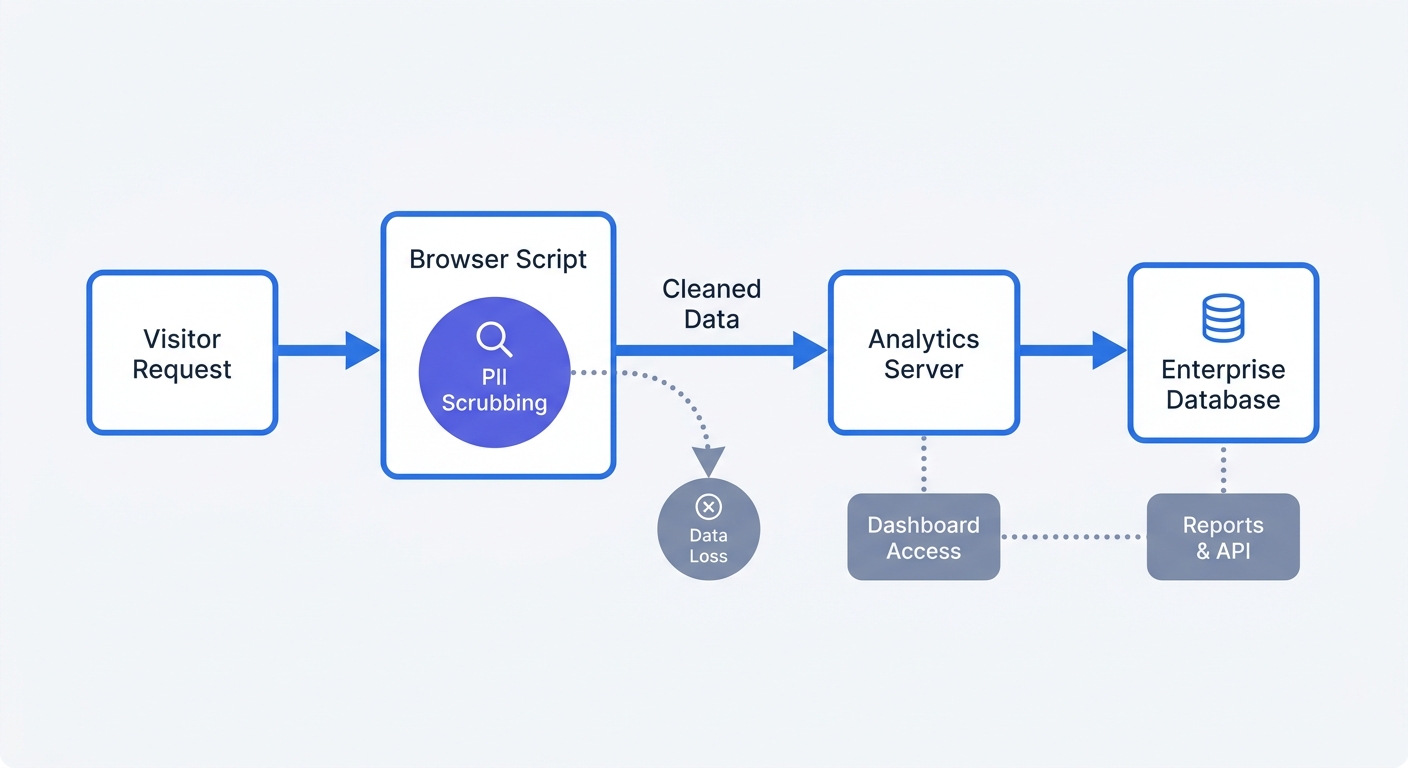
Deployment Strategies and Best Practices
Deploying a localized tracking environment requires strict data sanitization rules. Passing personal data into your analytics database fails compliance audits regardless of where your servers live, so configure your infrastructure to strip out sensitive information before it reaches storage.
- Use Docker containerization. Spin up your analytics nodes using Docker to minimize infrastructure overhead. This isolates the tracking application from your core web servers and allows you to scale the analytics database horizontally during traffic spikes. Define your database configurations, Redis cache, and analytics API in a single
docker-compose.ymlfile to ensure consistent deployments across staging and production environments. - Enforce client-side PII scrubbing as defense-in-depth. You might append email addresses or names to URL query parameters for campaign tracking. Write a middleware function that scrubs any parameter containing an
@symbol or matching?email=before the network request fires. However, client-side scrubbing alone is not a security boundary; your ingestion backend must independently redact or reject sensitive data before persistence or logging to ensure PII never reaches your database. - Implement zero-load scripting for legacy tools. If your legal team mandates keeping legacy cookie-based tracking active alongside your cookieless setup, block the script entirely until the user opts in. Loading a tracking script but keeping it inactive still transmits an IP address to the analytics server, constituting a compliance violation, so ensure zero network requests ping your tracking domains before active consent occurs.
- Configure SSL termination at the load balancer. Secure the data payload in transit by terminating SSL/TLS at your load balancer or reverse proxy, like NGINX or Traefik. This offloads the cryptographic workload from your analytics application containers, improving query processing speeds. Note that SSL termination at the load balancer means traffic from the proxy to backend containers may travel unencrypted unless you re-encrypt those internal hops. If your architecture assumes a trusted private network for backend traffic, document this assumption; otherwise, configure TLS for internal communication as well.
Test your deployment by opening your browser's network tab. Navigate your staging environment and verify that no unauthorized requests leave the internal network. Once you confirm the isolation, configure your internal load balancers to route the analytics traffic through a dedicated subdomain like metrics.yourcompany.com. This first-party context prevents browser tracking protections from blocking your analytics scripts.
Aligning Marketing and IT on Self-Hosted Tools
The transition to an internally hosted analytics platform often creates friction between technical teams and marketing departments. While IT prioritizes security, uptime, and strict data minimization, marketing requires granular attribution, historical data access, and rapid campaign deployment. You must bridge this gap to ensure the new platform succeeds.
Define custom events collaboratively. In standard cloud tools, you might track hundreds of redundant button clicks and page scroll depths, cluttering the database with low-value metrics. Identify the exact conversion actions that drive revenue, such as form submissions, checkout completions, and file downloads, and configure your self-hosted instance to track only these interactions. This data minimization approach satisfies IT's storage concerns while providing the precise conversion data needed to optimize ad spend.
Build custom dashboards tailored to specific departmental needs. Your DevOps team requires real-time views on server response times, script load latency, and JavaScript execution errors, whereas your paid media managers need a dashboard focused exclusively on UTM parameters, session duration, and campaign ROI. Providing these distinct, filtered views prevents team members from getting overwhelmed by irrelevant data points.
Establish a strict protocol for deploying new tracking parameters. Whenever you launch a new campaign, you must use standardized UTM conventions, because a misspelled campaign tag creates separate, fragmented dimension values in your reporting. Validate and normalize UTM parameters to maintain clean attribution data. Create a shared internal spreadsheet that automatically generates correct UTM strings. Once you copy the formatted link, the analytics platform files the resulting traffic accurately without requiring developer intervention. If you need to fix existing attribution data, you may require a historical backfill.
Stop handing your proprietary traffic data to third-party cloud networks. Swetrix gives you a powerful, privacy-first analytics platform you can run entirely on your own infrastructure, helping you keep better control over your customer data. Note that self-hosting does not guarantee compliance or security; operators remain responsible for their infrastructure configuration, security controls, and compliance obligations. Try our managed Cloud version with a 14-day free trial at swetrix.com/signup, or explore our open-source tools to build your secure enterprise stack today.