- Date
Implementing Privacy Friendly Analytics For Law Firms
 Andrii Romasiun
A potential client searches for a bankruptcy attorney from their home office, clicks a search result, reads your practice area page, and submits a consultation request. Default analytics platforms log their IP address and immediately share that browsing history with advertising networks, breaching client confidentiality before you even review their case. Protect client confidentiality and measure marketing ROI accurately by adopting privacy friendly analytics for law firms like Swetrix. Standard tracking tools force legal practices into an impossible corner. You need data to justify your marketing spend, but collecting it through invasive scripts exposes your practice to massive liabilities, so solving this requires a complete shift away from persistent cookies toward anonymous, privacy-by-design tracking.
The Urgent Need For Secure Legal Analytics
Building a profitable practice requires consistent lead generation, and industry surveys indicate that 75 percent of lawyers consider their website their most effective marketing tool. Managing that tool means measuring traffic, but the methods used to do so frequently violate the trust the legal profession relies on.
High-Stakes Data And Attorney-Client Privilege
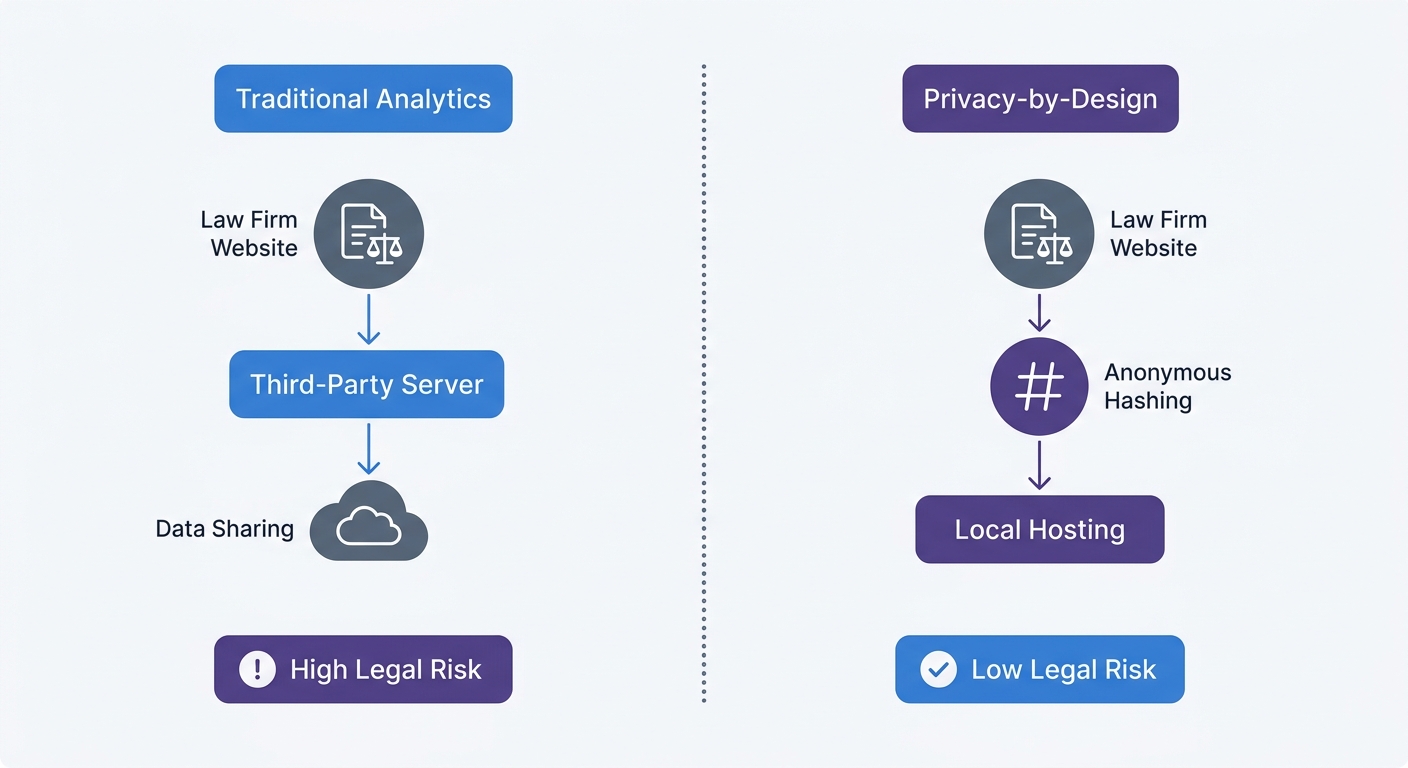
Analytics platforms like Google Analytics operate by assigning a unique identifier to every visitor and tracking them across the web. When someone visits a divorce or criminal defense page, that data point enters a massive advertising ecosystem, tying the visitor's sensitive legal inquiry to their broader digital profile.
Legal ethics boards increasingly scrutinize these data flows. If your website transmits a visitor's search parameters to a third party without explicit consent, you compromise attorney-client privilege. This risk extends beyond regulatory fines, as an American Bar Association survey found that 29 percent of law firms have reported experiencing a data breach. Storing unnecessary personally identifiable information in your analytics dashboard turns a routine marketing task into a severe security vulnerability.
Deploying a privacy-first tool like Swetrix eliminates this liability. Because the platform never collects IP addresses or user profiles, an unauthorized party gaining access to your analytics dashboard would find nothing but aggregated, anonymous numbers.
The Threat Of CIPA And Mega-Fines
Aggressive litigants in California weaponize the California Invasion of Privacy Act (CIPA) against websites using standard tracking technology. Originally drafted as a wiretapping law, CIPA now applies to tracking pixels and session recording scripts. If a third-party script captures user input on your contact form before the user hits submit, plaintiffs argue you have wiretapped the conversation.
These lawsuits target U.S. businesses using Google Analytics and Meta tracking pixels without explicit upfront consent. The penalties hit hard, with maximum CCPA fines reaching $7,500 per intentional violation per affected consumer, making standard analytics tools a direct threat to your firm's financial stability.
Audit your site by opening your website in a browser, right-clicking, and selecting Inspect. Navigate to the Network tab, refresh the page, and check for requests sent to Facebook, Google Ads, or unauthorized live chat providers; if they appear, your firm remains exposed to these claims.
The Cookie Banner Dilemma For Legal Sites
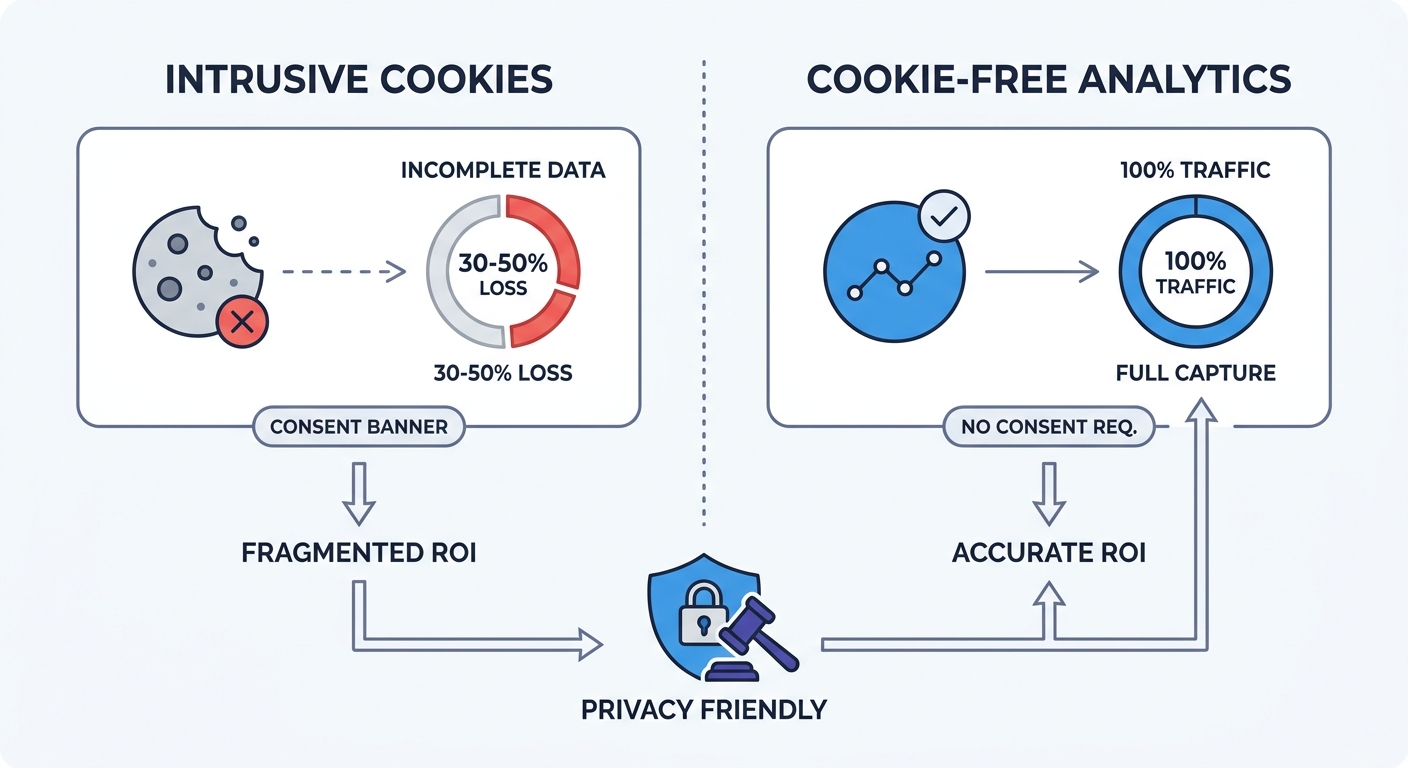
Regulatory bodies across the globe require websites to obtain clear, unambiguous consent before setting non-essential cookies. To comply with GDPR and CCPA regulations, law firms install cookie consent banners that block analytics scripts until the user clicks an accept button, breaking traditional data collection in the process.
Lost Data And Blind Marketing
Most users decline optional tracking when prompted, preventing Google Analytics from loading. A potential client navigates your site, reads your biographies, and submits a lead form, but your reports show zero visits and zero conversions.
This data loss renders marketing metrics useless. Because tracking platforms miss half the website traffic, firms cannot determine their cost per acquisition and often pause successful ad campaigns due to failed attribution.
Privacy friendly analytics for law firms bypass this problem. Because platforms like Swetrix operate without persistent cookies, they do not require consent banners under GDPR or ePrivacy directives, allowing you to capture 100 percent of your traffic legally while delivering a faster browsing experience.
Achieving GDPR And CCPA Compliance
Compliance requires more than hiding an analytics script behind a popup. GDPR mandates that data processors minimize data collection and restrict cross-border data transfers, yet U.S. cloud providers often route European visitor data through servers outside the EU, violating these mandates directly.
Firms serving international clients or operating in strict jurisdictions must control where their data lives. Cloud-hosted analytics tools must guarantee regional data residency, a feature Swetrix offers by default to ensure all European visitor data remains on EU servers. Choosing software built specifically to satisfy these frameworks eliminates complex legal reviews of your marketing stack.
Core Features Of Privacy-First Tracking
Transitioning away from invasive tracking requires understanding how modern, compliant data collection works. Firms do not have to sacrifice marketing intelligence to protect client confidentiality; they only need to change the technical mechanics of how a visit gets counted.
Cookie-Free Architecture And Ephemeral Hashing
Legacy analytics identify unique users by placing a text file in their browser, leaving a cookie that persists for months to log every return visit. Privacy-first tracking discards this method in favor of ephemeral hashing.
When a potential client visits a Swetrix-powered site, the system takes their IP address and browser user agent, combines them with a random daily string, and generates a cryptographic hash. This hash allows the system to recognize the visitor as they click from your homepage to your contact page. At midnight, the random string rotates and the hash expires permanently, so if the same user returns the next day, they generate a different hash and appear as a new visitor.
This architecture provides accurate session metrics without creating a persistent profile. No personal data gets stored on your server, and no browsing history gets shared with ad networks.
Data Minimization And Local Hosting
Analytics dashboards often collect hundreds of data points you never use. Device fingerprints, screen resolutions, and exact GPS coordinates bloat your database and increase your liability. Data minimization solves this by restricting collection to actionable metrics.
Configure your platform to track only what drives your business decisions:
- Total unique visits per day
- Referral sources (organic search, paid ads, legal directories)
- Top performing landing pages
- Bounce rates on practice area pages
Compare the default behavior of legacy tools against privacy-focused alternatives:
| Feature | Legacy Analytics | Privacy-First Analytics |
|---|---|---|
| Visitor Identification | Persistent cookies stored for up to 2 years | 24-hour rotating cryptographic hashes |
| Data Sharing | Shared with advertising ecosystems | Kept entirely private to the law firm |
| IP Addresses | Stored in raw or partially masked formats | Never stored; hashed immediately and discarded |
| Consent Banner | Strict opt-in required by GDPR/CCPA | Not required; tracks 100% of traffic legally |
| Data Residency | Often routed through global servers | Localized hosting (e.g., EU servers for GDPR) |
To maintain control over this minimal dataset, consider hosting the software yourself. Swetrix provides an open-source version that deploys on your firm's private servers, keeping all traffic data securely behind your own firewall. For a managed solution, Swetrix Cloud offers the same privacy guarantees with European hosting starting at $19 per month for 100,000 events.
Measuring Marketing ROI Safely
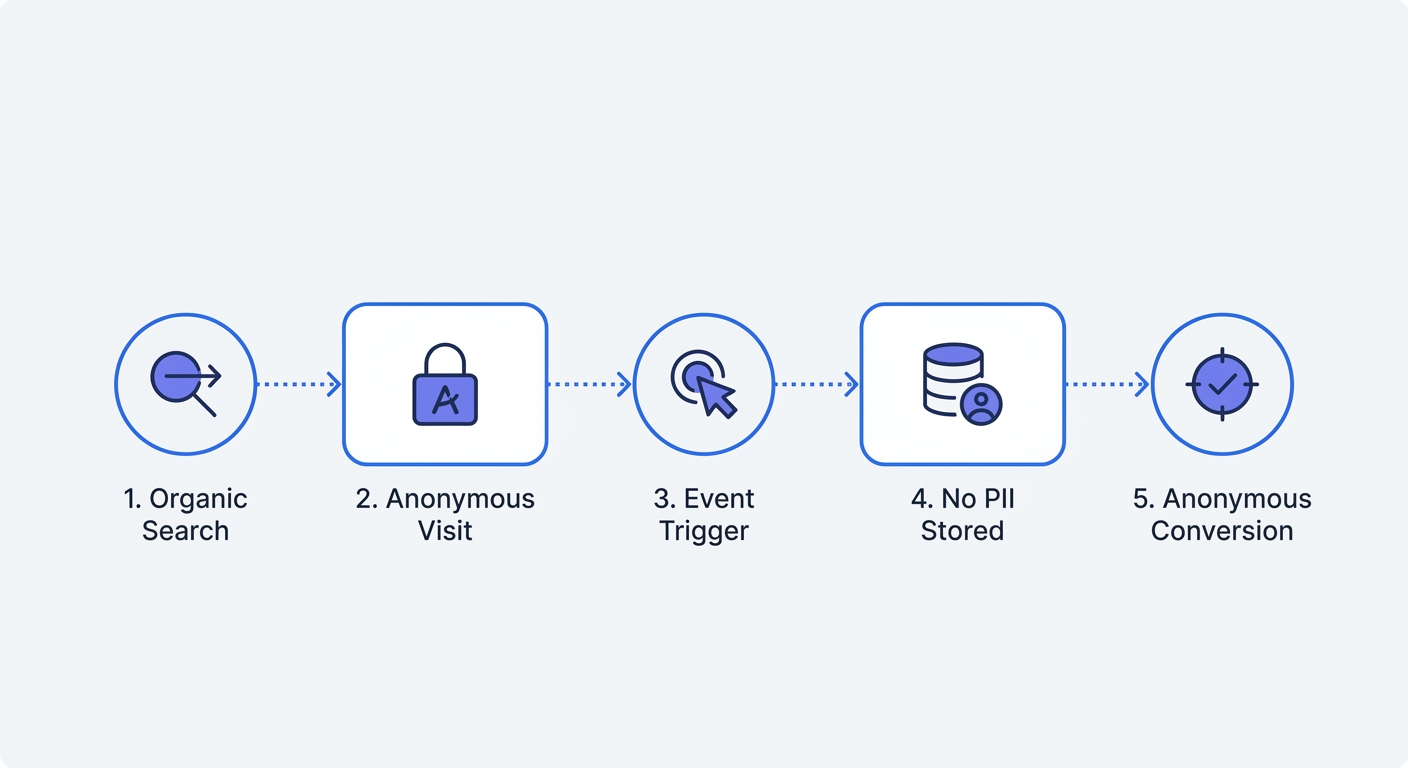
Accurate attribution directs your marketing budget, meaning if you spend ten thousand dollars on a local SEO campaign, you must know how many consultations that investment produced. Tracking these conversions anonymously makes this possible.
Tracking Organic And Paid Traffic Sources
Measure the share of your law firm’s visits that comes from organic search rather than assuming an industry average applies. Review collected URLs and query strings so that search terms or client details do not enter your analytics unnecessarily.
Standardize your campaign tracking by appending UTM parameters to your paid search ads, directory listings, and newsletter links to tell your analytics platform exactly where a visitor originated.
Use the Swetrix UTM Generator to build clean links for your campaigns, such as tagging Google Ads with ?utm_source=google&utm_medium=cpc&utm_campaign=personal_injury. The analytics platform reads these tags upon arrival and logs the campaign source, attaching the data to the anonymous session hash so you can tie the eventual conversion back to the original ad click.
Anonymous Conversion Tracking
Conversion tracking measures when a visitor takes a valuable action, like clicking a phone number or submitting a lead form. Many law firms mistakenly implement session recording tools (like Hotjar) to monitor these actions, deploying scripts that record user screens and capture keystrokes to routinely log sensitive case details typed into text boxes before the user even submits the form.
Replace invasive screen recording with anonymous custom events, which count the specific action without recording the user's screen or form inputs.
To track a consultation request in Swetrix, trigger a custom event when the user successfully submits the form. Add a simple JavaScript call to your form's submission handler:
document.getElementById("consultation-form").addEventListener("submit", function () {
  swetrix.track({
    ev: "Consultation_Requested",
    meta: {
      practice_area: "Family Law",
    },
  });
});
This code sends a single ping to the analytics dashboard noting that a family law lead was generated, without sending the client's name, email, or case description. A clear tally of form submissions appears in your dashboard alongside the traffic sources that generated them, providing complete ROI visibility without compromising confidentiality.
Steps To Audit And Upgrade Your Analytics
Transitioning your firm to a compliant data setup takes less than an afternoon. Start by mapping your current data flows and identifying every script running on your site.
Identifying Invasive Third-Party Scripts
Your marketing agency may have installed tracking tools years ago that continue to harvest data today, and you must locate and remove them.
- Open your firm's website in a private browsing window.
- Open the browser's Developer Tools and select the Application tab.
- Check the Cookies section under Local Storage for persistent identifiers like
_ga(Google Analytics) or_fbp(Meta Pixel). - Switch to the Network tab, type "collect" or "track" in the filter bar, reload the page, and document which domains receive data payloads.
Compile a list of every third-party domain receiving traffic data from your site, then instruct your webmaster or agency to remove any tracking script that relies on persistent cookies or shares data with advertising networks. Strip out all session recording and heat-mapping tools immediately.
Migrating To A Privacy-First Platform
Once you remove the legacy scripts, implement your privacy friendly analytics for law firms using an installation process that mirrors traditional tools but delivers vastly different compliance outcomes.
Register for your analytics account and add the project to your dashboard to generate a lightweight tracking script. Paste this script into the <head> section of your website, or if you use a Content Management System like WordPress, place it in your header configuration via an injection plugin.
<script src="https://swetrix.org/swetrix.js" defer></script>
<script>
  document.addEventListener("DOMContentLoaded", () => {
    swetrix.init("YOUR_PROJECT_ID");
    swetrix.trackViews();
  });
</script>
After deploying the script, verify the data flow by clicking through your site and watching the real-time dashboard populate. Because the script does not use cookies, you can safely remove the cookie consent banner from your site, instantly improving page speed and user experience.
Lead response time remains an important metric for legal marketing, as responding to a web inquiry within five minutes yields a higher conversion rate than waiting an hour, though exact conversion bumps vary depending on the practice area. Use your new tracking setup to optimize the pages that generate those fast-moving leads, monitoring conversion rate metrics to ensure contact forms load quickly and function perfectly on mobile devices.
Data privacy no longer forces your firm to operate in the dark. By adopting ephemeral hashing, minimizing data collection, and implementing anonymous event tracking, you secure the metrics needed to grow the practice. This approach keeps client inquiries confidential, protects your firm from wiretapping litigation, and measures every marketing dollar with total precision.
Stop risking attorney-client privilege with invasive tracking tools. Swetrix delivers cookie-free, open-source analytics that give you 100% visibility into your marketing ROI while keeping your law firm fully compliant with CIPA, GDPR, and CCPA regulations. Try our 14-day free trial today and secure your website's data collection.