- Date
How to Track Perplexity, Gemini, and Claude Traffic
 Andrii Romasiun
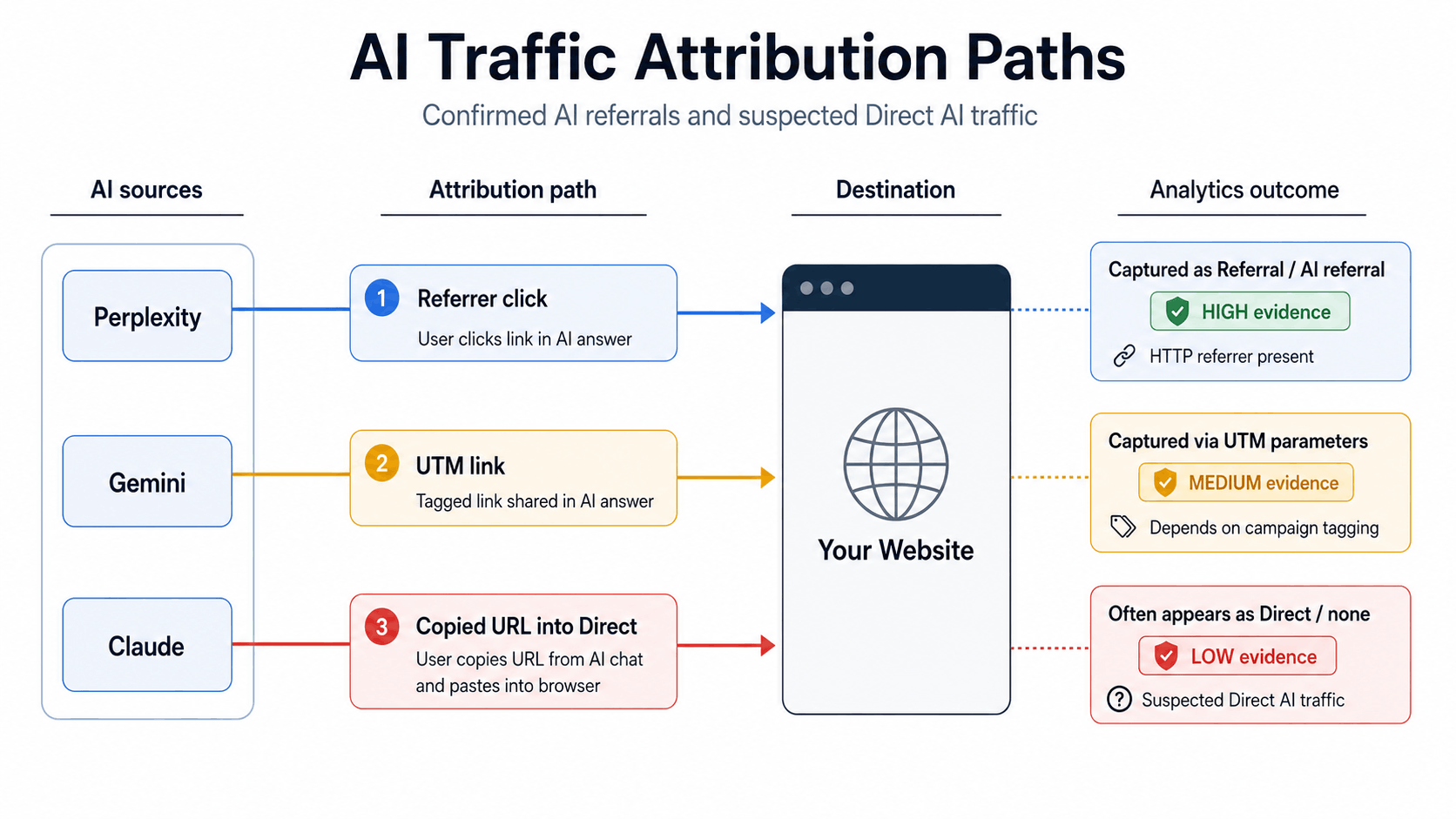
Perplexity, Gemini, and Claude can send visitors through source citations, web answers, copied links, and user-triggered page fetches. Some visits arrive with a clean referrer. Some land as Direct because apps, redirects, and browser referrer settings remove source context.
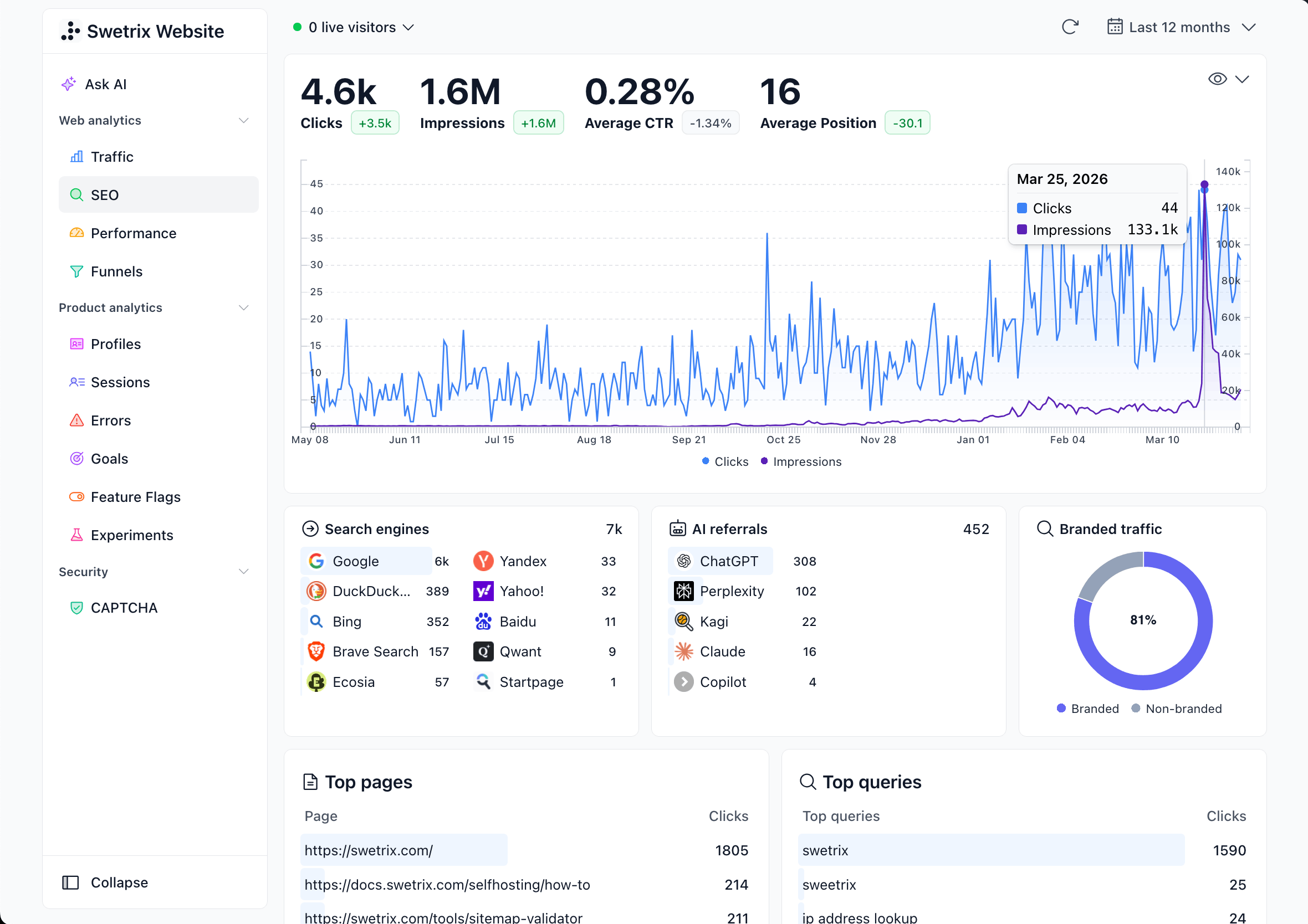
Swetrix gives you the parts you can prove: referrers, UTMs, landing pages, custom events, goals, funnels, user and session analysis, user flows, performance monitoring, error tracking, shared dashboards, revenue analytics, and AI Chat. Use those signals to build a source view that your team can trust.
Start with confirmed referrals. Add UTMs where you control the link. Keep suspected Direct traffic in a separate group so your team does not turn guesses into attribution.
Create Source Groups First
Open your Swetrix project and go to Traffic Sources. Start with Referrers, then create saved views for each assistant. Keep each source separate until you have enough traffic to compare quality.
Use this starting map:
| Source group | Match in Referrers | Server-log watchlist | Confidence |
|---|---|---|---|
ai_perplexity | perplexity.ai, www.perplexity.ai | PerplexityBot, Perplexity-User | High when the referrer appears |
ai_gemini | gemini.google.com, selected google.com sessions on AI-visible pages | Googlebot, GoogleOther, your Google-Extended robots policy | Medium unless the referrer names Gemini |
ai_claude | claude.ai, www.claude.ai | ClaudeBot, Claude-User, Claude-SearchBot | High when the referrer appears |
ai_owned_distribution | UTM links with utm_medium=ai_assistant | None needed | High |
ai_suspected_direct | No referrer, AI-cited landing page, matching date window | Assistant fetches before the visit | Low to medium |
Treat the bot names as access signals. Perplexity documents PerplexityBot and Perplexity-User in its crawler documentation. Claude documents ClaudeBot, Claude-User, and Claude-SearchBot in its crawler documentation. Google documents Google-Extended as a product token that affects Gemini model training and grounding in its crawler documentation.
For Swetrix reports, count browser sessions and UTM sessions as traffic. Use server logs to understand whether assistants can fetch your pages, then keep those records out of visitor totals.
Separate Clicks From Fetches
A click means a person reached your site. A fetch means an assistant, crawler, or user-triggered agent requested the page. Teams create messy reports when they mix those two records.
Use two tools for two jobs:
| Signal | Where to inspect it | How to use it |
|---|---|---|
| Referrer session | Swetrix Referrers, Entry Pages, Source / Medium | Measure visits, events, goals, funnels, and revenue |
| UTM session | Swetrix Campaigns and Source / Medium | Measure links you placed in owned content |
| Bot or fetch request | Server, CDN, or WAF logs | Check access, crawl status, and assistant retrieval |
| Citation or mention | Manual prompt checks, form answers, CRM notes | Explain demand that came before the click |
Check server logs when a page earns no AI referrals but still appears in assistant answers. A fetch may happen before a citation. Users may read a citation without clicking. A person may read the answer and search your brand.
For each high-value page, keep a small evidence log:
| Date | Assistant | Prompt cluster | Page | Evidence | Report label |
|---|---|---|---|---|---|
| June 19, 2026 | Perplexity | privacy analytics tools | /google-analytics-alternative | Citation and perplexity.ai referrer | ai_perplexity |
| June 19, 2026 | Gemini | cookie free analytics saas | /blog/privacy-first-analytics | Google traffic and Gemini manual check | ai_gemini_medium_confidence |
| June 19, 2026 | Claude | analytics for nextjs app | /docs/nextjs | Claude-User fetch and Direct visit | ai_suspected_direct |
Handle Direct Traffic Without Overclaiming
Expect part of AI assistant traffic to land in Direct. A user can copy a URL from an answer. A mobile app can remove the referrer. A redirect can drop the source. Browser policy can reduce referrer detail to the origin.
Build a separate ai_suspected_direct segment:
- Filter Direct sessions.
- Add landing pages that Perplexity, Gemini, or Claude cited in your manual checks.
- Compare the date range around the citation or content update.
- Check custom events, goals, and revenue for those sessions.
- Add a short note to the report with the evidence and confidence level.
Keep the label conservative. ai_suspected_direct helps content and product teams spot demand, but it should not inflate source attribution. Confirmed referrers and UTMs deserve stronger credit than Direct estimates.
Add a field to signup, demo, or sales forms:
How did you hear about us?
Use an open text field. People write useful answers such as "Claude recommended this for Next.js analytics" or "Perplexity listed Swetrix with other cookieless tools." Review those answers every 7 days and tag them in your CRM or reporting sheet.
Use UTMs For Links You Control
You cannot tag organic citations that Perplexity, Gemini, or Claude create. Tag the links you place in owned content: partner pages, public prompt libraries, help docs, community answers, sales notes, newsletters, and onboarding emails.
Use one naming rule across the team:
utm_source=<surface_or_partner>
utm_medium=ai_assistant
utm_campaign=<topic_or_offer>
utm_content=<placement>
Example:
https://example.com/pricing?utm_source=perplexity&utm_medium=ai_assistant&utm_campaign=privacy_analytics&utm_content=partner_directory
Use this table as a naming standard:
| Link you control | UTM source | UTM medium | UTM campaign | UTM content |
|---|---|---|---|---|
| Partner profile that AI assistants cite | partner_directory | ai_assistant | privacy_analytics | vendor_profile |
| Public Perplexity prompt library | perplexity | ai_assistant | analytics_research | prompt_link |
| Claude workflow page | claude | ai_assistant | docs_setup | workflow_template |
| Gemini research note | gemini | ai_assistant | comparison_research | source_link |
Test each link before publishing. Open the tagged URL in a private browser window, fire the main CTA event, then confirm that Swetrix records the source, medium, campaign, landing page, and event in the same session.
Analyze Landing Pages By Intent
AI assistant visitors often land on the page that answers the task. The homepage may receive less traffic than docs, comparison pages, pricing pages, and long-tail blog posts.
Open each assistant source group in Swetrix and review Entry Pages. Sort by sessions, then compare bounce rate, custom events, funnel step, and revenue. Read the top pages as intent, not volume.
| Landing page type | Common assistant intent | Metric to check | Next action |
|---|---|---|---|
| Pricing | Plan fit, event volume, cost | pricing_viewed, trial_started, revenue per session | Add plan guidance and event-count examples |
| Docs | Setup, framework support, integration detail | script_installed, errors, activation | Improve examples and inspect JavaScript errors |
| Comparison | Vendor shortlist, privacy check, migration | CTA rate, signup rate, funnel conversion | Add proof, migration steps, and feature table |
| Blog guide | Research, education, problem framing | Scroll depth, CTA clicks, next page | Add a contextual CTA near the answer |
Run this review for each assistant. Perplexity traffic may skew toward cited research pages. Claude traffic may hit docs and technical guides. Gemini traffic may blend with Google search paths, so compare landing pages against Search Console and your manual citation log.
Compare Conversion Quality
Teams can misread traffic volume. Give more attention to a source with 50 sessions and 5 paid accounts than a source with 2,000 sessions and no activation.
Track events tied to intent:
| Event | Fires when | Use it for |
|---|---|---|
pricing_viewed | Visitor opens pricing or changes an event tier | Buying intent |
trial_started | Visitor starts signup | Self-serve conversion |
demo_requested | Visitor submits a sales form | Sales intent |
script_installed | First project sends data | Activation |
upgrade_started | Existing user opens upgrade flow | Expansion intent |
Build one goal per source group, then build a funnel from AI landing page to activation:
| Step | Page or event |
|---|---|
| 1 | AI landing page |
| 2 | pricing_viewed or main CTA click |
| 3 | trial_started |
| 4 | script_installed |
| 5 | Stripe, Paddle, or API revenue event |
Use sample data like this while you define the report:
| Source group | Sessions | Trial starts | Trial rate | Paid accounts | Revenue per session |
|---|---|---|---|---|---|
ai_perplexity | 120 | 14 | 11.7% | 5 | $8.40 |
ai_gemini | 210 | 9 | 4.3% | 2 | $2.10 |
ai_claude | 55 | 7 | 12.7% | 3 | $9.60 |
ai_suspected_direct | 180 | 8 | 4.4% | 2 | $2.70 |
Replace the sample data with Swetrix revenue tracking once your Stripe, Paddle, or API connection sends transactions. Then review revenue per session beside funnel conversion. A small source can send visitors who become better customers than a broad channel.
Set A Reporting Cadence
Use a short cadence while the segment grows. AI assistant traffic can spike after one citation, one product launch, or one content update, so the first month needs closer review.
Use this rhythm:
| Timeframe | Review | Owner | Output |
|---|---|---|---|
| First 30 days | Every 7 days | Growth or founder | Source groups, top entry pages, first conversions |
| After baseline | Every 14 days | Growth and content | Page updates, UTM cleanup, event fixes |
| Planning cycle | Once each month | Founder, product, marketing | Revenue per session, content roadmap, funnel fixes |
Keep each report to five blocks:
- Source group changes.
- Top landing pages by assistant.
- Trial starts, demo requests, activation, and revenue.
- Direct traffic evidence and confidence.
- Actions shipped since the last review.
Use Swetrix AI Chat for a first pass:
Compare ai_perplexity, ai_gemini, and ai_claude for the last 30 days. Show sessions, top entry pages, trial_started events, funnel conversion, and revenue per session.
Open the dashboard after the answer and verify the numbers before changing content, signup flow, or budget.
Final Recommendation
Track Perplexity, Gemini, and Claude as separate source groups. Start with confirmed referrers, add UTM links where you control the URL, and keep suspected Direct traffic apart from confirmed attribution. Judge each source by landing-page intent, conversion, and revenue instead of visits alone.
Swetrix fits this workflow because it gives you cookieless analytics with no personal data collection, real-time referrers, UTM tracking, custom events, goals, funnels, user and session analysis, user flows, performance monitoring, error tracking, shared dashboards, organisations, revenue analytics, AI Chat, open source code, self-hosting, and EU-hosted Cloud in one product.
Start a 14-day free trial of Swetrix and build a clean AI assistant traffic report this week. You can measure Perplexity, Gemini, and Claude traffic without cookies, personal data collection, or a banner-heavy analytics setup.

The web analytics your site deserves.
Tired of bloated dashboards, privacy concerns, and data you can't trust? Switch to Swetrix and get simple, powerful analytics that respects your users.