- Date
How to Track AI Search Traffic Without Cookies
 Andrii Romasiun
AI search traffic has a measurement problem. A visitor asks ChatGPT, Perplexity, Gemini, Claude, or Copilot for a recommendation, clicks a source, lands on your site, and converts three pages later. Your dashboard may show chatgpt.com, perplexity.ai, claude.ai, gemini.google.com, copilot.microsoft.com, google.com, or plain direct traffic.
Cookie banners make that harder. When a visitor rejects tracking, your team loses the session before you can compare AI referrals against organic search, paid search, or partner links. Swetrix gives you a cleaner setup: cookieless analytics, referrers, UTM tracking, custom events, goals, funnels, user flows, error tracking, performance monitoring, revenue analytics, and shared dashboards without collecting personal data.
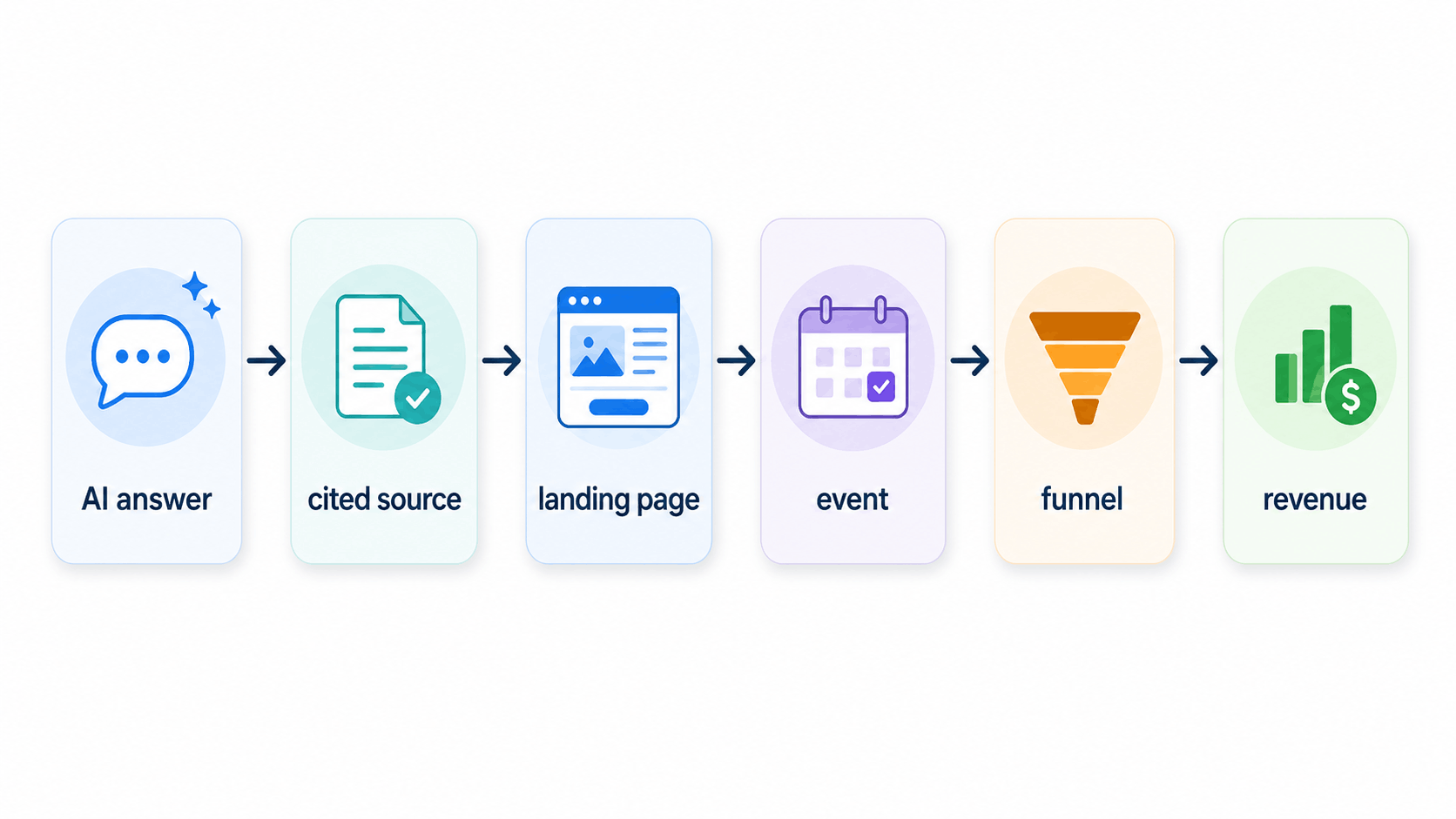
Measure AI traffic as a chain, not a single channel. Track the click, segment the landing page, fire the event, inspect the funnel, and attribute revenue. That workflow works even when the AI answer itself never sends a cookie, account ID, or durable user identifier.
What AI Search Traffic Looks Like
AI tools can send visitors through several paths. ChatGPT Search can answer with links to relevant web sources, so your analytics can see some ChatGPT clicks as referrers. Google takes a different route. Google says AI Overviews and AI Mode surface links to supporting websites, and Search Console includes those appearances in the Web performance report for Google Search features.
Separate three signals before you build reports:
| Signal | What it means | Where to check it | What to do next |
|---|---|---|---|
| Citation | An AI answer mentions or links your page | Manual checks, AI visibility tools, Search Console for Google surfaces | Record the prompt, cited URL, and answer type |
| Click | A person lands on your site from the AI surface | Referrers, landing pages, UTMs | Segment the session and compare behavior |
| Conversion | The visitor triggers a goal, funnel step, or transaction | Events, funnels, revenue analytics | Attribute value back to source and page |
A citation does not equal a visit. A user may read the AI answer and stop. Another user may copy your brand name and search for it later. Your analytics stack should measure the traffic you receive and mark the gaps you cannot prove.
Build an AI Referrer Segment
Open your referrers report and create a segment for known AI sources. Start with domains you can verify in your own traffic, then revise the list each month.
| AI surface | Referrer or source pattern to watch | Notes |
|---|---|---|
| ChatGPT | chatgpt.com, chat.openai.com, openai.com | Expect both referral traffic and direct follow-up visits |
| Perplexity | perplexity.ai | Watch cited pages and long-tail landing pages |
| Gemini | gemini.google.com, bard.google.com | Some traffic may blend with Google surfaces |
| Claude | claude.ai | Expect small volume and high intent on technical pages |
| Copilot | copilot.microsoft.com, bing.com | Split Microsoft AI traffic from classic Bing search where possible |
| Google AI Overviews and AI Mode | google.com, google.* | Treat as Google Search traffic unless Search Console gives a better clue |
In Swetrix, filter referrers for those patterns and save the view for Monday review. Compare each source against:
- Landing page
- Country
- Device
- Bounce rate
- Goal completion
- Revenue per visitor
If a source sends five visits and two trial starts, do not dismiss it because the volume looks small. AI answer clicks often arrive from people who already received a short list of options. Judge them by funnel quality, not raw sessions.
Do Not Confuse Google AI Clicks With Chatbot Referrals
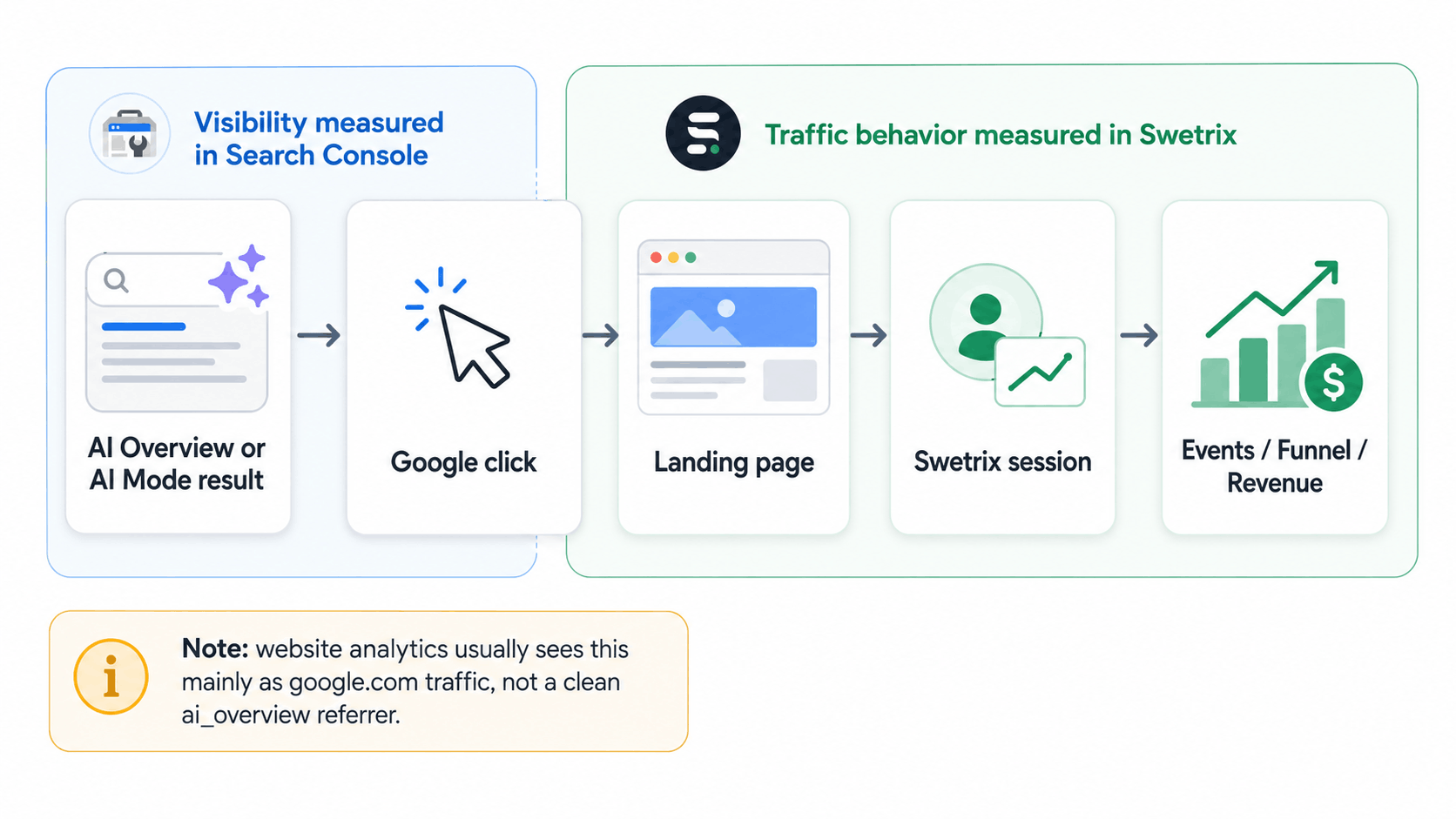
Google AI Overviews and AI Mode need separate handling. Search Console counts AI Mode and AI Overview clicks when a user clicks an external page link from those experiences. It also assigns AI Overview links the same position as the overview block and counts an impression when the link appears under the relevant visibility rules.
Your website analytics does not receive a clean ai_overview referrer from Google. Most site-side reports see Google as the source. Use Search Console for query, impression, and click context, then use Swetrix for what happened after the visitor landed.
Run this Monday check:
- Open Search Console and filter Web results for pages that gained impressions but lost organic clicks.
- Compare those pages against Swetrix landing-page traffic from Google.
- Flag pages where impressions rose while sessions stayed flat.
- Inspect the queries in Google Search and AI Mode to see whether an AI answer resolves the question before the click.
- Add stronger next steps to those pages, such as a calculator, template, comparison table, pricing block, or signup CTA.
For Google AI traffic, the most useful report pairs Search Console visibility with on-site behavior. Search Console shows where Google surfaced the page. Swetrix shows whether visitors who arrived from Google took action.
Account for Dark AI Traffic
Dark AI traffic means the visitor came from an AI-assisted journey, but the session lacks a usable AI referrer. This happens when someone copies a URL from an answer, opens a cited source in an app webview that strips referrers, shares an AI answer in Slack, or searches your brand after reading a recommendation.
Mark the probable cases instead of pretending the data can prove more than it can.
| Pattern in analytics | Possible AI cause | How to test it |
|---|---|---|
| Direct traffic spikes on one guide | Users copy the URL from an AI answer | Check AI tools for that exact URL and topic |
| Branded search rises after a citation | Users search your brand after reading the answer | Compare brand queries with cited-page dates |
| Long-tail landing pages convert well | AI tools send qualified visitors to specific pages | Segment by page and compare revenue per visit |
| New referrer appears once or twice | AI surface, app, or browser changed link handling | Add it to a watchlist before grouping it |
Create an ai_suspected segment for landing pages that receive unexplained direct traffic after you confirm citations in AI answers. Keep that label separate from ai_referred. Your team can act on both, but the confidence level differs.
Use UTMs Where You Control the Link
You cannot force ChatGPT, Perplexity, Gemini, Claude, Copilot, or Google AI Mode to cite your UTM-tagged URL. Adding UTMs to every public page can also create duplicate URLs and messy canonical signals. Keep your canonical pages clean.
Use UTMs when you control the distribution:
- Links in your docs, templates, and free tools
- Partner listings that AI tools often quote
- Community answers and comparison pages you own
- Newsletter links that readers paste into AI prompts
- Demo links that sales teams share after AI-assisted discovery calls
Use a compact naming convention:
utm_source=chatgpt
utm_medium=ai_assistant
utm_campaign=ai_search_tracking
utm_content=pricing_comparison_prompt
For pages you want AI systems to cite, focus on stable URLs, clear headings, and answer blocks. Google says AI features use standard Search eligibility, so keep pages indexable, text-based, and useful without a special AI markup file.
After setting UTMs, test one link in a private browser session. Open Swetrix, filter by utm_source, and confirm that the session lands in the expected campaign. Fix naming drift before you hand the link to sales, marketing, or partners.
Segment Landing Pages by Intent
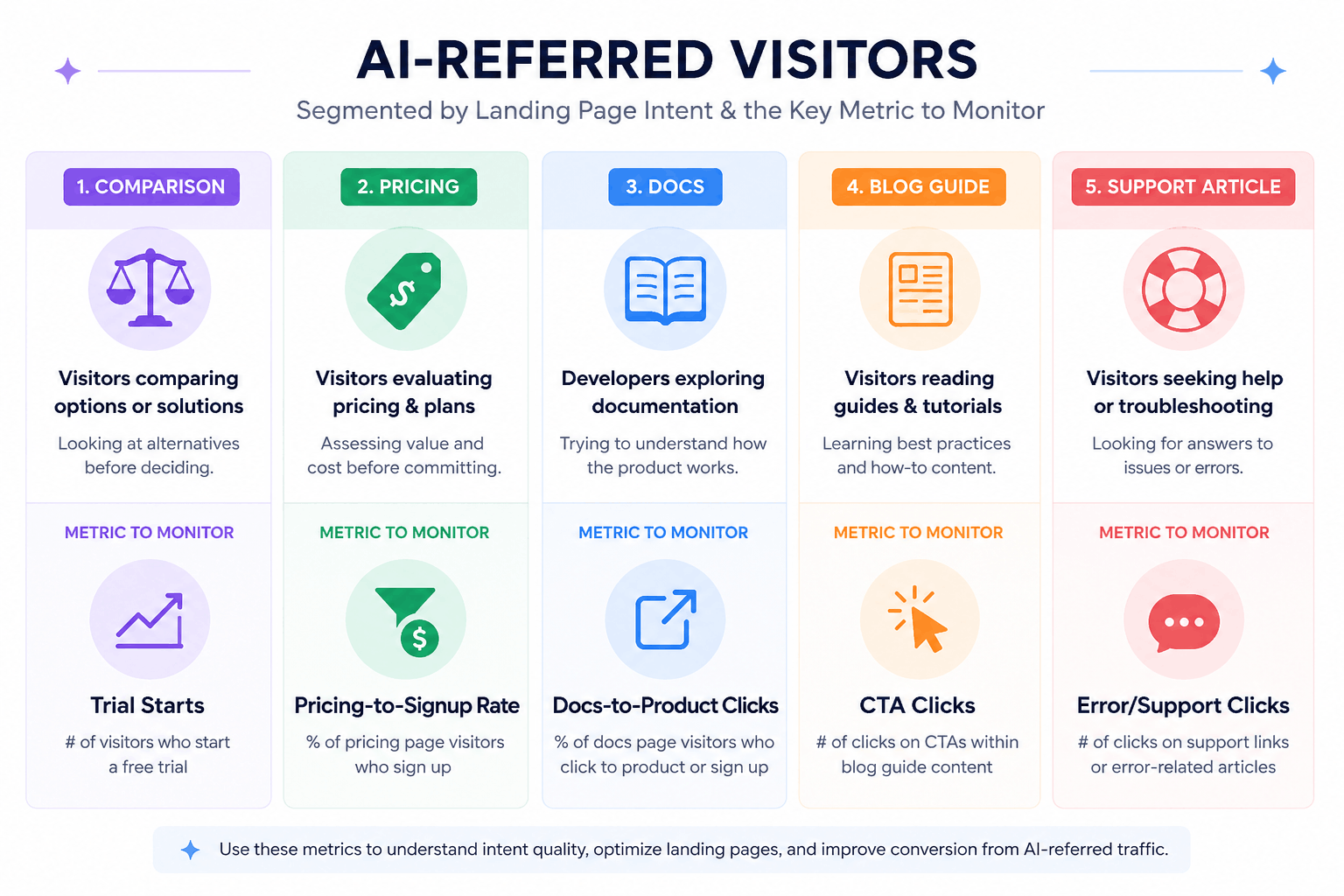
AI answer clicks often skip your homepage. Visitors land on a comparison post, documentation page, pricing page, changelog, or help article because the assistant chose the most specific source.
Group AI landing pages by intent:
| Landing page type | Visitor intent | Metric to check | Action |
|---|---|---|---|
| Comparison | Vendor shortlist | Trial starts per visitor | Add feature proof and migration path |
| Pricing | Budget check | Pricing-to-signup rate | Clarify event tiers and trial terms |
| Docs | Implementation | Docs-to-product click rate | Add SDK snippets and next-step links |
| Blog guide | Problem research | Scroll depth, CTA clicks | Add examples, templates, and related tools |
| Support article | Post-purchase issue | Error rate, support clicks | Fix the product friction behind the query |
In Swetrix, create filters for AI referrers plus landing-page paths. Save views for /blog, /docs, /pricing, and comparison pages. Then compare each view against all traffic.
If AI visitors read a comparison page and convert at 4.8% while all visitors convert at 1.6%, expand the comparison section and add a migration CTA. If docs traffic from AI sources bounces at 80%, rewrite the first screen so it answers the setup question before it asks users to browse the full docs tree.
Track Events That Prove Intent
Pageviews tell you who arrived. Events tell you who cared.
Add custom events to actions that show buying, adoption, or research intent. Start with five:
| Event | Fires when | Why it matters |
|---|---|---|
ai_cta_clicked | Visitor clicks the main CTA on an AI landing page | Measures immediate intent |
pricing_viewed | Visitor opens pricing after an AI referral | Connects research to budget review |
signup_started | Visitor begins account creation | Marks funnel entry |
integration_docs_opened | Visitor opens setup docs | Shows developer intent |
demo_requested | Visitor submits a sales form | Captures high-value demand |
For simple website actions, Swetrix supports event attributes in markup:
<button swetrix-event="ai_cta_clicked">Start your trial</button>
For product or backend events, send a server-side event through the API when the action succeeds. Keep event names short and use the same schema across pages. Add metadata such as landing_page_type, ai_source, and campaign when your implementation supports it.
Do not send email addresses, names, raw IP addresses, prompts, or pasted AI chats as analytics metadata. You can measure intent without storing personal data.
Build Funnels From AI Visit to Revenue
AI traffic deserves its own funnel because the visitor often arrives with context. A person who clicked a cited source may already know the category, the alternatives, and the problem.
Build this funnel first:
- AI landing page visit
- CTA click
- Signup started
- Signup completed
- Key activation event
- Paid conversion
For SaaS, choose one activation event that predicts retention. Examples include project_created, script_installed, team_invited, or first_report_viewed. For agencies, track dashboard_shared or client_invited. For ecommerce, track product_viewed, checkout_started, and purchase_completed.
Then compare AI traffic against other channels:
| Channel | Visit-to-signup | Signup-to-activation | Activation-to-paid | Revenue per 1,000 visits |
|---|---|---|---|---|
| AI referrals | 5.2% | 61% | 18% | $1,710 |
| Organic search | 2.4% | 48% | 11% | $620 |
| Paid search | 3.1% | 44% | 9% | $780 |
| Direct | 4.0% | 57% | 16% | $1,220 |
Use your own data, not these sample numbers. The table format matters because it forces the team to discuss value, not traffic volume.
Swetrix revenue analytics can connect transactions from Stripe, Paddle, or the API and report net revenue, average order value, MRR, and transactions beside traffic data. That lets you compare AI search sources by revenue, not guesswork.
Why Cookieless Analytics Fits AI Search
AI-search measurement does not need cross-site tracking. You need clean source data, landing-page context, events, funnels, and revenue. Cookies add friction without solving the citation gap.
Cookie banners create three problems for AI traffic:
- First, a visitor may reject analytics before you measure the session.
- Second, the banner interrupts a high-intent landing page visit.
- Third, consent state creates sampled data, so small AI channels look noisier than they are.
Privacy-first analytics avoids that tradeoff. Swetrix tracks visits, referrers, UTM parameters, custom events, goals, funnels, performance, errors, user flows, and revenue without cookies or personal data. Swetrix lists current Cloud pricing at 100,000 events per month for $19 per month, with a 14-day trial and no free Cloud plan.
European consent rules still depend on your configuration and jurisdiction. CNIL says some audience measurement tools can qualify for a consent exemption under strict conditions. Keep your setup narrow: measure your own site, avoid cross-site profiles, avoid personal data, and document what you collect.
A Practical Monday Review
Run this process every Monday:
- Check Swetrix referrers for AI source patterns.
- Review direct traffic spikes on AI-cited landing pages.
- Compare Search Console clicks and impressions for pages that may appear in Google AI features.
- Open the top five AI landing pages and inspect the first screen.
- Check custom events and funnel completion for AI segments.
- Compare revenue per visitor against organic, paid, and direct.
- Add one content or product fix to the backlog.
Use Swetrix AI Chat when you want a fast first pass on questions such as "Which AI referrers drove signup events last week?" or "Which landing pages from AI sources had the highest revenue per visitor?" Then inspect the saved segment before you change budget or roadmap priorities.
Final Recommendation
Treat AI search as an attribution layer across search, referrals, direct traffic, and owned campaigns. Track confirmed AI referrers, mark suspected dark AI traffic, keep UTMs clean where you control the link, and measure behavior through events, funnels, and revenue.
Swetrix should sit at the center of that workflow if you want privacy-first measurement without cookie banners. Use Search Console for Google AI visibility, use Swetrix for on-site behavior, and connect revenue so your team can see which AI sources produce customers.
Try Swetrix free for 14 days and measure AI search traffic without cookies, personal data collection, or banner friction.

The web analytics your site deserves.
Tired of bloated dashboards, privacy concerns, and data you can't trust? Switch to Swetrix and get simple, powerful analytics that respects your users.