- Date
How to Anonymize IP Addresses in Analytics
 Andrii Romasiun
Logging into your analytics dashboard might reveal a massive drop in traffic after adding a cookie banner, because visitors who click "Reject All" vanish from your reports. Learning how to anonymize IP addresses in analytics solves this problem. By stripping personal identifiers before they hit a database, you satisfy GDPR requirements, qualify for consent exemptions, and restore traffic visibility. Platforms like Swetrix handle this process automatically, giving you cookieless tracking without the legal risk.
The Legal Status of IP Addresses as Personal Data
The General Data Protection Regulation classifies dynamic IP addresses as personal data. The Court of Justice of the European Union settled this in the 2016 Breyer v. Germany ruling, which occurred after Patrick Breyer sued the German government for logging his IP address across federal websites. Since internet service providers possess the additional information needed to match an IP back to a specific person, the court determined the address itself constitutes identifiable data. Storing a raw IP address immediately exposes your business to regulatory scrutiny.
The Financial Cost of Storing Raw IPs
Regulators enforce these privacy rules aggressively. Data protection authorities have issued billions of euros in GDPR fines since May 2018, noting a significant year-over-year increase in enforcement actions across most major industries. Because the European Union processes over 400 data breach notifications daily, keeping a database filled with raw visitor IP addresses creates a massive liability for your organization if an attack occurs.
Audit your web server logs today to ensure compliance, as platforms like Nginx and Apache store visitor IP addresses in plain text by default. Open your nginx.conf file, locate the log_format directive, and remove the $remote_addr variable from the string. If your server captures the raw address in an access log, your analytics pipeline begins with a compliance violation before the data ever reaches your dashboard.
Pseudonymization vs. Anonymization: A Key Difference
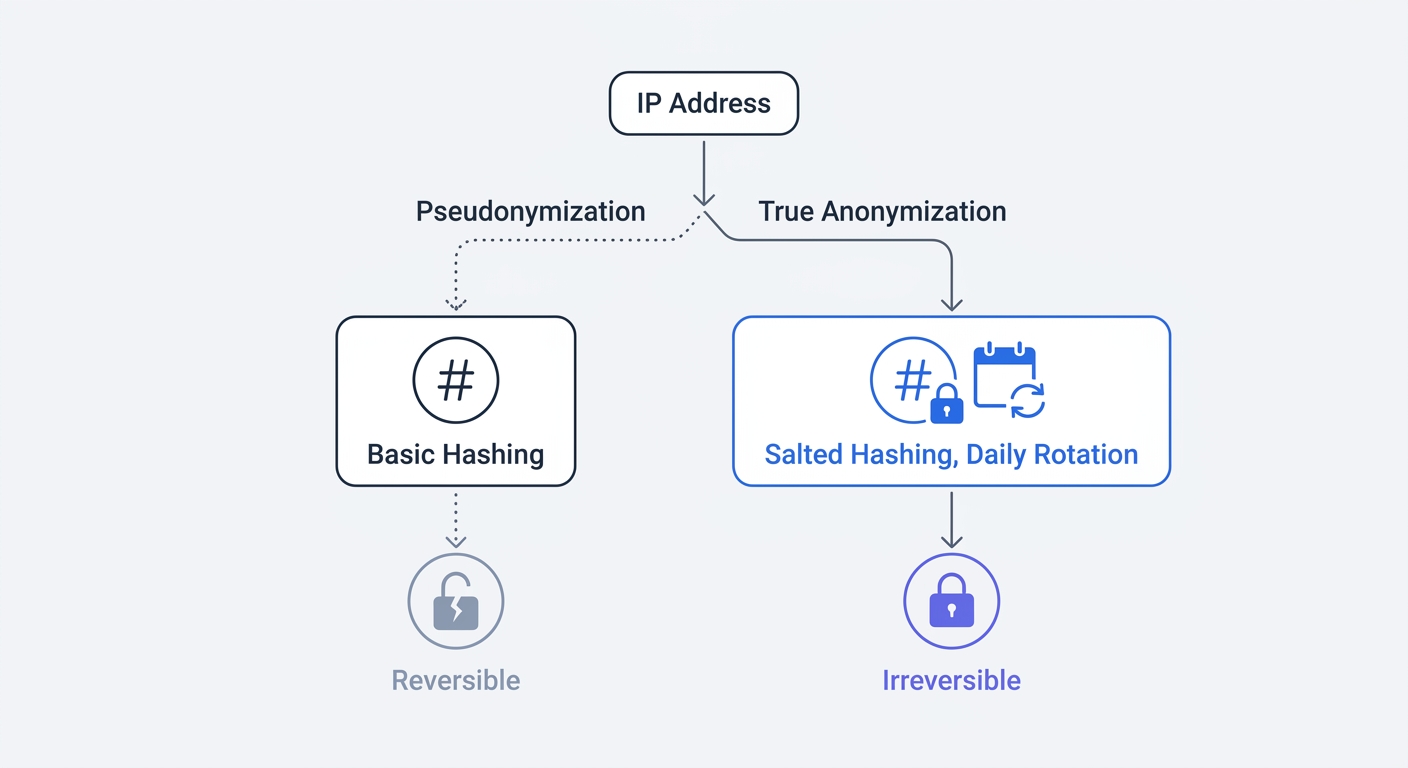
Standard analytics tools claim they protect user privacy by hashing IP addresses, which involves running the string of numbers through a cryptographic function like SHA-256 to store the resulting alphanumeric text. European law classifies this specific technical approach as pseudonymization, treating it with much stricter regulatory oversight than full anonymization.
The Vulnerability of Basic Hashing
IPv4 features a highly limited number of possible addresses, totaling around 4.3 billion. Using a standard graphics card, an attacker can generate a "rainbow table" containing the SHA-256 hash for every IPv4 address in minutes. They can then match the pseudonymous hash in your database to their precomputed table to reveal the original IP address.
European regulators recognize this vulnerability. In a landmark decision, the French data protection authority fined a company €40 million for relying on basic pseudonymization, ruling that identifiers linked to IP addresses remain personal data because re-identification requires no disproportionate effort.
Check the specific hashing algorithm your analytics provider uses to confirm compliance. If the platform applies a static hash without a rotating cryptographic salt, you process personal data and must acquire explicit user consent.
The Cross-Border Transfer Trap
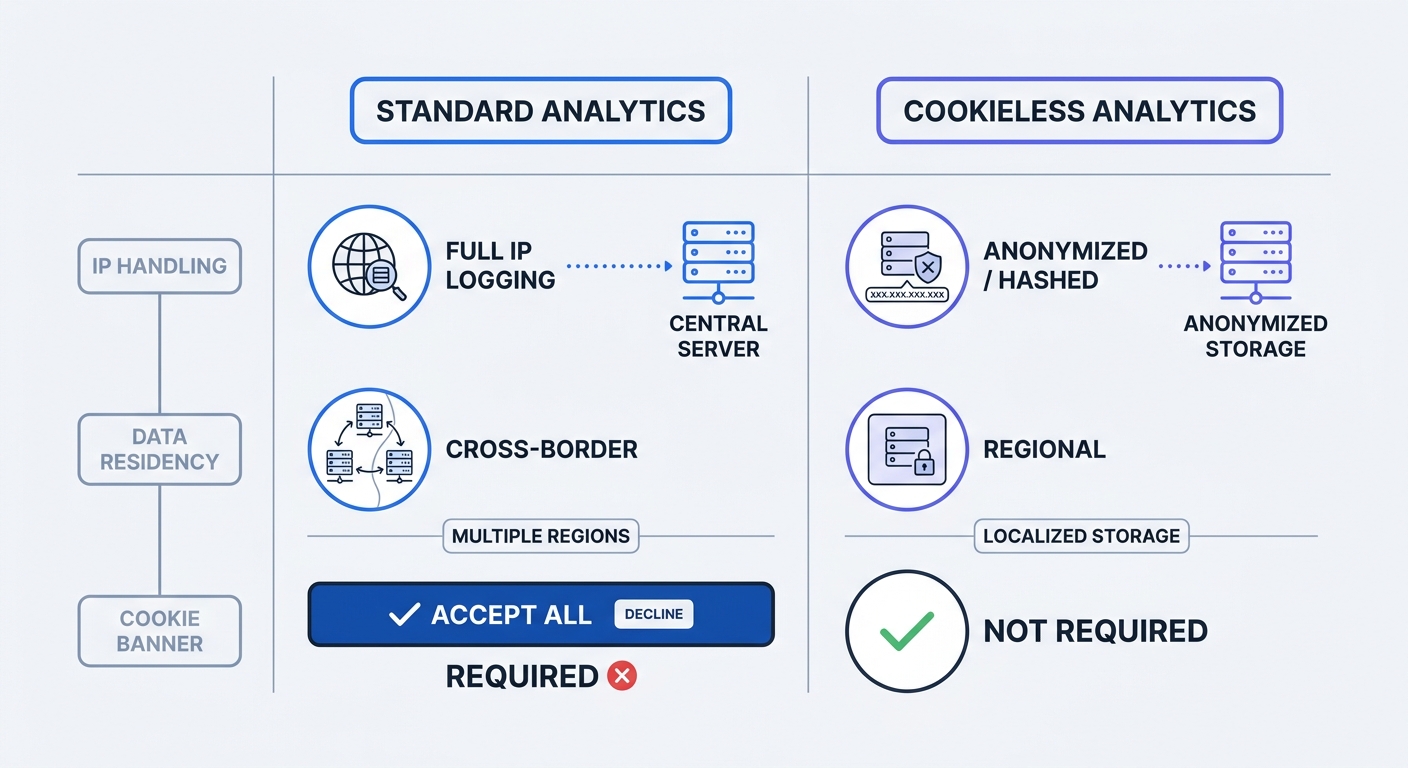
Google Analytics 4 drops IP addresses before writing data to its servers, but those servers reside primarily in the United States. In August 2025, the Cologne District Court ruled that transferring even dynamic IPs to US infrastructure violates GDPR international transfer requirements, as US intelligence agencies can access data crossing American servers through surveillance laws like FISA 702. The initial TCP/IP handshake required to load the tracking script exposes the IP address to US telecom infrastructure, making software-level IP masking insufficient.
Move your analytics data processing to EU servers, as relying on an EU-hosted provider isolates your traffic from foreign surveillance laws and satisfies local data residency requirements.
How to Anonymize IP Addresses in Analytics
Achieving anonymization requires mathematical certainty that the data cannot be reverse-engineered or tracked across multiple sessions. You must implement cryptographic salting and in-memory processing to guarantee this level of security.
Implementing Daily Rotating Salted Hashing
Instead of relying on a raw hash, privacy-first systems append a randomized string of characters to the IP address before hashing it. This "salt" alters the mathematical output, rendering precomputed rainbow tables useless. To achieve permanent anonymization, you must rotate that salt daily.
When the server generates a new cryptographic salt every 24 hours, tracking a user across multiple days becomes mathematically impossible. A visitor on Tuesday produces a different hash than the same visitor on Wednesday, which provides accurate daily unique visitor counts without building a persistent, cross-day profile.
If you build your own tracking server, schedule a cron job to generate a random 256-bit cryptographic salt at midnight and discard yesterday's salt entirely. Your server code must then combine the new salt with the incoming IP and user agent string before running it through SHA-512.
In-Memory Processing and IP Masking
Data processing location matters as much as the cryptographic method, meaning the raw IP address must never touch a hard drive, a database, or a persistent log file. Configure your tracking endpoints to perform the salting and hashing in RAM upon receiving the HTTP request. Once the in-memory process outputs the daily hash, the server drops the raw IP and writes only the anonymous hash to the database.
You can preserve broad geographic data for marketing reports without storing exact addresses using IP masking, which involves stripping the final octet of an IPv4 address in memory.
function maskIp(ipAddress) {
  if (ipAddress.includes(".")) {
    const parts = ipAddress.split(".");
    return `${parts[0]}.${parts[1]}.${parts[2]}.0`;
  }
  if (ipAddress.includes(":")) {
    const parts = ipAddress.split(":");
    return `${parts[0]}:${parts[1]}:${parts[2]}:0000:0000:0000:0000:0000`;
  }
  return null;
}
This logic changes 192.168.100.54 to 192.168.100.0. Implementing this script lets you retain the ability to see which city or region a visitor came from while permanently destroying the specific household identifier.
Disabling Persistent Cross-Site Identifiers
Anonymizing an IP address accomplishes nothing if you leave a third-party tracking cookie on the user's browser, because privacy requires severing all ties to individual devices. Remove tracking pixels that rely on cross-site fingerprinting or local storage tokens. If your analytics payload includes a persistent user ID string generated by the browser, you will still need a cookie banner regardless of your server-side IP handling.
The Business Benefit: Reclaiming Lost Analytics Data
Privacy compliance directly improves your marketing ROI by restoring lost visibility. Web analytics must transition from a model that collects everything to one that collects only what is necessary, and IP anonymization functions as the technical manifestation of this data minimization principle.
Recovering Hidden Traffic Data
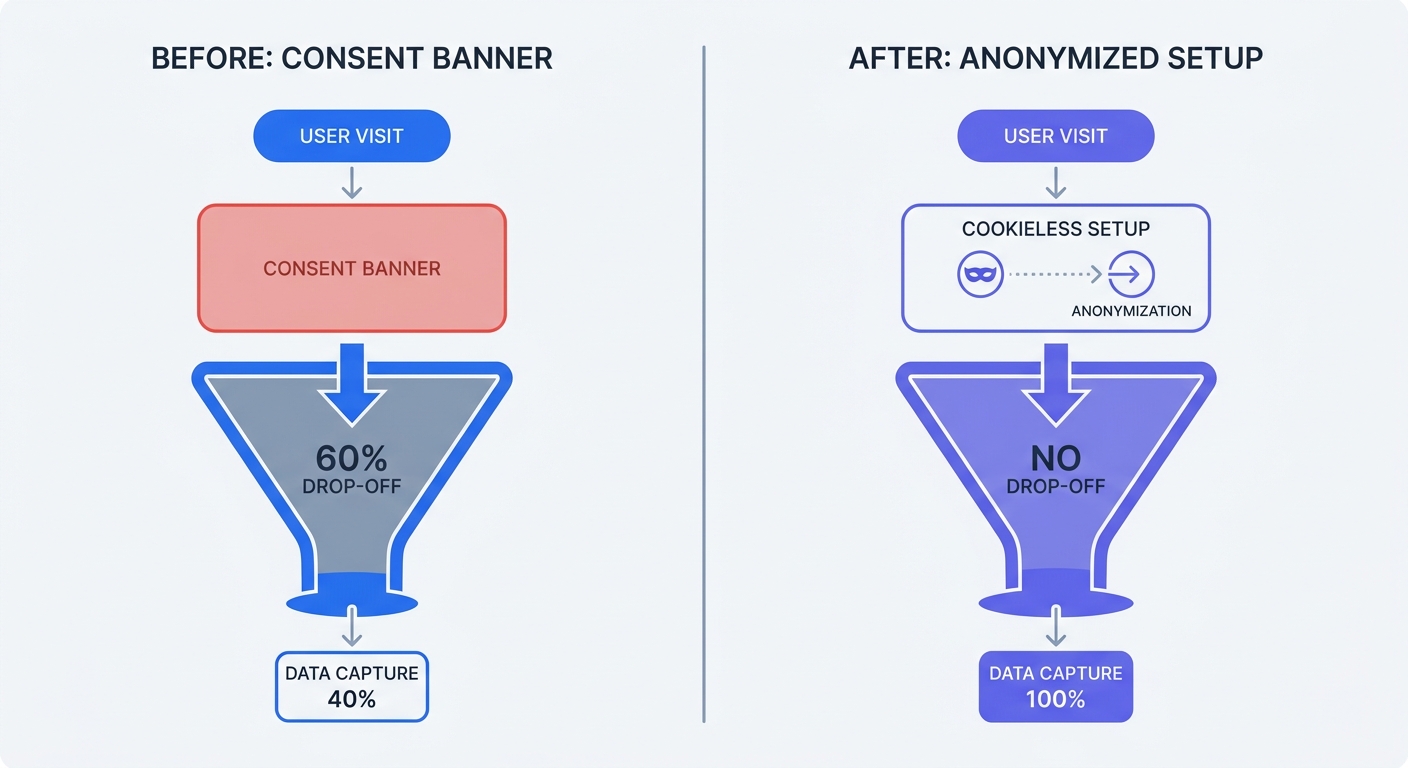
A legally compliant GDPR banner with a visible "Reject All" button causes a significant loss of website visit data across most B2B and e-commerce sectors, though this drop can vary widely depending on audience demographics and banner design. Users reject tracking when given an equal choice, and in countries like Germany and France, fewer than 25 percent of visitors actively accept tracking cookies.
When you lose more than half your traffic data, your conversion rates skew and you cannot accurately measure campaign performance. A $10,000 ad spend looks like a failure because the analytics platform never recorded the conversions tied to users who clicked "Reject All." Consequently, customer acquisition costs artificially inflate because you divide your marketing spend by a smaller pool of recorded conversions.
Qualifying for Cookie Banner Exemptions
By implementing IP anonymization without cross-site tracking, you qualify for consent exemptions. Regulatory bodies like the French CNIL provide guidelines allowing businesses to track website analytics without asking for user consent, provided the system practices data minimization and does not share data with third parties.
Remove your cookie banner once you replace legacy trackers with an anonymized, cookieless platform, as you no longer need to interrupt the user experience with consent pop-ups. You recover the traffic data previously hidden behind rejections. Cisco research indicates that 96 percent of organizations see a positive return on privacy investments, averaging a 1.6x yield across industries, and reclaiming your top-of-funnel analytics data serves as the primary driver for that return.
Setting Up Compliant Analytics with Swetrix
Building a salted hash pipeline and securing EU servers takes significant engineering resources, but Swetrix provides this infrastructure out of the box. As an open-source, cookie-free web analytics platform, Swetrix handles the technical demands of IP anonymization automatically.
One-Click Privacy Compliance
Swetrix uses a daily rotating salt combined with in-memory processing, ensuring the raw IP address never writes to disk. Because the cryptographic salt regenerates every 24 hours, the platform tracks unique daily visitors accurately while making it mathematically impossible to identify an individual over time. Users gain full visibility into pageviews, bounce rates, and UTM campaign performance without touching personal data. Since the Swetrix codebase is open-source, developers can verify this anonymization process directly.
Moving to EU Data Residency
The Swetrix Cloud infrastructure resides in the European Union, meaning your data never touches a US server. This architecture bypasses the FISA 702 compliance traps that plague legacy analytics tools, delivering real-time dashboards, custom event tracking, and performance monitoring without violating user privacy.
Take control of your data today by creating a Swetrix account and deploying the lightweight tracking script on your site. Once the analytics flow into your dashboard, delete your legacy tracking tags and take down your cookie banner.
Stop losing your traffic data to ad blockers and rejected cookie banners. Swetrix gives you GDPR-compliant analytics that protect user privacy by design. With plans starting at $19 per month for 100,000 events, you receive data ownership, EU hosting, and zero cross-site tracking. Start your 14-day free trial today and see 100% of your real website traffic.