- Date
Can You Find an IP by Phone Number for Free?
 Andrii Romasiun
A standard public lookup cannot reliably reveal a phone's current IP address from its number alone. A phone's IP comes from its active network connection, which changes as the device moves between Wi-Fi and mobile data networks. Reverse phone directories provide static subscriber registration details, not live network routing information. If you run a web search to find an IP by phone number for free, the results will point toward databases of names and addresses rather than active device connections.
Because a phone number acts as an administrative identifier for a telecom billing system while an IP address serves as a temporary routing destination for data packets, connecting the two requires live carrier logs that public lookup sites do not possess.
When you need to track a connection, locate a device, or measure traffic, you need tools built for those specific goals. Checking your own network settings, securing a lost handset, and analyzing visitors to your website all require entirely different software.
The Short Answer: No, Not From the Number Alone
A phone number functions as an account identifier tied to a SIM card or eSIM profile, so when someone dials that number, the cellular network routes the voice call or SMS to the cell tower currently communicating with that specific subscriber. The internet, however, does not use phone numbers to route web traffic.
Web traffic relies on IP addresses assigned by the local network provider. If you sit in a coffee shop reading an article on your phone, the coffee shop's internet service provider assigns the IP address. The cellular carrier has no involvement in that Wi-Fi connection, meaning the phone number remains completely detached from the data routing.
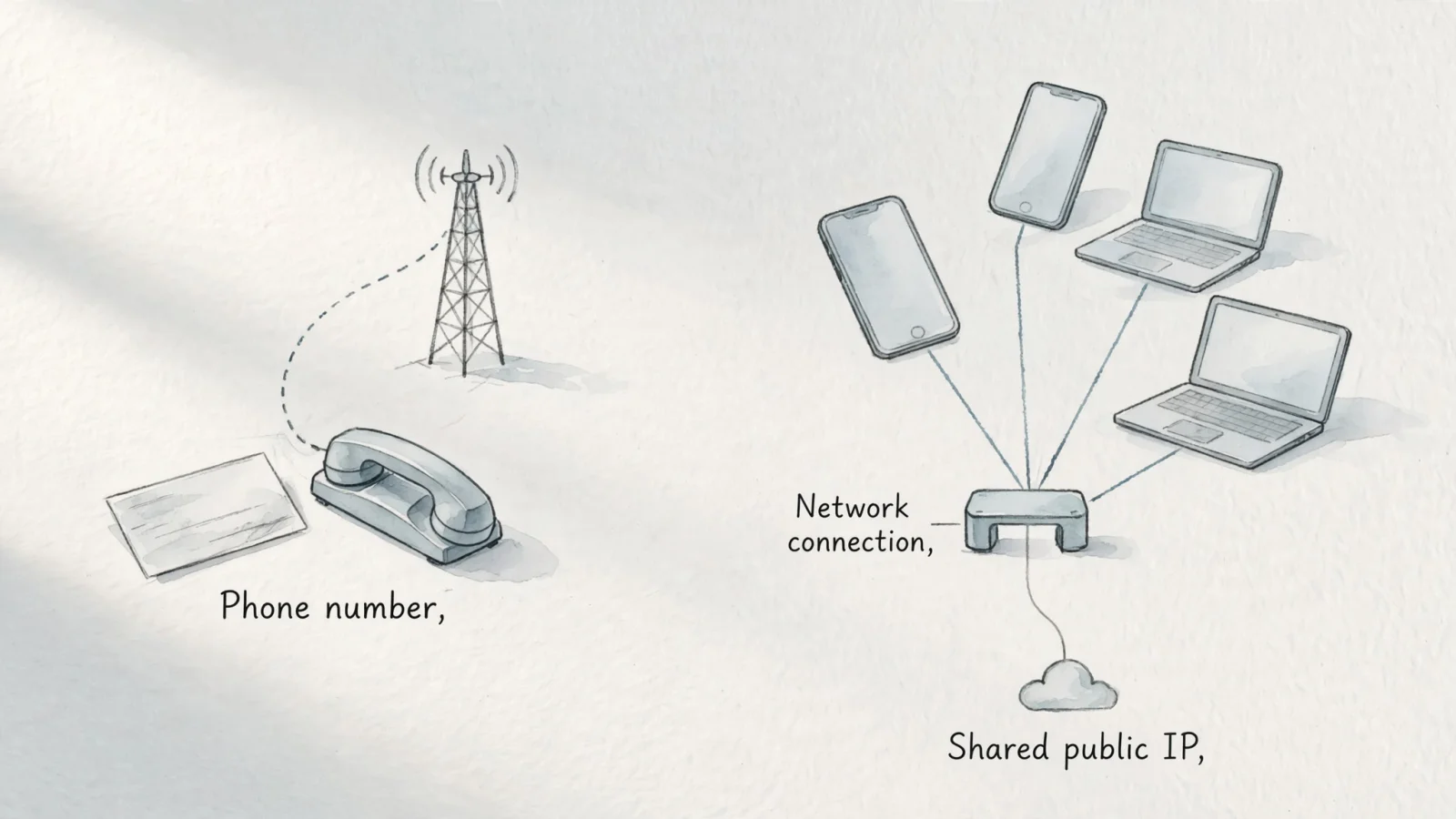
Even when a phone uses mobile data, the connection remains separated by carrier infrastructure. The mobile operator assigns a temporary IP address to the handset to load websites and apps. Legitimate public lookup services cannot access the live session databases required to match a subscriber's phone number to the IP address they hold at that exact moment.
If you run a website and want to understand your audience, focusing on phone numbers or individual visitor IPs creates unnecessary privacy risks. Privacy-first analytics platforms handle this safely. As a Google Analytics alternative, Swetrix provides detailed product analytics and traffic attribution without requiring you to collect phone numbers or store raw IP addresses.
Why a Phone Number Doesn’t Reveal Its Current IP
Mobile network architecture handles voice calls and internet data through distinct systems. When a smartphone connects to a cellular data network, the provider establishes a data session. During this setup phase, the network assigns an IP address so the device can communicate with external servers.
For 3GPP GPRS, RFC 6459's overview of IPv6 in 3GPP networks describes each primary PDP context as having its own IPv4 address and/or /64 IPv6 prefix, assigned by the PDN and anchored at the corresponding gateway.
DHCP can dynamically assign IP addresses for a limited period, allowing a network to reuse them when clients no longer need them. The Dynamic Host Configuration Protocol standards define this allocation and reuse process.
Mobile providers also use a technology called Carrier-Grade NAT to conserve their limited supply of IPv4 addresses. Instead of giving every active smartphone a unique public IP address, the carrier routes thousands of subscribers through a single public-facing gateway. The public address visible to a website belongs to the carrier's gateway equipment.
The carrier-grade NAT requirements explain that many subscribers can share one public IPv4 address, so that address alone does not identify a subscriber. To identify a subscriber from a shared address, the CGN would need records of the transport protocol, subscriber identifier, external IP address, external port, and timestamp.
These network realities make third-party lookup tools ineffective. A free website claiming to match phone numbers to IP addresses lacks access to telecom session logs, dynamic lease records, and NAT translation tables. Such sites can sometimes guess the general cellular provider based on the phone number prefix, but they cannot determine the live network routing address.
Use the Right Route for Your Goal
Checking a network connection, recovering a missing phone, and tracking website engagement are different tasks. Trying to use a single phone-number lookup for all three will yield inaccurate information. Select the method that matches your specific requirement.
Check Your Own Phone’s IP Address
You can view your phone's network routing details directly on the device. When you connect to a Wi-Fi network, the local router assigns a private, local IP address to your handset. Open your phone's Wi-Fi settings and tap the information icon next to your current network to view this local address.
Websites do not see that local address, as they see the public address of the modem or carrier gateway handling the traffic instead. To find the public IP address currently representing your phone, disconnect from any VPNs and load a reputable network-checking website. The displayed string of numbers is the address assigned by your internet service provider or cellular carrier. Expect this public address to change when you switch from Wi-Fi to mobile data.
Recover a Lost Android Phone
Finding a misplaced device requires platform-level location tools, not network address lookups. If you lose an Android handset, open a web browser on another device and log into the Google account associated with the missing phone.
Use Google's Find Hub help page to find, secure, or erase a lost Android device. Google estimates location from sources such as GPS, nearby Wi-Fi networks, and mobile towers, and it can show the device's last known location if a current location is unavailable. To secure or erase it remotely, Google says the device must have power, be connected to mobile data or Wi-Fi, be signed in to a Google Account, have Find Hub turned on, and be visible on Google Play.
Measure Traffic to a Website You Own
If you own a website, you likely want to know who visits your pages. However, relying on IP addresses for audience identification introduces privacy compliance issues and provides inaccurate data due to shared carrier networks.
Shift your focus to measuring actions and outcomes. Analytics platforms or configured server logs can track how people arrive at your site and what they do once they load a page. You can monitor which search terms drive traffic, which external links bring in visitors, and which marketing campaigns generate the highest interest. Pay attention to the paths users take through your site and where they abandon their carts.
Swetrix helps you gather these insights ethically. You can set up website conversion funnel analysis to pinpoint exactly where users drop off, without ever logging a raw IP address or tracking a phone number. The platform uses transient processing to handle incoming visitor data. It reads the incoming IP and user-agent data, applies a cryptographic hash with a rotating daily salt to create a temporary session identifier, and discards the raw values.
This cookieless approach delivers advanced product analytics, including custom event tracking, error monitoring, and campaign attribution. You gain a clear picture of your website's performance and technical health while respecting visitor privacy. Pair these insights with dedicated webmaster utilities, like an on page SEO checker, to optimize your pages based on aggregate user behavior rather than individual tracking.
Locate or Identify Someone Else
If you need to find a family member or coordinate with a colleague, rely on consent-based location sharing. Modern smartphone operating systems include built-in features that allow users to share their live GPS location with approved contacts for a specified duration. Messaging applications also offer similar opt-in location broadcasting.
Do not trust websites that promise to locate someone using only their phone number. These services either return outdated public registry information or attempt to charge money for generic area-code approximations. If an emergency occurs, law enforcement agencies have the established legal authority to request real-time network triangulation and subscriber data directly from the cellular providers.
What an IP Lookup Can and Cannot Tell You
Even when you possess a valid public IP address, the information you can extract from it remains limited. Network addresses indicate how traffic routes through the internet infrastructure, meaning they do not function as precise GPS coordinates or definitive proof of a person's identity.
IP geolocation provides an approximate physical location based on where the internet service provider registers the address. Third-party mapping databases associate blocks of addresses with specific cities or regions. When you look up an IP, the result usually reflects the location of the carrier's data center or the municipal broadband exchange.

Accuracy varies with the signals available. For IP geolocation, the Google Maps Geolocation API documentation says the API estimates location from the request's IP address when considerIp is true and no Wi-Fi or cell-tower signals can be geolocated. That fallback has the API's lowest accuracy, with an uncertainty radius that can reach thousands of meters.
Privacy laws further complicate how you handle network addresses as a website owner. In the European Union, courts evaluate IP addresses based on the potential for identification. The Court of Justice of the European Union ruled in the Breyer judgment that a dynamic IP address constitutes personal data for a website operator, provided that operator has the legal means to obtain the matching ISP subscriber records.
This ruling emphasizes the connection between the network address and the underlying telecom data. While you cannot identify the user directly from the IP, the ISP can, meaning the address carries privacy obligations. This legal framework highlights the need for analytics platforms that anonymize incoming data and avoid storing raw network identifiers. Relying on aggregated metrics allows you to evaluate your marketing efforts without triggering complex compliance requirements tied to individual user identification.
Frequently Asked Questions
People often confuse the functions of phone numbers, network addresses, and device location services. These answers clarify the technical boundaries.
Can You Find Someone’s IP Address From Their Phone Number?
No public service can reliably provide a person's current IP address based solely on their phone number. IP addresses belong to the active internet connection, which changes as devices switch networks. Tying a phone number to a live network address requires access to secure, internal carrier routing logs.
Can a Phone Number Show Someone’s Exact Location?
A phone number alone cannot reveal a device's precise location to the general public. Reverse number directories might show the city or region where the number was originally registered. Exact location tracking requires device-level GPS access, consent-based sharing apps, or law enforcement warrants served to the cellular provider.
Does a Phone Keep the Same IP Address?
A phone changes its IP address regularly. When you connect to your home Wi-Fi, you receive an address from your local router. When you leave the house, your phone switches to mobile data and receives a new, temporary address from the cellular network. Even while on the same mobile network, the carrier periodically rotates the assigned address.
How Do I Check My Own Phone’s IP Address?
Open your phone's network settings to find your local Wi-Fi address. To see the public address your device currently presents to websites, open a web browser and load a dedicated IP-checking utility. Remember that this public string may represent a shared carrier gateway rather than your specific handset.
Can an IP Lookup Show a Phone’s GPS Location?
An IP lookup provides an estimated geographical area based on the internet service provider's registration data, but it cannot access the phone's internal GPS receiver. The lookup typically returns the location of the nearest routing facility or data center, which could be dozens of miles away from the actual device.
Can Swetrix Find a Visitor’s IP From Their Phone Number?
Swetrix cannot determine a visitor's IP address from a phone number. The platform operates as a privacy-first analytics tool designed to measure website engagement without identifying individual people, helping you track traffic sources, campaigns, and conversions using anonymized, cookieless metrics.
Stop relying on invasive identification methods to measure your website's performance. Transition to a platform that respects visitor privacy while delivering the deep product insights you need to grow. Try Swetrix to track custom events, monitor technical errors, and map conversion funnels without storing raw IP addresses or displaying intrusive consent banners.