- Date
Do You Need a Cookie Banner? The Complete Guide
 Andrii Romasiun
A visitor from Munich lands on your site. Before they read a word, a modal blocks the screen asking them to accept or reject cookies. Half of them click accept without reading. The other half bounce.
Cookie banners exist because privacy laws require websites to ask permission before collecting personal data. The decision to implement one depends on three factors: the types of cookies your site uses, where your visitors are located, and which privacy regulations apply to your business. Get any of these wrong, and you face either unnecessary friction that tanks conversions or regulatory fines that reach €20 million.
Most sites need a banner. If you use Google Analytics, Facebook Pixel, or any ad tracking tool, you're collecting personal data that triggers consent requirements under GDPR, CCPA, and similar laws. But a growing number of businesses are eliminating the banner by switching to privacy-first analytics platforms like Swetrix that don't collect personal data or use cookies. No personal data collection means no legal basis for requiring consent.
When You Legally Need a Cookie Banner (And When You Don't)
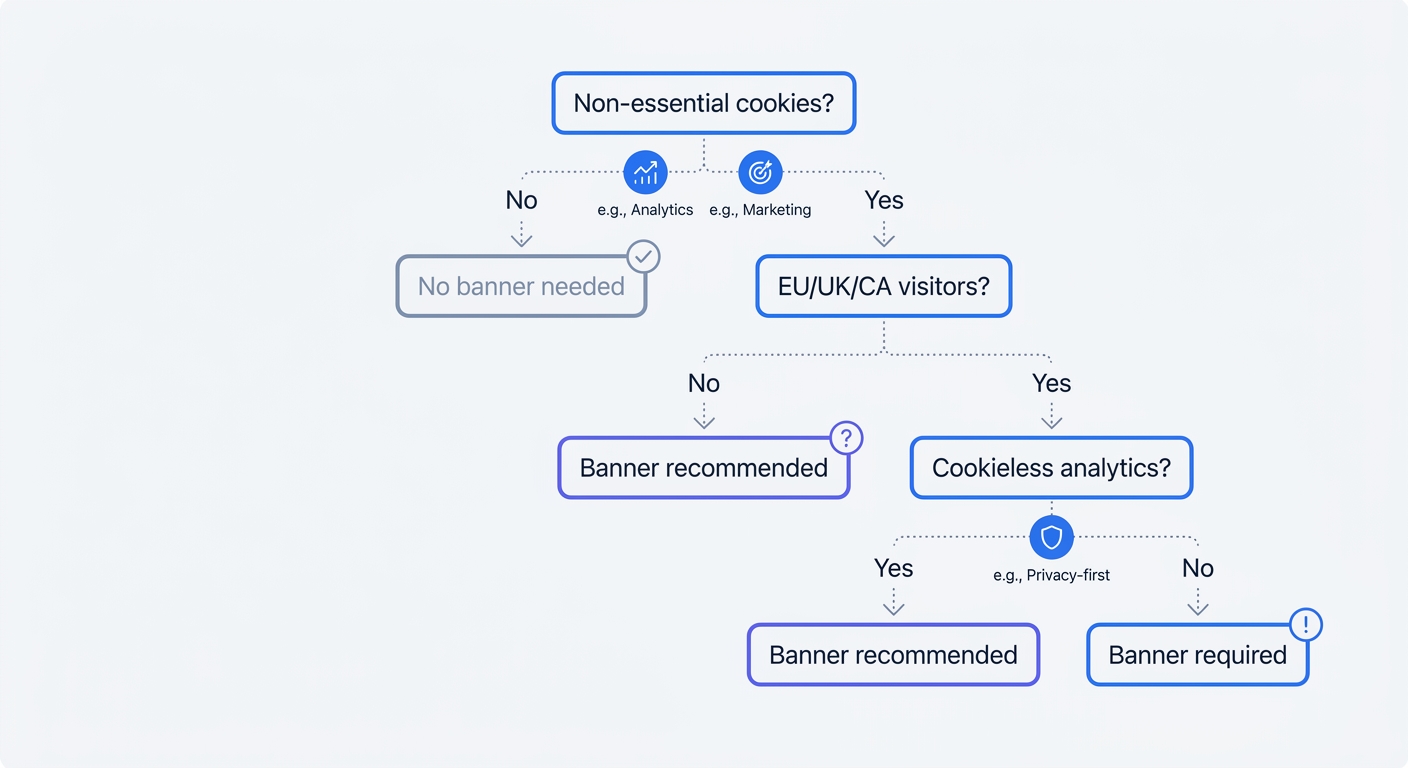
The Three Factors That Determine Cookie Banner Requirements
Cookie banner requirements hinge on three questions. First: does your site use non-essential cookies? Essential cookies handle core functions like shopping carts, login sessions, and security features. These don't require consent. Analytics cookies, advertising trackers, and functionality cookies like chat widgets all require consent because they collect or process personal data.
Second: where are your visitors located? If your site receives traffic from the European Union or United Kingdom, GDPR applies regardless of where your business is based. A US-based blog with 5% EU traffic must comply with GDPR for those visitors. California's CCPA, Brazil's LGPD, and similar laws in South Africa, Saudi Arabia, and Singapore create overlapping requirements that affect most international sites.
Third: can you achieve your analytics goals without personal data? If yes, you can skip the banner. Swetrix tracks pageviews, referrals, and conversion events without cookies or personal data collection. Multiple EU data protection authorities, including France's CNIL and Germany's DSK, confirm that privacy-first analytics tools configured correctly are exempt from consent requirements.
Cookies That Require Consent vs. Essential Cookies
Necessary cookies don't require consent. These include session IDs that maintain login state, shopping cart contents, security tokens that prevent CSRF attacks, and load balancing cookies that distribute traffic across servers. If removing the cookie breaks core site functionality, it's essential.
Everything else requires consent. Google Analytics sets cookies to track user behavior across sessions. Facebook Pixel drops cookies to build advertising profiles. Even cookies like "remember my language preference" require consent under GDPR because they process user choices over time.
The line blurs with first-party analytics cookies. Some businesses argue that basic traffic counting qualifies as essential for site operation. Most EU data protection authorities reject this interpretation. If the cookie tracks individual user behavior across visits or enables cross-site tracking, consent is required.
Geographic Triggers: EU, US, and Global Requirements
European laws require explicit opt-in consent before loading non-essential cookies. The banner must appear before any tracking scripts fire. Users must see clear "Accept" and "Reject" buttons with equal visual weight. Pre-ticked boxes don't count as consent. Only 15% of European websites meet minimum GDPR requirements, and 49% violate cookie rules.
US laws follow a notice-and-opt-out model. California's CCPA requires disclosure when cookies are used for selling or sharing personal information, plus a clear opt-out mechanism. No federal cookie law exists, but state-level privacy laws now operate in over 20 states. Most US sites should implement opt-out cookie banners to cover California, Virginia, Colorado, and other regulated states.
Global frameworks mirror GDPR's approach. Brazil's LGPD, India's DPDP Act, South Africa's POPIA, and Singapore's PDPA all require consent for non-essential cookies. If your site attracts international traffic, assume you need a banner unless you've eliminated personal data collection.
The Hidden Costs of Cookie Banners (That Nobody Talks About)
Data Loss: Why You're Only Seeing Half Your Traffic
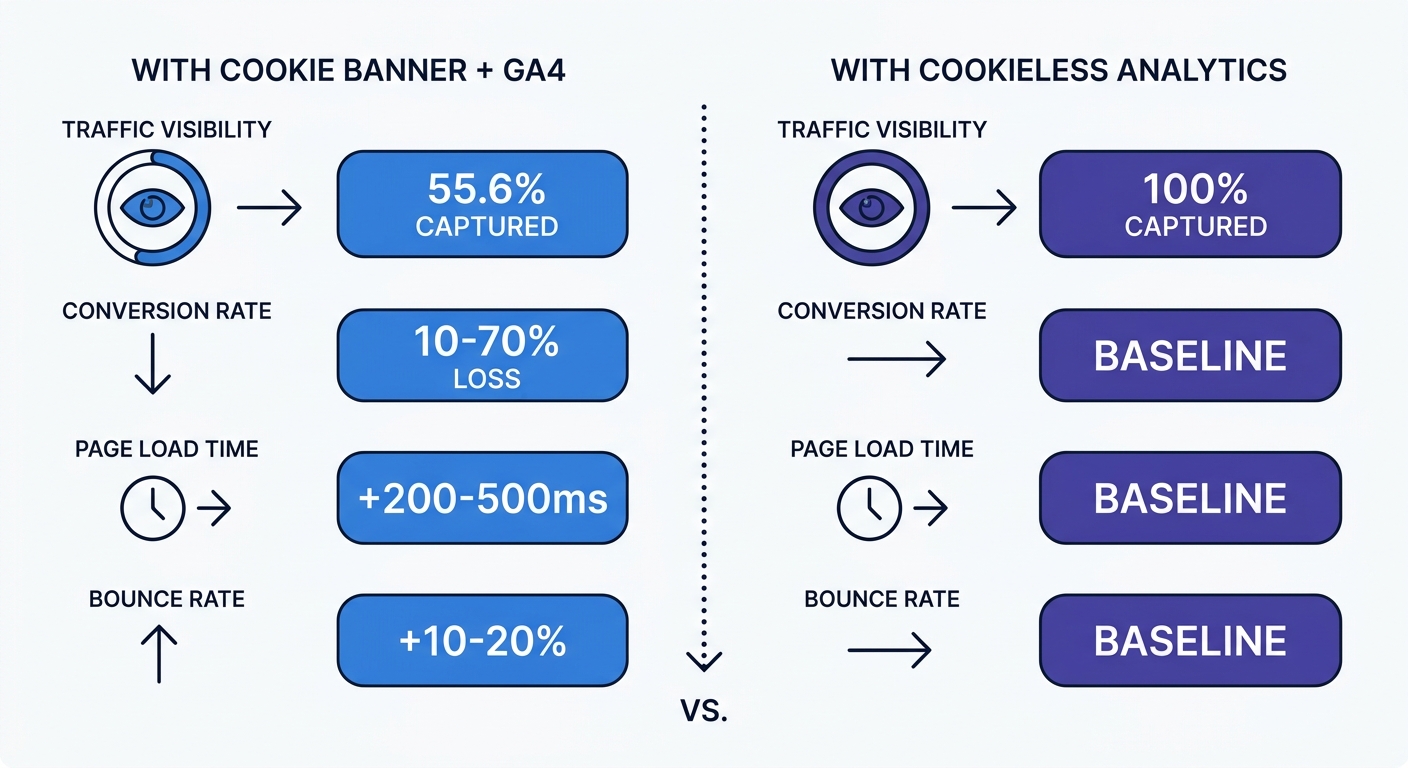
Cookie banners create a data blind spot that most analytics dashboards never reveal. An independent study by Orbit Media comparing Google Analytics 4 to Plausible on the same site found that GA4 captured only 55.6% of traffic. The primary cause wasn't ad blockers or browser tracking prevention—it was consent declines.
Between 30% and 70% of users reject cookies depending on geography and banner design. Those visitors generate no trackable data. You can't see their journey, attribute their conversions, or optimize their experience. A $5,000 ad campaign might drive 300 conversions that show up as "direct" traffic because the visitors who converted had rejected cookies.
The gap distributes unevenly in ways that make it worse than the raw percentage suggests. Visitors from direct traffic or branded search accept cookies at higher rates. Visitors from paid ads or cold organic search are encountering you for the first time. They decline more often. GA's blind spot is largest where acquisition data matters most: new visitors you paid to bring in.
Geography amplifies the problem. Fewer than 25% of users in Germany and France accept cookies, while more than 80% of US users accept. If you run EU-focused campaigns, you're flying blind on three-quarters of your traffic. EU-focused sites see consent acceptance rates of 40-50%. US-focused sites hit 65-75%, but that still leaves a third of visitors invisible.
Conversion Impact: The 10-70% Problem
Bounce rates jump 10-20% on sites with cookie banners, especially on mobile devices where banners often cover significant screen real estate. A recent analysis shows that up to 70% of conversions are lost the moment a cookie consent banner is triggered.
The conversion loss stems from three sources. First, the banner creates friction. Users must make a decision before engaging with your content. Decision fatigue increases abandonment. Second, users who decline cookies often leave because they assume the site won't function without accepting. Third, the banner delays content rendering, which increases perceived load time and triggers impatience.
Mobile users suffer the worst experience. A banner that takes 20% of desktop screen space can consume 40-50% of a mobile viewport. Users can't see your headline, value proposition, or call-to-action until they dismiss the banner. Users make their cookie choices within 8 seconds of seeing a banner. If your value proposition isn't visible in those 8 seconds, you've lost them.
Ad performance metrics become unreliable when cookies are blocked by default. Tracking pixels stop reporting back to platforms like Google Ads, Meta, and Microsoft Ads. Reported cost-per-conversion rises, not because campaigns are underperforming, but because the data to measure them is missing. You optimize toward incomplete data and make decisions based on a fraction of reality.
Performance Penalties and User Experience Damage
Consent management platforms add JavaScript that delays page rendering. Every 100ms of load time costs roughly 1% in conversions. Most CMPs add 200-500ms. Poorly optimized cookie banners can increase your Largest Contentful Paint by up to 500ms, which pushes sites over Core Web Vitals thresholds and damages search rankings.
The performance hit compounds when the CMP loads before critical content. Many implementations block page rendering until the consent script initializes, checks for existing consent, and displays the banner. Users stare at a blank screen or loading spinner while the CMP executes. Perceived performance suffers even when load time remains acceptable.
Over 40% of internet users run ad blockers or privacy tools, and most of these block analytics cookies too. Your CMP still loads, still delays rendering, and still shows the banner—but the cookies it manages are blocked. You pay the performance penalty without gaining the data.
Trust erosion represents the least measurable but potentially most damaging cost. 50% of users accept cookies out of habit, not because they want to. They've learned that rejecting cookies often breaks site functionality or requires multiple screens. This learned helplessness breeds resentment. Users accept, but they remember that you forced them to make an uncomfortable choice before delivering value.
How to Implement a Compliant Cookie Banner (If You Need One)
GDPR Requirements: What Your Banner Must Include
GDPR Article 4 defines consent as a clear affirmative action that is freely given, specific, informed, and unambiguous. Article 7 adds requirements: you must prove consent was obtained, users must be able to withdraw consent as easily as they gave it, and consent requests must use clear and plain language.
Your banner must explain cookie purposes in language every user can understand. "We use cookies to improve your experience" fails the specificity test. "We use analytics cookies to count visitors and advertising cookies to show you relevant ads on other sites" passes. List cookie categories separately: necessary, analytics, advertising, functionality. Let users accept or reject each category independently.
Accept and Reject buttons must carry equal visual weight. European data protection authorities expect similar sizing, comparable color contrast, and placement on the same level of the banner. A bright green "Accept All" button next to a gray text link labeled "Manage Preferences" violates this requirement. 28% of banners use dark patterns, and 44% are missing a reject-all button.
No cookies can load before consent. Many websites still load analytics or marketing cookies before users make a choice. This is one of the most common compliance failures. If non-essential cookies are triggered before consent, you're in violation regardless of how well-designed your banner appears. Over 60% of websites with a CMP still set trackers before users had given consent.
Consent must be revocable. Provide a persistent link in your footer or privacy policy that reopens the consent banner. Users should be able to withdraw consent with the same ease they granted it—one click, not a multi-step process buried in account settings.
Design Best Practices That Don't Tank Conversions
Banner design affects both compliance and conversion rates. Neutrally designed banners led to only 17% rejections, well below privacy preferences. A banner with no decline option pushed rejection to 4%. A banner with a visible rejection option increased rejection to 34%. Compliant design increases rejections, but that's the required outcome.
Well-designed, compliant cookie banners with balanced options achieve consent rates between 72.5% and 82%, compared to the 31% industry average. The difference comes from clarity, not manipulation. Explain the value exchange: "We use analytics to improve site speed and fix broken links. We use advertising cookies to show you relevant offers." Users accept when they understand the benefit.
Place the banner at the bottom of the screen on desktop, top on mobile. Bottom placement on desktop preserves access to content. Top placement on mobile ensures visibility without requiring scrolling. Avoid center-screen modals that block all content—these maximize friction and abandonment.
Use progressive disclosure for cookie details. Show category-level choices on the first screen: Accept All, Reject All, Customize. Clicking Customize reveals granular controls for each cookie type with plain-language descriptions. Most users choose Accept All or Reject All. The minority who want control get it without forcing everyone through a complex interface.
Test banner timing. Displaying the banner on page load maximizes compliance but also maximizes friction. Delaying the banner by 2-3 seconds lets users see your value proposition before making a decision. Some sites trigger the banner on scroll or after a time threshold. These approaches reduce initial friction but risk non-compliance if cookies load before the banner appears.
Choosing a Consent Management Platform (CMP)
67% of banners come from consent management platforms. Market leaders include Usercentrics, OneTrust, CookieYes, and Termly. Platform selection depends on organizational maturity. Lightweight CMPs target small businesses with pre-built templates, basic scanning, and simplified pricing starting around $50-200/month. Full-suite platforms serve enterprises with multi-brand management, advanced automation, analytics, and integration with marketing clouds, starting at $500+/month.
Key features to evaluate: automatic cookie scanning that detects all cookies on your site, script blocking that prevents non-essential cookies from loading before consent, consent logging that stores proof of when and how each user consented, multi-language support for international sites, and integration with your analytics and advertising platforms.
Script blocking represents the most critical technical requirement. The CMP must intercept and block all non-essential scripts until the user grants consent. Many CMPs require manual configuration: you tag each script with its category, and the CMP blocks it. This works but creates maintenance overhead when you add new tools. Advanced CMPs use automatic detection and blocking, though these cost more.
Consent logs provide audit-ready proof of compliance. You must prove you obtained consent in a sound way. Logs should capture user ID (or anonymous identifier), timestamp, consent choices by category, banner version shown, and IP address (if permitted under your privacy policy). Store logs for at least the duration of the consent (12 months) plus any applicable statute of limitations.
Technical accessibility matters for compliance and user experience. Keyboard navigation, focus management, and screen reader announcements should come from your CMP. Test the banner with keyboard-only navigation and a screen reader. If users can't reject cookies without a mouse, you're excluding disabled users and potentially violating accessibility laws alongside privacy laws.
The Cookie-Free Alternative: How Privacy-First Analytics Eliminates the Banner
Why Swetrix and Other Cookieless Tools Don't Require Consent
Cookie consent banners exist because personal data is being collected. Remove the personal data, and the legal basis for requiring consent disappears. Swetrix tracks pageviews, referrals, and conversion events without collecting personal data, using cookies, or creating persistent identifiers. It anonymizes IP addresses, doesn't track users across sites, and stores no information that could identify an individual.
Multiple EU data protection authorities, including France's CNIL and Germany's DSK, have confirmed that privacy-first analytics tools, when configured correctly, are exempt from consent requirements. The key phrase is "configured correctly." The tool must not collect personal data, must not use cookies or similar persistent identifiers, and must not enable cross-site tracking.
Swetrix meets these requirements by design. It counts visitors without identifying them. A visitor from Berlin sees their pageview increment the Germany counter, but Swetrix stores no information linking that pageview to an individual. IP addresses are anonymized before processing. No user profiles exist. No behavioral tracking occurs across sessions.
Competitors in the privacy-first analytics space include Plausible, Matomo (in privacy mode), and Simple Analytics. Plausible's script weighs 2.5KB gzipped versus GA4's 135KB, reducing page load time and carbon footprint. Matomo offers both cloud-hosted and self-hosted options, giving enterprises full data control. Simple Analytics focuses on minimalist reporting for content sites.
Swetrix differentiates through real-time dashboards, campaign tracking with UTM parameters, custom event tracking for conversions, performance monitoring, error tracking, and shared dashboards for client reporting. These features cover the analytics needs of most marketing sites, SaaS products, and content publishers without requiring personal data collection or cookie consent.
What You Gain: 40-50% More Visible Traffic and Better Data
Businesses switching to cookieless analytics report seeing 40-50% more traffic than Google Analytics showed. The difference isn't that cookieless tools inflate numbers—they capture previously invisible visitors who declined cookies or ran ad blockers.
Data quality improves because you're measuring everyone, not the subset who accepted cookies. Referral sources become accurate. Conversion attribution reflects reality instead of a sample. Companies using first-party data strategies achieve 2.9x better customer retention rates and 1.5x higher marketing ROI compared to those dependent on third-party cookies.
Over 72% of B2B companies employ server-side tracking, reporting an average 45% data quality improvement over client-side-only approaches. Server-side tracking captures events on your backend instead of relying on browser-side JavaScript. The user's browser never receives a tracking cookie because data collection happens on your server. This approach is immune to ad blockers, doesn't require consent banners for basic analytics, and gives you more control over what data you collect.
User experience improves. No modal blocks content on page load. No decision fatigue before engagement. No performance penalty from CMP scripts. Visitors see your value proposition first, make their decision about your product second. Bounce rates drop. Time on site increases. Conversions improve.
The compliance burden disappears. No consent management platform subscription. No documented consent records. No granular opt-out controls. No ongoing audits of what fires after a decline. Cookie consent compliance involves a non-trivial compliance operation that cookieless analytics removes.
Migration Guide: Switching from Google Analytics
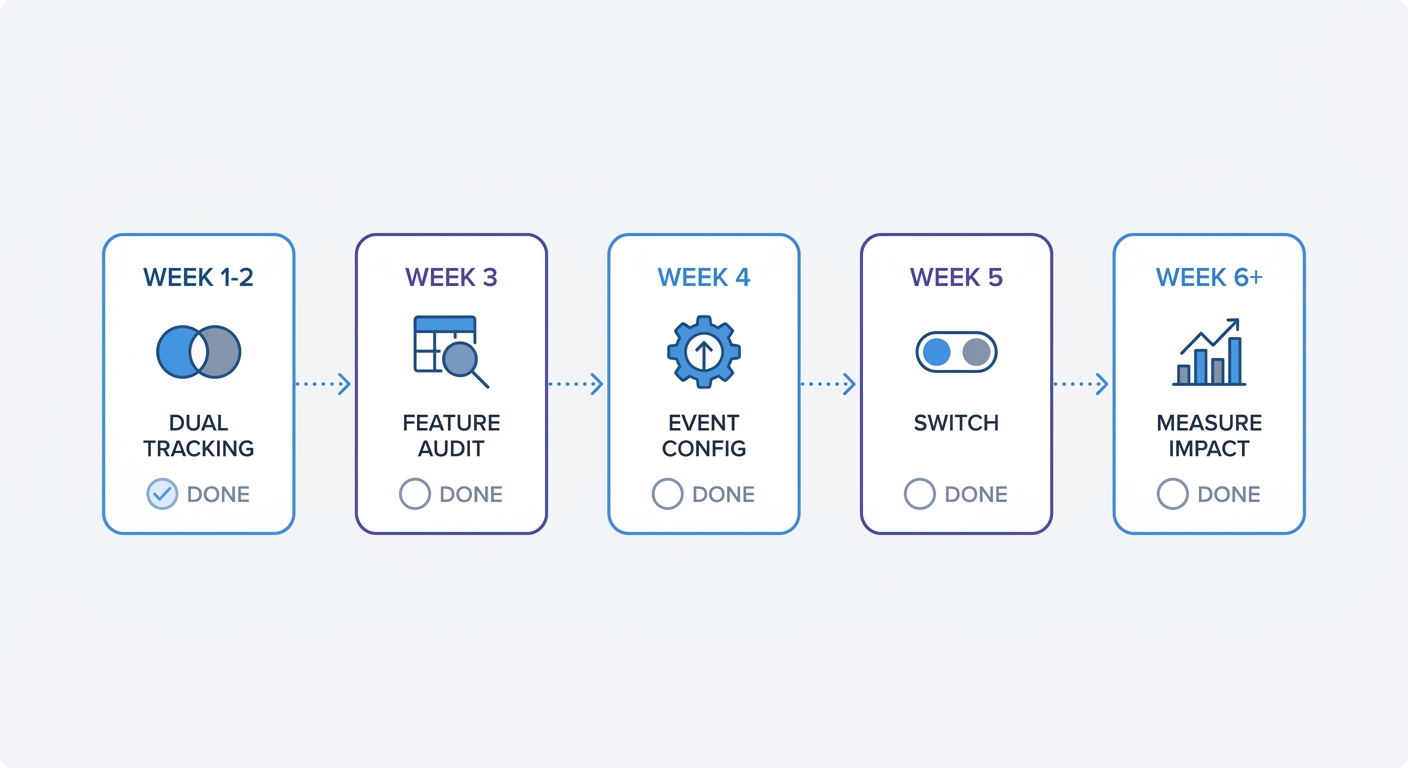
Start by running Swetrix alongside Google Analytics for two weeks. Add the Swetrix script to your site without removing GA4. Compare the data. Swetrix will show higher traffic numbers because it captures visitors who declined GA4's cookies. Check whether referral sources, top pages, and conversion patterns match. They should align directionally even if absolute numbers differ.
Identify which GA4 features you use versus have access to. Most sites use pageviews, referrals, top pages, and basic conversion tracking. Advanced features like user-level funnels, cross-device attribution, and audience segmentation require personal data collection. If you're not using these features, you're paying the compliance cost without gaining the benefit.
Configure events in Swetrix for key conversions. Swetrix supports custom events that track button clicks, form submissions, file downloads, and other interactions. Use the same event names you used in GA4 to maintain consistency in reporting. Test each event to verify it fires correctly.
Remove Google Analytics and the cookie banner. Delete the GA4 script from your site. Remove the consent management platform. Update your privacy policy to reflect that you no longer collect personal data through analytics. The process takes 1-2 weeks from start to finish.
Measure performance and conversion improvements. Track bounce rate, time on site, and conversion rate for the month before and after the switch. Most sites see bounce rate drop 10-20% and conversions increase 5-15% from removing banner friction. The data quality improvement makes optimization decisions more reliable, compounding gains over time.
Swetrix offers a 14-day free trial that lets you test the platform before committing. Pricing starts at 100,000 events per month for $19/month or $190/year, scaling by event volume. For most small to mid-sized sites, this costs less than a consent management platform subscription while eliminating the compliance burden.
2025-2026 Enforcement Trends: Why This Matters Now
Record Fines and Automated Detection
€1.2 billion in fines were issued in 2025 alone, with daily breach notifications exceeding 400 for the first time since 2018. Regulators are intensifying their crackdown on privacy violations, and cookie consent violations represent low-hanging fruit for enforcement.
In September 2025, France's CNIL fined SHEIN's Irish subsidiary €150 million for placing advertising cookies on user devices without consent and maintaining non-functional opt-out mechanisms. The same month, CNIL fined Google €325 million for displaying Gmail ads without consent and manipulating cookie acceptance during account creation.
Earlier enforcement actions set the pattern. In December 2020, CNIL sanctioned Amazon Europe Core €35 million for placing advertising cookies without consent on Amazon.fr. In December 2023, Yahoo received a €10 million fine for placing about 20 tracking cookies for targeted ads despite users rejecting cookies.
Cookie consent violations fall under GDPR's highest penalty tier. Article 83(5) authorizes fines of up to €20 million or 4% of the company's total worldwide annual turnover from the preceding financial year, whichever is higher. For a company with €500 million in annual revenue, 4% equals €20 million. The fine scales with business size, making violations expensive for organizations of any scale.
Data Protection Authorities coordinate enforcement and scan websites. Many authorities use automated tools to detect cookie violations, increasing detection speed and reach. If you have EU traffic and use non-compliant cookies, discovery is a matter of when, not if.
The Dark Pattern Crackdown
The European Data Protection Board has published guidance targeting dark patterns in cookie banners. Sweden, France, Italy, Germany, and the Netherlands have all issued fines for manipulative banner design. The amounts range from tens of thousands to tens of millions of euros depending on company size and violation severity.
Common dark patterns under enforcement scrutiny include: making the accept button prominent while hiding or de-emphasizing the reject option, requiring multiple clicks to reject while accepting takes one click, pre-selecting cookie categories and requiring users to deselect them, using confusing language that obscures what users are consenting to, and making it difficult to withdraw consent after accepting.
28% of banners use dark patterns, and 44% are missing a reject-all button. These violations are easy to detect and prove, making them attractive targets for enforcement. Regulators can screenshot the banner, document the violation, and issue a fine without complex technical investigation.
Regulators are moving from warnings to serious penalties. Sweden's Data Protection Authority targeted companies for manipulative cookie banners, making clear that 2025 marks a new era in cookie compliance enforcement. Comply fully or face financial consequences.
What's Coming: ePrivacy Regulation and US State Laws
The EU's ePrivacy Regulation will tighten cookie rules further when it passes. Current drafts require stricter consent mechanisms, shorter cookie lifespans, and enhanced user controls. The regulation has been in development for years, but momentum is building toward final adoption in 2026-2027.
Over 20 US states have privacy laws creating a compliance patchwork. California's CCPA started the trend. Virginia, Colorado, Connecticut, Utah, and others followed with similar frameworks. Each law has different requirements for cookie disclosure and opt-out mechanisms. Complying with all of them requires either implementing the strictest standard across your site or geo-targeting different consent flows by state.
Global frameworks in Brazil (LGPD), India (DPDP Act), South Africa (POPIA), and Singapore (PDPA) mirror GDPR's approach. As these laws mature and enforcement ramps up, the compliance burden for cookie-based tracking will continue to increase. GDPR fines have surpassed €4.5 billion, and other jurisdictions are following the same enforcement trajectory.
Browser changes compound regulatory pressure. Safari's Intelligent Tracking Prevention started blocking third-party cookies in 2017. Firefox followed with Enhanced Tracking Protection in 2019. Chrome announced plans to phase out third-party cookies, though the timeline keeps shifting. Regardless of when Chrome completes the transition, the direction is unmistakable: browsers are eliminating the technical foundation that cookie-based tracking relies on.
The convergence of browser deprecations, privacy regulations, and consumer privacy expectations confirms that privacy-first measurement is the baseline expectation. Organizations recognizing cookieless tracking technology as strategic capability rather than compliance burden achieve better outcomes.
Making Your Decision: Cookie Banner Checklist
Quick Assessment: Do You Need a Banner?
Answer these four questions to determine your cookie banner requirement:
What cookies does your site use? List every analytics tool, advertising platform, chat widget, and third-party script. Check your browser's developer tools to see what cookies load. Google Analytics, Facebook Pixel, Google Ads conversion tracking, LinkedIn Insight Tag, and similar tools all set non-essential cookies that require consent.
Where are your visitors located? Check your analytics for geographic distribution. Any EU, UK, or California traffic triggers regulatory requirements. Even 1% EU traffic means GDPR applies to those visitors. Most sites with any international presence need to comply with multiple privacy frameworks.
Are any cookies necessary only? Necessary cookies include session IDs for logged-in users, shopping cart contents, security tokens, and load balancing. If your site only uses these and nothing else, you might not need a banner. This scenario is rare. Most sites use at least one analytics or advertising tool that requires consent.
Can you achieve your analytics goals without personal data collection? If you need pageviews, referrals, top pages, and basic conversion tracking, cookieless analytics covers your needs. If you require user-level funnels, cross-device attribution, or remarketing audiences, you need cookie-based tracking and therefore need a banner.
Cost-Benefit Analysis: Banner vs. Cookie-Free Analytics
Compare the full cost of each approach:
Cookie Banner Path Costs:
- CMP subscription: $50-500/month depending on platform and features
- Compliance audit time: 10-20 hours initially, 2-4 hours quarterly for ongoing monitoring
- Data loss from rejections: 30-70% of visitors invisible in analytics
- Conversion drop from banner friction: 10-70% depending on banner design and traffic source
- Performance penalty: 200-500ms added page load time
- Ongoing consent log management: storage, retrieval for audits, retention policies
- Fine risk if implementation fails: €20M or 4% of global revenue
Cookie-Free Analytics Path Costs:
- Swetrix subscription: lower than CMP costs, starting at $19/month for 100,000 events
- Migration time: 1-2 weeks to implement and verify
- Loss of user-level tracking: no cross-device attribution, no remarketing audiences, no user-level funnels
Benefits Comparison:
Cookie Banner path enables full GA4 and advertising platform features, user-level attribution, remarketing capabilities, and cross-device tracking. You pay for these with compliance overhead, data loss, conversion friction, and fine risk.
Cookie-Free Analytics path eliminates banner friction, captures 40-50% more visible traffic, removes consent management overhead, eliminates fine risk for cookie violations, improves page load speed, and delivers cleaner user experience. You trade advanced tracking features for simplicity, compliance, and better data on the metrics that matter most.
Recommendation by site type:
Content sites, blogs, SaaS marketing sites, and most B2B businesses should choose cookie-free analytics. The features you lose (user-level tracking, remarketing) matter less than the benefits you gain (complete data, no friction, zero compliance burden).
E-commerce sites with heavy remarketing, complex attribution needs, or enterprise marketing clouds require cookie-based tracking. Implement a compliant banner, but optimize for consent rates and minimize friction. Consider hybrid approaches: use cookieless analytics for site-wide metrics and cookie-based tracking only for specific remarketing campaigns.
Most websites don't need cookie banners—they need better analytics. Swetrix delivers the metrics that drive decisions without the compliance burden that drives visitors away. Start a 14-day free trial and see what your traffic looks like when you're measuring everyone, not the subset who clicked accept.