- Date
The Difference Between First and Third Party Cookies Explained
 Andrii Romasiun
When you land on a new website and a massive consent banner blocks the content, ignoring the prompt causes traditional analytics tools to lose your visit entirely. Only 11% of U.S. adults can correctly identify how these trackers operate behind the scenes, largely because most people treat all website storage the same.
A cookie is a small text file saved to a browser, and the domain issuing that file determines whether it helps the user or tracks them. First-party cookies keep a shopping cart intact during navigation, while third-party cookies track behavior across the internet to serve targeted ads. You can bypass this confusing technology entirely by switching to cookieless tracking platforms like Swetrix, which measure traffic accurately without relying on persistent identifiers.
Understanding the Core Definitions
The technical distinction between first and third-party cookies comes down to the domain name in the address bar. When a browser receives a web page, the server includes a Set-Cookie HTTP header specifying a domain, which dictates how the browser categorizes and restricts the data.
Defining First-Party Cookies
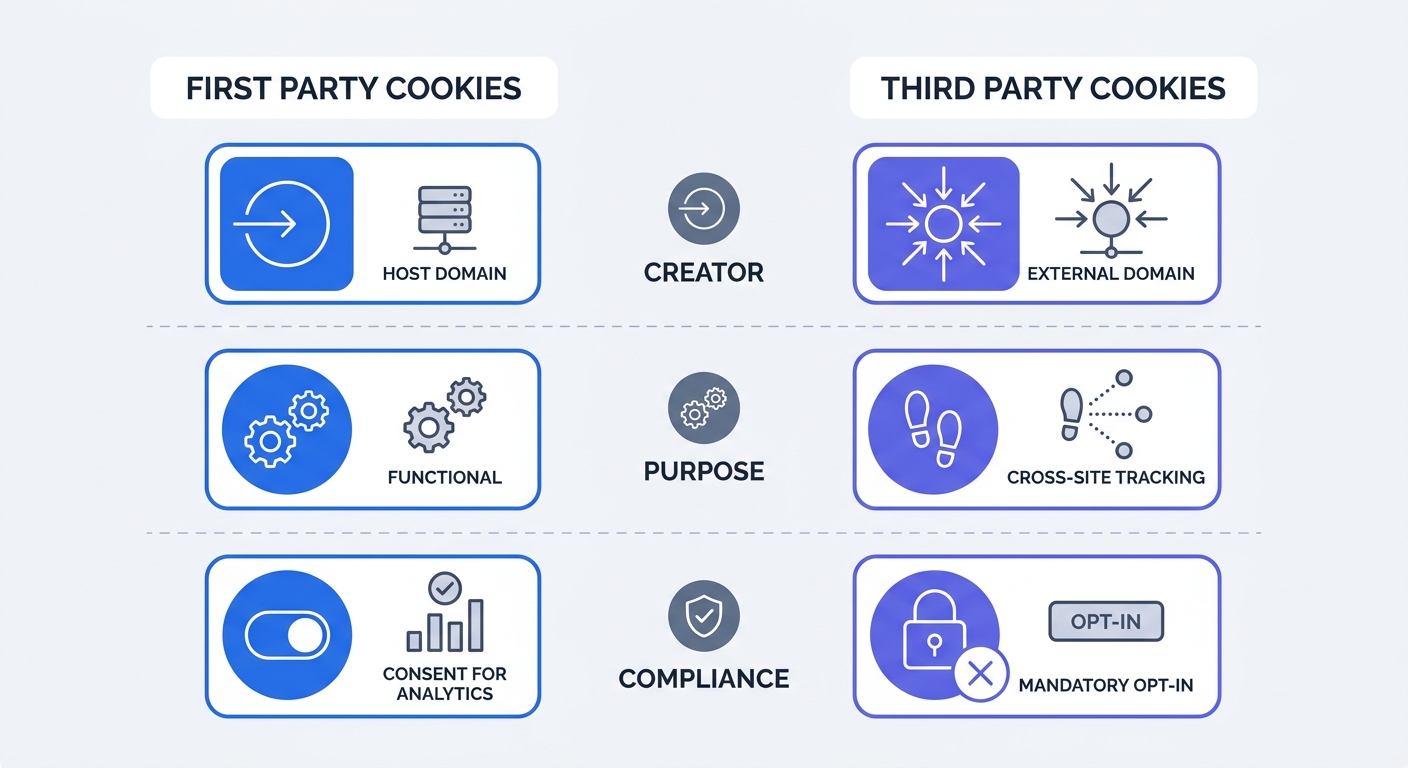
First-party cookies belong to the exact domain you are currently visiting. If you navigate to store.com, any cookie created by that server is a first-party cookie, meaning the browser locks this data down. Consequently, when you leave the store and go to a search engine, the search engine cannot read the original cookie.
These files handle core website functionality like remembering cart items, language preferences, and dark mode toggles. When you log in, a first-party session cookie stores an authentication token so the server remembers your active session after you navigate to the next page.
To see this in action, open your website in Chrome and press F12 to access Developer Tools. Navigate to the Application tab, expand the Cookies menu on the left sidebar, and click your domain name. Every item listed in that table with your exact domain under the "Domain" column is a first-party cookie that you control directly.
Defining Third-Party Cookies
Third-party cookies belong to external domains operating behind the scenes of the site you are visiting. If you read an article on news.com that embeds a YouTube video, a Facebook share button, and a Google Ads script, those external servers also drop cookies onto your browser.
Since Facebook dropped the cookie, their servers can read it again when you visit a completely different site that also uses a Facebook pixel. This mechanism stitches your browsing history together across unrelated websites, building a behavioral profile used for cross-site retargeting.
Returning to the Cookies menu in your Chrome Developer Tools reveals this cross-site tracking. If you see domains like doubleclick.net, facebook.com, or linkedin.com listed while visiting your own website, you are serving third-party cookies to your visitors. Every one of those external scripts passes visitor data out of your control and into a third-party advertising network.
The Impact of Cookies on Privacy and Compliance
Regulators view the distinction between these two tracking methods strictly, enacting privacy laws that dictate what you can store on a user's device and who you can share that information with.
GDPR and ePrivacy Regulations
The General Data Protection Regulation (GDPR) and the ePrivacy Directive mandate that websites process data lawfully. Because third-party cookies pass personal data to external organizations, they require explicit, informed, and prior opt-in consent.
You do not need a consent banner for strictly necessary first-party cookies, so an authentication token or a load-balancing cookie gets a free pass because the website breaks without it. Analytics cookies do not receive this exemption. Even if you use a first-party cookie for analytics, European law requires the user to opt in before that cookie loads if it assigns a unique persistent ID to track them across multiple sessions.
This legal framework forces webmasters into a difficult position. You either risk heavy fines by tracking users illegally, or you deploy a strict consent banner that causes significant traffic data loss when users refuse to opt in.
The Danger of Deceptive Cookie Banners
To fight falling acceptance rates, companies often weaponize their consent interfaces. Many sites use deceptive design patterns, highlighting the "Accept All" button in bright green while hiding the "Reject" option behind three layers of menus.
Regulators have lost patience with these tactics, leading to a surge in California Invasion of Privacy Act claims regarding tracking technologies. Litigation has shifted from checking if a banner exists to auditing the exact millisecond a tracking script executes.
Audit your Consent Management Platform (CMP) by opening a private browsing window, accessing the Network tab in Developer Tools, and loading your homepage. Without clicking anything on the cookie banner, filter the network requests for your analytics or advertising scripts. If those scripts fire and transmit data before you grant consent, your CMP is failing. A banner that visually blocks the screen while scripts load invisibly in the background constitutes a direct compliance violation.
The Failure of Traditional Cookie Analytics
Legacy analytics platforms rely on setting cookies to identify unique users, assuming every visitor will either accept the banner or browse without restrictions. That assumption collapsed as privacy awareness grew.
The Analytics Data Blackhole
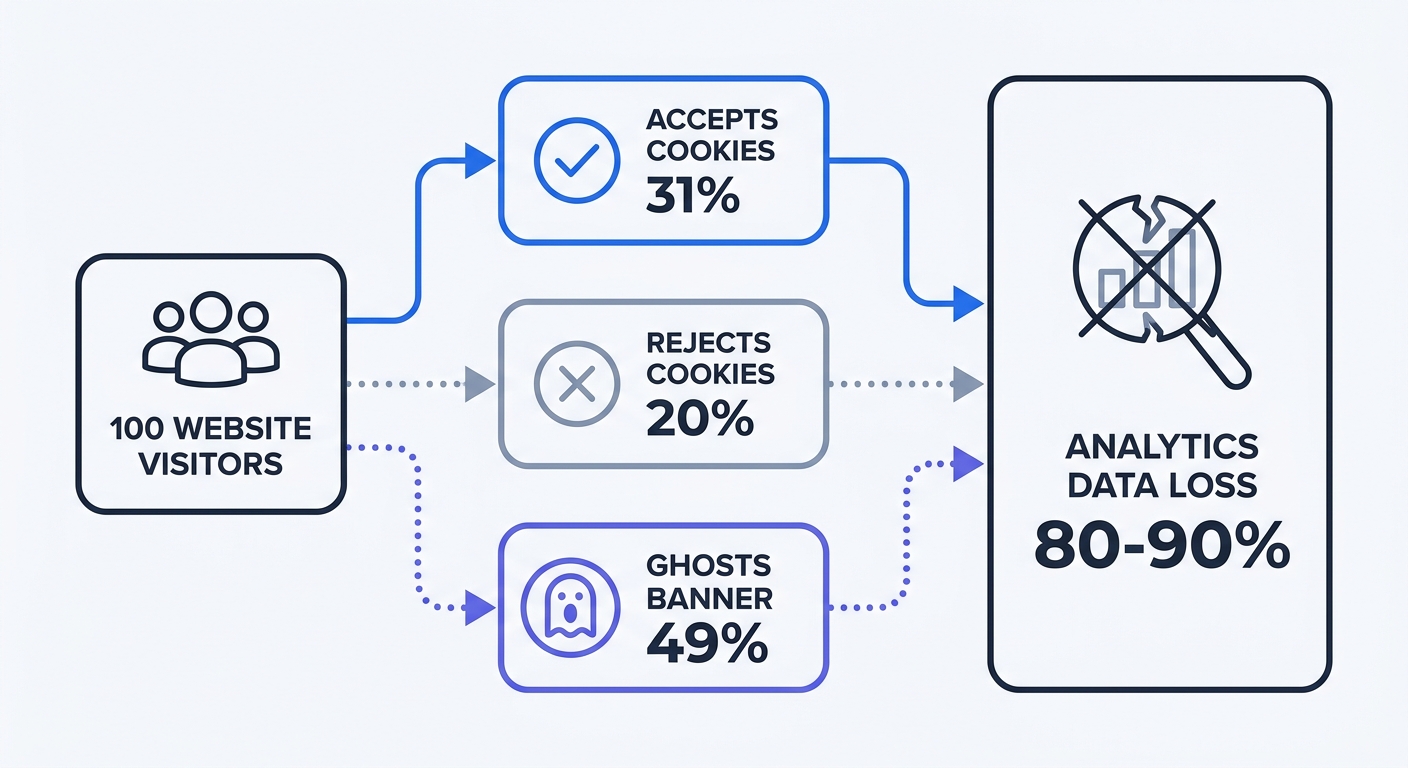
When visitors land on a site, they must choose to accept cookies, reject them, or ignore the banner entirely. This third option, known as banner ghosting, destroys data integrity as a significant portion of consumers ignore consent prompts by scrolling past them or closing the tab, though this range varies by industry and content type.
Combining explicit cookie rejection with banner ghosting causes traditional analytics platforms to lose the vast majority of visitor data. As a result, a marketing dashboard showing 1,000 monthly visitors might represent 10,000 real people.
This data loss skews every metric you track. If you spend $5,000 on a campaign that drives 200 conversions, but your cookie-dependent analytics tool only records 40 of those users who accepted the banner, your Cost Per Acquisition appears five times higher. Consequently, you might cut the budget of profitable channels based on incomplete reporting.
The Impact of Banner Ghosting
The browser ecosystem actively fights cookie-based tracking through mechanisms like Apple Safari's Intelligent Tracking Protection (ITP) and Mozilla Firefox's Enhanced Tracking Protection (ETP). Both browsers block third-party cookies by default and cap the lifespan of first-party tracking cookies to seven days or fewer.
Although Google abandoned its plan to phase out third-party cookies in Chrome by letting users manage their own privacy settings, legacy tracking remains broken. Millions of internet users activate ad blockers, install privacy extensions, or enable strict browser protections manually.
Relying on persistent cookies guarantees inaccurate reporting, making it difficult to optimize a landing page conversion rate when half the visitors entering the funnel vanish from the dataset before reaching the checkout page.
Solving Data Loss with Cookieless Analytics
The only way to recover missing traffic data is to stop relying on user storage. Cookieless analytics platforms measure website performance by processing temporary signals rather than leaving files on the visitor's hard drive.
The Mechanics of Cookieless Tracking
When a user visits a cookieless website, the server evaluates their IP address and browser user agent. Instead of saving this information, a privacy-focused analytics platform passes these variables through a cryptographic hash function along with a daily rotating salt.
This process generates a random string of characters, such as a8f9c2x, allowing the platform to file the pageview under that temporary hash. If the user clicks to another page five minutes later, the system generates an identical hash to attribute the second pageview to the same session.
At midnight, the salt changes, meaning the exact same IP address and user agent will generate a different hash the next day. The system tracks unique daily visitors accurately while making it mathematically impossible to stitch those visits together into a multi-month behavioral profile, ensuring no files touch the user's device and no Personally Identifiable Information (PII) enters the database.
Bypassing the Consent Banner Trap
Switching to a cookieless platform like Swetrix removes the analytics data blind spot. Because Swetrix avoids cookies and does not store PII, it falls outside the consent requirements of GDPR and the ePrivacy Directive for analytics tracking.
Administrators can load the Swetrix script the moment a visitor lands on the site without waiting for a cookie banner interaction. This architecture captures complete website traffic accurately, revealing the true number of visitors, their referral sources, and their conversion paths without violating user privacy or risking compliance fines.
Reviewing your analytics dashboard for traffic drop-offs over the last two years provides clear evidence of this issue. If your reported numbers have steadily declined while sales remained flat, banner ghosting is distorting your metrics, requiring a transition to a cookie-free alternative to restore visibility to your marketing funnel.
Actionable Steps to Future-Proof Your Website
Transitioning away from third-party tracking requires structural changes to how you handle visitor data by shifting control from the browser back to your own servers.
Implement Server-Side Tracking
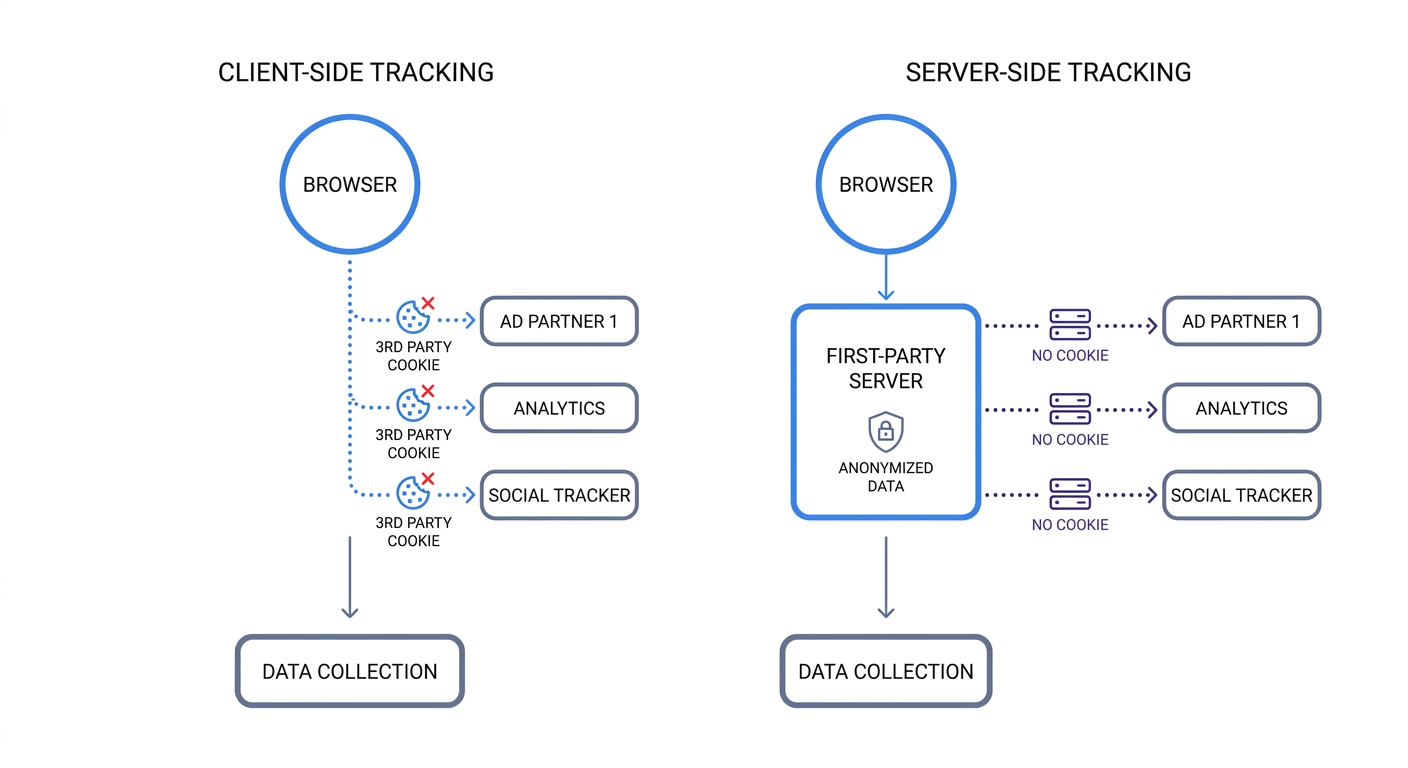
Traditional client-side tracking relies on the browser to execute scripts, meaning that when a user clicks a button, their browser sends data directly to external providers like Facebook or Google. Because this happens on the client side, ad blockers easily intercept these network requests.
Server-side tracking solves this by sending a single stream of data from the browser to a server you control rather than directly to external vendors. Your server acts as a checkpoint that receives the click data, strips out the user's IP address, removes personal identifiers, and then forwards the sanitized information to your analytics and advertising platforms.
Configure a server-side container using a subdomain like analytics.yourcompany.com. Routing tracking requests through a first-party subdomain makes privacy tools less likely to block them, and this architecture guarantees that no third-party vendor can scrape unauthorized data from your visitors' browsers.
Build a First-Party Data Infrastructure
With third-party audience targeting degrading, organizations must build their own datasets centered on first-party data, which includes any information a user intentionally shares with your business.
Gate high-value content, such as a robust template, a calculator, or a detailed report, behind email capture forms in exchange for a newsletter signup. Once a user authenticates, tracking pixels become unnecessary for measuring engagement, allowing you to monitor their interactions through their user account and email activity.
Use progressive profiling to enrich this data over time by asking for a single data point like an email address today, and requesting their job title next month in exchange for a webinar registration. Storing this progressively gathered information in a secure Customer Relationship Management (CRM) system builds a resilient dataset that remains unaffected by future browser privacy updates.
Stop losing half your traffic to ignored consent banners and blocked scripts. Swetrix Cloud provides fully compliant, cookie-free web analytics hosted on EU servers. Starting at $19/mo for 100,000 events, you get real-time dashboards, custom event tracking, and performance monitoring without compromising user privacy. Start your 14-day free trial today and capture 100% of your website data accurately.