- Date
10 Data Retention Policy Best Practices for Analytics in 2026
 Andrii Romasiun
In an era of privacy-first analytics, managing the data lifecycle is as critical as collecting it. A well-defined data retention policy is no longer just a document for your legal team; it's a strategic asset that builds user trust, optimizes storage costs, and ensures compliance with complex regulations like GDPR and CCPA. Many organizations treat data retention as an afterthought, leading to unnecessary risk, bloated databases, and a diminished ability to respond to user data requests efficiently. This approach is no longer sustainable.
This guide moves beyond generic advice to provide actionable, modern data retention policy best practices. We will detail 10 specific strategies you can implement immediately to create a robust, compliant, and efficient data governance framework. Our focus is on practical application, especially for those using privacy-focused analytics tools where balancing insightful metrics with user privacy is paramount.
You will learn how to:
- Automate deletion schedules and document everything for auditability.
- Segment data types and apply jurisdiction-specific rules.
- Balance data minimization with the need for useful analytics.
- Implement technical controls and clear cross-team responsibilities.
These practices will help you transform your data retention from a liability into a competitive advantage, demonstrating a clear commitment to ethical data stewardship while still empowering data-driven decisions.
1. Implement Role-Based Data Access and Retention Tiers
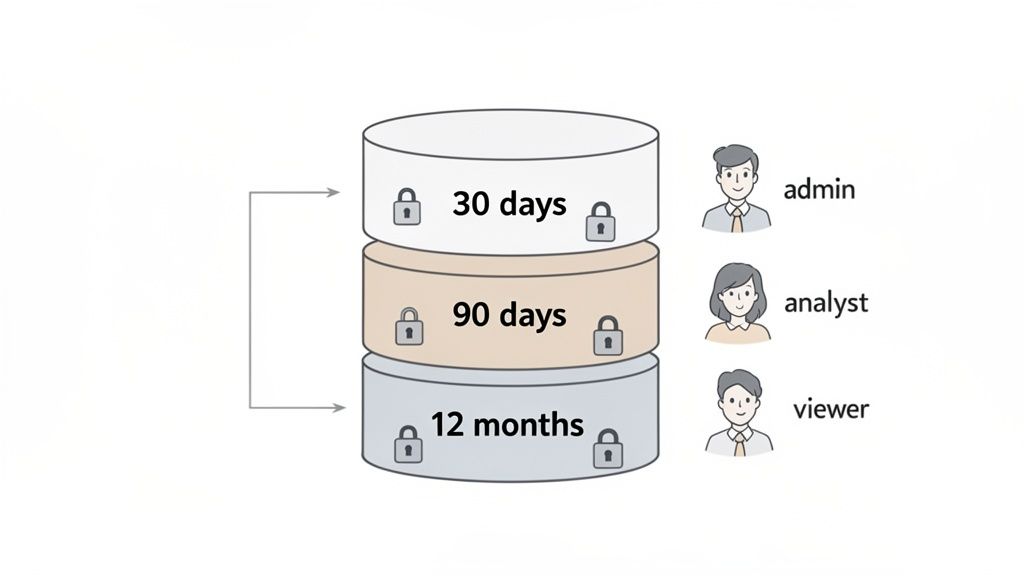
A one-size-fits-all retention schedule often fails to balance analytical needs with privacy obligations. A more nuanced and effective approach is to implement tiered retention periods based on data sensitivity and the roles of individuals accessing that data. This strategy ensures that the most sensitive information, like raw user session logs, is kept for the shortest necessary time, while less sensitive, aggregated metrics are retained longer for strategic analysis.
This method directly supports the data minimization principle, a core tenet of regulations like GDPR. By differentiating retention, you significantly reduce your organization's risk profile. Raw, identifiable data poses a greater privacy risk, so limiting its exposure time is a critical component of modern data retention policy best practices.
How It Works in Practice
This tiered model isn't just theoretical; it's a practical framework used by leading companies to manage data responsibly. For example, a SaaS payment processor like Paddle might retain detailed transaction records for seven years to comply with tax laws but restrict access to raw session logs to a strict 90-day window for privacy compliance.
Similarly, a digital agency using an analytics tool like Swetrix can configure its policies to serve both clients and internal teams effectively. They might set a 30-day retention period for individual user session data to protect visitor privacy, while keeping aggregated monthly and yearly reports for three years to demonstrate long-term campaign performance to clients.
Actionable Implementation Tips
To apply this practice, follow these steps:
- Classify Your Data: Define clear sensitivity levels. For example:
- High: IP addresses, user identifiers, detailed session replays.
- Medium: Geolocation data (city-level), device types, event funnels.
- Low: Aggregated page view counts, unique visitor trends, bounce rates.
- Automate Enforcement: Use database triggers, scheduled cron jobs, or built-in platform features to automatically delete data once it reaches its expiration date. Manual deletion is prone to error and inconsistency.
- Align Access with Tiers: Use your analytics platform's team management features to grant access based on roles. A product manager might need access to 90-day event data, while a C-level executive may only need access to long-term aggregated reports.
- Document Everything: Create a clear, accessible document outlining your data classifications, retention periods for each tier, and the rationale behind them. This documentation is crucial for demonstrating compliance during audits.
2. Establish Clear Data Lifecycle and Disposal Procedures
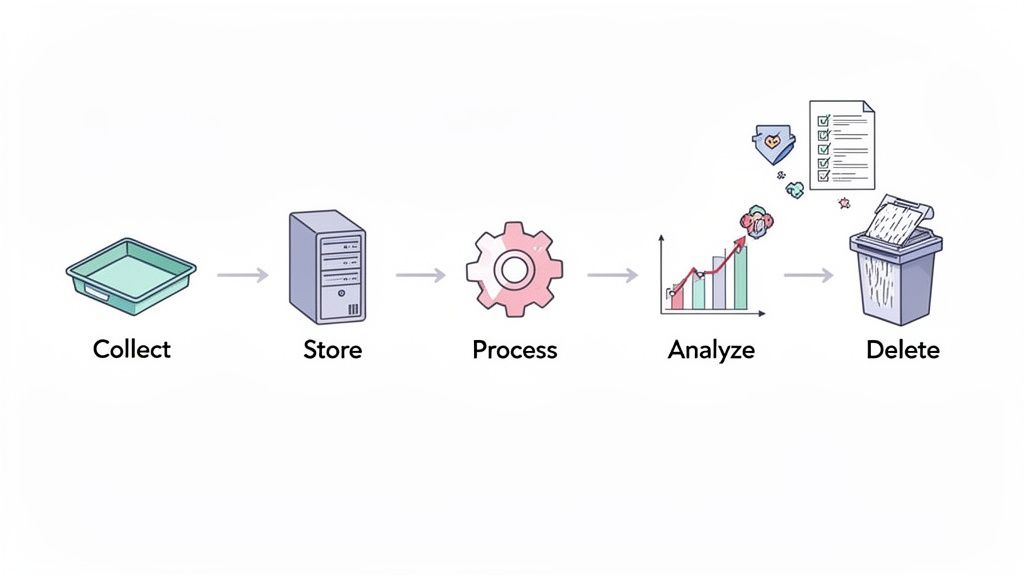
Simply setting a retention period isn't enough; you need a documented, end-to-end process for the entire data lifecycle. This involves mapping every stage from initial collection and storage to processing, analysis, and final, secure deletion. Creating these procedures prevents data from being retained indefinitely by default, a common pitfall that increases storage costs and legal exposure.
This systematic approach ensures data is handled consistently and securely, preventing "data sprawl" where forgotten datasets become compliance liabilities. For analytics platforms like Swetrix, this means defining precisely when raw event data is collected, how long it's stored, when it’s aggregated into reports, and the exact method for permanent deletion. Formalizing this lifecycle is a cornerstone of modern data retention policy best practices and is essential for adhering to GDPR and CCPA requirements.
How It Works in Practice
Leading privacy-conscious companies integrate data lifecycle management directly into their operations. For instance, a SaaS company using Swetrix might define different lifecycles based on user status: raw event data for trial users is deleted 30 days after the trial ends, while active customer data is retained for 12 months to support product improvements.
Similarly, a digital agency managing multiple client accounts can establish a monthly data purge procedure coordinated with billing cycles. This ensures that once a client project is complete, their associated analytics data is securely disposed of according to the service agreement, protecting both the agency and the client.
Actionable Implementation Tips
To apply this practice, follow these steps:
- Create a Data Inventory: Document each data type (e.g., user events, session logs), its collection method, purpose, storage location, retention period, and the designated deletion method in a spreadsheet.
- Automate Deletion Workflows: Rely on automated scripts, database jobs, or platform-native features to enforce disposal schedules. Manual processes are unreliable and introduce the risk of human error.
- Test Your Procedures: Quarterly, verify that your deletion and anonymization procedures work as expected. Confirm that the data is truly unrecoverable from all systems, including backups.
- Establish Clear Ownership: Using a self-hosted solution provides maximum control over your data, which is a key aspect of true data ownership. Assign responsibility for monitoring and executing these lifecycle procedures to a specific team or individual.
- Update Public-Facing Policies: Clearly outline your data lifecycle and retention practices in your public privacy policy and terms of service to maintain transparency with your users.
3. Differentiate Between Operational and Historical Data Retention
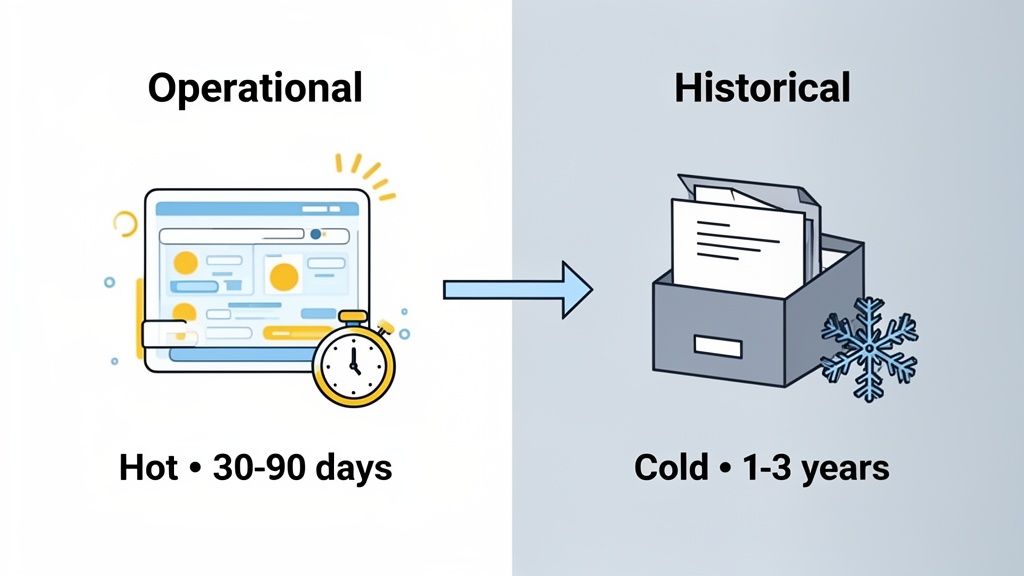
Not all data serves the same immediate purpose, so it shouldn't be managed with a single retention rule. A sophisticated approach involves creating separate policies for operational data, which fuels real-time dashboards and active analysis, and historical data, which is archived for long-term trend analysis or compliance. This distinction allows you to keep recent, queryable data in "hot" storage for instant access while moving older data to cost-effective "cold" storage.
This tiered storage model is a cornerstone of modern data retention policy best practices because it optimizes both performance and cost. It ensures that your day-to-day analytics are fast and responsive, powered by a lean dataset, while still preserving the long-term context needed for strategic, year-over-year comparisons without compromising system efficiency.
How It Works in Practice
This practice is standard in data warehousing and is highly applicable to web analytics. For example, an e-commerce brand might keep seven days of granular, real-time transaction data in its operational database to optimize current campaigns and troubleshoot user issues. After that period, the data is aggregated into monthly performance reports and moved to an archive for two years to meet tax compliance and inform annual business reviews.
Similarly, digital agencies managing multiple client sites can use an analytics tool like Swetrix to show 90 days of operational data for immediate campaign reporting. They can then archive aggregated historical data for up to three years to generate compelling year-over-year growth reports for clients, demonstrating long-term value without slowing down their daily dashboards.
Actionable Implementation Tips
To effectively separate operational and historical data, follow these steps:
- Define Query Needs: Determine the time frame your team needs for daily operational tasks. Most dashboards and active analyses only require 30 to 90 days of data.
- Automate Archival Jobs: Set up automated, scheduled scripts or jobs to move data from hot to cold storage. This could be a monthly process that aggregates raw events into summary tables before archiving them.
- Leverage Cold Storage: For self-hosted analytics, use cost-effective object storage solutions like Amazon S3 or Google Cloud Storage for your historical archives. This drastically reduces long-term storage costs.
- Document Data Tiers: Clearly document what constitutes operational versus historical data, where each is stored, and the procedures for accessing the historical archive. This ensures clarity for both technical and non-technical teams.
4. Implement Automated Data Retention Enforcement with Audit Logs
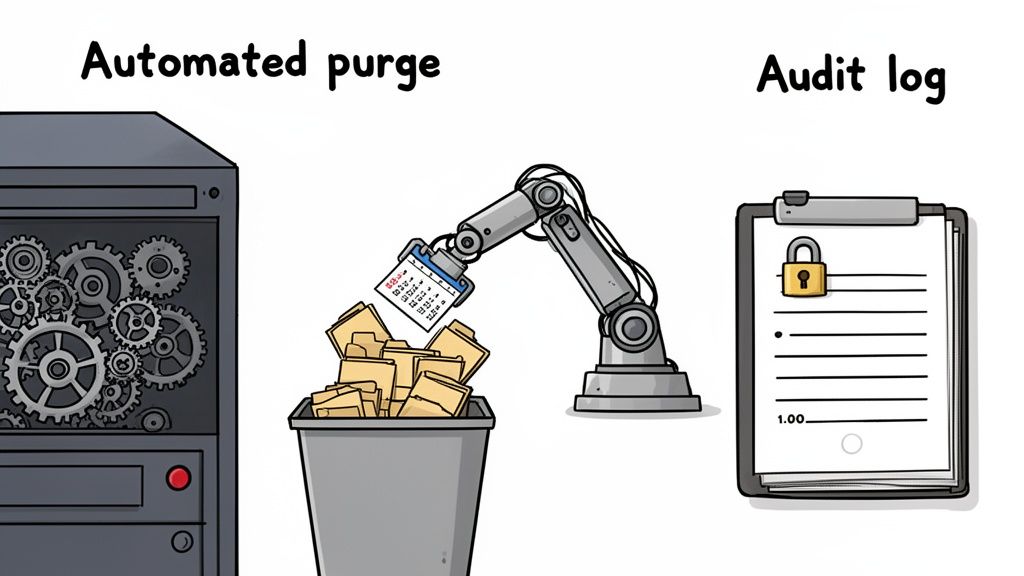
Relying on manual processes for data deletion is a recipe for inconsistency, human error, and compliance failures. The solution is to replace these fragile workflows with automated systems that enforce your retention policies without human intervention. This approach ensures data is purged consistently and on time, while detailed audit logs provide an immutable record of what was retained, accessed, and deleted.
This combination of automation and logging is a cornerstone of modern data retention policy best practices, creating the accountability and evidence required for regulatory frameworks like GDPR and security standards like SOC 2. For analytics platforms, this means configuring automated purging of raw event data at defined intervals while meticulously logging all deletions and access attempts to prove compliance.
How It Works in Practice
Automation turns your retention policy from a document into an active, enforceable system. For instance, a startup using a privacy-focused tool like Swetrix can set up a nightly automated job to delete all raw event data older than 30 days. The system simultaneously generates an audit log entry for each deletion job, confirming its successful completion.
Digital agencies can leverage this for client-specific needs, creating automated workflows that purge all client data on the exact contract termination date. The audit log provides a precise deletion timestamp, which can be shared with the client to confirm that their data has been handled responsibly and according to the agreed-upon terms.
Actionable Implementation Tips
To deploy an automated and auditable retention system, consider these steps:
- Test Before Deploying: Always test your automated deletion scripts in a staging environment. This prevents accidental deletion of critical production data.
- Set Up Monitoring and Alerts: Configure alerts to notify your team if an automated deletion job fails or falls behind schedule. This allows for quick intervention to maintain compliance.
- Store Audit Logs Separately: Keep audit logs in a separate, immutable system (like a write-once, read-many storage bucket) to protect them from tampering or accidental deletion.
- Schedule for Off-Peak Hours: Run data deletion jobs during periods of low system traffic to minimize any potential impact on application performance.
- Include Logs in Your Policy: Your main data retention policy document should specify the retention period for the audit logs themselves. A common practice is to retain logs longer than the data they pertain to.
5. Create Jurisdiction-Specific Retention Schedules
Operating globally means navigating a complex web of data protection laws, each with its own retention requirements. A single retention schedule for all users is no longer sufficient or compliant. The best practice is to develop jurisdiction-specific retention policies tailored to the legal and regulatory landscapes of where your users are located. This ensures you respect regional privacy rights while maximizing data utility where laws are more flexible.
This granular approach is a cornerstone of a robust compliance strategy. For instance, the EU’s GDPR mandates strict data minimization and purpose limitation, often leading to shorter retention periods. In contrast, other regions may have less stringent requirements, allowing for longer retention for analytics. Creating distinct schedules is a fundamental component of effective data retention policy best practices for any international business.
How It Works in Practice
A SaaS company with a global user base can implement this by segmenting its data based on user location. For traffic from the European Union, it might set a strict 90-day retention period for identifiable user data to align with GDPR principles. For users in the United States, where laws like the CCPA focus more on consumer rights to deletion, it could maintain a longer 12-month retention window for product analytics.
Similarly, an e-commerce brand using Swetrix can leverage geolocation data to apply different rules automatically. They could configure their system to retain transaction data from Brazilian customers only as long as necessary under LGPD, while keeping data from other regions for a standard two-year period for trend analysis. This targeted approach minimizes risk without sacrificing valuable business insights.
Actionable Implementation Tips
To implement this geographically-aware retention strategy, follow these steps:
- Map Jurisdictional Requirements: Create a compliance matrix that lists every country or state you operate in alongside its specific data retention laws, such as data minimization, mandatory deletion timelines, and legal hold requirements.
- Leverage Geolocation Data: Use your analytics platform to tag incoming data with its country of origin. This allows you to build automated workflows that apply the correct retention policy based on the user's location.
- Build Flexible Systems: Design your data architecture to support different retention rules for different data segments. In a self-hosted Swetrix instance, this could mean creating separate tables or partitions for data from different jurisdictions.
- Consult Legal Experts: Engage legal counsel specializing in international data privacy to validate your retention schedules for each jurisdiction. You can learn more about GDPR compliance for websites to understand the nuances.
- Document and Review: Clearly document the retention period for each jurisdiction and the legal justification behind it. Review and update this documentation annually or whenever you enter a new market.
6. Balance Data Minimization with Analytics Utility
Collecting vast amounts of data "just in case" is an outdated and risky practice. A core principle of modern data privacy, enshrined in regulations like GDPR, is data minimization. This means you should only collect and retain the data absolutely necessary to fulfill a specific, legitimate business purpose and delete it once that purpose is met.
This approach forces a deliberate trade-off between privacy risk and analytical value. Instead of indefinite storage, you create a system where data utility is constantly evaluated against its retention period. This is a fundamental aspect of effective data retention policy best practices, ensuring you aren't holding onto potentially sensitive information without a clear justification, thereby reducing your compliance and security footprint.
How It Works in Practice
This balance is crucial for companies that rely on data for growth but are committed to user privacy. For example, a SaaS company using an analytics platform like Swetrix can keep detailed feature usage data for 12 months to inform product development decisions, while retaining error logs for only 90 days, which is long enough for debugging but minimizes exposure of technical details.
Similarly, a startup can configure its analytics to retain UTM parameters from a marketing campaign for the duration of the campaign plus a 30-day analysis window, after which the data is automatically deleted. This provides essential marketing insights without creating a permanent record of every user's entry point. The goal is to tie every piece of data to a specific, time-bound business objective.
Actionable Implementation Tips
To apply this practice, follow these steps:
- Conduct a 'Data Necessity Audit': For each data point you collect (e.g., in Swetrix), document its specific business purpose and justify the required retention window. If you can't define a purpose, question if you should collect it at all.
- Challenge Retention Requests: When a team asks to extend a retention period, ask them: "What specific business decision requires this data, and for how long?" This encourages a purpose-driven mindset.
- Set Hard Deletion Dates: Avoid indefinite retention periods. Implement automated scripts or use your analytics tool's features to enforce strict, automatic deletion schedules.
- Communicate Your Approach: Clearly outline your data minimization practices in your privacy policy. This transparency builds trust and demonstrates a commitment to user privacy.
7. Establish Data Subject Access and Deletion Workflows
A data retention policy is incomplete without a clear, documented process for handling individual rights requests. Regulations like GDPR (with its "right to be forgotten") and CCPA give users the right to ask for a copy of their data (a Subject Access Request or SAR) or demand its complete deletion. Having efficient workflows to manage these requests is non-negotiable for compliance and building user trust.
These processes must be robust enough to identify, retrieve, and permanently erase all data linked to a specific individual within a strict timeframe, typically 30 days. Failing to do so can result in significant fines and reputational damage. For analytics, this means being able to pinpoint every event and session tied to a user identifier, like an IP address or session ID, and actioning the request. This capability is a cornerstone of modern data retention policy best practices.
How It Works in Practice
These workflows transform a legal requirement into a predictable operational task. For instance, when a startup using Swetrix receives a deletion request from a user in the EU, its documented procedure is triggered. The team queries its system by the user's IP address and session ID, deletes all associated events within 15 days, logs the action for audit purposes, and confirms completion with the user.
A more complex scenario involves a digital agency managing Swetrix analytics across multiple client websites. When a user submits a deletion request, the agency's workflow ensures they identify every client property where the user's data might exist. They then systematically purge the data from all instances and provide a consolidated confirmation, demonstrating comprehensive compliance.
Actionable Implementation Tips
To build a compliant and efficient process, follow these steps:
- Document the Workflow: Create a step-by-step guide detailing how requests are received, verified, assigned, and executed. Define roles, approval steps, and the confirmation process.
- Leverage Automation: Use your analytics platform's API to automate data retrieval and deletion. For Swetrix users, this avoids risky manual database queries and ensures a faster, more reliable process.
- Use a Ticketing System: Track every request in a system like Jira or Linear. This creates an auditable trail and helps your team monitor deadlines, such as setting a reminder at the 20-day mark for a 30-day request.
- Test and Refine: Quarterly, submit test SAR and deletion requests to validate your workflow. Verify that the data is truly and permanently removed from your systems, including backups.
- Train Your Team: Ensure everyone involved understands the procedures, their responsibilities, and key terminology from privacy regulations like GDPR.
8. Implement Data Retention Impact Analysis and Review Cycles
A data retention policy is not a "set it and forget it" document. Business needs, regulations, and technologies evolve, making static policies quickly obsolete. The solution is to establish regular review cycles where you formally analyze the impact and relevance of your existing retention schedules. This continuous improvement approach ensures your policy remains effective, compliant, and aligned with current business realities.
This practice transforms your policy from a reactive compliance document into a proactive strategic asset. By regularly asking, "Is this data still necessary for its original purpose?" you reinforce the principle of purpose limitation. This ongoing scrutiny is a cornerstone of modern data retention policy best practices, ensuring that you are not holding onto data out of habit but out of defined, justifiable need.
How It Works in Practice
A formal review process prevents "data hoarding" and reduces risk. For example, a startup using an analytics tool like Swetrix might conduct an annual review and discover that detailed feature usage data, initially set for a 90-day retention, is never actually consulted by the product team beyond the first 14 days. They can then adjust the retention period accordingly, saving on storage costs and minimizing their data footprint.
Similarly, a digital agency's annual review might highlight increased GDPR enforcement and rising fines in the EU. In response, they could proactively tighten their clients' user data retention policies from 12 months to six months to reduce liability. This scheduled analysis ensures the policy adapts to the changing legal landscape, not just internal needs.
Actionable Implementation Tips
To build a sustainable review cycle, follow these steps:
- Schedule Formal Reviews: Set a recurring date on the calendar (e.g., the first week of January) and invite all relevant stakeholders, including legal counsel, data protection officers, and department heads.
- Analyze Actual Data Usage: Use your analytics platform to document which reports and data points are actually being accessed. If a dataset hasn't been used in a year, question its retention.
- Create a Review Template: Document the process with a simple template for each data category:
Current Policy → Justification → Actual Access Frequency → Proposed Change → Rationale. - Version Control Your Policy: Track changes to your data retention policy in a system like Git. Use commit messages to explain the "why" behind each update, creating an auditable history.
- Communicate Changes: After a review, share the findings and policy updates in a team meeting and update your public-facing privacy policy and internal data processing documentation.
9. Separate Personal Data from Pseudonymous/Aggregated Data in Retention Policies
Not all data carries the same level of risk. A best practice is to create distinct retention schedules for personal data versus pseudonymous or aggregated data. This layered approach allows you to retain valuable analytical insights for longer periods while strictly minimizing the exposure of information that can directly identify an individual.
This strategy is a cornerstone of privacy-by-design, directly addressing the principles of data minimization outlined in regulations like GDPR. By treating directly identifiable data, like IP addresses, with the highest level of care and the shortest retention periods, you significantly reduce your organization's compliance risk. This is a critical component of any effective set of data retention policy best practices.
How It Works in Practice
This separation is fundamental to how privacy-first analytics platforms operate. For instance, a Swetrix user can configure their instance to delete raw IP addresses after just seven days to protect visitor privacy, while retaining aggregated data like "top pages" or "traffic by country" for over a year to analyze long-term trends. This ensures operational security without sacrificing strategic business intelligence.
Similarly, an e-commerce platform might retain individual transaction details containing personal data for 90 days to handle returns and chargebacks. Afterward, this data is aggregated into monthly sales reports by country, which can be kept for three years for financial planning. The personal, high-risk data is purged, while the low-risk, high-value summary remains.
Actionable Implementation Tips
To implement this separation effectively, follow these steps:
- Classify Your Data Fields: Start by categorizing every piece of data you collect. Is it personal (IP address), pseudonymous (hashed session ID), or aggregated (monthly visitor count)?
- Automate Aggregation Pipelines: Implement an automated process that transforms personal data into an aggregated or pseudonymous state just before its retention period expires. For example, a script could run daily to aggregate the previous day's user sessions into summary statistics before deleting the raw logs.
- Utilize Platform Features: Leverage built-in tools like Swetrix's IP masking and session hashing to minimize the collection of personal data from the very beginning. This reduces the amount of high-risk data you need to manage.
- Document Your Classifications: Maintain a data dictionary that clearly defines each data type, its classification, the rationale behind it, and the specific retention rule that applies. This documentation is invaluable for team training and compliance audits.
10. Document Retention Policy Changes and Maintain Version History
A data retention policy is not a static document; it's a living framework that must adapt to new regulations, business needs, and privacy standards. Simply changing your policy isn't enough. You must meticulously document every modification, creating a clear audit trail that demonstrates accountability and thoughtful governance over your data lifecycle management.
This practice is a cornerstone of modern compliance frameworks like GDPR and SOC 2, which require organizations to prove their policies are actively managed, not just written and forgotten. Maintaining a version history with detailed change logs provides irrefutable evidence that your retention decisions are deliberate and justified. This level of diligence is a critical element of any robust list of data retention policy best practices.
How It Works in Practice
Maintaining a version history means that for every change, you record what was altered, why it was necessary, who approved it, and when it became effective. For instance, a startup using an analytics tool like Swetrix might decide to shorten its session data retention from 90 to 30 days. The change log would note this, attribute the decision to the DPO, and state the rationale: "Aligning with stricter GDPR enforcement trends for user session data."
Similarly, a SaaS company could use a Git repository to manage its policy documents. A commit message might read, "Reduce IP address retention from 30 to 7 days per Q3 privacy review. Analysis shows no access required after one week." This creates an immutable, timestamped record of the policy's evolution, which is invaluable during compliance audits or security reviews. To see how a privacy-first company transparently handles its own policies, you can review the Swetrix data policy for an example of clarity.
Actionable Implementation Tips
To effectively document your policy's lifecycle, follow these steps:
- Use Version Control: Store policy documents in a system like Git or a dedicated document management platform that tracks changes, authors, and timestamps automatically.
- Maintain a Change Log: For each update, create a log entry detailing:
- Date: When the change was made effective.
- Change: A summary of the modification (e.g., "Shortened PII retention from 1 year to 180 days").
- Approver: The individual or body that authorized the change (e.g., "Legal Counsel," "DPO").
- Rationale: The business or legal driver behind the decision (e.g., "CCPA compliance requirement").
- Include Versioning in Documents: Add a version number and an "effective date" to the header or footer of your policy document itself.
- Archive Old Versions: Never delete previous versions of your policy. Archiving them provides a historical record that can be crucial for responding to inquiries about past data handling practices.
10-Point Data Retention Policy Comparison
| Policy | 🔄 Implementation Complexity | ⚡ Resource Requirements | ⭐ Expected Outcomes | 📊 Ideal Use Cases | 💡 Key Advantages |
|---|---|---|---|---|---|
| Implement Role-Based Data Access and Retention Tiers | 🔄 High — RBAC + tiered retention logic | ⚡ Medium–High — engineering, DB changes, training | ⭐⭐⭐ Reduced exposure and clearer governance | 📊 Enterprises, agencies needing granular access control | 💡 Limits sensitive data access while preserving aggregated analytics |
| Establish Clear Data Lifecycle and Disposal Procedures | 🔄 Medium — documented workflows + automation | ⚡ Medium — process design, automated deletion, audits | ⭐⭐⭐ Consistent deletion and audit readiness | 📊 Teams needing end‑to‑end governance and audit trails | 💡 Prevents data sprawl, reduces storage costs, demonstrates compliance |
| Differentiate Between Operational and Historical Data Retention | 🔄 High — dual‑tier storage and migration tooling | ⚡ Medium — storage architecture, archival tooling | ⭐⭐⭐ Optimized performance and lower long‑term cost | 📊 Platforms with real‑time dashboards + long‑term trends | 💡 Fast hot queries; cost‑efficient cold storage for history |
| Implement Automated Data Retention Enforcement with Audit Logs | 🔄 Medium–High — automation + immutable logging | ⚡ Medium — monitoring, log storage, alerting | ⭐⭐⭐⭐ Reliable enforcement and strong audit evidence | 📊 Regulated organizations needing proof of deletion | 💡 Eliminates human error; provides tamper‑resistant audit trails |
| Create Jurisdiction-Specific Retention Schedules | 🔄 High — geo‑tagging + multiple legal policies | ⚡ High — ongoing legal review and enforcement per region | ⭐⭐⭐ Ensures regional compliance and risk mitigation | 📊 Businesses operating across multiple legal jurisdictions | 💡 Complies regionally without globally over‑restricting data |
| Balance Data Minimization with Analytics Utility | 🔄 Medium — policy decisions and utility reviews | ⚡ Low–Medium — governance, periodic audits | ⭐⭐⭐ Lower privacy risk while retaining key insights | 📊 Privacy‑first startups balancing analytics needs | 💡 Focuses retention on necessary data; reduces storage & risk |
| Establish Data Subject Access and Deletion Workflows | 🔄 Medium — request verification and deletion pipelines | ⚡ Medium — tooling, tracking, dedicated staff time | ⭐⭐⭐ Meets legal timelines and builds user trust | 📊 Consumer‑facing services with SAR/DSAR volume | 💡 Enables timely compliant responses and documented confirmations |
| Implement Data Retention Impact Analysis and Review Cycles | 🔄 Low–Medium — scheduled reviews and reporting | ⚡ Low — periodic cross‑team effort and metrics collection | ⭐⭐⭐ Continuous policy improvement and cost savings | 📊 Organizations wanting proactive retention tuning | 💡 Identifies unused data and informs retention adjustments |
| Separate Personal Data from Pseudonymous/Aggregated Data | 🔄 High — classification, pseudonymization, separate pipelines | ⚡ Medium–High — engineering, privacy tooling, governance | ⭐⭐⭐⭐ Strong privacy protection with preserved analytics | 📊 Analytics platforms needing long‑term metrics without PII | 💡 Minimizes PII exposure while retaining aggregate value |
| Document Retention Policy Changes and Maintain Version History | 🔄 Low — version control and changelog practices | ⚡ Low — documentation process and storage | ⭐⭐⭐ Clear audit trail and governance evidence | 📊 Teams subject to audits or regulatory scrutiny | 💡 Traceability of decisions; simplifies audits and accountability |
Putting Your Data Retention Policy into Action
Navigating the complexities of data retention can seem daunting, but the journey from a vague policy to a robust, automated system is one of the most critical investments you can make in your business's long-term health and reputation. Implementing these data retention policy best practices transforms your approach from a reactive compliance checklist into a proactive data governance strategy. It's about shifting your mindset from "store everything, just in case" to "retain only what is necessary, for as long as it is justified."
This shift is not merely about avoiding fines under GDPR or CCPA; it's about building a leaner, more secure, and more efficient data infrastructure. By embracing the principles we've covered, you’re not just deleting old data. You are actively reducing your attack surface, minimizing storage costs, and streamlining your analytics to focus on the insights that truly matter. A well-defined policy is the foundation of digital trust.
From Theory to Tangible Results
The core message woven through all ten best practices is that a data retention policy is not a static document you file away. It is a living, breathing component of your operations that demands automation, clear ownership, and continuous review.
Here are the most important takeaways to guide your next steps:
- Automation is Your Ally: Manual data deletion is prone to error and inconsistency. Implementing automated retention enforcement and maintaining detailed audit logs are non-negotiable for scaling your compliance efforts and proving your adherence to regulations.
- Context is Everything: A one-size-fits-all retention period is obsolete. Differentiating between operational and historical data, creating jurisdiction-specific schedules, and separating personal data from aggregated metrics allow for a nuanced, defensible strategy.
- Documentation is Your Defense: In the eyes of a regulator or auditor, if it isn't documented, it didn't happen. Maintaining clear version histories of your policy, documenting retention impact analyses, and establishing transparent data subject access and deletion workflows are your best lines of defense.
Key Insight: A successful data retention strategy is built on three pillars: Automation for enforcement, Context for justification, and Documentation for proof. Neglecting any one of these pillars leaves your organization vulnerable.
Your Action Plan for Stronger Data Governance
Mastering these concepts is not just a technical exercise; it's a strategic business advantage. A strong retention policy signals to your customers that you are a responsible steward of their data, a powerful differentiator in a privacy-conscious market. It forces your teams to be more intentional about the data they collect and use, leading to more focused and effective analytics.
Begin by performing a gap analysis. Audit your current processes against the ten best practices outlined in this article. Where are the biggest risks? Where are the quick wins? Start by establishing clear lifecycle procedures and documenting everything, even if your automation tools aren't fully in place yet. This iterative approach will build momentum and demonstrate immediate value. For any startup founder, indie maker, or marketing team, this proactive stance on data governance is what separates sustainable growth from unnecessary risk.
Ready to build your analytics on a foundation of privacy and control? Swetrix is an open-source, privacy-first analytics service designed to give you powerful insights without compromising user data. With features that align perfectly with modern data retention policy best practices, Swetrix helps you stay compliant and build trust from day one.