- Date
Cost Per Click Calculator: CPC, Clicks, Spend
 Andrii Romasiun
Calculate your average cost per click using ad spend and click volume, or reverse the formula to estimate the budget required for a traffic target. A cost per click calculator performs strict arithmetic on the values you supply. It gives you an immediate picture of campaign charges, but it does not forecast auctions or guarantee what future traffic will cost.
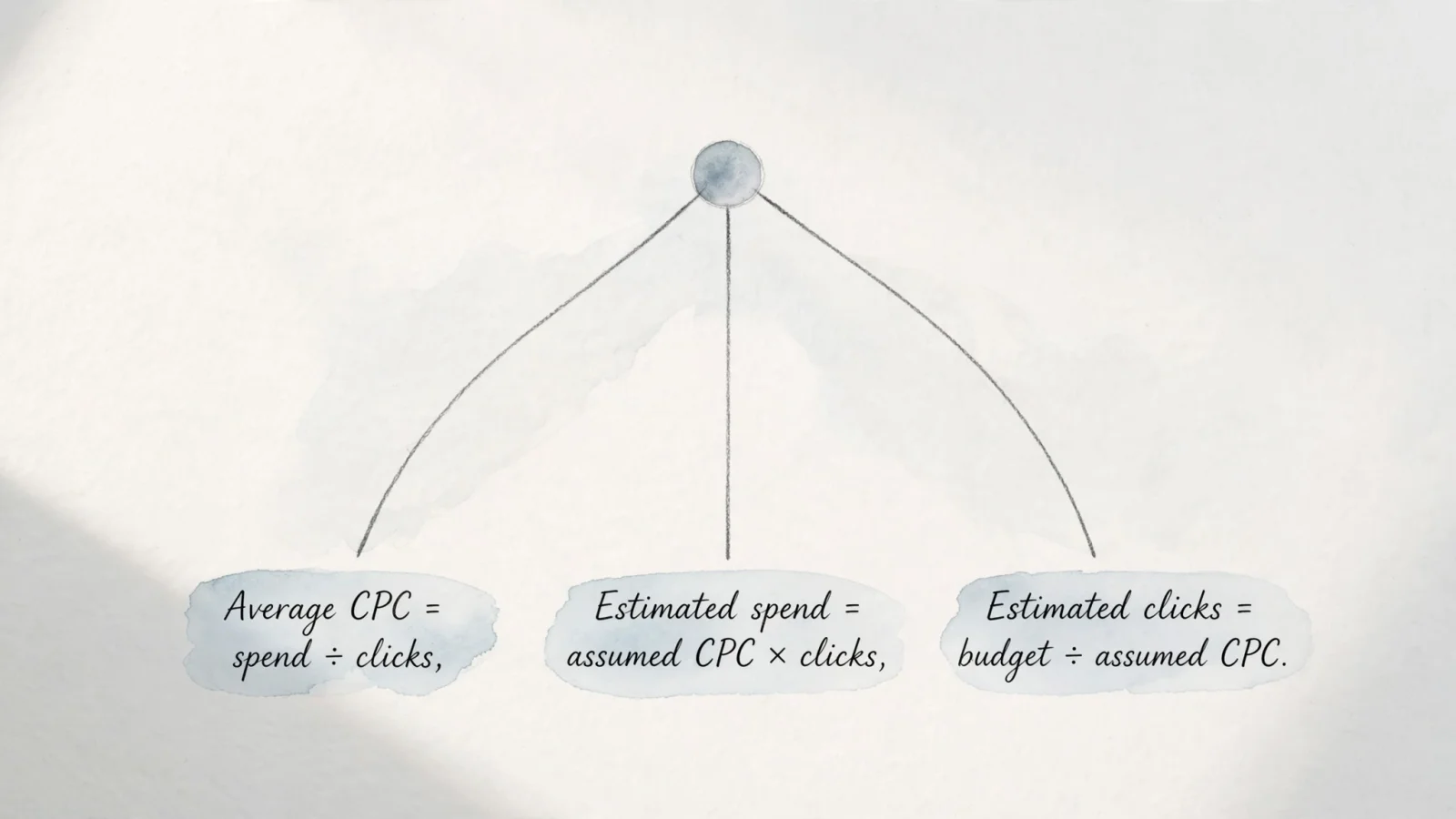
You can use this tool to solve for three distinct metrics depending on your planning phase. Finding your historical average CPC requires entering the total reported ad spend and actual clicks. To forecast a budget, enter an assumed CPC alongside your target click volume. Estimating traffic limits works similarly, taking your total budget and an assumed CPC to show how many clicks that budget buys.
After determining what a click costs, the next step involves checking whether that visitor takes a profitable action. Advertising platforms track the spend and the click, while a web analytics platform like Swetrix monitors what happens after arrival. Connecting the initial ad charge to the final website conversion provides the complete picture of your return on investment.
Calculate Average CPC From Spend And Clicks
The baseline calculation measures historical performance. For that calculation, Google Ads defines average cost-per-click as the total cost of your clicks divided by the total number of clicks.
The formula requires only two inputs: total cost and total clicks. If a search campaign spends $600 and generates 300 clicks, the calculation divides 600 by 300 to output an average CPC of $2.00. This result provides illustrative arithmetic based on your inputs rather than an industry benchmark.
Aggregating multiple campaigns requires dividing the combined spend by the combined clicks to find the true average. Taking a simple mean of several campaign CPCs produces an inaccurate result unless every campaign generated the exact same number of clicks. For example, if Campaign A generates 10 clicks at $10.00 each ($100 spend) and Campaign B generates 1,000 clicks at $1.00 each ($1,000 spend), a simple mean of the two CPCs suggests an average of $5.50. The combined calculation gives the click-weighted average: dividing the $1,100 total spend by the 1,010 total clicks yields $1.09.
Accurate results require keeping your cost and click inputs within the same scope. The reporting period, currency, and chosen click metric need to match. Comparing last month's spend to this month's clicks outputs a meaningless number, while campaigns with zero clicks cannot be divided by zero, leaving the resulting CPC incalculable.
Estimate Clicks Or Spend In Reverse
Planning a new campaign often involves working the formula backward. Instead of measuring historical data, you can use an assumed CPC to estimate either the budget required to reach a goal or the traffic a fixed budget affords.
Estimating your required spend involves multiplying your assumed CPC by the target number of clicks. If reaching a sales quota takes 300 clicks at an assumed $2.00 CPC, the estimated spend reaches $600. Running this calculation helps you request adequate budget before launching a campaign, which prevents funds from running out halfway through the month.
Dividing your total budget by the assumed CPC reveals the available clicks. A $600 budget paired with an assumed $2.00 CPC yields an estimated 300 clicks. You can use this calculation to set realistic traffic expectations when working under a strict spending cap.
These reverse calculations serve strictly as planning estimates. The CPC input acts as an assumption that rarely survives contact with a live auction. Actual delivery depends on your bids, daily budget limits, ad quality scores, targeting parameters, auction context, and customer behavior. As competition shifts throughout the day, the ad platform adjusts charges dynamically, so your final traffic volume and total spend will drift from initial estimates. Planning sets the baseline, while daily monitoring catches cost fluctuations.
Differentiating Average CPC From Maximum Bids
A calculated average CPC summarizes the charges you already incurred across thousands of individual clicks. This metric remains distinct from a maximum CPC, which sets the base bid for a single click.
Google confirms that the actual CPC charged in an auction is often below your maximum CPC bid. In Search auctions, that charge is the minimum amount needed to clear the Ad Rank thresholds and beat the Ad Rank of the competitor immediately below your ad; if no eligible competitor is immediately below, Google charges the reserve price. However, Enhanced CPC or a bid adjustment can make actual CPC exceed the maximum CPC bid.
Your maximum bid rarely functions as a hard, permanent ceiling. Bid adjustments for mobile devices, specific geographic locations, or high-converting times of day can multiply your base bid before the auction begins. Automated bidding strategies also adjust bids dynamically based on the likelihood of a conversion. Factors including historical click-through rates, landing page relevance, and intense seasonal competition all influence the final charge on a per-auction basis.
Because a calculator only performs arithmetic on the totals you supply, it cannot reproduce these complex auction dynamics or promise what future clicks cost. The calculated average is a click-weighted average of those varying auction charges.
Judge CPC Against Conversion Economics
Evaluating campaign success requires looking beyond a low average CPC. A $0.50 click that never converts wastes money, while a $5.00 click reliably generating high-value sales drives profit. You can evaluate CPC effectively by comparing it to your conversion economics, specifically checking your target cost per acquisition and landing page conversion rate.
The relationship follows a standard planning formula where your allowable CPC equals your target CPA multiplied by your click-to-conversion rate. Entering the conversion rate as a decimal makes the math work. If your business model supports a $50 target CPA and your landing page converts clicks into customers at 5%, your allowable CPC sits at $2.50 ($50 multiplied by 0.05). Keeping your average CPC at or below $2.50 keeps the campaign within that target CPA at the current conversion rate.
Changes to the conversion rate immediately alter what you can afford to pay for traffic. If the landing page breaks and the conversion rate drops to 2%, that same $2.50 CPC produces a $125 CPA, pushing the campaign above its $50 target CPA. The denominator in your conversion rate needs to match the click metric you assess. Advertising platforms often define conversion rate as conversions divided by eligible interactions, which usually means ad clicks, so your tracking needs to align with that definition.
Evaluating the business value of those conversions alongside your target return on ad spend helps guide advertising decisions. So a higher CPC makes sense when clicks lead to purchases of higher-margin products or subscriptions to premium software tiers.
Ad platforms report the initial click and the resulting charge accurately. Measuring the conversion rate and ROAS reliably requires a system that connects those clicks to on-site actions. Swetrix bridges this gap by tying tagged campaign visits to goal completions without relying on cookies. The ad platform remains the definitive source for spend and click totals, while Swetrix tracks the behavior of acquired visitors, so you can compare campaign outcomes with your allowable CPC thresholds.

Track What Happens After The Click
A calculator tells you what the traffic cost, while web analytics tells you what the traffic did. Measuring the post-click experience requires isolating paid visitors from organic traffic and tracking their progression through your website.
Tagging every campaign link with UTM parameters before launching an ad provides clear tracking. Standardizing utm_source, utm_medium, and utm_campaign values helps each paid click carry its origin data to the landing page. A link tagged with utm_source=google and utm_medium=cpc identifies exactly where the user originated. Once the visitor arrives, Swetrix automatically parses those tags and groups the traffic in your source attribution reports. Explicit tagging helps prevent paid visits from appearing as direct traffic, allowing you to filter user behavior by specific advertising campaigns.
Setting up goals and funnels provides the remaining conversion data necessary to evaluate your CPC. A funnel maps the specific sequence of pages or events a user navigates to complete a purchase, such as moving from the landing page to the pricing tier, through the checkout cart, and onto the final confirmation screen. When a campaign delivers a low CPC but visitors drop off immediately after the landing page, the funnel report highlights that exact failure point. This visibility shows whether the ad copy mismatched the landing page offer, or if a technical error on the checkout form prevented the final conversion.
The General Data Protection Regulation (GDPR) applies in all EU member states and harmonizes data privacy laws across Europe.
For companies operating SaaS platforms or client portals, the integration goes deeper. Embedding Swetrix dashboards directly into your custom admin panels via iframes offers web analytics to your own end users. They gain visibility into their own traffic and conversion metrics, bypassing the need for your development team to build a proprietary analytics engine from scratch.
Cost Per Click Calculator FAQs
How do you calculate average CPC from spend and clicks?
Divide the total cost of ad clicks by the total number of clicks generated. Spending $1,000 to acquire 500 clicks results in an average CPC of $2.00. Keeping the inputs within the same reporting period and currency ensures an accurate result. When combining multiple campaigns, divide the total combined spend by the total combined clicks to get a true click-weighted average, avoiding the inaccuracy of a simple mean.
Is average CPC the same as a maximum bid?
Average CPC summarizes the actual charges incurred across all clicks in a given period, while a maximum CPC sets the base bid for a single click, before adjustments. In Google Search auctions, the actual amount charged often falls below the maximum bid because Google charges the minimum required to clear Ad Rank thresholds and beat the competitor immediately below you. Bid adjustments and automated bidding strategies also alter the final charge, further separating the average cost from the maximum bid.
How do you calculate clicks from a budget?
Dividing your total available budget by your assumed cost per click estimates the traffic you can afford. A $1,000 budget divided by an assumed $2.50 CPC yields an estimated 400 clicks. Because the CPC input acts as an assumption, live auction dynamics, ad quality, and competitor bidding will cause the actual number of clicks delivered to drift from the initial estimate.
What determines a good CPC?
An acceptable CPC allows the campaign to remain profitable. Multiplying your target cost per acquisition by your landing page conversion rate calculates this threshold. If your target CPA is $100 and the site converts 2% of clicks into customers, the allowable CPC reaches $2.00. Any CPC at or below $2.00 works well for that specific campaign. Generic industry benchmarks ignore specific profit margins and conversion rates, rendering them unreliable targets.
Does a CPC calculator predict future ad costs?
A calculator performs arithmetic on the values you supply without forecasting auction dynamics, competitor behavior, or platform algorithm changes. While the tool helps plan budgets based on historical averages or estimates, it cannot guarantee what traffic costs tomorrow. Ad platforms charge based on live auctions, so future costs always vary from static calculations.
Why should CPC be compared with conversion rate?
Comparing CPC to conversion rate reveals whether the traffic generates a return, because CPC only measures the cost of acquiring a visitor rather than the value they bring. A low CPC wastes budget if visitors never buy, while a high CPC becomes highly profitable if the traffic converts at a strong rate. Analyzing both metrics together connects advertising spend directly to business revenue.
Calculate your campaign's average CPC, then use Swetrix to see which tagged campaigns bring visitors who complete a goal or move through a funnel. Try the cookieless Google Analytics alternative at Swetrix.com.