- Date
Best Analytics Tools With A/B Testing, Feature Flags, and Revenue Tracking
 Andrii Romasiun
Analytics used to answer one question: who visited the site? SaaS teams need a wider answer now. Measure the campaign, test the onboarding change, release the winner to the right segment, then connect the result to paid revenue.
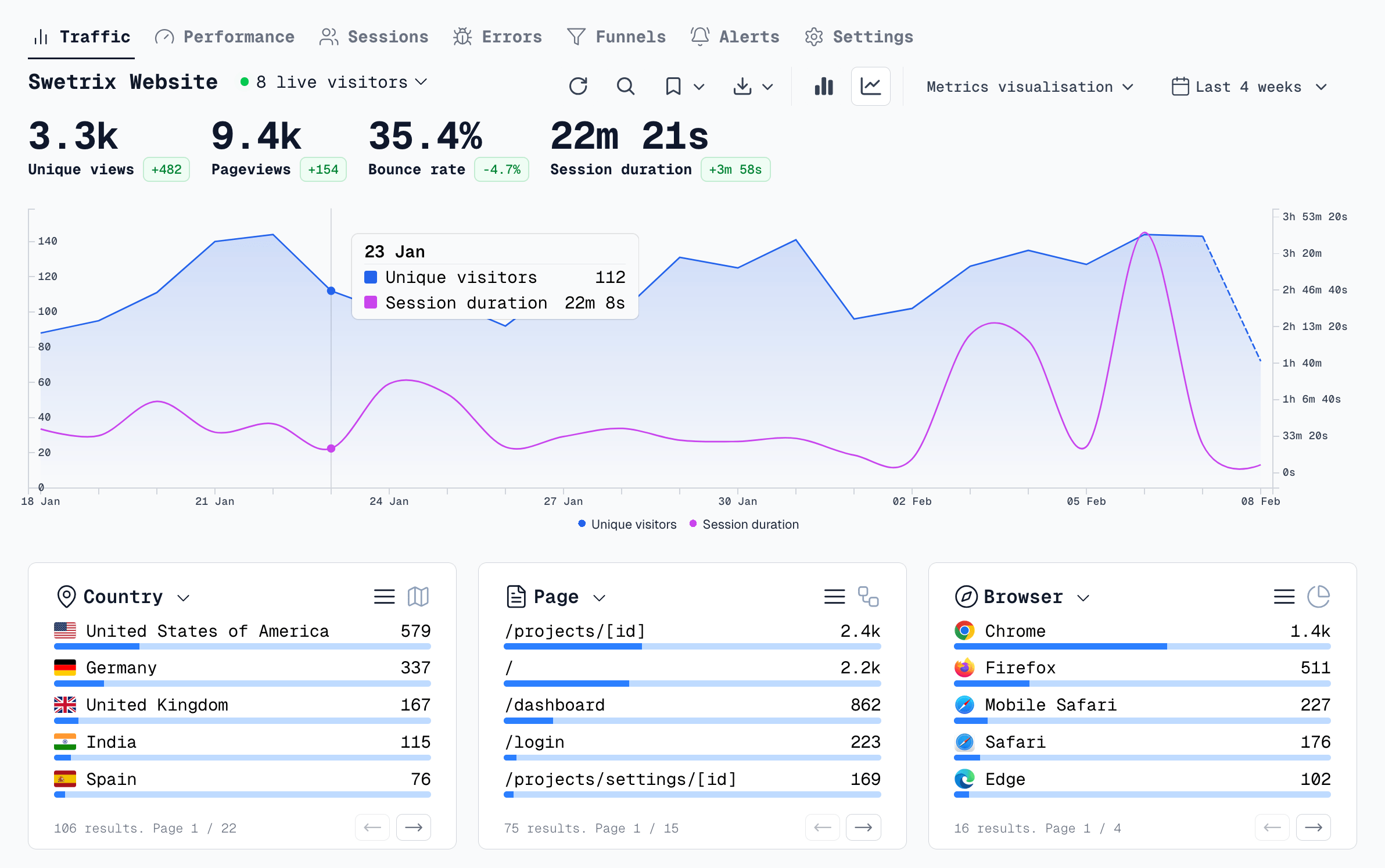
Swetrix sits first for teams that want that loop in one privacy-first product. You get cookieless analytics, no personal data collection, open source code, self-hosting, EU-hosted Cloud, real-time dashboards, referrers, UTMs, custom events, goals, funnels, user/session analysis, user flows, performance monitoring, error tracking, shared dashboards, organisations, A/B experiments, feature flags, revenue analytics with Stripe, Paddle, or API, and AI Chat.
Use this comparison when you need one workflow across analytics, experiments, flags, and revenue. If your stack needs one tool for traffic, another for tests, another for flags, and another for billing attribution, check the handoffs before the invoice.
Quick Answer
| Tool | Best fit | Analytics | A/B tests | Feature flags | Revenue workflow | One workflow? |
|---|---|---|---|---|---|---|
| Swetrix | SaaS, agencies, privacy-conscious product teams | Web analytics, events, funnels, user flows, sessions, performance, errors | Yes | Yes | Stripe, Paddle, or API revenue in the analytics dashboard | Strong |
| PostHog | Engineering-led product teams | Product and web analytics, funnels, retention, replay, errors | Yes | Yes | Event-based revenue analysis | Strong with setup |
| LaunchDarkly plus analytics stack | Teams that put release control first | Needs Swetrix, GA4, Amplitude, Mixpanel, or warehouse reporting | Yes | Yes | Needs external analytics or warehouse work | Split stack |
| Statsig | Data-heavy product and experimentation teams | Product analytics, web analytics, journeys, replay | Yes | Yes | Metrics can include revenue events | Strong for product teams |
| GrowthBook | Warehouse-first teams | Product analytics on paid Cloud, warehouse metrics | Yes | Yes | Warehouse or event-source revenue metrics | Strong if your data model exists |
| VWO | CRO and marketing teams | Behavior analytics, funnels, recordings, form analysis | Yes | Web and feature rollouts | Goal and revenue metrics through experiment setup | Strong for CRO |
| Optimizely | Enterprise experimentation programs | Experimentation analytics, journey and funnel views | Yes | Yes | Metrics can connect to revenue and retention | Strong for enterprise teams |
| GA4 plus external tools | Teams tied to Google reporting | Web and app analytics, ecommerce events, BigQuery export | Needs external testing tool | Needs external flag tool | GA4 ecommerce events or warehouse analysis | Split stack |
| Plausible-style alternatives | Simple privacy-first website reporting | Traffic, goals, events, funnels in some products | No in most cases | No in most cases | Event values or ecommerce attribution in some products | Narrow |
Start With The Workflow
Pick the tool after you map the workflow. Fix the event model before you judge chart design.
| Step | What to configure | Example event or metric | Tool capability to check |
|---|---|---|---|
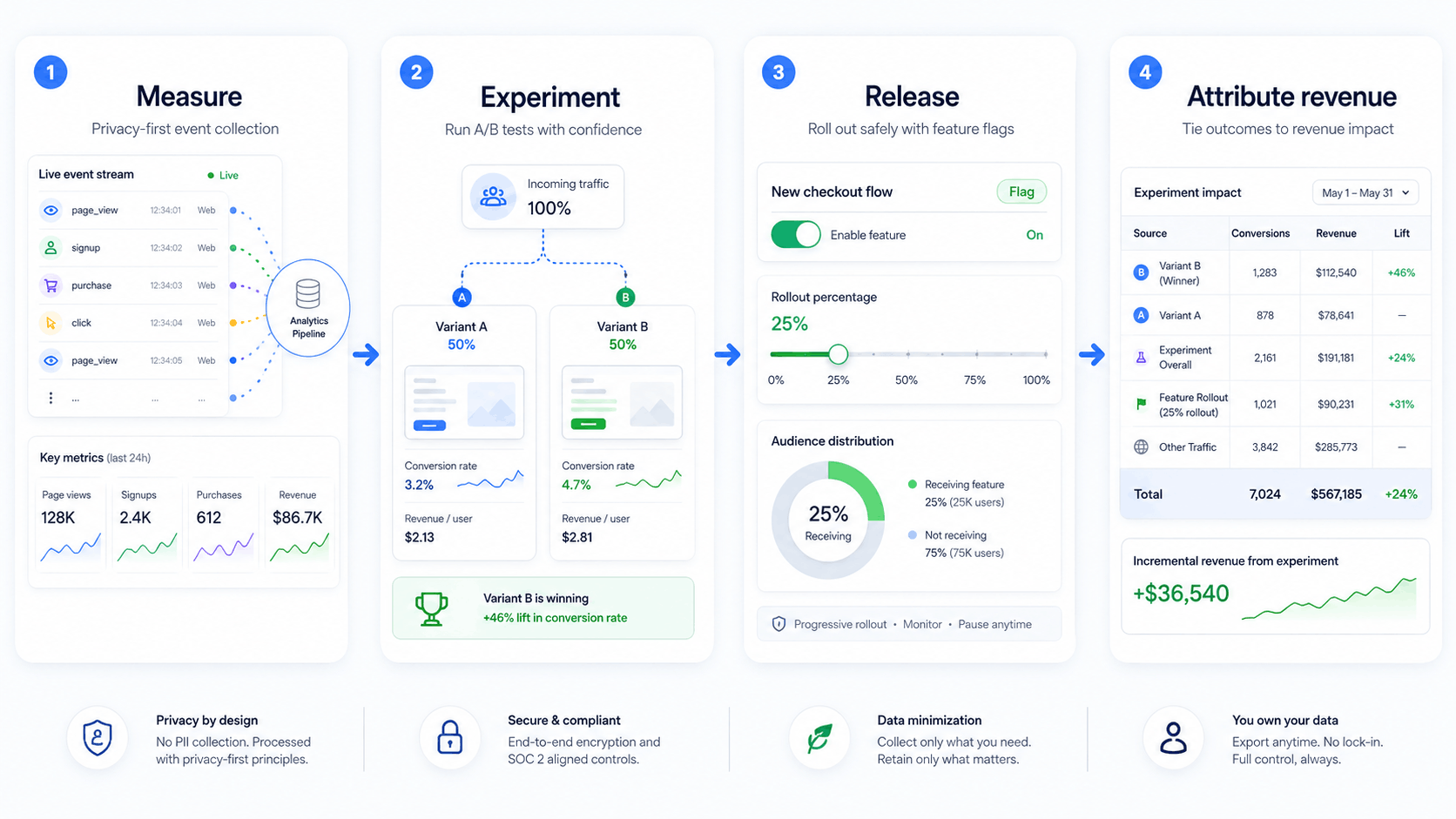
| Measure | Track the baseline funnel | visit -> signup_started -> signup_completed | Events, UTMs, referrers, goals, funnels |
| Experiment | Test one change | pricing_page_variant = short_copy | A/B tests, sample size, segments |
| Release | Ship the winning variant | checkout_redesign = 25_percent | Feature flags, staged rollout, kill switch |
| Attribute revenue | Connect paid outcome | subscription_paid = 49.00 USD | Stripe, Paddle, API, ecommerce, warehouse metrics |
Instrument six events before you compare vendors:
- Track
signup_startedwhen a visitor opens your account form. - Track
signup_completedafter account creation. - Track
activation_completedwhen a user reaches first value. - Track
feature_usedwithfeature_nameandplan. - Track
experiment_exposedwithexperiment_keyandvariant. - Track
subscription_paidfrom your billing source instead of a thank-you page pixel.
Keep emails, names, billing addresses, raw IP addresses, and support text out of analytics properties. Product teams can measure behavior without storing personal data in analytics.
1. Swetrix
Choose Swetrix when you want privacy-first web analytics and product analytics in the same place as experiments, release controls, and revenue.
With Swetrix, your team tracks traffic sources, UTM campaigns, custom events, goals, funnels, user flows, user/session analysis, performance, JavaScript errors, feature flags, A/B experiments, and revenue. Connect Stripe or Paddle, or send backend revenue through the API. Then filter revenue by referrer, campaign, page, country, browser, device, segment, profile, or session.
Swetrix lists Cloud pricing from $19/mo for 100,000 events, a 14-day free trial, and no Cloud free tier in the current pricing section. If you need feature flags and A/B tests, choose Plus. Cloud teams get EU hosting. Infrastructure teams can self-host the open source product.
Use Swetrix when you need to answer:
- Which UTM campaign creates activated users?
- Which onboarding variant creates more paid accounts?
- Which release increased signups without raising JavaScript errors?
- Which channel created Stripe or Paddle revenue?
Start with this setup:
- Add the Swetrix tracking script to your marketing site and app.
- Define goals for signup, demo request, checkout, and activation.
- Create a funnel from landing page to activation.
- Connect Stripe, Paddle, or the Revenue API.
- Run the first experiment on one page or one onboarding step.
- Roll the winner out with a feature flag in stages.
2. PostHog
Choose PostHog when engineers own product analytics and want a broad product stack.
PostHog gives teams product analytics, web analytics, feature flags, experiments, session replay, error tracking, surveys, data warehouse tools, and AI features. Its pricing page lists separate meters for analytics events, replay, feature flag requests, experiments, exceptions, warehouse rows, and AI credits, so run your expected event volume through the calculator before you commit.
Use PostHog if your team wants to test product changes, inspect retention, and connect feature flags to product analytics. Budget time for naming events, setting identity rules, choosing a region, and excluding personal data from properties.
Revenue analysis works when your team sends purchase, subscription, refund, plan, and account events into PostHog. If your marketing site needs cookieless acquisition analytics and your app needs broader product analysis, combine Swetrix for website and revenue attribution with PostHog for deeper product work.
3. LaunchDarkly Plus Analytics Stack
Choose LaunchDarkly when release control matters more than built-in analytics.
LaunchDarkly gives engineering teams feature flags, targeting, percentage rollouts, experiment flags, release monitoring, guardrail metrics, and rollback controls. Its pricing page prices usage around service connections, client-side MAU, experimentation MAU, and observability usage.
Pair LaunchDarkly with Swetrix, GA4, Amplitude, Mixpanel, or your warehouse when you need full analytics and revenue attribution. LaunchDarkly can control who sees a checkout variant. Your analytics tool still needs to connect exposure, conversion, errors, performance, and revenue.
Use this split when your engineers want a mature release platform and your marketing or product teams trust a separate analytics source.
4. Statsig
Choose Statsig when your product team wants experimentation, feature management, and analytics under one data-heavy system.
Statsig lists experimentation, feature flags, product analytics, web analytics, session replay, warehouse-native deployment, and EU hosting support on its pricing page. Developer and Pro plans include large event allowances, and enterprise teams can run warehouse-native setups.
Use Statsig for product-led teams with data science support, many experiments, and a strong appetite for metrics design. Revenue fits the workflow when your team sends revenue events or connects warehouse data into Statsig metrics.
Privacy check: review identity fields, session replay masking, warehouse access, and event retention before rollout. Teams with public marketing sites may still prefer Swetrix for cookieless website analytics and lighter client-side tracking.
5. GrowthBook
Choose GrowthBook when your warehouse owns the source of truth.
GrowthBook fits teams that store events, users, subscriptions, and revenue in BigQuery, Snowflake, Postgres, or another warehouse. You can run A/B tests, manage feature flags, use safe rollouts, and analyze metrics against warehouse data. Cloud plans add a managed warehouse option and product analytics features.
Use GrowthBook when your data team can define metrics and your engineers want open source flags and experiments. Revenue attribution depends on the data source you connect, so model subscription events, refunds, upgrades, and plan changes before you start.
Small teams without a data warehouse may reach value faster with Swetrix because analytics, experiments, flags, and revenue live in the same product from day one.
6. VWO
Choose VWO when a CRO team owns web experiments and needs behavior analysis beside tests.
VWO covers web testing, mobile app testing, feature experimentation, web rollouts, personalization, heatmaps, recordings, funnel analysis, form analysis, and goal reporting. It suits marketing teams, ecommerce teams, agencies, and conversion specialists who spend most of their time on landing pages, checkout flows, and user behavior.
Revenue can fit VWO when you configure experiment goals, ecommerce values, or integrations. Product teams that need cookieless web analytics, error tracking, performance monitoring, self-hosting, and revenue attribution in one smaller product should compare Swetrix first.
Use VWO when your main workflow is: observe user behavior, build a page test, measure conversion lift, then ship the better page.
7. Optimizely
Choose Optimizely when an enterprise experimentation program needs governance, scale, and platform depth.
Optimizely Feature Experimentation covers frontend, backend, mobile, edge, feature control, rollouts, stats, multi-armed bandits, analytics, and integrations. Enterprise teams can define custom metrics, connect warehouse data, and tie experiments to revenue or retention.
Use Optimizely when you have multiple teams running experiments, procurement requirements, and a need for strict governance. Smaller SaaS teams may find the program cost and setup overhead too high if they need a practical analytics-plus-release workflow this quarter.
Check before rollout: decide who owns the metrics, who approves flags, who audits experiments, and who removes stale flags after the launch.
8. GA4 Plus External Tools
Choose GA4 when your company already depends on Google Ads, BigQuery exports, ecommerce reports, and app analytics.
GA4 can track recommended ecommerce and lead events, but it does not give SaaS teams a native first-party feature flag product. Google says Optimize and Optimize 360 ended on September 30, 2023, and Google points users toward A/B testing integrations. That means teams need VWO, Optimizely, AB Tasty, LaunchDarkly, GrowthBook, or another experimentation layer.
Use GA4 plus external tools when your paid media team needs Google reporting and your engineering team accepts a split stack. Add a warehouse if you need to join experiment exposure, app events, billing data, and refunds.
Privacy-conscious teams should review consent behavior, regional transfer risk, data retention, and which identifiers enter GA4. If you want cookieless analytics without personal data collection, start with Swetrix and add external ad platform reporting where you need it.
9. Plausible-Style Privacy-First Alternatives
Choose Plausible, Fathom, Simple Analytics, Umami, or Pirsch when you need clean website reporting and a narrow privacy-first setup.
These tools fit content sites, public websites, simple SaaS marketing sites, and agencies that need traffic, referrers, UTMs, goals, events, and shareable dashboards. Some offer funnels, user journeys, ecommerce revenue values, or custom properties.
Feature flags and product experiments sit outside this category in most cases. Pair a privacy-first web analytics tool with GrowthBook, LaunchDarkly, VWO, or Optimizely if you need release controls. Compare Swetrix first if you want privacy-first analytics, A/B experiments, feature flags, revenue, performance, and errors in one workflow.
Choose By Team Shape
| Team shape | Start with | Add after rollout |
|---|---|---|
| Founder-led SaaS | Swetrix | Warehouse exports after event volume grows |
| Agency reporting for clients | Swetrix | Shared dashboards and organisation roles |
| Engineering-led product team | Swetrix or PostHog | Warehouse reporting for advanced cohorts |
| Release-heavy engineering org | LaunchDarkly plus Swetrix | Data warehouse for cross-tool joins |
| CRO team on high-traffic web pages | VWO or Optimizely | Swetrix for cookieless traffic and revenue attribution |
| Warehouse-first data team | GrowthBook or Statsig | Swetrix for public website analytics |
| Google Ads-heavy marketing team | GA4 plus Swetrix | External testing and flag tools |
Rollout Checklist
Use this checklist before you buy or migrate.
- Write the four-step workflow in one sentence: measure, experiment, release, attribute revenue.
- Pick the top five events that drive the decision.
- Add one revenue source: Stripe, Paddle, API, ecommerce event, or warehouse table.
- Define the experiment exposure event and variant property.
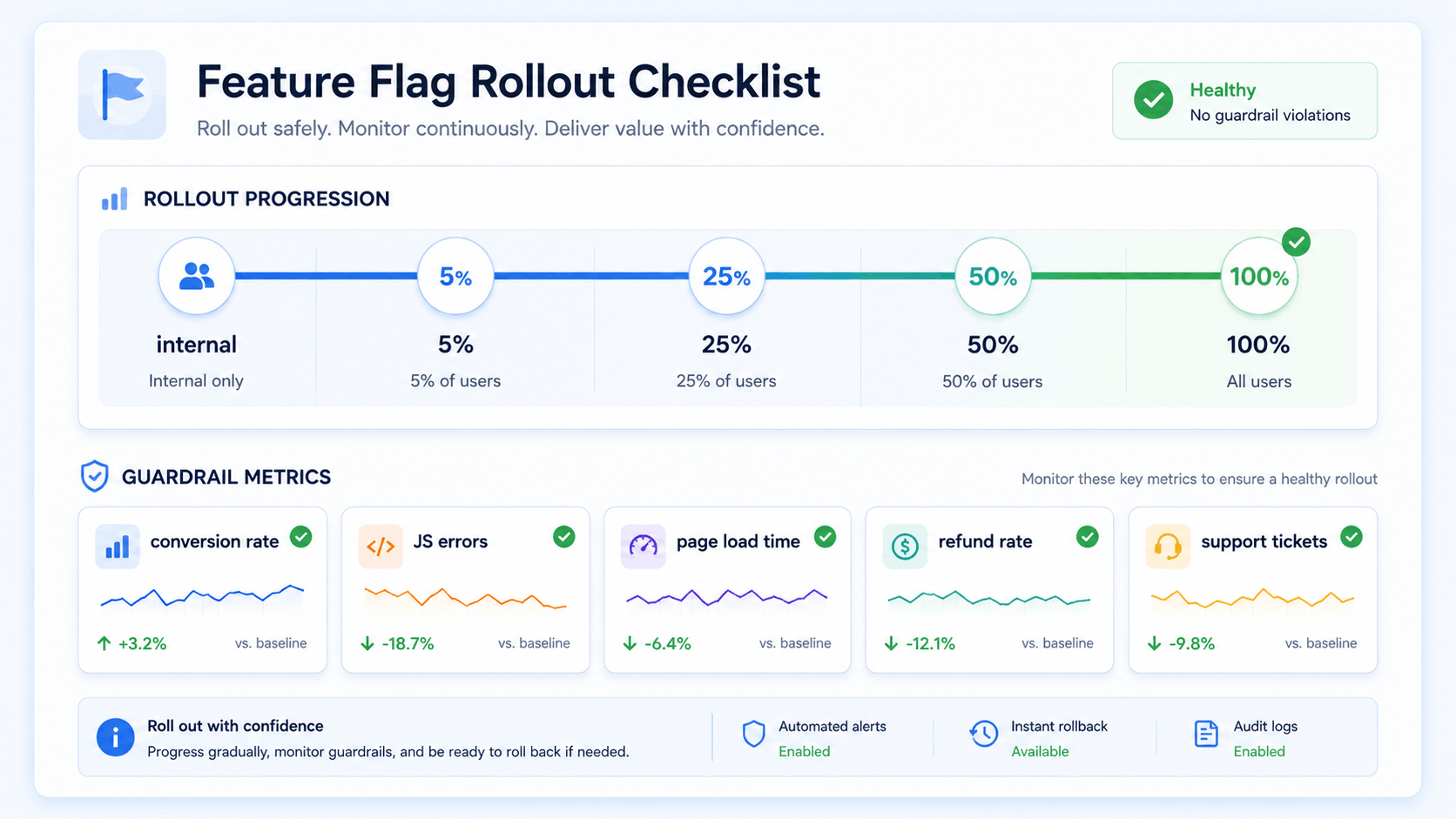
- Set the flag rollout plan: internal, 5%, 25%, 50%, 100%.
- Pick guardrails: conversion rate, JavaScript errors, page load time, refund rate, support tickets.
- Remove personal data from every event property.
- Set a stale flag review date before the release starts.
For Swetrix, a simple signup event can start in HTML:
<button swetrix-event="signup_started">Start trial</button>
For revenue attribution, send the payment from your backend or connect Stripe/Paddle. A thank-you page event gives you a hint. A billing integration gives you confirmed revenue, renewals, and refunds.
Final Recommendation
Start with Swetrix if you want one privacy-first workflow for measurement, experiments, feature flags, and revenue. It fits SaaS teams, agencies, founders, marketers, and product teams that care about fast dashboards, cookieless tracking, no personal data collection, open source code, EU hosting, self-hosting, and a practical path from campaign click to paid account.
Pick PostHog or Statsig when engineering and product teams need deeper product systems. GrowthBook fits when the warehouse owns the metric layer. LaunchDarkly earns its place when release control needs its own platform. VWO or Optimizely make sense when CRO or enterprise experimentation drives the buying decision. Use GA4 with external tools if Google reporting stays mandatory. Plausible-style tools fit narrow website reporting.
Try Swetrix free for 14 days. Track analytics, A/B experiments, feature flags, performance, errors, user flows, and revenue without cookies or personal data collection.

The web analytics your site deserves.
Tired of bloated dashboards, privacy concerns, and data you can't trust? Switch to Swetrix and get simple, powerful analytics that respects your users.