- Date
Finding the Best Analytics Tool for Ghost Blogs
 Andrii Romasiun
You chose Ghost because you value speed and a clean reading experience, but pasting a traditional analytics script into your site header undermines both. Adding a massive JavaScript tracker slows down your page loads while the legally required cookie banner ruins the minimalist design your readers expect. Finding the best analytics tool for ghost blogs requires balancing deep marketing insights with visitor privacy, which is why privacy-first platforms like Swetrix have become the go-to choice for modern publishers. Replacing invasive trackers with privacy-first analytics restores your page speed and recovers the traffic data lost to rejected cookie banners.
Why Ghost Blogs Need Better Analytics
Ghost powers a rapidly growing segment of the independent web, with active domains having doubled their footprint since 2022. Site owners migrate to this CMS specifically to escape the bloated architectures of legacy platforms like WordPress, so maintaining that performance advantage requires careful choices about third-party scripts.
The Limits of Ghost's Built-In Stats
Ghost 6.0 introduced native, cookie-free web analytics powered by Tinybird directly into the admin dashboard. This built-in reporting provides a high-level view of your blog's performance, allowing you to check total unique visitors, page views, and top referral sources without leaving your content editor. Because it runs server-side and uses no tracking cookies, the native solution respects reader privacy by default.
However, the system stops at surface-level metrics and leaves you blind to specific user behavior. Ghost's native dashboard cannot track custom conversion funnels, such as a reader clicking an outbound affiliate link or completing a multi-step premium membership checkout. It lacks campaign attribution capabilities, preventing you from appending UTM parameters to an email newsletter to track which send generated the most paid subscribers. If you need to measure the return on investment for specific marketing campaigns, these native stats will not provide the necessary data.
The Hidden Cost of Google Analytics
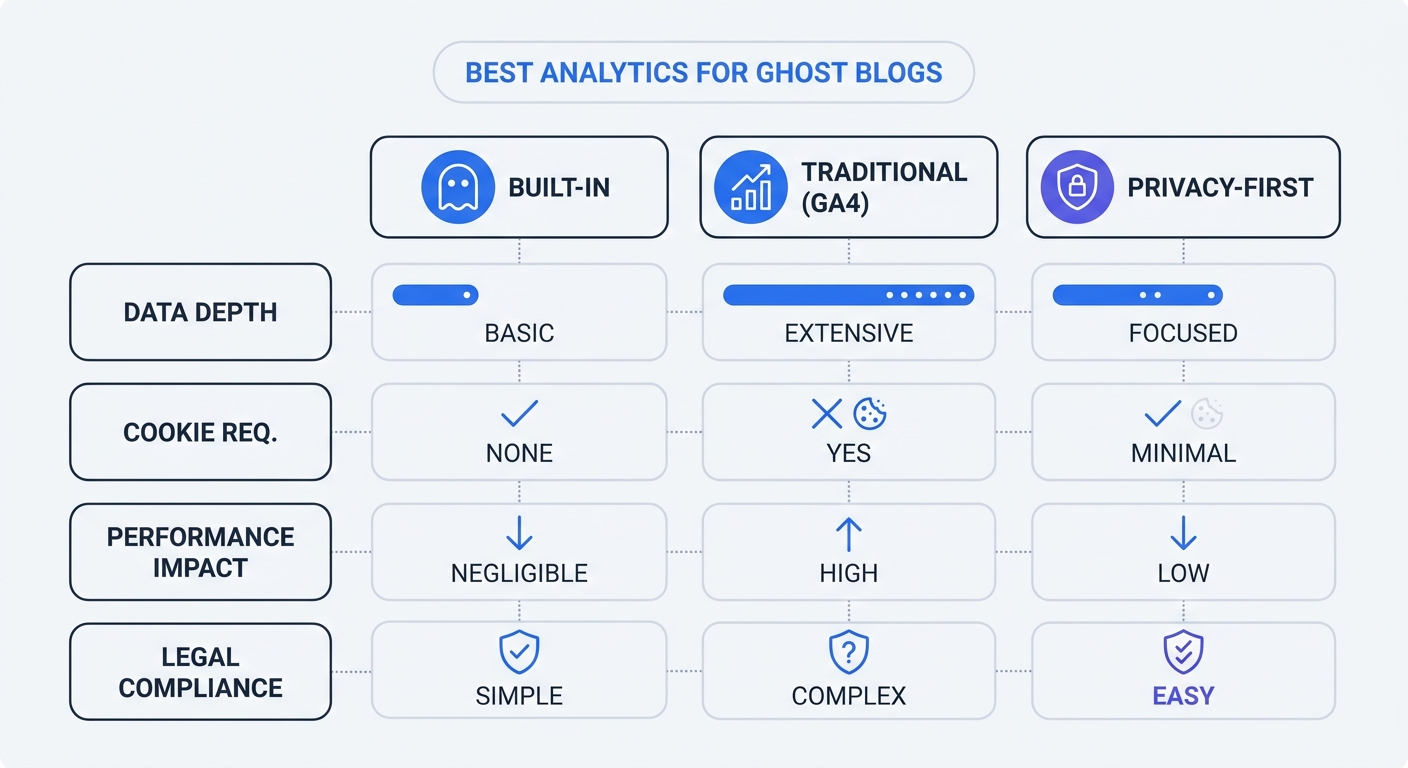
To fill the gaps left by Ghost's native dashboard, you might default to Google Analytics 4 (GA4), but deploying this tool introduces noticeable latency into the reading experience. The GA4 tracking script downloads a significant payload to the browser before the page finishes rendering, which inflates your Time to First Byte (TTFB) and delays the Largest Contentful Paint (LCP). Since search engines penalize slow sites, this analytics tool actively works against your organic acquisition strategy.
Furthermore, GA4 relies on persistent identifiers to stitch user sessions together, triggering strict compliance requirements under global privacy laws. You cannot legally run Google Analytics in Europe or California without securing explicit user consent. Using Swetrix instead allows you to bypass these hurdles while keeping your blog lightweight and compliant.
The Problem with Cookie Banners and Tracking Loss
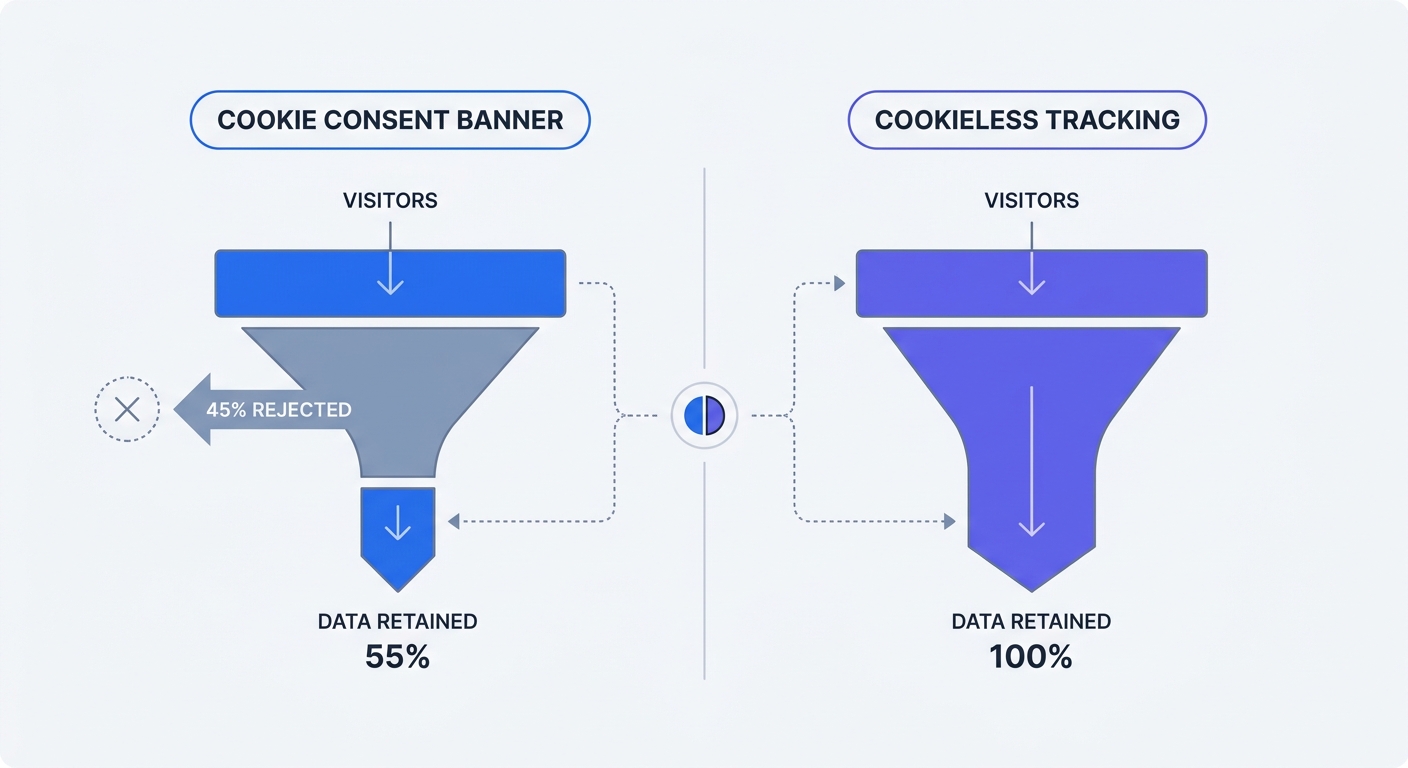
Adding a cookie consent banner to your Ghost blog destroys the data integrity you installed the analytics tool to capture because readers frequently opt out when given a clear choice.
Plunging Cookie Consent Rates
Global cookie consent rates often average less than 50 percent, though acceptance varies by region and audience type. Fewer than 25 percent of internet users in France and Germany accept tracking cookies, and ad-supported media blogs see the lowest compliance, often hovering around a 30 percent acceptance rate.
If your analytics platform requires cookies, you operate blind for more than half your traffic, meaning a blog generating 10,000 monthly visits might only record 4,500 of them in the reporting dashboard. This data loss directly damages your marketing decisions. When a specific guest post drives 500 new visitors but 350 of them reject the tracking banner, the campaign looks like a failure on paper, causing you to abandon profitable traffic sources because the tool failed to record them.
The GDPR Risk Factor
Attempting to trick readers into accepting cookies carries massive financial risk, as privacy regulators have intensified enforcement and issued significant fines for non-compliant cookie banner designs. A legally compliant banner under the General Data Protection Regulation (GDPR) must offer an explicit "Reject All" button on the first layer of the pop-up, and this button must be identical in size, color, and prominence to the "Accept All" button. Regulators forbid pre-checked boxes or burying the opt-out mechanism in a secondary settings menu. Since deploying a strictly compliant banner guarantees a massive spike in tracking rejection, dropping cookie-based tracking entirely provides the only reliable way to regain full data visibility while eliminating legal risk.
Top Features to Look for in Ghost Analytics
Modern analytics separate the act of counting visitors from profiling them, allowing you to capture accurate marketing data without tracking individuals across the internet.
Cookieless Data Collection
Cookieless analytics platforms track sessions by generating a temporary hash based on the visitor's IP address and user agent, which resets daily. Because the system cannot recognize the same user if they return next week, it never builds a permanent profile of their browsing habits. These platforms do not require consent banners since no personally identifiable information is stored and no tracking files are placed on the user's device.
Removing the banner directly improves your site metrics, especially since a Contentsquare benchmark puts the cross-industry average time on page at 54 seconds, though this ranges from 44 seconds for energy and grocery sites up to 82 seconds for B2B platforms. Forcing a reader to spend five of those seconds dismissing a complex privacy modal increases your bounce rate, whereas frictionless entry keeps the reader focused on your content the moment the page loads.
Full-Stack Observability for Marketing
While standard traffic metrics count your visitors, observability tools record why they left. A modern tracking setup bridges the gap between marketing and technical performance by providing real-user monitoring, helping you understand how fast your Ghost theme loads on real mobile devices in different regions rather than relying on lab-simulated speed tests.
Client-side JavaScript error tracking represents a highly valuable observability feature for publishers. If a recent Ghost update or a custom theme modification breaks your subscription checkout portal on iOS Safari, standard traffic analytics will only show a sudden drop in conversions. Swetrix provides an integrated error tracker that immediately logs the specific JavaScript failure and identifies the exact browser and operating system combination causing the issue, preventing broken code from bleeding your membership revenue for weeks before a reader emails you about it.
The Best Analytics Tool for Ghost Blogs: Top Picks
Ghost's lack of a traditional plugin ecosystem means your analytics tool must run via a basic script injection, so we evaluated the top platforms based on payload size, data depth, and privacy compliance.
Swetrix: The Top Recommendation
Swetrix is the most comprehensive, privacy-first alternative to traditional analytics. Built as an open-source platform and hosted on EU servers, it complies with GDPR, CCPA, and PECR regulations without requiring consent banners.
Swetrix excels for Ghost users by combining marketing data with technical observability. Alongside standard traffic metrics, referrers, and campaign tracking, Swetrix logs client-side JavaScript errors and monitors page load performance for every user, notifying you immediately if your Ghost theme breaks. You can track custom events, like newsletter signups or clicks on outbound affiliate links, and map them into visual conversion funnels. The dashboard updates in real-time, allowing you to track traffic spikes and share specific dashboard views with partners or clients.
Swetrix Cloud pricing scales based on the volume of data you process, starting at $19 per month for 100,000 events. The cloud service includes a 14-day free trial to verify the data against your existing setup, while highly technical users have the option to self-host the open-source version on their own infrastructure.
Plausible and Fathom
Plausible and Fathom provide cookieless tracking solutions for users focused strictly on traffic metrics. Both platforms prioritize privacy, bypass the need for consent banners, and load fast, but they fall short in technical observability. Neither tool offers the client-side JavaScript error tracking required to monitor the health of custom Ghost themes or broken checkout flows. While both remain solid Google Analytics alternatives for counting page views, their lack of error monitoring and deeper performance insights leaves a significant blind spot if you want to understand why a specific landing page stopped converting paid members.
Ghost Native Analytics
Keep Ghost's built-in analytics active for a quick daily traffic check, as the native dashboard remains the fastest way to view totals right after publishing a post. However, you should not rely on it as your primary marketing source of truth. Treat it as a supplemental overview while using a dedicated platform like Swetrix to handle UTM campaign attribution, custom event tracking, and technical monitoring.
How to Install Analytics on Your Ghost Blog
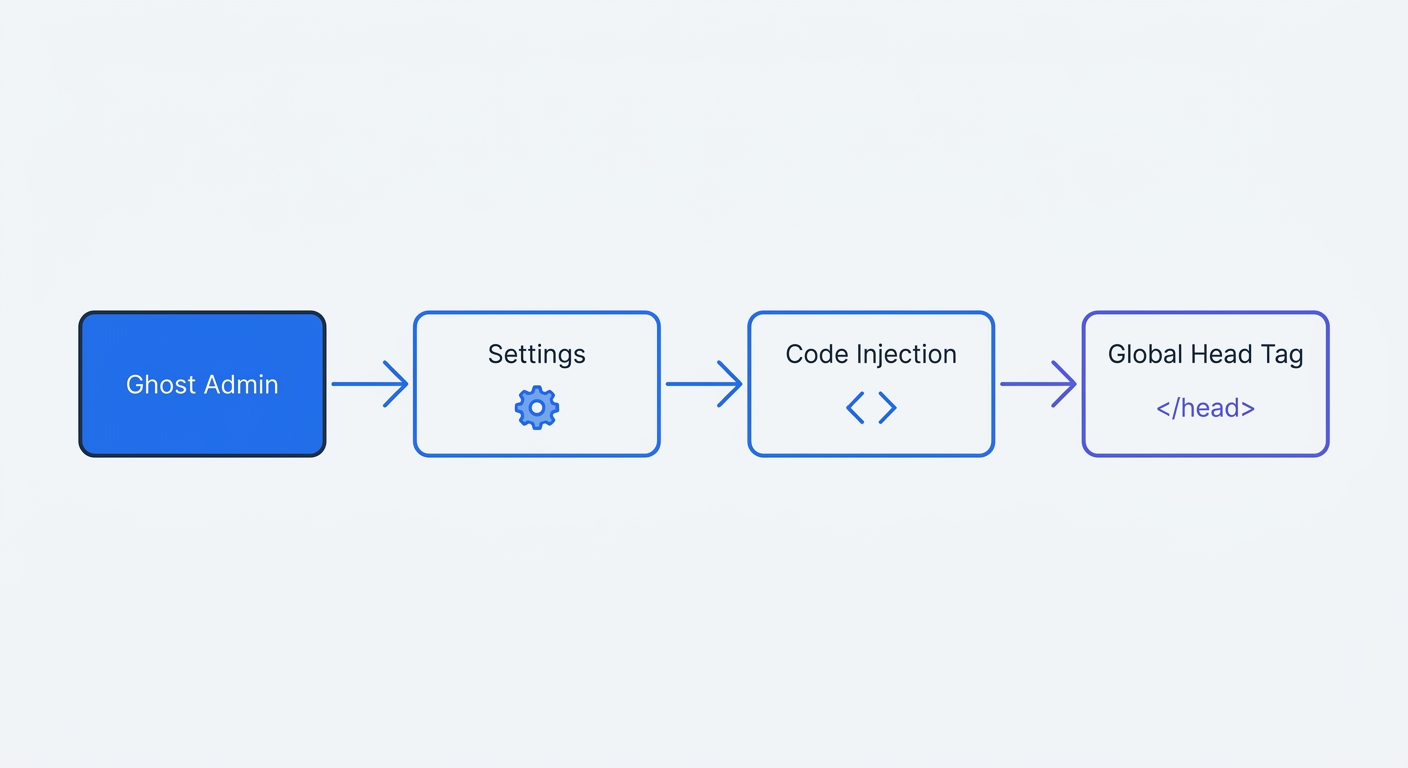
Adding third-party scripts to Ghost requires using the global Code Injection panel, which applies the tracking tag to every page on your site, including new posts you publish in the future.
Using Ghost Code Injection
- Log into your Ghost Admin dashboard.
- Click the gear icon in the bottom left corner to open Settings.
- Navigate to Advanced and select Code Injection.
- Locate the Site Header text box.
- Paste your platform's tracking snippet into this field.
If you use Swetrix, the integration requires a single lightweight script. Replace YOUR_PROJECT_ID with the specific string found in your Swetrix project settings.
<script src="https://swetrix.org/swetrix.js" defer></script>
<script>
  document.addEventListener("DOMContentLoaded", () => {
    swetrix.init("YOUR_PROJECT_ID");
    swetrix.trackViews();
  });
</script>
Using the defer attribute ensures the browser downloads the script in the background without pausing the rendering of your blog content, and you can finalize the installation by saving your changes in the top right corner of the Ghost interface.
Tracking Ghost Portal Conversions
Ghost handles subscriptions through a built-in Portal interface. Because this portal loads dynamically, tracking membership signups requires tying a custom event to the portal button clicks by adding this code snippet directly below your main Swetrix initialization script in the Site Header injection box:
<script>
  document.addEventListener("DOMContentLoaded", () => {
    const subscribeButtons = document.querySelectorAll("[data-portal]");

    subscribeButtons.forEach((button) => {
      button.addEventListener("click", () => {
        swetrix.track({
          ev: "portal_opened",
          meta: {
            button_type: button.getAttribute("data-portal") || "default",
          },
        });
      });
    });
  });
</script>
This configuration listens for clicks on any element containing a data-portal attribute, so when a reader clicks a subscribe or sign-in button, Swetrix files a custom event named portal_opened and logs the specific type of portal action the user requested.
Testing Your Implementation
Test your installation to verify the script fires correctly before sending traffic to a new campaign.
- Open a new Incognito or Private Browsing window to prevent ad blockers or admin sessions from interfering with the test.
- Navigate to your blog's homepage.
- Right-click anywhere on the page and select Inspect to open the browser Developer Tools.
- Click the Network tab.
- Type the name of your analytics tool into the filter bar.
- Click a link to another blog post on your site.
Watch the Network panel for a new network request firing to the tracking server. Click that request and verify it returns a HTTP 200 OK status code. Once the request fires successfully, open your Swetrix dashboard to confirm your active session appears in the real-time reporting view, allowing you to close the developer tools and begin analyzing your traffic with total visibility.
Regain full visibility of your Ghost blog traffic while maintaining a frictionless reading experience. Start your 14-day free trial at swetrix.com/signup to replace heavy tracking scripts with fast, cookieless analytics and integrated error monitoring.