- Date
Server Side Tracking vs Client Side: The Ultimate Guide
 Andrii Romasiun
You check your marketing dashboard and see a 30% drop in conversions, yet your payment processor reports record sales. You have a tracking problem. Users run ad blockers that intercept third-party analytics scripts before execution. You fix this mismatch by understanding the differences between server side tracking vs client side. Capturing data on your own infrastructure stops data loss, enforces user privacy controls, and maintains precise conversion counts.
Server Side Tracking vs Client Side Explained
Developers define web analytics by locating data collection points. You collect visitor actions in the user's browser, or you route them through your backend infrastructure.
Client-Side Tracking: The Traditional Method
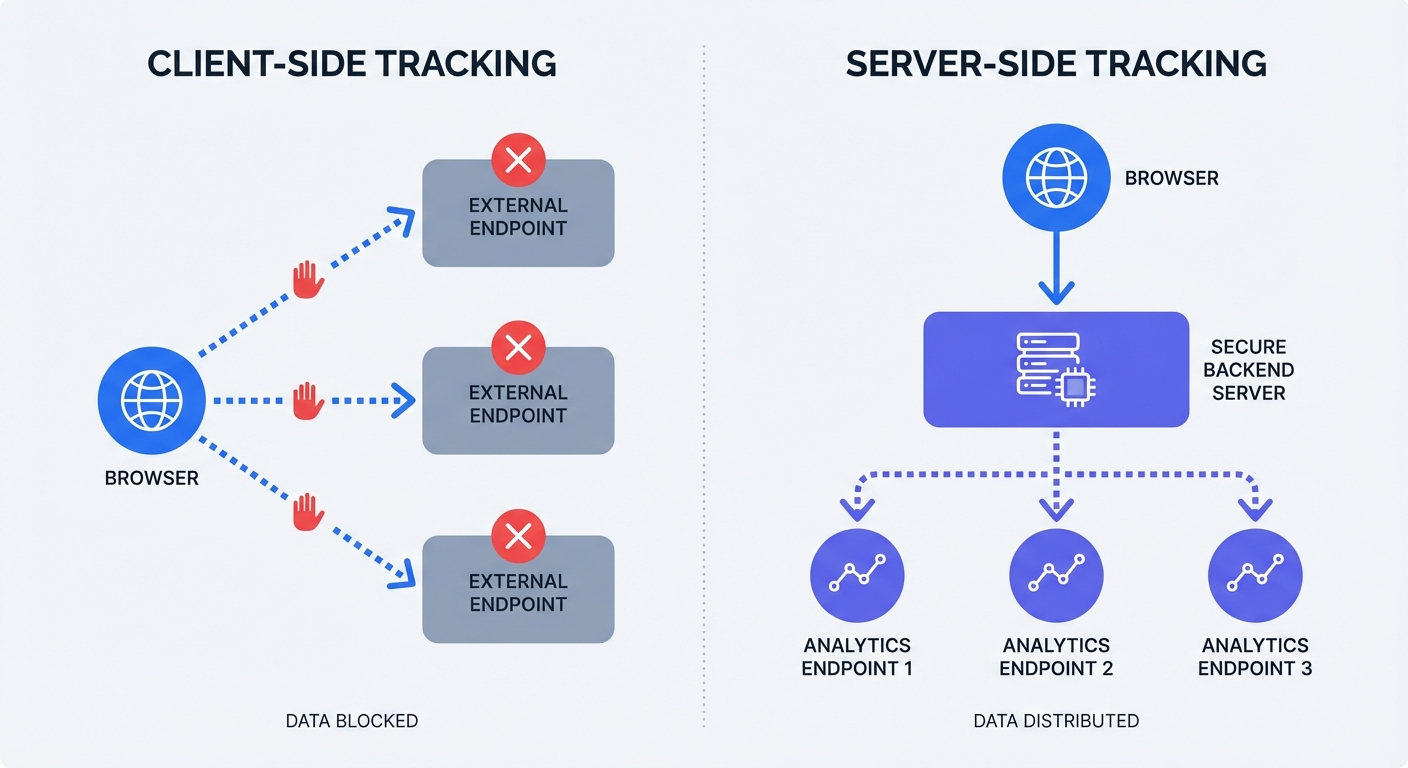
Client-side tracking requires the visitor's browser to process data. You place a JavaScript snippet on your website. A visitor opens a page, prompting their browser to download the script and send a data payload to external vendors like Google Analytics or Meta.
This method forces the user's device to communicate with third-party domains. You face a major vulnerability because browsers give users control over allowed scripts and network connections.
Open your browser developer tools and click the Network tab. Load an e-commerce website and filter the network requests for the word "collect" or "track." Dozens of network requests fire from your browser to external advertising platforms. Install an ad blocker and refresh the page to watch those requests fail, resulting in lost tracking data.
Server-Side Tracking: The Secure Middleman
Server-side tracking bypasses the browser during the final data handoff. You send data from the visitor's browser to your backend server. The server processes the event and forwards the secure payload to analytics platforms like Swetrix.
You take ownership of the data pipeline. The initial request bypasses privacy tools and ad blockers because it routes to your owned domain instead of a known advertising network. You write code in your application backend to trigger events based on definitive user actions.
A customer submitting a checkout form triggers your Node.js or PHP application to process the payment and make a secure API call to your analytics provider. This backend communication creates a cookieless telemetry stream, bypassing browser restrictions to guarantee accurate conversion counts.
The Cause of Client-Side Tracking Data Loss
Browsers and privacy extensions restrict third-party scripts to protect users from invasive retargeting, resulting in corrupted data for website owners. Developers research server side tracking vs client side to understand and mitigate this signal loss.
The Ad Blocker and Signal Loss Crisis
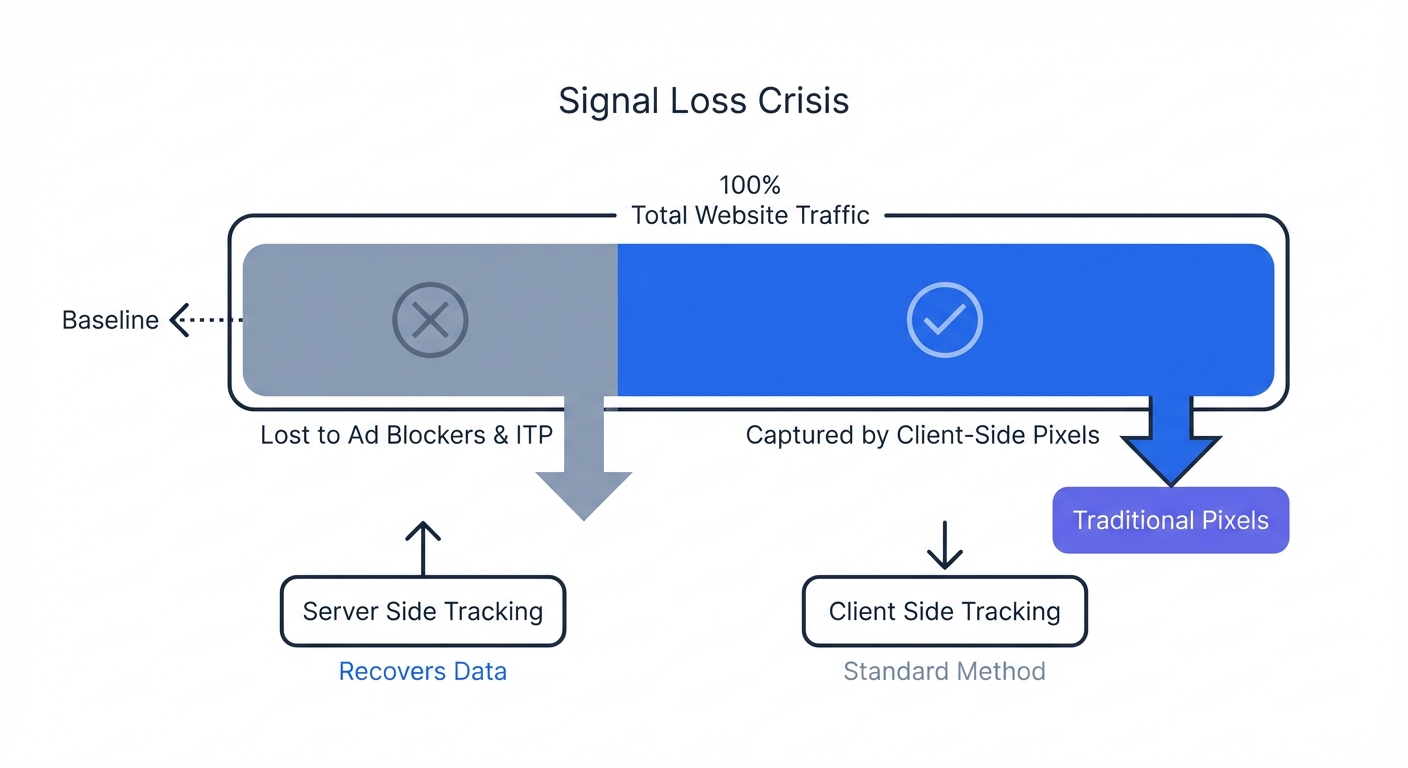
Internet users block tracking scripts at scale in 2026. Global ad blocker usage sits between 29.5% and 42%, while North American usage reaches 45%. You lose 30% to 40% of your analytics data when relying on browser pixels.
Apple restricts third-party cookies with Safari Intelligent Tracking Prevention, Mozilla uses Firefox Enhanced Tracking Protection, and Google rolled out Chrome user-choice tracking prompts. These browser-level protections create a signal loss crisis for marketing teams. You run ad campaigns without seeing which clicks generate sales.
Calculate your signal loss by opening your web analytics dashboard to pull the total number of conversions for the past 30 days. Pull the completed order count from your transactional database, like Stripe or Shopify, for the same period. Divide the analytics count by the database count to reveal your tracking blind spot.
Recovering Lost ROI and Attribution
Capturing data on your backend fixes broken ad attribution to provide an uninterrupted view of user conversions. Enterprise brands recover this lost attribution data to achieve an average 21% increase in media return on investment.
Gartner researchers found in 2024 that 70% of marketers preferred server-side methods to maintain data accuracy. Industry analysts observe enterprise brands with large advertising budgets nearing 100% adoption of server-side data collection. Mid-market adoption passed 40% and climbs higher each quarter.
You spend money on advertising to acquire customers and need precise tracking data to calculate your customer acquisition cost. Server-side data collection ensures you credit the correct marketing channel for every sale. You stop wasting budget on underperforming ads, allocating resources instead to campaigns driving verified backend conversions.
Privacy, GDPR Compliance, and Page Speed
Moving your data collection to the server provides technical benefits beyond accurate conversion counting. You gain control over user privacy and improve your website performance scores.
Enhancing GDPR Compliance Through Data Ownership
You enhance GDPR compliance by acting as a filter between the user and external vendors.
Client-side scripts allow external vendors to scrape browser data, leaving you with zero control over what third-party code reads from the user's device. Server-side data collection makes you the secure middleman. You inspect every piece of data before forwarding the payload to an external dashboard.
You fulfill GDPR data minimization principles by writing server logic to scrub Personally Identifiable Information. You intercept the payload to drop the user IP address, hash the email address, and strip out granular location data. Your server sends clean, anonymized event data to your analytics provider.
Privacy laws require you to ask visitors for tracking permission. You enforce this choice on your server by configuring your application to honor rejections from your consent banner. Writing a conditional statement halts the API call, ensuring no data leaves your infrastructure.
Stopping JavaScript Bloat from Slowing Your Site
Loading multiple third-party JavaScript tags requires client bandwidth and processing power. Browsers pause page rendering to download, parse, and execute analytics scripts.
Bloating your front end with tracking tags damages SEO rankings because Google uses Core Web Vitals to score websites. Google lowers your search visibility for slow page loads and delayed interactivity.
Moving analytics to your server speeds up page load times. You remove external JavaScript dependencies from the browser and rely on your backend infrastructure to handle the data transmission.
Run a Lighthouse performance audit in your browser developer tools to review the "Reduce the impact of third-party code" diagnostic. Count the analytics scripts blocking the main thread. Migrating those scripts to your backend application improves website performance, a metric you track using the Swetrix performance monitoring feature.
Implementing Server-Side Tracking in 2026
You choose from multiple paths to build a server-side data pipeline based on your technical resources and budget.
Infrastructure Tools: Custom APIs, sGTM, and CDPs
You build your tracking infrastructure using one of three primary architectures requiring different levels of developer involvement.
| Setup Method | Required Technical Skill | Hosting Costs | Best Use Case |
|---|---|---|---|
| Custom Server API | High (Requires backend coding) | Zero (Uses existing servers) | Custom web apps, SaaS platforms, high-privacy needs |
| Google Tag Manager Server-Side | Medium (Requires cloud configuration) | $50 to $150+ per month | E-commerce sites, heavy marketing tag usage |
| Customer Data Platforms | Low to Medium (SDK integration) | $200+ per month | Enterprise teams routing data to 10+ destinations |
Custom Server-to-Server APIs You log events in your backend application using the Swetrix API for events to send data from Node.js, PHP, or Python. This method requires zero additional infrastructure because you add the tracking code into your existing controllers.
Here is an example of logging a server-side purchase event using Node.js:
// Example Node.js backend purchase controller
async function processPurchase(req, res) {
  const { userId, orderTotal } = req.body;

  // 1. Process the payment via Stripe
  const payment = await stripe.charges.create({ amount: orderTotal });

  // 2. Send the secure server-side event to Swetrix
  await fetch("https://api.swetrix.com/log", {
    method: "POST",
    headers: { "Content-Type": "application/json" },
    body: JSON.stringify({
      projectID: "YOUR_PROJECT_ID",
      event: "purchase_completed",
      metadata: { revenue: orderTotal },
    }),
  });

  res.status(200).send("Order complete");
}
Google Tag Manager Server-Side (sGTM) You provision a cloud server to host your tag manager container and configure your website to send data to this specific instance. Your server-side container routes the data to analytics vendors. You pay monthly hosting fees to Google Cloud or AWS to maintain this server.
Customer Data Platforms (CDPs) You use tools like Segment or RudderStack to manage your data pipeline by installing one SDK on your backend. You send user events to the CDP, giving you a visual interface to route data to hundreds of different marketing tools. You pay a premium for this convenience.
The Hybrid Tracking Strategy
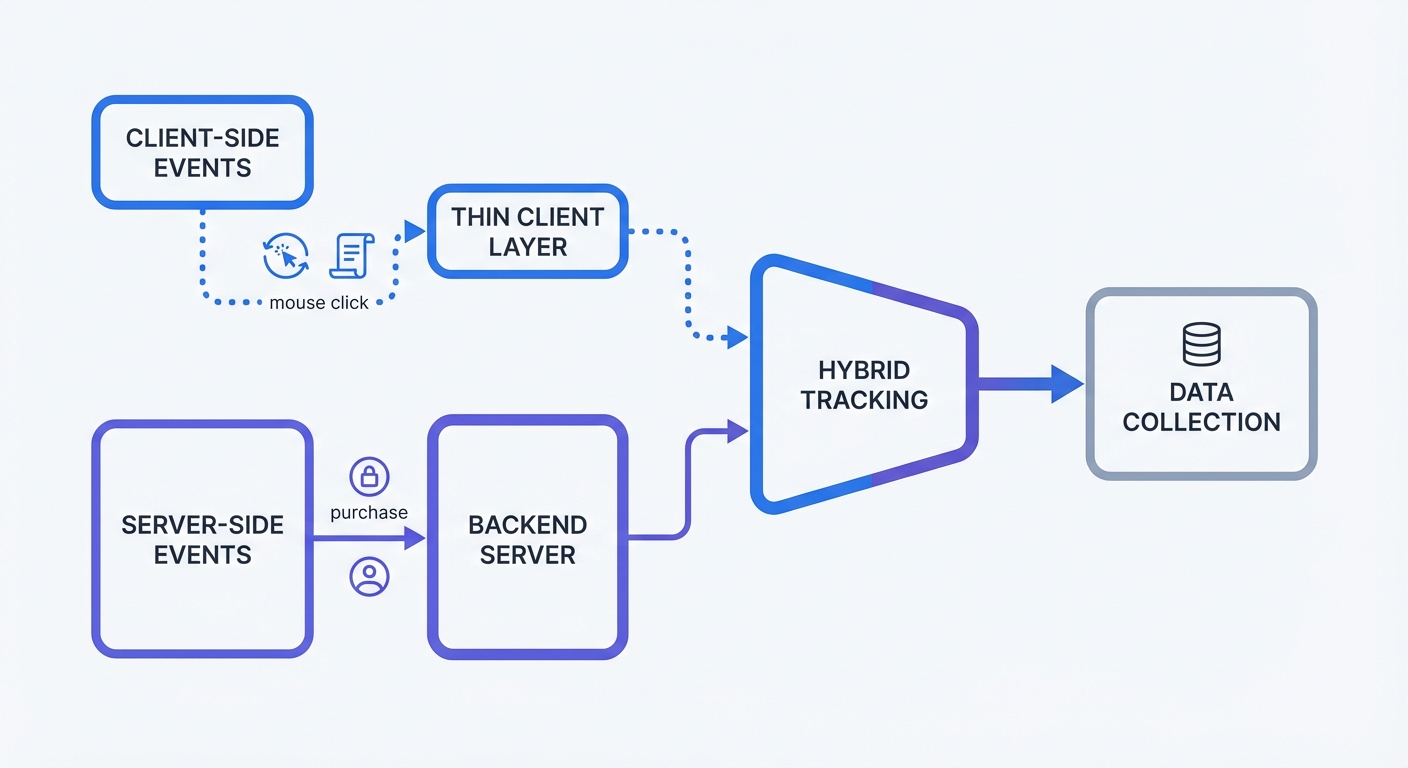
You build a complete data picture by combining both methods. Evaluating server side tracking vs client side reveals distinct advantages for each approach, making a hybrid strategy the best way to capture all events.
A lightweight browser script tracks user interface interactions, while backend endpoints track secure transactional events.
- Client-Side Responsibilities: Mouse clicks, scroll depth, and video engagement.
- Server-Side Responsibilities: E-commerce purchases, account registrations, and subscription renewals.
Audit your current tracking plan by opening a spreadsheet to list every event. Tag each event as a "UI interaction" or a "business metric". Mandate that developers move every business metric to the backend, leaving UI interactions in the browser script. This split ensures you record every purchase despite ad blockers while monitoring page layout engagement.
Best Practices for First-Party Subdomains
Browsers block requests to known third-party domains, forcing you to format tracking requests as first-party traffic. You bypass domain filters by mapping your tracking endpoint to a custom subdomain on your website.
Website owners using example.com must not send data to analytics-vendor.com. Send data to metrics.example.com instead. Browsers see the matching root domain of this controlled subdomain and allow the data transmission.
You configure this DNS routing in four steps:
- Access your domain registrar or DNS provider panel.
- Go to your DNS records management section.
- Create a new CNAME record.
- Name the host
metricsand point the destination to your analytics server endpoint.
Update your application code to send tracking payloads to this new metrics.example.com endpoint. You establish a secure pipeline for your business data to capture precise conversion counts. This configuration speeds up your website and protects user privacy through controlled data flows.
Stop losing conversions to ad blockers and browser restrictions. We built Swetrix to give you reliable, privacy-focused, cookieless analytics that developers implement in minutes. Start your 14-day free trial today by visiting https://swetrix.com/signup to take control of your tracking data.