- Date
AI Search Analytics: The Metrics That Actually Matter
 Andrii Romasiun
AI search changes how people find, compare, and trust products before your analytics tool sees a visit. A founder asks ChatGPT for privacy-first analytics tools. Developers ask Perplexity how to replace GA4 without cookies. Marketers see an AI Overview, click a source, read one page, and come back through branded search two days later.
Pageviews count arrivals. They miss influence, intent, and money. If your team wants to measure AI search with any confidence, track the path from source to landing page, event, funnel, and revenue.
Swetrix fits that workflow because it gives you cookieless analytics, referrers, UTM tracking, custom events, goals, funnels, user and session analysis, user flows, performance monitoring, error tracking, shared dashboards, organisations, revenue analytics, and AI Chat without personal data collection.
Start With A Scorecard
Create one AI search scorecard before you add more charts. Give each metric an owner and one action. Teams get noise from raw traffic reports when AI tools influence demand without sending many visits.
| Metric | What to measure | Where to check it | Action |
|---|---|---|---|
| AI referral sessions | Sessions from AI source domains | Swetrix referrers | Save an AI source segment |
| Landing pages | First page the visitor opens after AI source | Swetrix pages and referrers | Match page intent to CTA |
| Assisted conversions | Conversions after an AI touch | Swetrix sessions, goals, funnels | Credit assist sources in reports |
| Event completion | Key actions per AI segment | Swetrix custom events | Fix weak pages or CTAs |
| Funnel drop-off | Loss between AI visit and conversion | Swetrix funnels | Improve the biggest drop |
| Revenue by source | Paid value from AI traffic | Swetrix revenue analytics | Compare AI against search, paid, and direct |
| Content freshness | Age and update status of cited pages | Content log plus landing pages | Refresh pages that lose quality signals |
| Branded AI traffic | AI-influenced brand demand | Search queries, direct visits, form answers | Separate brand pull from discovery |
Use this scorecard in your growth meeting. Ask one question for each row: what changed, what caused it, and what action should happen this week?
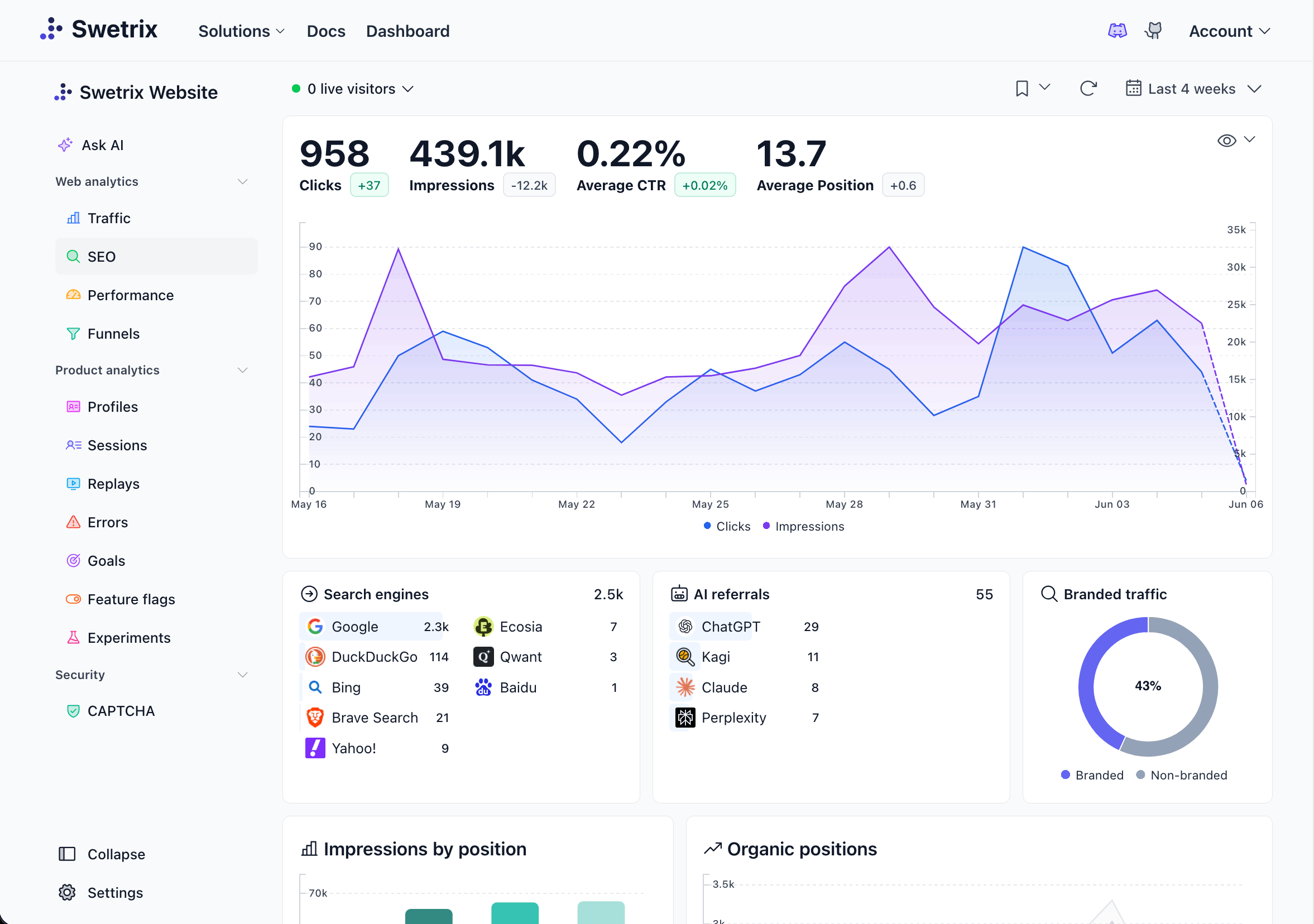
Track AI Referral Sessions
AI referral sessions start when a person clicks from an AI product and lands on your site. OpenAI says ChatGPT Search can return answers with links to relevant web sources, and those clicks can show up as referral traffic. Other tools use their own domains, app views, or search partners, so review your source list each month.
Start with these source patterns:
| Source group | Referrer patterns to watch | First report to open |
|---|---|---|
| ChatGPT | chatgpt.com, chat.openai.com, openai.com | Landing pages and signup events |
| Perplexity | perplexity.ai | Cited guides and comparison pages |
| Claude | claude.ai | Docs, API pages, and technical posts |
| Gemini | gemini.google.com, google.com | Google landing pages and Search Console |
| Copilot | copilot.microsoft.com, bing.com | Bing traffic and Microsoft AI sources |
| Other answer tools | New domains with low volume and high intent | Referrer watchlist |
Open Swetrix referrers and save a filter for those patterns. Compare AI referral sessions against organic search, paid search, social, and direct traffic. Judge each source by conversion rate and revenue per session, with visit count as context.
If perplexity.ai sends 42 sessions and 5 trial starts, treat it as a high-intent source. If another channel sends 4,000 pageviews and 3 trial starts, give the source with more conversions the first review slot.
Pair Site Analytics With Search Console
Google AI traffic needs a different lens because many clicks still arrive as Google traffic. On June 3, 2026, Google announced Search Generative AI performance reports in Search Console, with views for impressions, pages, countries, devices, and dates across AI Overviews, AI Mode, and generative AI features in Discover.
Use Search Console for visibility. Use Swetrix for behavior after the click.
- Open Search Console and review pages that appear in generative AI reports.
- Open Swetrix and filter Google traffic by the same landing pages.
- Compare sessions, bounce rate, events, goals, and revenue.
- Add pages with rising AI visibility and weak on-site action to your refresh list.
Google can tell you where your pages appeared. Swetrix can tell you whether visitors signed up, paid, hit an error, or left halfway through the funnel.
Segment Landing Pages By Intent
AI tools often send people to the most specific page: a comparison post, docs page, or pricing page. Buyers may land on a comparison post. Developers may land on docs. Marketers may land on pricing after an AI answer names your product.
Group AI landing pages by intent:
| Landing page type | Visitor intent | Metric to check | Action |
|---|---|---|---|
| Comparison | Vendor shortlist | Trial starts per session | Add proof, migration notes, and pricing clarity |
| Pricing | Budget check | Pricing-to-signup rate | Clarify event tiers and trial terms |
| Docs | Setup validation | Docs-to-project event rate | Add code snippets and product links |
| Blog guide | Problem research | CTA clicks and scroll events | Add examples, tables, and next steps |
| Feature page | Fit check | Goal completion | Tie feature copy to use cases |
For example, a privacy analytics comparison page might get 120 AI referral sessions in a week. If 18 people click pricing and 9 start a trial, expand that page with a clearer feature matrix, a migration checklist, and a CTA above the second section.
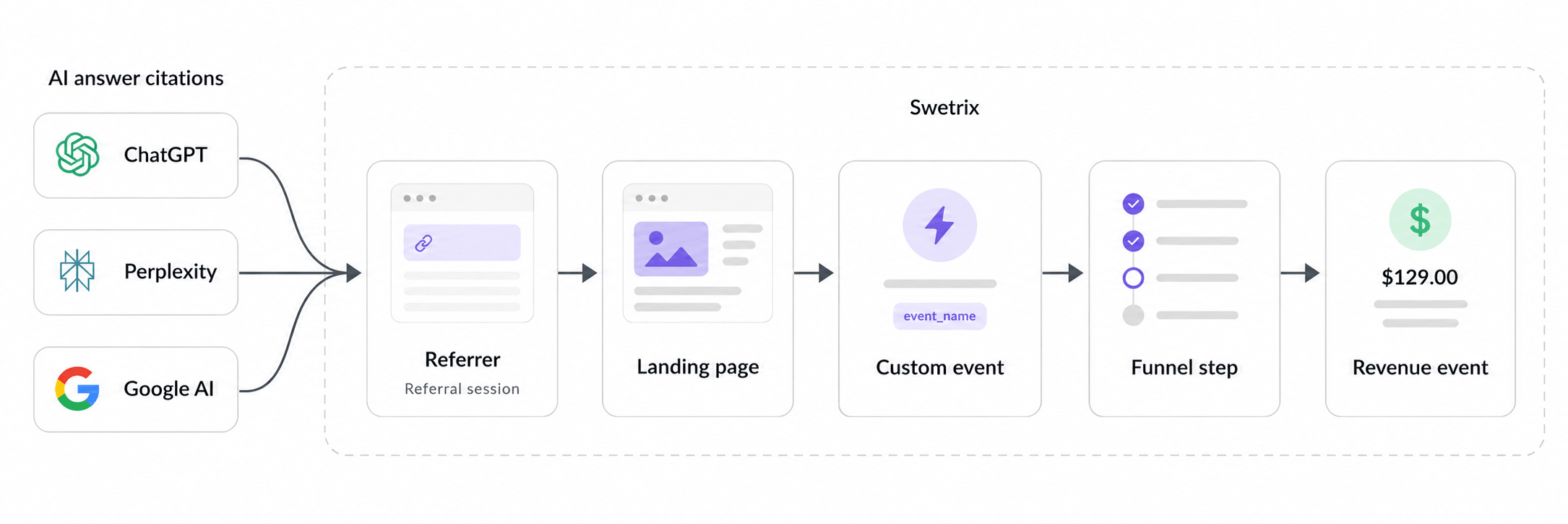
Measure Assisted Conversions
An AI source can influence a conversion without owning the last click. A visitor may click from ChatGPT, read your docs, leave, search your brand, and sign up from direct traffic.
Track three confidence levels:
| Label | Evidence | How to use it |
|---|---|---|
ai_referred | AI referrer on the session | Use in source reports |
ai_assisted | Prior AI touch before goal completion | Use in funnel and revenue review |
ai_suspected | Direct or branded visit lines up with AI visibility | Use as a content signal |
Keep those labels separate. Confirmed traffic can support attribution. Suspected traffic can support content work, but avoid using it to rewrite revenue credit by itself.
Add this field to demo, sales, or signup forms:
How did you hear about us?
Review answers that mention ChatGPT, Perplexity, Gemini, Claude, Copilot, or AI search. Tag those leads as assisted demand in your CRM or reporting notes. For self-serve SaaS, pair that answer with Swetrix sessions, custom events, and revenue data.
Track Event Completion
Events tell you whether AI visitors take action after landing. Choose actions that show buying intent, product fit, or setup progress.
| Event | Fires when | Use it for |
|---|---|---|
ai_cta_clicked | Visitor clicks the main CTA on an AI landing page | Page quality review |
pricing_viewed | Visitor opens pricing after an AI referrer | Buying intent |
signup_started | Visitor begins account creation | Funnel entry |
project_created | User creates the first project | Activation |
script_installed | Tracking script sends the first event | Setup success |
dashboard_shared | Agency or team shares a dashboard | Account expansion |
Add simple click tracking to key CTAs:
<button swetrix-event="ai_cta_clicked">Start trial</button>
For product events, send metadata that helps analysis without storing personal data:
swetrix.track({
  name: "signup_started",
  meta: {
    source_group: "ai_referral",
    landing_page_type: "comparison",
    source_confidence: "confirmed",
  },
});
Keep prompts, names, emails, raw IP addresses, and pasted AI chats out of event metadata. Use source groups, page types, plan names, and funnel steps instead.
Inspect Funnel Drop-off
AI visitors may arrive with more context than classic search visitors. That can raise conversion rates on comparison pages and reveal friction inside signup or setup.
Build one AI funnel:
| Funnel step | Event or page | Drop-off question |
|---|---|---|
| AI landing page | Pageview with AI source | Does the page match the answer intent? |
| CTA click | ai_cta_clicked | Does the first screen make the next step clear? |
| Signup started | signup_started | Does the form ask too much too soon? |
| Signup completed | signup_completed | Does email or SSO create friction? |
| Project created | project_created | Does onboarding explain the first action? |
| Script installed | script_installed | Do docs and setup steps work? |
| Paid conversion | Stripe, Paddle, or API revenue event | Does value reach the buyer before payment? |
Read the largest drop first. If AI sessions click the CTA but abandon signup, rewrite the form and reduce fields. If they create a project but fail to install the script, improve docs, framework snippets, and error states.
Swetrix helps here because funnels, user and session analysis, user flows, performance monitoring, and error tracking sit beside the same traffic data. A funnel drop may come from weak copy, a slow page, or a JavaScript error. Check all three before you change the page.
Tie Revenue To Source
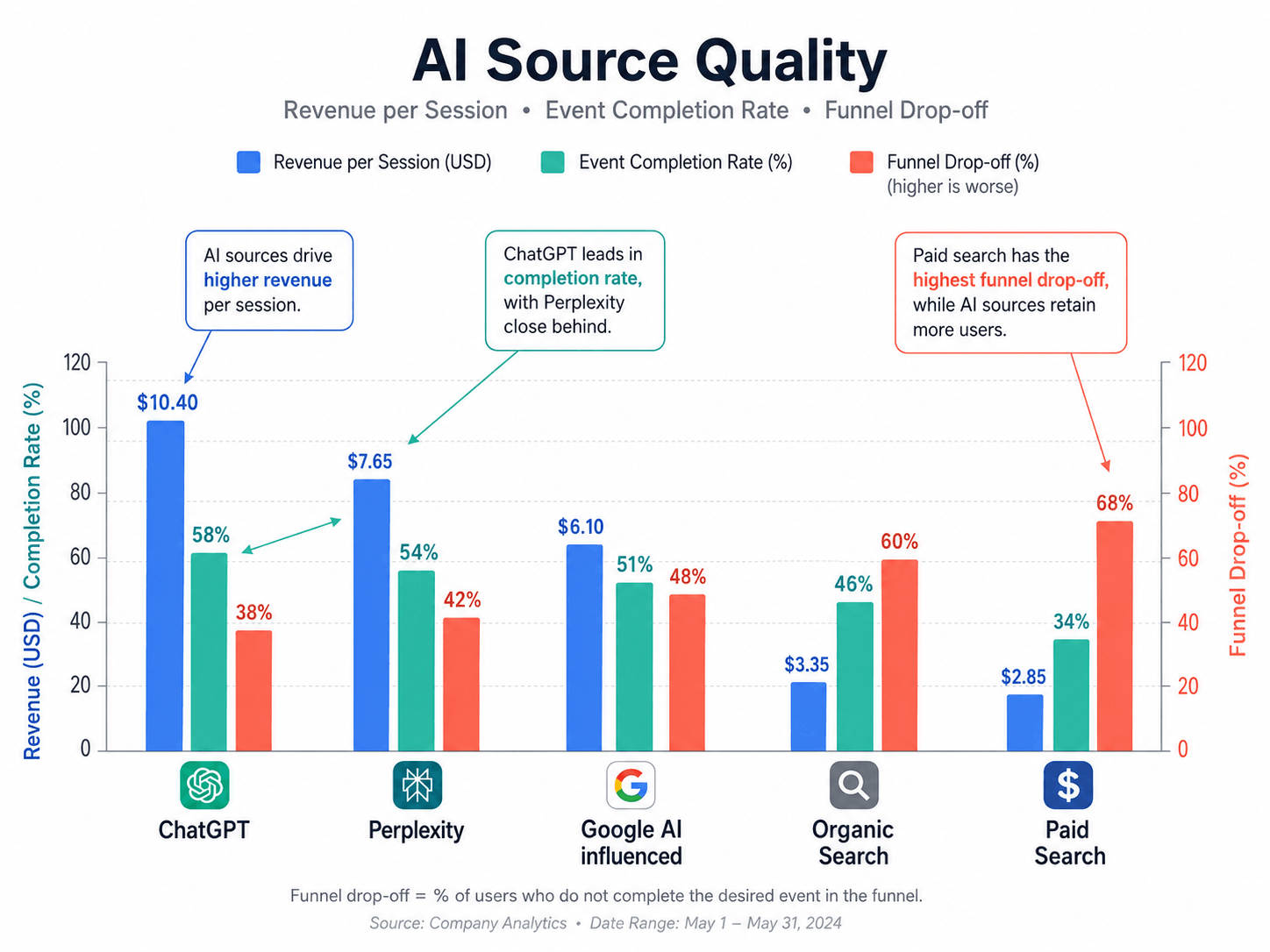
Revenue by source keeps AI search honest. A source with 30 sessions can matter more than a source with 3,000 visits if it sends people who buy.
Connect Stripe, Paddle, or API revenue in Swetrix. Then compare AI sources against other channels with one table:
| Source | Sessions | Signup rate | Paid conversions | Revenue | Revenue per session |
|---|---|---|---|---|---|
| ChatGPT | 180 | 6.1% | 5 | $950 | $5.28 |
| Perplexity | 74 | 9.5% | 4 | $760 | $10.27 |
| Google AI influenced | 420 | 3.8% | 7 | $1,330 | $3.17 |
| Organic search | 6,200 | 2.4% | 46 | $8,740 | $1.41 |
| Paid search | 1,900 | 3.2% | 18 | $3,060 | $1.61 |
Use your own numbers. This sample shows the pattern that matters: low-volume AI sources can drive high revenue per session. Raw pageviews would hide that.
Split Branded And Non-branded AI Traffic
AI search can create two demand types:
| Traffic type | What it means | How to spot it | Action |
|---|---|---|---|
| Branded AI traffic | The user asks for you or searches your brand after an AI answer | Brand queries, direct visits, form answers | Improve proof, pricing, and trial path |
| Non-branded AI traffic | The user asks a category, problem, or comparison question | AI referrers to guides, docs, and comparison pages | Build answer-led content and stronger CTAs |
Separate those two groups before you judge content ROI. Branded AI traffic shows that people already know you or saw your name in an answer. Non-branded AI traffic shows discovery. Both matter, but they require different work.
For branded traffic, make the next step obvious. Add a short pricing summary, trust proof, open source link, and signup CTA near the top of pages that receive brand-driven visits.
For non-branded traffic, answer the task faster. Add comparison tables, implementation steps, examples, and links to related docs. The visitor arrived with a problem, so give them the next action before they leave.
Watch Content Freshness
Pages with current facts, clear structure, and proof give your team better source material for AI answers and human readers. Your analytics can show which pages need updates before rankings or citations drop.
Create a content freshness table:
| Page | Last update | AI sessions | Event completion | Revenue | Action |
|---|---|---|---|---|---|
/blog/google-analytics-alternative | 34 days ago | 86 | 7.0% | $620 | Add feature and pricing notes |
/blog/cookieless-analytics-tools | 91 days ago | 44 | 2.2% | $90 | Rewrite intro and CTA |
/docs/nextjs | 18 days ago | 31 | 12.9% | $410 | Add framework version notes |
/pricing | 7 days ago | 63 | 15.8% | $1,120 | Test pricing FAQ copy |
Refresh pages that meet two conditions: AI traffic exists and event completion falls below your site average. Add dates to the content log so your team can compare update work against later sessions, goals, and revenue.
Also check brand accuracy. If AI tools describe an old plan, removed feature, or wrong setup path, update the source page that should correct the answer. Add clear headings and tables because both people and answer engines can parse them fast.
Use Pageviews As A Diagnostic Signal
Pew Research Center found in its March 2025 U.S. browsing dataset that Google users clicked a standard result on 8% of visits with an AI summary, compared with 15% of visits without one. The same study found that users clicked AI summary source links on 1% of visits with a summary.
That finding points to a measurement gap. Pageviews undercount influence. A person can see your brand in an AI answer, search you later, and buy after a direct visit. Another person can click a citation, read one pricing page, and convert fast.
Use pageviews to detect changes:
- Track whether AI source sessions rise or fall.
- Compare landing pages against conversion events.
- Pair Search Console AI visibility with Swetrix behavior.
- Review direct and branded traffic after major citations.
Then make decisions from events, funnels, and revenue.
Build The Dashboard
Your AI search dashboard should answer four questions on one screen:
| Question | Dashboard block |
|---|---|
| Which AI sources send visitors? | Referrer sessions by source |
| Which pages receive AI demand? | Landing page table with intent labels |
| Which actions do visitors complete? | Event completion and funnel drop-off |
| Which sources create money? | Revenue by source and assisted conversions |
Add a small freshness block below those. Sort by AI sessions, event completion, and last update date. The content team can see what to refresh, while the product team can see where setup or activation breaks.
Use Swetrix AI Chat for quick questions during the review:
Which AI referrers drove signup_started events this week?
Which AI landing pages had the highest revenue per session?
Where did AI referral sessions drop from signup to script installation?
Save the final dashboard for founders, marketers, agencies, and product teams. Give each group the same source data, then let each owner focus on the actions they control.
Final Recommendation
Measure AI search through the revenue path: source, page, event, funnel, customer. Start with AI referral sessions, landing pages, event completion, funnel drop-off, assisted conversions, revenue by source, branded vs non-branded demand, and content freshness.
Swetrix should sit at the center of that report if you want cookieless analytics, real-time dashboards, funnels, user flows, performance monitoring, error tracking, revenue analytics, and AI Chat without personal data collection. Pair it with Search Console for Google AI visibility, then use events and revenue to decide what deserves work.
Try the Swetrix 14-day free trial and build an AI search analytics dashboard that tracks sources, events, funnels, and revenue without cookies.

The web analytics your site deserves.
Tired of bloated dashboards, privacy concerns, and data you can't trust? Switch to Swetrix and get simple, powerful analytics that respects your users.