- Date
How to Run A/B Tests for AI Search Landing Pages Without Cookies
 Andrii Romasiun
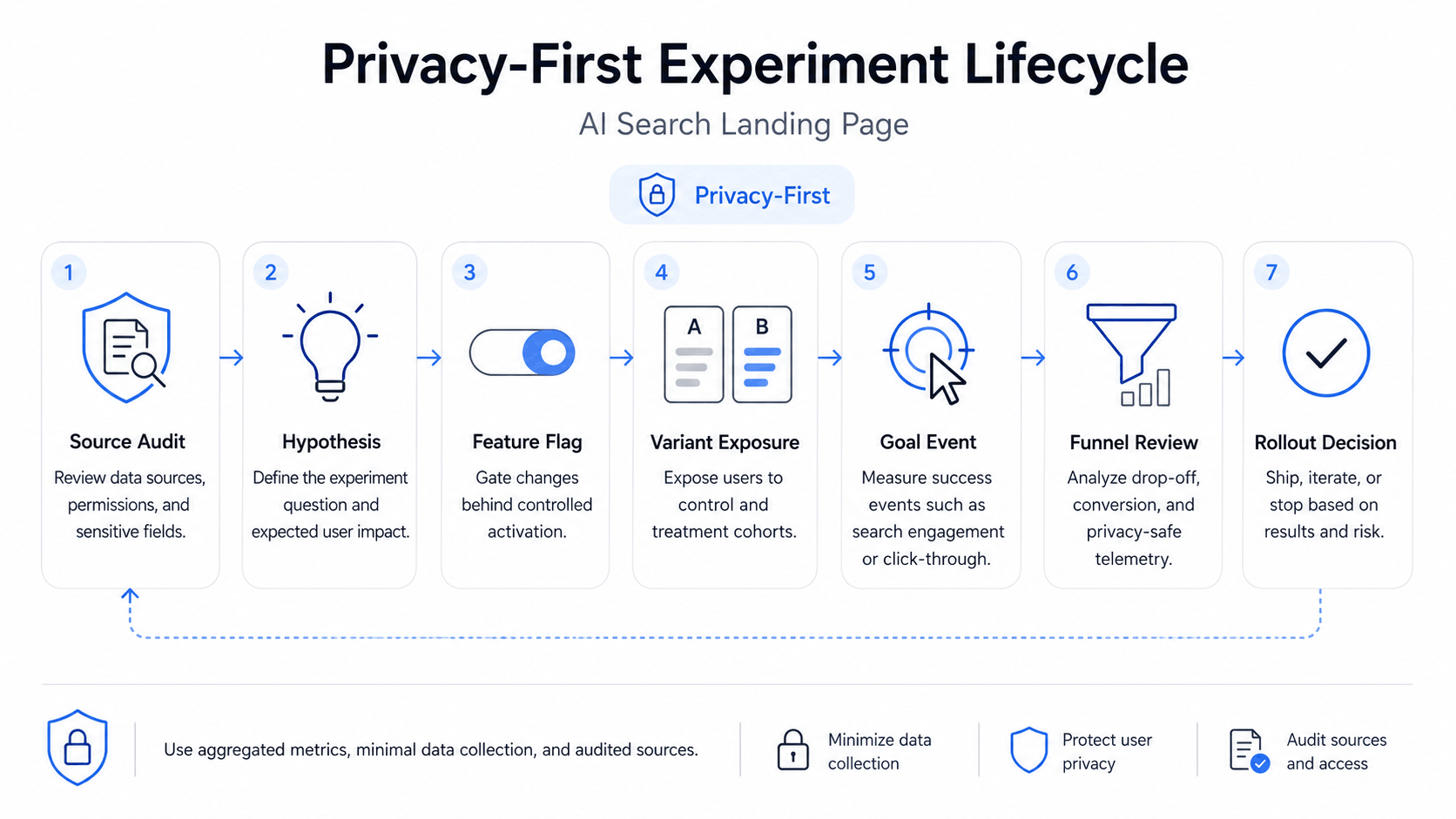
AI search traffic can look small in your analytics, then distort a landing page test if you treat it like normal organic search. A visitor from an AI answer may land with a comparison, definition, or recommendation in mind. The page has to confirm the answer, remove doubt, and move the person toward one action.
Swetrix gives you a clean setup for this work: cookieless analytics, referrers, UTM tracking, custom events, goals, funnels, feature flags, and A/B experiments in one privacy-first dashboard. Use those pieces together and you can test landing pages without consent banners, tracking cookies, or a mess of disconnected tools.
Map AI Search Traffic First
Open your analytics dashboard and split AI search traffic from classic organic search before you design a variant. Google has begun giving some site owners generative AI performance reports in Search Console, including page, country, device, and date views for AI features such as AI Overviews and AI Mode. In Swetrix, combine that search visibility with referrer data and UTM fields so you can see what happens after the click.
One 2026 measurement study found Google AI Overview activation at 13.7% across trending queries and 64.7% for question-form queries. Query type changes the traffic mix, so avoid one blended "organic" bucket for landing page experiments.
Use this starting taxonomy:
| Traffic group | How to identify it | First test idea |
|---|---|---|
| AI feature from Google Search | Search Console AI feature visibility, plus organic landing page sessions in Swetrix | Test answer-first copy for pages that receive question-style visits |
| AI assistant referral | Referrers from AI assistants and browsers with AI answer surfaces | Test stronger proof above the first CTA |
| Classic organic search | Search engine referrers without AI feature evidence | Keep the control page stable as your baseline |
| Paid or owned campaign | UTM source, medium, and campaign fields | Exclude it from the AI search test unless the campaign targets the same intent |
Start with one page that receives enough AI search visits to matter. A pricing comparison page, a "best X for Y" page, and a technical integration page all make good candidates because AI answers tend to cite pages that answer narrow questions.
Write a Testable Hypothesis
A hypothesis has to connect the AI search intent, the page change, and the metric you expect to move. Keep it specific enough that a losing result teaches you something.
Use this format:
For visitors who arrive from AI search, changing
[page element]from[control]to[variant]will increase[primary goal]from[baseline]to[target], while keeping[funnel guardrail]within[limit], because[reason tied to the query intent].
Example:
For visitors who arrive from AI search, changing the hero from a broad product pitch to a proof-first comparison block will increase
trial_startedfrom 3.8% to 4.6%, while keepingpricing_to_signupdropoff under 35%, because these visitors need fast confirmation after an AI answer cites the page.
Check three inputs before launch:
- Measure the baseline conversion rate for the goal during the last 2 to 4 weeks.
- Pick a minimum detectable lift that would change your decision. A 20% lift on a 4% conversion rate means a target of 4.8%.
- Decide the guardrail before the test starts. Use funnel dropoff, revenue per visitor, error rate, or page speed.
Weak hypotheses produce weak variants. "Improve the page" gives you no decision rule. "Move answer proof above the fold for AI search visitors and protect trial quality" gives your team a test you can judge.
Choose Variants for AI-Cited Pages
AI-cited pages need copy tests that answer the reason for the citation. Test the part of the page that a visitor checks after an AI answer sends them your way.
| Variant type | Use it when | Change to test | Guardrail |
|---|---|---|---|
| Answer-first hero | Visitors land from question-form queries | Lead with a direct answer, then put the CTA below the proof | Time to CTA click |
| Proof-first block | The page competes in comparison queries | Move reviews, logos, security claims, or benchmark data above the fold | Signup completion rate |
| Extraction table | AI systems and readers need fast facts | Add a compact comparison table with pricing, deployment, privacy, and limits | Bounce rate from AI search |
| CTA intent match | Visitors arrive with solution awareness | Test "Start trial" against "See live demo" or "Compare options" | Trial activation or booked demo rate |
Write variants for people first. A clear table, a concise answer, and visible proof also help AI systems extract the page with fewer mistakes, but the user still has to trust the landing page after the click.
Configure Events and Goals
Create one primary conversion goal. Use Swetrix default experiment exposure when variant assignment and display happen in the same code path. Add a custom exposure event if the visitor can receive a variant before the tested area appears.
Example implementation:
import { getExperiment, track } from "swetrix";

const variant = await getExperiment("ai-search-lp-copy", {}, "control");

renderLandingPageVariant(variant);

await track({
  ev: "ai_search_lp_viewed",
  unique: true,
  meta: {
    variant,
    surface: "hero",
  },
});
Send the conversion event at the action that maps to business value:
await track({
  ev: "trial_started",
  unique: true,
  meta: {
    page: "/ai-search-analytics",
    variant,
  },
});
Keep personal data out of event names and metadata. Use variant, page, plan, campaign, or surface. Avoid email, user ID, IP address, full AI prompt, or any field that can identify a person.
Create the goal in Swetrix:
- Open Goals in the project dashboard.
- Create a Custom Event goal with the value
trial_started. - Add metadata filters if the goal should count one page, campaign, or variant group.
- Link that goal to the experiment before launch.
If the page sells a plan, connect revenue analytics through Stripe, Paddle, or the API. A landing page variant that raises trial starts but lowers paid upgrades can look like a winner until revenue enters the report.
Check Funnel Impact
Your primary goal can improve while the next step gets worse. Build a funnel before launch and read it with the experiment result.
Use this funnel shape for a SaaS landing page:
| Step | Swetrix step type | Example value |
|---|---|---|
| Landing page view | Page | /ai-search-analytics |
| CTA click | Event | signup_cta_clicked |
| Signup page | Page | /signup |
| Trial start | Event | trial_started |
| Paid upgrade | Event or revenue | subscription_started |
Set pass rules before launch:
| Metric | Pass rule | Action |
|---|---|---|
| Primary goal | Variant beats control at your significance threshold | Ship the variant if guardrails pass |
| CTA click to signup | Dropoff rises by less than 5 percentage points | Inspect sessions if the gap exceeds the limit |
| Trial to paid upgrade | Revenue per visitor stays within 3% of control or improves | Keep testing if signups rise but revenue falls |
| JavaScript errors | Error rate stays flat across variants | Pause the flag if the variant adds errors |
Open Swetrix user flows after the test starts. If AI search visitors click proof sections, visit pricing, and return to the CTA, keep that proof near the top. If they jump into docs or legal pages before converting, test a shorter trust block on the landing page.
Run the Variant Behind a Feature Flag
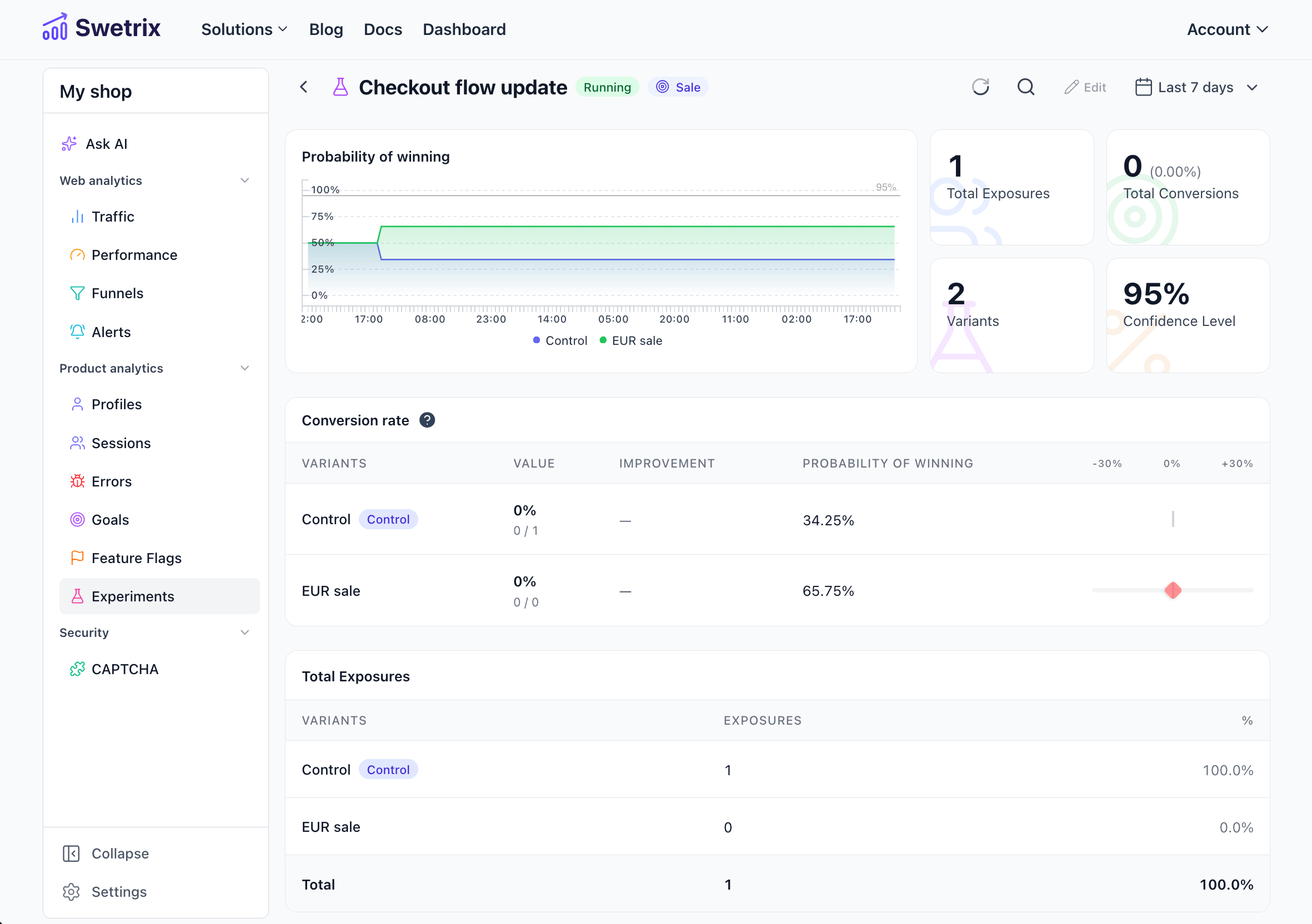
Use a feature flag for the page change so you can pause the test without a deploy. Swetrix experiments connect to feature flags, so the flag controls eligibility and the experiment controls variant allocation, exposure tracking, and result analysis.
Start with a small rollout if the page drives high-value leads:
- Ship the code with the flag off.
- Turn the experiment on for internal testers.
- Roll out to 10% of eligible AI search visitors.
- Move to 50/50 after you confirm events, page speed, and errors.
- Pause the flag if the variant breaks a guardrail.
Use a stable variant key in code:
const variant = await getExperiment("ai-search-lp-proof-first", {}, "control");

if (variant === "proof_first") {
  showProofFirstCopy();
} else {
  showControlCopy();
}
Keep the control page stable during the run. Avoid changing price copy, navigation, forms, or tracking while the experiment collects data. Every extra change makes the result harder to trust.
Read Significance With Discipline
Statistical significance estimates whether your variant beat the control by more than random noise would explain. Use it as a stop rule for the decision.
Plan the test with four numbers:
| Input | Example | Reason |
|---|---|---|
| Baseline conversion | 4.0% | Sets the starting point |
| Minimum detectable lift | 20% | Sets the smallest win you care about |
| Target conversion | 4.8% | Converts the lift into a goal rate |
| Exposures per day | 250 | Estimates how long the test has to run |
If your calculator says you need 7,000 exposures per variant and the page receives 250 eligible exposures per day, the test needs about 56 days. That may still work for a high-value page. For a small page, test a larger copy change, group similar pages, or wait until the page has more traffic.
Use these rules:
- Choose the sample size and confidence threshold before launch.
- Run the test through at least one full business cycle.
- Stop after the sample threshold and significance threshold both pass.
- Mark the result inconclusive if the effect stays small after the planned window.
Ask Swetrix AI Chat follow-up questions after the run, then verify the answer in the dashboard. Try: "Which AI search referrers had the highest signup dropoff during the proof-first experiment?" Use the answer to inspect funnels, sessions, and sources before you ship the variant.
Keep the Experiment Private
Cookie-based testing tools add consent work before you learn anything. The UK ICO says organisations must get consent for cookies and similar technologies that fall outside narrow service exemptions, and PECR can cover cookie data even if that data looks anonymous. That creates friction for tests built around client-side identifiers.
Run the experiment with less data instead:
| Privacy choice | Practical setup |
|---|---|
| No tracking cookies | Use Swetrix cookieless analytics and experiment assignments |
| No personal data in events | Store event names like trial_started, with metadata such as variant |
| No prompt capture | Track the landing page and referrer group, not the full AI query |
| Short retention for raw identifiers | Prefer aggregate goals, funnels, and revenue attribution |
| Data ownership needs | Use EU-hosted cloud or self-host Swetrix when your team requires it |
Privacy-first testing also keeps the dataset cleaner. Consent banners change user behavior on landing pages where the visitor has not built trust yet. Remove that interruption and measure the page itself.
Final Recommendation
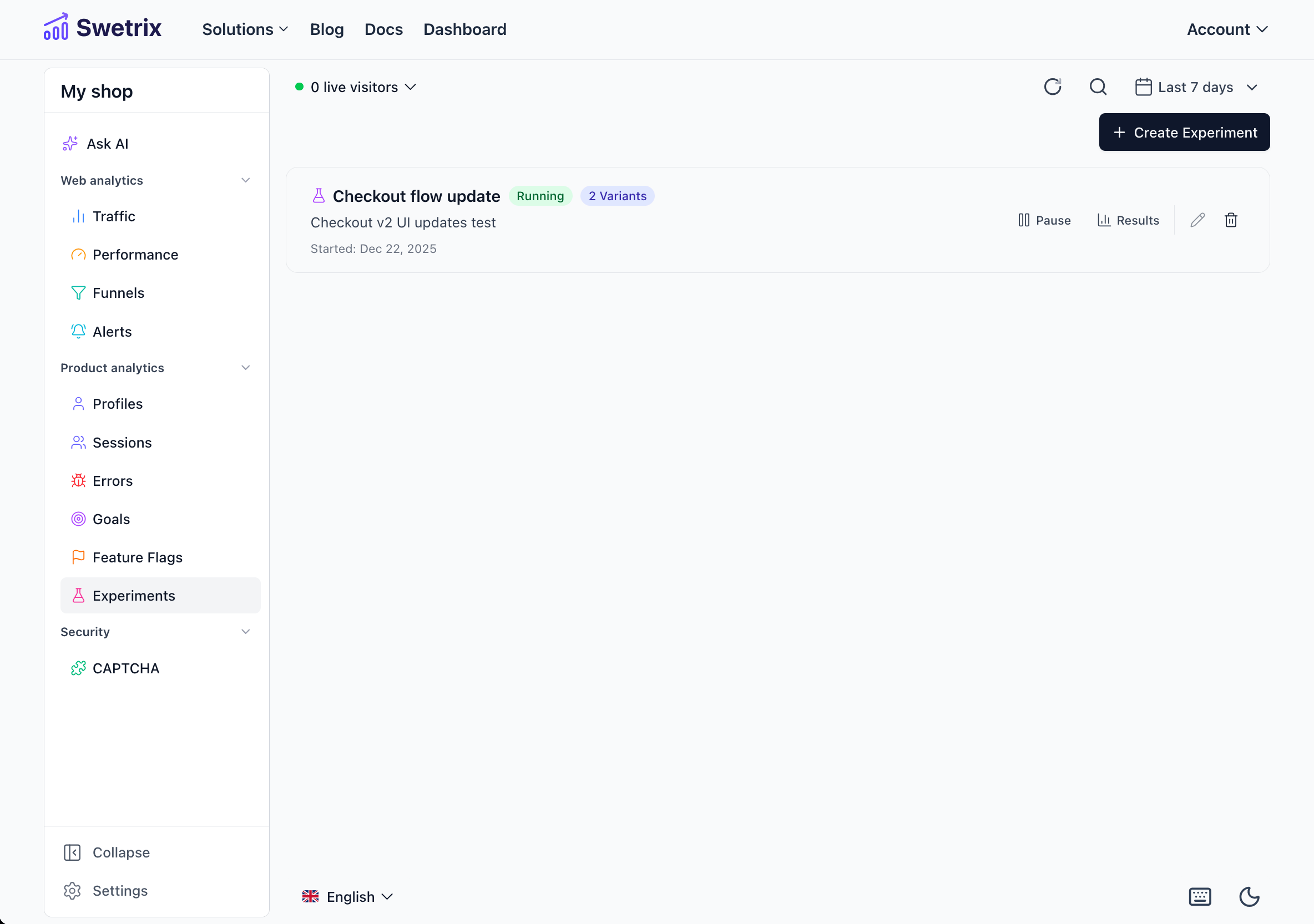
Start with one AI search landing page, one strong hypothesis, one primary goal, and one funnel. Test copy that matches the AI citation context: direct answers, visible proof, and AI-readable tables. Use feature flags to limit risk, then judge the result with sample size, significance, revenue, errors, and funnel dropoff.
Ship the winner when it passes the conversion goal and guardrails. If the result stays inconclusive, keep the learning, write a sharper hypothesis, and test a bigger change.
Swetrix gives you cookieless analytics, custom events, goals, funnels, feature flags, A/B experiments, performance monitoring, error tracking, revenue analytics, and AI Chat in one privacy-first product. Start your 14-day free trial.

The web analytics your site deserves.
Tired of bloated dashboards, privacy concerns, and data you can't trust? Switch to Swetrix and get simple, powerful analytics that respects your users.