- Date
What Is Consent Management Platform Tech? A Complete Guide
 Andrii Romasiun
A visitor lands on your website. Their browser attempts to load six different tracking scripts. Before those scripts fire, a popup appears demanding permission to collect personal data. The user clicks "Reject All." Your web analytics dashboard records nothing.
Understanding what is consent management platform technology explains why your traffic reports look empty. Marketing teams blame seasonality for declining pageviews. The traffic remains steady. The analytics platform stopped recording the visits.
Traditional tracking relies on persistent identifiers stored in the browser. Privacy laws dictate that you secure explicit permission before storing these identifiers. A consent management tool provides the legal infrastructure to ask for that permission, record the user's choice, and block unauthorized scripts.
Every time a user denies permission, conventional analytics tools drop the session. Websites using privacy-first, cookie-free platforms sidestep this problem. By removing personal data collection from the equation, you eliminate the legal requirement to hide your analytics behind a permission prompt.
What is a Consent Management Platform (CMP)?
A consent management platform is back-end software that controls how a website executes tracking scripts. The system maintains a registry of every third-party pixel, analytics tag, and advertising cookie installed on your domain. When a new visitor arrives, the CMP intercepts these scripts. The software holds them in a paused state.
The platform displays a prompt asking the visitor for tracking permission. Once the user submits their preferences, the system logs a digital receipt of that choice. The CMP reads the receipt and unblocks the scripts the user approved.
The Difference Between a CMP and a Cookie Banner
Webmasters confuse the visual prompt with the underlying system. The banner serves as a front-end interface. A functional CMP acts as a firewall for your website's tracking infrastructure.
Installing a visual banner without a back-end blocking mechanism violates the General Data Protection Regulation (GDPR). Webmasters must configure the two components to work together to achieve compliance.
| Feature | Visual Cookie Banner | Complete CMP |
|---|---|---|
| Primary Function | Displays text and buttons to the user. | Controls script execution based on user choices. |
| Data Logging | None. | Stores cryptographic proof of consent. |
| Prior Blocking | Fails to pause scripts on page load. | Pauses all non-required trackers until approval. |
| Auto-Scanning | Requires manual updates. | Scans the domain for new third-party trackers. |
Audit your tracking setup to determine which tool you have installed. Open Google Chrome. Navigate to your website in an Incognito window. Right-click anywhere on the page and select Inspect. Open the Network tab. Refresh the page without clicking your banner. If Google Analytics or Meta Pixel requests populate the Network tab before you interact with the prompt, your system lacks a functional CMP.
Do I Need a CMP for My Website?
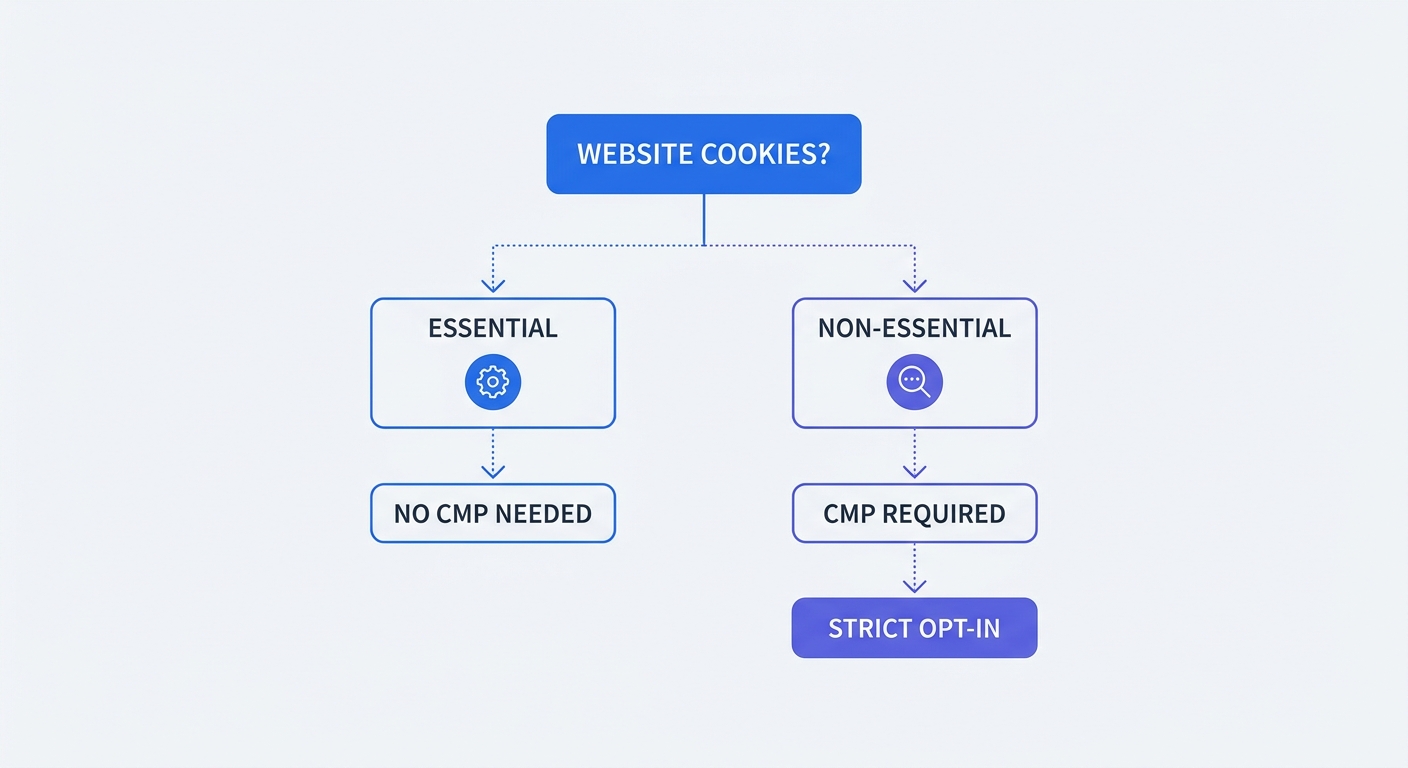
Legal requirements hinge on your technical tracking stack and your audience location. You must install a CMP if you use regulated tracking methods and serve users in jurisdictions with privacy legislation.
Review your website infrastructure to catalog every external script. Look for advertising pixels, user session recording tools, and traditional web analytics. Any service that drops a text file into local storage to recognize a returning user triggers consent requirements under European and certain US state laws.
Drop the tracking methods, and the legal requirement disappears. Websites running on anonymized, cookie-free platforms do not need to install a CMP. Removing these scripts gives you the freedom to delete the banner.
If your marketing strategy relies on ad retargeting, you need a CMP. Follow these steps to verify your legal standing:
- List every third-party script running on your site.
- Identify which scripts use persistent device storage or collect IP addresses.
- Review your traffic logs to confirm if users visit from Europe, California, or Brazil.
- Install a compliant platform if steps two and three return positive results.
Why CMPs Cause Massive Analytics Data Loss
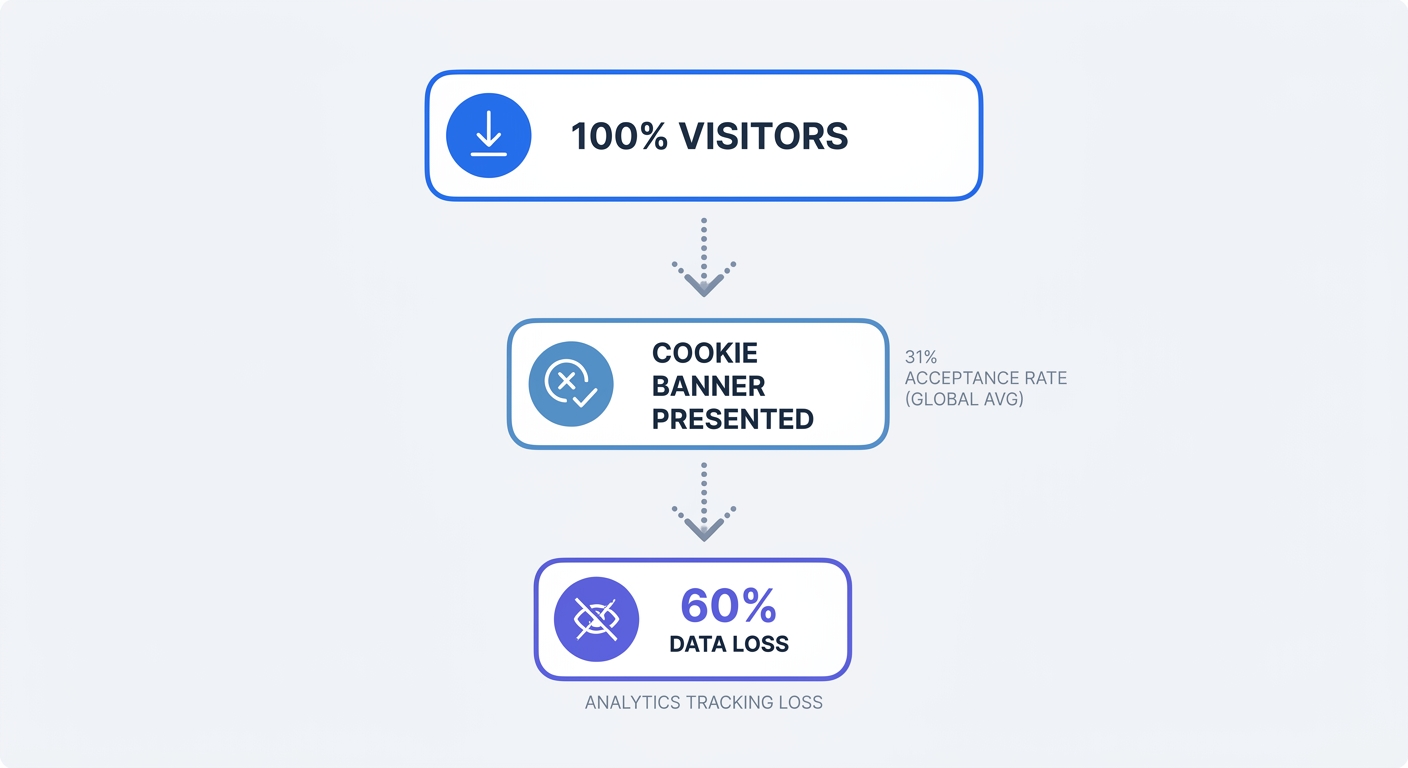
Installing a compliant platform destroys visibility into user behavior. The system functions as designed by blocking unauthorized scripts. Users dislike tracking and deny permission at high rates.
Your analytics software requires the CMP to fire. A rejected prompt means the analytics script remains paused. The visitor browses your site, adds products to their cart, and completes a purchase. Your reports show zero pageviews and zero conversions for that journey.
Global Consent and Acceptance Rates
User behavior trends toward rejection. As banner fatigue sets in, visitors seek out the quickest way to dismiss the prompt without granting access.
The global average cookie banner acceptance rate sits at 31% across all industries, though rates can range anywhere from 4% to 85% depending on the region and audience. Acceptance rates vary by content type; users reading specialized B2B publications grant permission at higher rates than visitors hitting mass-market retail sites.
Visitors also employ passive avoidance strategies. Users ignore the prompt and navigate the site with the banner obscuring part of the screen. Because compliant platforms block trackers until the user grants explicit approval, an ignored banner equals a rejected banner.
Relying on legacy tracking means making business decisions based on less than a third of your audience data. A landing page might convert at a profitable rate, but analytics platforms categorize the visit as a failure because the users who purchased refused consent.
The Analytics Traffic Drop After Installation
The correlation between compliance and data loss is direct. When a domain implements a legally sound prior-blocking system, reported metrics collapse.
The UK Information Commissioner's Office (ICO) updated their own website to adhere to strict consent rules. Following the implementation, the regulatory body observed a significant reduction in recorded analytics traffic—illustrating the direct impact of compliant prior-blocking systems on data visibility.
Calculate your own missing data by comparing front-end analytics with raw server logs. Web servers log every file request, regardless of cookie consent.
- Access your Nginx or Apache server access.log files.
- Filter the logs to count unique IP addresses requesting HTML files over a 30-day period.
- Open your Google Analytics 4 dashboard and view total users for the same timeframe.
- Subtract the GA4 user count from the server unique IP count.
The resulting number represents your data blind spot. This blind spot obscures high-value attribution data. You lose the ability to verify which marketing channels drive revenue. Fix this tracking gap by measuring users without cookies or modeling the missing data using algorithms.
CMP Compliance Failures and Current Trends
Regulatory bodies run automated scans to catch websites faking compliance. Adding a popup to your site does not protect you from fines. The underlying configuration determines your legal standing.
Despite the threat of penalties, many websites fail basic compliance checks by executing tracking scripts before the user submits a choice. These misconfigurations result from careless tag management or conflicting marketing priorities.
Google Consent Mode v2 and Strict Enforcement
Google updated its tracking architecture to enforce privacy laws across its ecosystem. Consent Mode v2 is mandatory for all domains using Google Analytics or Google Ads in the European Economic Area and the UK.
Consent Mode acts as a bridge between your chosen CMP and your Google tags. Instead of hard-blocking the tags, the CMP sends signals detailing the user's choices through four parameters: analytics_storage, ad_storage, ad_user_data, and ad_personalization. If the user denies consent, Google tags execute cookieless "pings" to record basic event data without persistent identifiers.
The Google platform attempts to fill your reporting gaps using machine learning. Advanced Consent Mode models the behavior of users who rejected tracking based on the behavior of users who accepted it.
This modeling process requires high data volumes to function. A website needs a minimum of 700 ad clicks over 7 days for the algorithms to train. Small to medium businesses fail to hit this threshold. The platform discards the unconsented pings, leaving reports empty.
Audit your Consent Mode integration using Google Tag Assistant.
- Open Tag Assistant and enter your URL.
- Click into the Consent tab on the summary screen.
- Verify that the
analytics_storageandad_storageparameters show as Denied on the initial page load. - Interact with your banner and confirm the parameters update to Granted.
Avoiding Dark Patterns and Non-Compliant Setups
Regulators pursue websites that trick users into accepting trackers. Design choices that push visitors toward a desired action qualify as dark patterns.
Making the "Accept All" button bright green while burying the "Reject All" option in a secondary settings menu violates core privacy principles. The path to refusal must carry the same cognitive load as the path to acceptance.
Implement these configuration rules to ensure your setup meets 2026 legal standards:
- Equal Prominence: Use identical button sizes, font weights, and contrast ratios for both acceptance and rejection.
- No Pre-Ticked Boxes: If your banner includes categorical toggles for "Marketing" or "Statistics," default them all to the off position.
- Withdrawal Mechanism: Provide a persistent floating icon or footer link allowing users to revoke their permission at any time.
- Honor Global Privacy Control: Configure your platform to detect and respect automated GPC browser signals.
Fixing dark patterns increases your rejection rate. When given a clear, easy way to opt out, most visitors take it. Marketers must choose between legal compliance and accurate data inside legacy analytics platforms.
The Swetrix Solution: Analytics Without a CMP
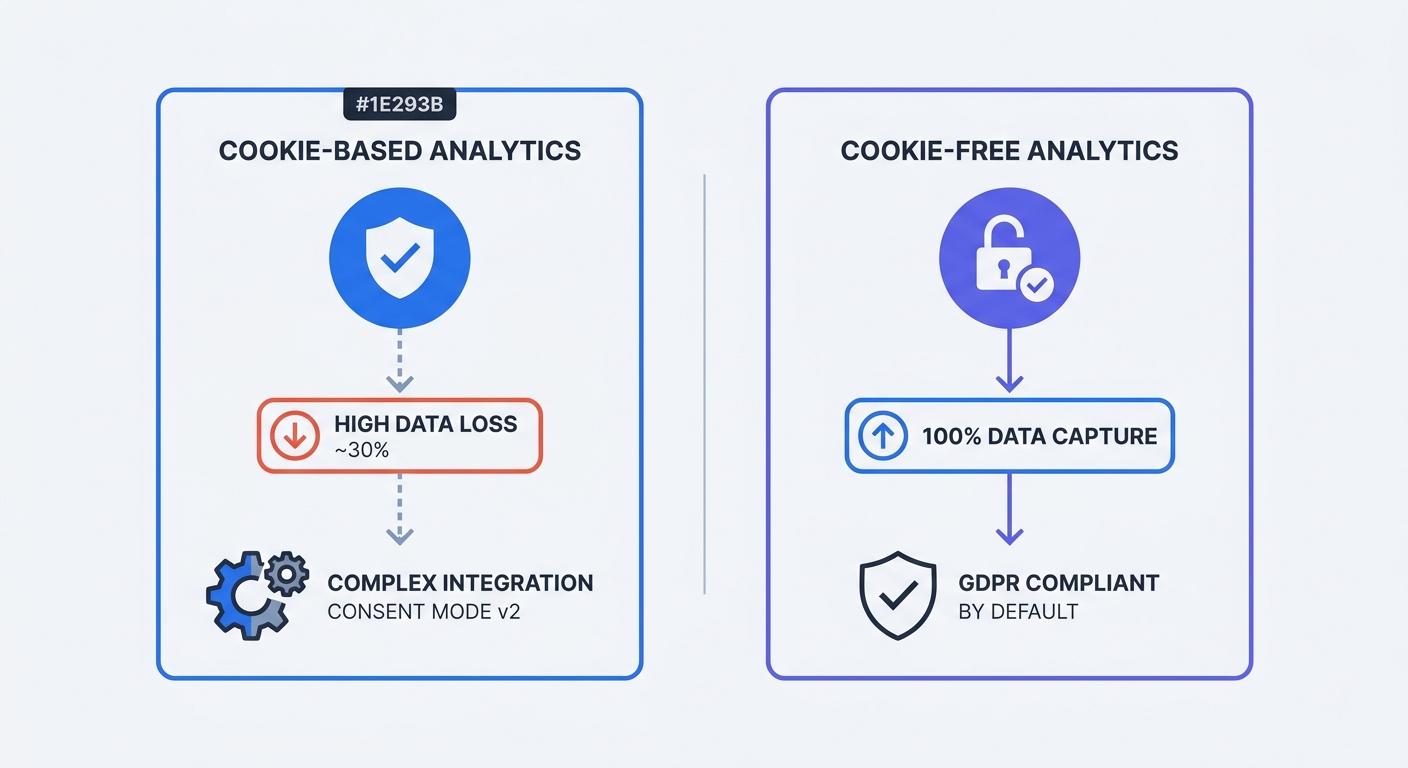
You can capture 100% of your website traffic without violating privacy laws. The regulatory framework targets persistent identifiers, cross-site tracking, and personal data collection. Remove those elements, and the rules no longer apply.
Replacing a cookie-heavy tracker with a privacy-first web analytics tool eliminates the root cause of your data loss.
Why Cookie-Free Analytics Bypass Banner Data Loss
The ePrivacy Directive and the GDPR contain exemptions for anonymous measurement. When analytics software operates without dropping files onto a user's device, the legal requirement for explicit permission vanishes.
Swetrix measures website behavior without generating cookies, utilizing device fingerprinting, or storing IP addresses. The platform assigns a temporary, randomized hash to track a unique visit. This hash resets daily. The system cannot track a user across different websites. The platform prevents the creation of a permanent advertising profile.
Because the data remains anonymous, you bypass the consent requirement. You do not need to pause the Swetrix tracking script. The script loads on the first pageview, logs the referer data, and records the session.
This architectural difference restores your metrics. Instead of losing 70% of your European traffic to banner rejections, you see every visitor in your dashboard. Marketers retain visibility into which campaigns drive traffic and which pages hold user attention.
Transitioning to Privacy-First Data Collection
Migrating away from legacy analytics requires a systematic clean-up of your tracking environment. You must strip out the old tags before you can remove your banner.
Follow these steps to transition your site to a compliant, cookie-free infrastructure.
- Audit Your Codebase: Open your CMS or tag management system. Locate and remove the Google Analytics snippet (
gtag.js). Delete any behavioral recording scripts like Hotjar or Clarity. - Review Marketing Pixels: If you run Meta or LinkedIn ads, consider shifting to server-side conversion tracking. If you keep client-side pixels, you must retain your CMP for those ad scripts.
- Uninstall the CMP: If your site no longer runs third-party ad pixels or tracking cookies, delete the CMP script from your header.
- Deploy Swetrix: Insert the lightweight Swetrix tracking script before the closing
</head>tag of your website.
<script src="https://swetrix.org/swetrix.js" defer></script>
<script>
  document.addEventListener("DOMContentLoaded", () => {
    swetrix.init("YOUR_PROJECT_ID");
    swetrix.trackViews;
  });
</script>
The script begins capturing traffic on the next pageview. You gain access to real-time performance data, custom event tracking, and detailed referer reports. Your website loads faster without the heavy banner interface dragging down performance scores.
Review the GDPR compliance documentation to understand how the temporary hashing mechanism protects user privacy. Document this mechanism in your privacy policy to provide transparency to your users.
Website owners no longer have to beg visitors for permission to count pageviews. You respect their privacy by design while regaining the insights needed to grow your business.
Stop losing your analytics data to rejected prompts and complex consent mode integrations. Try Swetrix today to capture 100% of your website traffic with a cookie-free, open-source platform. Start your free trial and build a privacy-first tracking stack.