- Date
Website Analytics for Healthcare HIPAA Compliance Guide
 Andrii Romasiun
A hospital's marketing team launches a patient portal campaign. Within weeks, the legal department receives a class-action lawsuit. The violation: Google Analytics captured appointment URLs, device fingerprints, and IP addresses from authenticated pages. The settlement: $12.2 million. Advocate Aurora Health learned this lesson in 2024, joining 19 healthcare organizations that paid over $100 million in tracking pixel penalties between 2023 and 2025.
Your analytics setup might be creating the same liability right now. Check your current tracking implementation against HIPAA requirements before the next quarterly compliance audit.
Why Google Analytics Fails HIPAA Compliance (And What It's Costing Healthcare)
The $100 Million Problem: Tracking Pixel Penalties
Novant Health paid $6.6 million. Advocate Aurora Health settled for $12.2 million. New York Presbyterian Hospital wrote a $300,000 check to the state attorney general. These organizations made the same mistake: deploying tracking pixels that transmitted protected health information to third parties without proper safeguards.
Financial exposure extends beyond regulatory fines. Healthcare data breaches now cost an average of $9.77 million per incident—double the financial sector and 2.5 times the cross-industry mean. Healthcare has topped breach cost rankings for 14 consecutive years.
Private litigation drives more risk than OCR enforcement in 2026. Class-action lawsuits target tracking violations even after the June 2024 Texas court ruling that vacated HHS guidance on unauthenticated pages. Over 700 healthcare breaches exposed 275 million patient records between 2024 and 2025—a 63.5% increase from 2023.
Audit your current analytics setup today. Open your website's developer console, navigate to the Network tab, and filter for requests to google-analytics.com, facebook.com/tr, or doubleclick.net. If these fire on pages where patients schedule appointments, view billing information, or access health records, you're transmitting PHI to third parties without a Business Associate Agreement.
What Makes Healthcare Website Data Protected Health Information
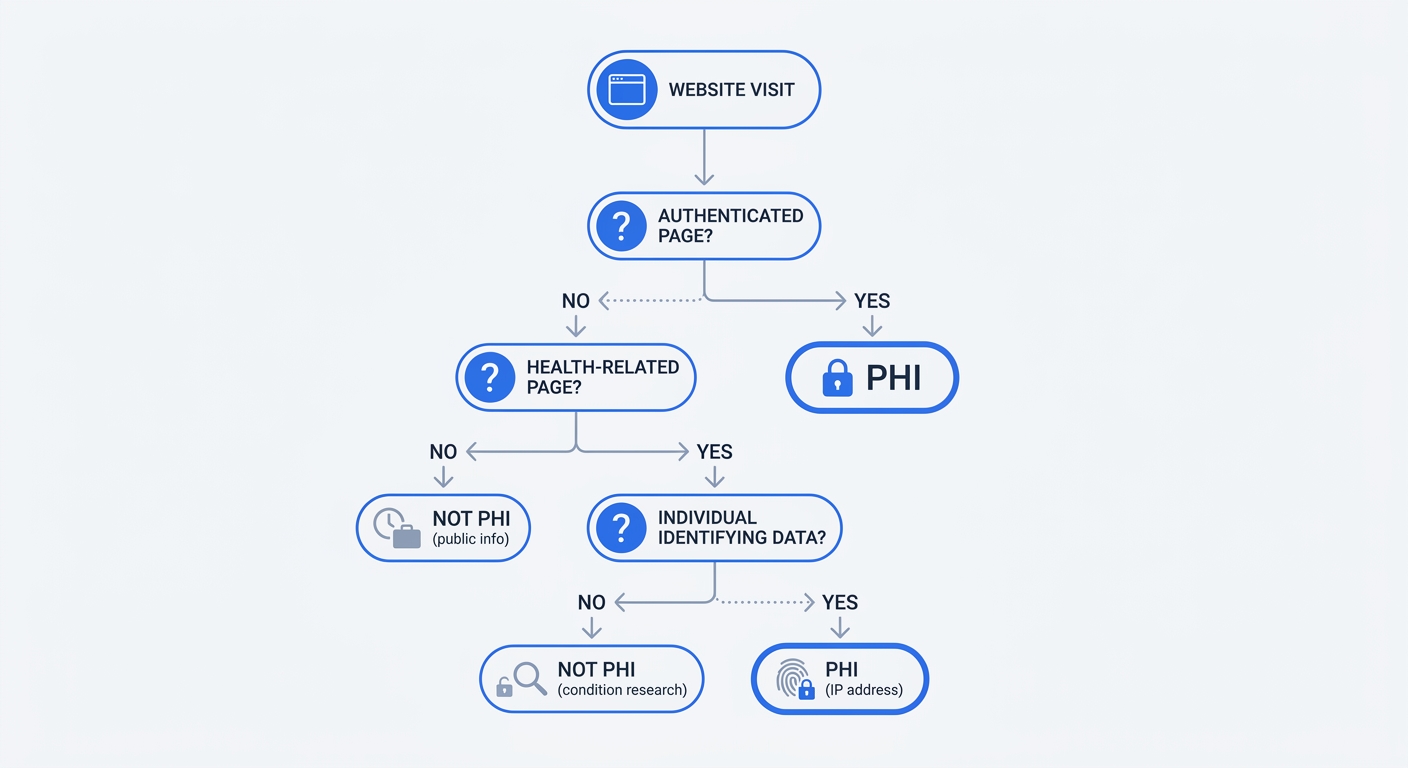
An IP address alone isn't PHI. A page view on your hospital's "Visiting Hours" page isn't PHI. Combine an IP address with a visit to your cardiology appointment scheduler, and you've created PHI under HIPAA's definition.
The regulation hinges on context. PHI includes any individually identifiable health information that relates to past, present, or future physical or mental health, the provision of healthcare, or payment for healthcare. When your analytics platform captures both an identifier (IP address, device fingerprint, cookie ID) and health-related context (page URL, navigation path, form interaction), the combined data set becomes protected.
Authenticated pages—patient portals, billing systems, appointment schedulers requiring login—almost always generate PHI when tracked. The user has identified themselves, and every page they visit relates to their healthcare.
Unauthenticated pages create a gray area. A visitor browsing your "Careers" page or checking parking information doesn't trigger PHI creation. That same visitor researching treatment options for a specific condition, viewing doctor profiles, or using your symptom checker does create PHI when their device identifier links to health-related behavior.
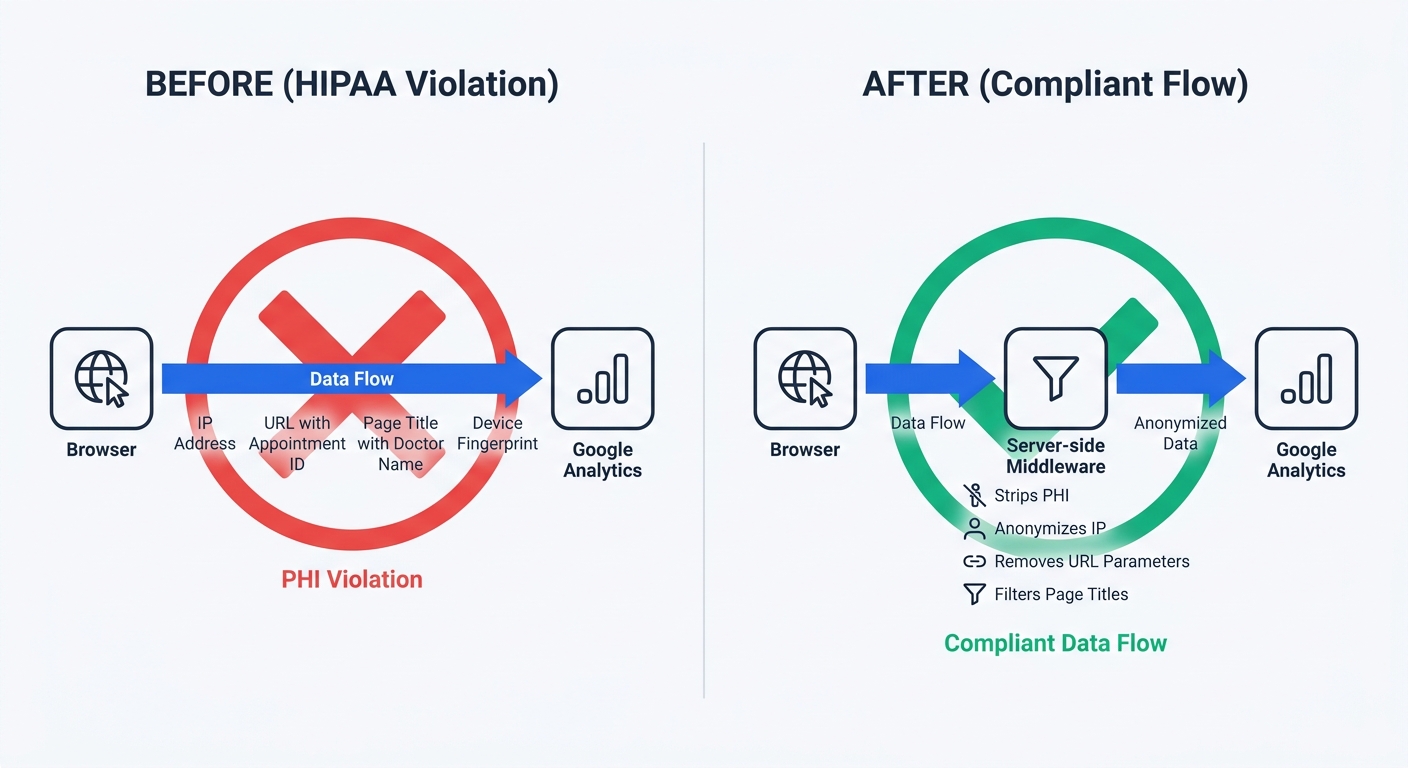
URL parameters expose PHI in ways most marketing teams miss. yoursite.com/appointments?doctor=smith&specialty=cardiology tells an analytics platform that this specific device visited a cardiologist's booking page. Page titles like "Appointment Confirmed - Dr. Smith - Cardiology" transmit the same information. Custom events tracking "Clicked Schedule Appointment with Dr. Smith" create an explicit health-related record tied to a device.
Review your website's URL structure and page titles. Search your analytics platform for any custom events or goals that reference medical specialties, doctor names, or health conditions. Each instance represents a potential PHI disclosure.
Why Google Won't Sign a Business Associate Agreement
Google states it makes no representations that Google Analytics satisfies HIPAA requirements and does not offer Business Associate Agreements for this service. The company's position hasn't changed in over a decade. Google Workspace and Google Cloud offer BAAs covering Gmail, Drive, Calendar, BigQuery, and other enterprise services. Google Analytics and GA4 remain excluded.
The technical architecture makes compliance impossible. GA4 captures IP addresses, full page URLs, navigation paths, device fingerprints (browser, OS, screen resolution, language), referral sources, and geographic location on every page load. No configuration setting prevents this data collection—it's fundamental to how the platform functions.
IP anonymization removes one identifier but leaves device fingerprints, page URLs, and behavioral patterns intact. A visitor's journey from "diabetes symptoms" to "endocrinology appointments" to "insurance coverage questions" creates a health profile even without an IP address. The device fingerprint links these visits to a single individual.
Server-side tracking doesn't solve the problem either. Moving the tracking code from browser to server changes where data collection happens, not what data gets collected. If your server sends page URLs, user agents, and navigation sequences to Google Analytics, you're still transmitting PHI.
Calculate your exposure. Count how many monthly visitors access authenticated pages or health-related content on your site. Multiply by $63,973—the per-violation fine under current HIPAA penalty tiers. A mid-size hospital with 50,000 monthly patient portal sessions faces theoretical exposure exceeding $3 billion if every session constitutes a separate violation.
Understanding HIPAA Requirements for Website Analytics
Business Associate Agreement (BAA) Requirements Explained
A Business Associate Agreement is a legal contract required when a covered entity shares PHI with a vendor. The BAA obligates the vendor to implement specific safeguards, limit PHI use to permitted purposes, report breaches within required timeframes, and allow compliance audits.
Tracking technology vendors are business associates if they create, receive, maintain, or transmit PHI on behalf of a regulated entity for a covered function or provide services that involve PHI disclosure. When your analytics platform receives health-related behavioral data linked to individual identifiers, it becomes a business associate.
The BAA must exist before any PHI transmission occurs. Deploying tracking code first and requesting a BAA later doesn't retroactively legitimize the disclosure. Each day of operation without a BAA in place constitutes ongoing violations.
A Business Associate Agreement protects your organization by contractually obligating vendors to implement HIPAA-required safeguards. Before deploying any analytics platform that may handle PHI, request the vendor's standard BAA and allow reasonable time for their legal review process.
Request BAAs from your current analytics vendors today. Send a formal email to their legal or compliance department: "We are a HIPAA-covered entity. Our use of your platform may involve the transmission of protected health information. Please provide your standard Business Associate Agreement for review and execution. Could you provide an estimated timeline for response, or would within two weeks be feasible?" Document the request date and track vendor responses as part of your compliance recordkeeping.
The 2022 HHS Guidance and 2024 Court Ruling
December 2022 marked a turning point. HHS issued a bulletin clarifying that regulated entities are not permitted to use tracking technologies in a manner that would result in impermissible disclosures of PHI to tracking technology vendors. The guidance specified that even unauthenticated page visits could create PHI when combined with IP addresses and health-related content.
The American Hospital Association sued HHS, arguing the guidance exceeded the agency's authority. On June 20, 2024, the U.S. District Court for the Northern District of Texas vacated portions of the guidance—specifically the assertion that HIPAA obligations are triggered when an online technology connects an individual's IP address with a visit to an unauthenticated public webpage addressing specific health conditions or providers.
Healthcare organizations celebrated the ruling as permission to resume Google Analytics on public pages. The celebration was premature. Over $100 million in fines have been issued since 2023 for tracking violations. Private class-action litigation continues regardless of the court ruling. OCR shifted enforcement focus toward authenticated pages but maintains that tracker identifiers combined with health-context visits constitute PHI.
The ruling doesn't eliminate risk—it narrows the scope of federal enforcement while leaving organizations exposed to state attorneys general, private lawsuits, and reputational damage. 47% of healthcare marketers report reduced ROI and reputation damage from non-compliance issues.
Document your risk assessment. Create a spreadsheet listing every page on your website. Mark each as authenticated or unauthenticated. For unauthenticated pages, note whether content relates to health conditions, treatments, providers, or healthcare services. This inventory becomes your compliance roadmap.
Authenticated vs Unauthenticated Pages: What's the Difference?
Authenticated pages require login credentials. Patient portals, appointment scheduling systems, billing interfaces, prescription refill forms, and health record access all fall into this category. Every authenticated page view creates PHI when tracked because the user has identified themselves and the content relates to their healthcare.
Unauthenticated pages are accessible without login. Your homepage, contact information, visiting hours, career listings, and general hospital information don't create PHI when visited. The distinction blurs when unauthenticated pages contain health-related content.
A visitor researching "knee replacement recovery timeline" on your orthopedics blog creates PHI if your analytics platform links their device identifier to that specific health topic. The same visitor checking your parking garage rates does not. The content determines whether the visit relates to healthcare provision.
Form interactions on unauthenticated pages require special attention. A "Request Appointment" form that captures name, phone number, and reason for visit generates PHI the moment a user begins typing. If your analytics platform tracks form field interactions, keystroke data, or partial submissions, you're collecting PHI before the user clicks submit.
Search functionality creates another PHI vector. A visitor searching your site for "diabetes treatment options" or "Dr. Smith cardiology" generates a search query that combines health context with a device identifier. Analytics platforms that capture internal site search terms record this as PHI.
Configure your analytics platform to exclude authenticated pages. Most platforms allow page-level exclusions through tag management rules or configuration settings. Create a rule that prevents tracking code from firing on any URL path containing /portal/, /patient/, /billing/, or /appointments/.
7 HIPAA-Compliant Analytics Platforms That Offer BAAs
Cloud-Based Solutions with Business Associate Agreements
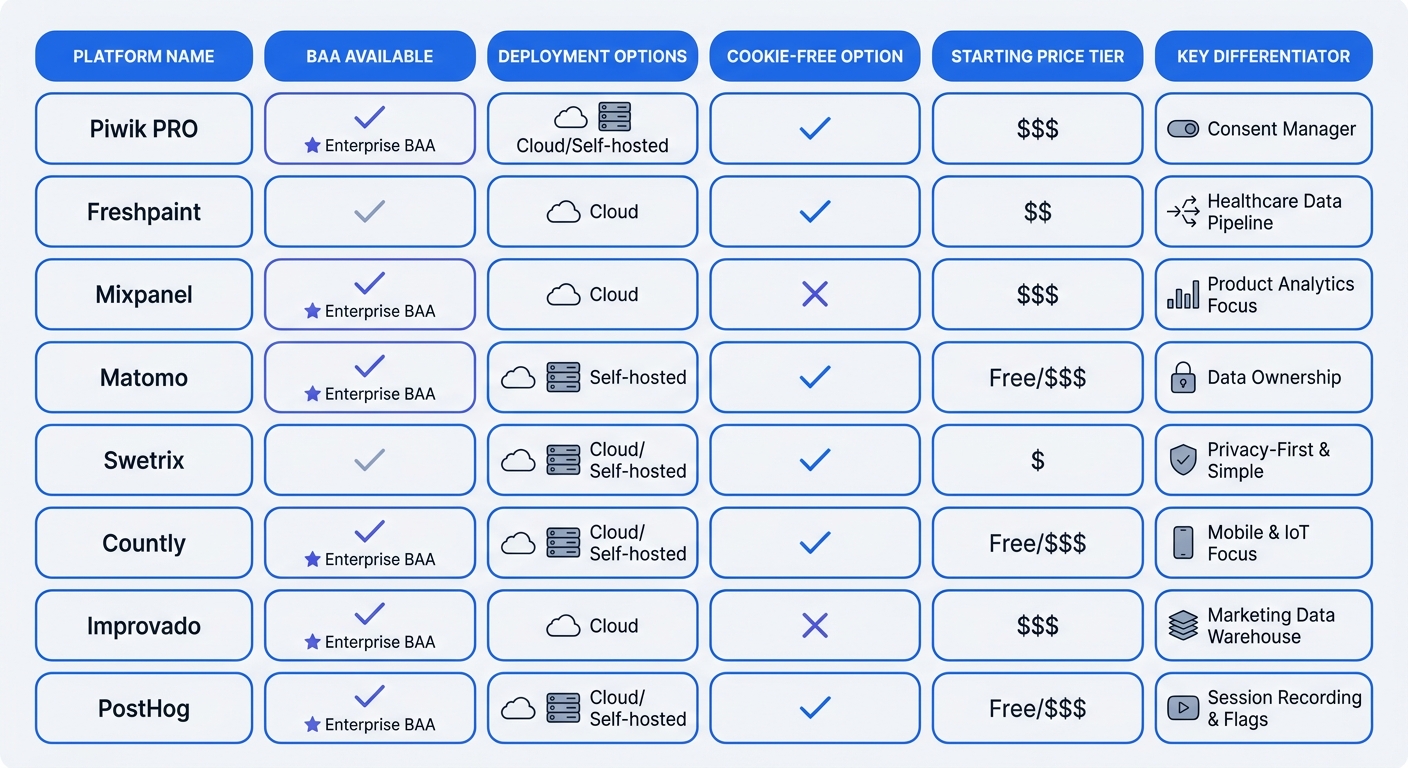
Piwik PRO serves enterprise healthcare organizations with a full-featured analytics platform and BAA support. The platform offers on-premise deployment options for organizations requiring complete data sovereignty. Pricing targets enterprise budgets with custom quotes based on traffic volume.
Freshpaint built its entire platform around healthcare compliance. The company offers a BAA on its Compliance plan, which requires a custom quote. Freshpaint acts as middleware between your website and downstream marketing tools, filtering PHI before data reaches non-compliant platforms. This architecture lets you continue using Google Analytics or Meta Ads while maintaining HIPAA compliance—Freshpaint strips identifying information before transmission.
Mixpanel provides a BAA on its Enterprise plan. The product analytics platform tracks user behavior, funnel conversion, and retention metrics. Healthcare organizations use Mixpanel to analyze patient portal engagement, telehealth adoption, and digital health tool usage. Enterprise pricing starts around $2,000 monthly for higher event volumes.
Amplitude offers behavioral analytics with BAA support. The platform excels at cohort analysis and user journey mapping. Healthcare teams track how patients move between symptom checkers, provider directories, and appointment booking flows. Amplitude's Growth and Enterprise plans include HIPAA compliance features.
PostHog combines product analytics, session replay, feature flags, and A/B testing in a single platform. The company offers EU hosting options and signs BAAs for healthcare customers. Self-hosting provides maximum data control for organizations with strict security requirements.
Countly supports both cloud hosting and self-hosted deployment with BAA availability on either option. The platform emphasizes privacy-first architecture with built-in consent management and data anonymization. Countly's self-hosted option eliminates third-party data transmission.
Improvado aggregates data from multiple marketing platforms into a unified analytics warehouse. The company offers BAAs and maintains SOC 2 compliance. Healthcare marketing teams use Improvado to connect advertising spend, website analytics, and patient acquisition data while maintaining HIPAA compliance across all sources.
Compare response times when requesting BAAs. Send identical requests to three vendors and track how long each takes to respond with a signed agreement. Vendors responding within 48 hours demonstrate mature compliance programs. Those taking weeks or requiring multiple follow-ups may lack healthcare expertise.
Self-Hosted Options for Maximum Data Control
Matomo pioneered open-source web analytics as an alternative to Google Analytics. The platform offers cloud hosting, but healthcare organizations must self-host to achieve HIPAA compliance because Matomo doesn't offer BAAs for its cloud service. Self-hosting requires technical expertise to maintain servers, apply security patches, and configure database encryption.
Swetrix Community Edition provides open-source analytics that healthcare organizations can deploy on their own infrastructure. Install the platform on HIPAA-compliant servers within your network perimeter. Patient traffic data never leaves your infrastructure, eliminating third-party data sharing risks. The self-hosted approach requires DevOps resources but provides absolute control over data storage, access controls, and audit logging.
Self-hosting shifts responsibility from vendor compliance to internal IT security. Your team must implement encryption at rest and in transit, configure role-based access controls, maintain detailed audit logs, and document security measures in your HIPAA Security Risk Assessment. Budget for ongoing server maintenance, security monitoring, and software updates.
Evaluate your technical capacity before choosing self-hosted analytics. Do you have dedicated DevOps staff? Can your team respond to security patches within 24 hours? Does your infrastructure meet HIPAA Security Rule requirements for encryption, access controls, and audit logging? If any answer is no, cloud-based solutions with BAAs provide better risk mitigation.
Cookie-Free Analytics That Skip Consent Requirements
Swetrix operates without cookies, eliminating consent banner requirements for analytics tracking. The platform never collects personally identifiable information. IP addresses are anonymized before processing. No device fingerprinting occurs. This approach lets patients access your clinic information, provider directories, and patient portals without clicking through legal popups.
Plausible Analytics offers lightweight, EU-hosted analytics with no cookies. The platform tracks page views, referral sources, and top pages without creating user profiles. Healthcare organizations use Plausible on public-facing marketing sites where detailed behavioral analytics aren't required.
Fathom Analytics provides privacy-first tracking with automatic GDPR and CCPA compliance. The platform collects aggregate statistics without individual user tracking. Simple dashboards show traffic trends, popular content, and referral sources.
Simple Analytics emphasizes straightforward metrics without complexity. The EU-hosted platform tracks visits, page views, and referral sources. No cookies, no fingerprinting, no personal data collection. Healthcare organizations use Simple Analytics for basic traffic monitoring on informational websites.
Cookie-free platforms trade granularity for compliance simplicity. You won't get user-level journey maps, cohort analysis, or detailed funnel tracking. For many healthcare marketing sites, aggregate traffic statistics and referral source data provide sufficient insight without HIPAA complications.
Test a cookie-free platform on a subset of your website. Deploy Swetrix or Plausible on your blog, resource library, or general information pages. Run it parallel to your existing analytics for 30 days. Compare the insights you use versus the data you collect but never analyze.
Implementing HIPAA-Compliant Analytics: Step-by-Step
Page-Level Configuration and Data Minimization
Remove all tracking code from authenticated pages immediately. Open your tag management system and create an exclusion rule for any URL path requiring login. Common patterns include /portal/*, /patient/*, /secure/*, /billing/*, and /appointments/*. Test the exclusion by logging into your patient portal and verifying no analytics requests fire in the browser's network tab.
Configure unauthenticated pages to minimize data collection. Disable user ID tracking—this feature links sessions across devices and creates persistent user profiles. Turn off enhanced measurement in GA4, which captures scroll depth, outbound clicks, site search, video engagement, and file downloads. Each automatic event increases PHI exposure risk.
Anonymize IP addresses at the earliest possible point. Most analytics platforms offer IP anonymization settings that truncate the last octet before storage. This converts 192.168.1.100 to 192.168.1.0, removing precise device identification while preserving geographic region data for reporting.
Strip URL parameters before transmission. Appointment IDs, doctor names, patient identifiers, and session tokens often appear in URLs. Configure your analytics platform to exclude query parameters or whitelist only safe parameters like UTM tracking codes. A URL like yoursite.com/appointments?patient_id=12345&doctor=smith should reach your analytics platform as yoursite.com/appointments.
Sanitize page titles that contain PHI. Default page titles like "Appointment Confirmed - Dr. Smith - Cardiology" transmit health information. Override these with generic titles: "Appointment Confirmed" or "Confirmation Page". Implement this through your content management system or tag management layer.
Document every configuration change in your HIPAA Security Risk Assessment. List which pages are excluded from tracking, what data elements are anonymized, and how URL parameters are stripped. This documentation demonstrates due diligence during compliance audits.
Server-Side Tracking to Strip PHI Before Transmission
Server-side tracking acts as middleware between browsers and analytics platforms, intercepting data before transmission and filtering PHI. Your website sends tracking events to your own server instead of to Google Analytics or Meta. The server inspects each event, removes identifying information, and forwards sanitized data to the destination platform.
Implement a server-side proxy using Google Tag Manager Server-Side or a custom Node.js application. The proxy receives events from your website, applies transformation rules, and forwards clean data. Transformation rules strip URL parameters, anonymize IP addresses, filter page titles, and remove custom event properties containing health information.
Configure your proxy to maintain an allowlist of safe data elements. Only page paths, referral sources, device categories, and UTM parameters pass through. Everything else gets dropped. This whitelist approach prevents accidental PHI transmission when developers add new tracking events.
Test your server-side implementation by sending sample events containing PHI. Create a test page with URLs like /appointments?patient_id=12345, page titles containing doctor names, and custom events with health conditions. Verify these elements are stripped before reaching your analytics platform. Check the destination platform's raw event data to confirm no PHI appears.
Monitor your proxy logs for filtering activity. Set up alerts when the proxy blocks events containing potential PHI. These alerts help identify tracking code that needs correction before it creates compliance violations.
Budget for infrastructure costs. Server-side tracking requires dedicated compute resources to handle event volume. A mid-size healthcare website processing 1 million monthly page views needs about $200-500 monthly in server costs, depending on cloud provider and traffic patterns.
Required Security Controls: Access, Encryption, and Audit Logs
HIPAA Security Rule compliance requires strict access controls, reliable data encryption, and detailed audit logs for any system handling PHI. Your analytics platform must implement these safeguards regardless of whether it's cloud-hosted or self-hosted.
Implement role-based access controls that limit analytics platform access to authorized personnel. Create separate roles for marketing analysts (view-only access to reports), developers (configuration access), and administrators (full access including user management). Require multi-factor authentication for all accounts.
Enable encryption in transit using TLS 1.2 or higher for all data transmission between browsers, servers, and analytics platforms. Verify your analytics platform encrypts data at rest using AES-256 or equivalent. Cloud platforms should provide encryption key management options that let you control or rotate keys.
Configure audit logging that captures who accessed what data when. Logs should record user logins, report views, configuration changes, data exports, and failed access attempts. Retain logs for at least six years to meet HIPAA record retention requirements.
Review access logs quarterly. Look for unusual patterns: after-hours access, bulk data exports, configuration changes by unauthorized users, or repeated failed login attempts. These patterns may indicate security incidents requiring investigation.
Test your disaster recovery procedures. Can you restore analytics data from backups? How long does recovery take? Document the process and test it once per year. HIPAA requires covered entities to maintain retrievable exact copies of electronic PHI.
Create a vendor evaluation checklist for any analytics platform you're considering. Does the platform offer a BAA? Can you disable IP collection? Is data encrypted in transit and at rest? Are audit logs available? Can you control data storage location? Can you export all data for migration? Require affirmative answers to all questions before proceeding.
Common HIPAA Analytics Mistakes (And How to Avoid Them)
Why Consent Doesn't Make Google Analytics Compliant
Healthcare organizations deploy cookie consent banners and assume compliance. The banner asks visitors to accept tracking before Google Analytics loads. This approach fails HIPAA requirements because consent doesn't eliminate the Business Associate Agreement requirement.
HIPAA mandates BAAs with any vendor that handles PHI on behalf of a covered entity. Patient consent addresses the provider-patient relationship but doesn't change the covered entity's obligations to vendors. If Google Analytics receives PHI, Google becomes a business associate regardless of whether the patient clicked "Accept Cookies."
Consent mechanisms also fail on technical grounds. Most consent management platforms load tracking code after the user accepts, but they can't prevent PHI from flowing through that code once activated. A patient who consents to tracking and then visits appointment scheduling pages still transmits PHI to Google Analytics.
The consent banner creates a false sense of security. Compliance teams see the banner and assume legal requirements are met. Meanwhile, every authenticated page view and health-related navigation path generates PHI disclosures to a vendor that won't sign a BAA.
Remove consent banners from your compliance strategy. They serve GDPR and CCPA requirements but don't address HIPAA obligations. If you're using Google Analytics on pages that might contain PHI, the consent banner doesn't reduce your violation exposure.
The Google Tag Manager Trap
Google Tag Manager (GTM) enables deployment of tracking scripts through a centralized interface. Marketing teams add Google Analytics, Meta Pixel, LinkedIn Insight Tag, and dozens of other trackers without involving developers. This convenience creates massive HIPAA exposure.
Each tag deployed through GTM receives the same data: page URLs, referral sources, user interactions, and form submissions. If one tag transmits PHI, the violation exists regardless of how the tag was deployed. GTM doesn't filter data or prevent PHI transmission—it's a delivery mechanism that makes non-compliant tracking easier to implement.
Marketing teams often deploy tags without understanding HIPAA implications. A campaign manager adds a new conversion tracking pixel for a paid search campaign. The pixel fires on the appointment confirmation page, capturing the patient's journey from ad click through booking. The organization disclosed PHI to an advertising platform without a BAA.
Audit your GTM container today. Export a list of all active tags. For each tag, identify the vendor receiving data and verify whether a BAA exists. Common violators include Meta Pixel, LinkedIn Insight Tag, Twitter conversion tracking, TikTok Pixel, and third-party advertising platforms.
Implement a tag approval workflow that requires compliance review before deployment. No tag goes live without answering: What vendor receives data? Do we have a BAA with this vendor? What pages will this tag fire on? Could any of those pages contain PHI? Document the answers before approving the tag.
Consider disabling GTM on healthcare websites. The risk of unauthorized tag deployment outweighs the convenience. Deploy analytics tracking through your website code where changes require developer review and testing.
Insurance Policy Exclusions You Need to Know About
Insurance carriers have introduced policy exclusions that eliminate coverage for pixel tracking liability. Healthcare organizations discover these exclusions after receiving lawsuit notices, when they attempt to file claims for defense costs and settlements.
The exclusions state that the policy doesn't cover claims arising from the use of tracking technologies, web beacons, pixels, or similar tools that collect or transmit personal information. Some policies exclude HIPAA violations related to website analytics.
Review your cyber liability and professional liability policies today. Search for exclusions related to "tracking technologies," "web analytics," "pixels," or "online tracking tools." If these exclusions exist, your organization bears the full cost of any tracking-related litigation.
Request policy amendments that eliminate or narrow these exclusions. Insurance carriers may agree to cover tracking technology claims if you demonstrate robust compliance controls: BAAs with all analytics vendors, documented risk assessments, regular compliance audits, and staff training.
Calculate your uninsured exposure. Multiply your monthly website visitors by the average settlement amount ($6-12 million based on recent cases) and divide by the number of affected individuals in those cases. This rough calculation shows potential per-visitor liability. A hospital with 100,000 monthly visitors could face theoretical exposure exceeding $50 million per year.
Document your compliance efforts in detail. Insurance carriers consider compliance programs when underwriting policies and evaluating claims. Maintain records of BAA requests and responses, vendor evaluation processes, configuration changes to reduce PHI transmission, staff training sessions, and regular compliance audits. This documentation may influence coverage decisions.
The Business Case for HIPAA-Compliant Analytics
True Cost of Non-Compliance: Fines, Lawsuits, and Reputation
OCR penalties represent only a fraction of total exposure. Regulatory enforcement actions have resulted in penalties such as the $300,000 fine issued to New York Presbyterian Hospital by the state attorney general. However, private litigation drives substantially higher costs. Class-action settlements in tracking pixel cases have reached $12.2 million, as in the Advocate Aurora Health case, with damages potentially awarded for every affected patient—often exceeding regulatory penalties by orders of magnitude.
Healthcare data breaches cost an average of $9.77 million per incident. This figure includes investigation costs, legal fees, notification expenses, credit monitoring for affected individuals, regulatory fines, and business disruption. Healthcare has maintained the highest breach cost of any industry for 14 consecutive years.
Stolen medical records command premium prices on dark web markets. A single record sells for $260-310—ten times the value of a stolen credit card. Criminals use medical records for insurance fraud, prescription drug schemes, and identity theft. The high value incentivizes targeted attacks against healthcare organizations with weak security controls.
Reputational damage compounds financial losses. Patients lose trust in organizations that mishandle their health information. Local news coverage of tracking violations and data breaches drives patients to competitors. 47% of healthcare marketers report reduced ROI and reputation damage from non-compliance issues.
Breach notification requirements create additional costs. HIPAA mandates individual notification within 60 days of discovering a breach affecting 500 or more individuals. Notification must include a description of the breach, types of information involved, steps individuals should take, and what the organization is doing to investigate and prevent future breaches. Notification costs include postage, call center staffing, and credit monitoring services.
Calculate your organization's potential breach cost. Start with the $9.77 million industry average. Adjust based on your patient volume, data sensitivity, and existing security controls. Add legal defense costs ($500,000-2 million for class-action litigation), regulatory investigation costs ($200,000-500,000), and reputation recovery expenses (marketing campaigns, patient outreach, community relations).
ROI of Privacy-First Analytics in Healthcare
Compliant analytics eliminates the largest source of HIPAA violation risk in modern healthcare operations. Tracking technologies account for over $100 million in penalties since 2023—more than any other single violation category. Removing this exposure protects your organization from both regulatory enforcement and private litigation.
Cookie-free analytics improves user experience by eliminating consent banners. Patients access your provider directories, symptom checkers, and appointment scheduling without clicking through legal popups. Conversion rates improve when friction decreases. Some healthcare organizations have reported increases in appointment bookings after removing consent banners and switching to cookieless analytics.
Privacy-first platforms reduce technical complexity. No tag management system to maintain. No consent management platform to configure. No cookie syncing or cross-domain tracking to troubleshoot. Marketing teams access the metrics they need without managing complex tracking infrastructure.
Data sovereignty options provide additional security. Self-hosted analytics platforms keep patient data within your network perimeter. No third-party vendors access your traffic data. No data crosses international borders. This architecture simplifies compliance with state privacy laws, GDPR for international patients, and internal security policies.
Compliant analytics enables data-driven decision making without regulatory risk. Marketing teams optimize campaigns based on traffic sources and conversion paths. Product teams improve patient portal usability through behavior analysis. Leadership tracks digital health adoption and telehealth utilization. All these insights become available without HIPAA violations.
Compare the cost of compliant analytics against potential breach exposure. A mid-size healthcare organization might spend $20,000-50,000 per year on a privacy-first analytics platform with BAA support. The same organization faces $9.77 million average breach costs and potential class-action settlements exceeding $10 million. The ROI calculation is straightforward: spending $50,000 to eliminate $10 million in exposure delivers 200:1 return.
Present this business case to leadership using specific numbers from your organization. Calculate monthly website visitors, estimate the percentage accessing health-related content, and multiply by average settlement amounts from recent cases. Show the cost of compliant analytics platforms. Highlight the insurance policy exclusions that leave the organization unprotected. Request budget approval for immediate implementation.
Swetrix offers a 14-day free trial of its privacy-first analytics platform. The cookieless architecture eliminates consent banner requirements while providing the traffic insights healthcare marketing teams need. For organizations requiring complete data sovereignty, Swetrix Community Edition can be deployed on your own HIPAA-compliant infrastructure. Start your trial at swetrix.com/signup or explore how privacy-focused analytics differs from traditional platforms at our Google Analytics alternative comparison page.