- Date
8 User Flow Diagram Examples to Master UX in 2026
 Andrii Romasiun
Understanding your user's journey from their first click to a final conversion is the bedrock of a successful product. It's easy to get lost in isolated metrics like page views or button clicks, but these individual data points don't tell the whole story. The real insights live in the sequence of actions users take, the paths they follow, and the friction points that cause them to drop off. This is where a well-designed user flow diagram becomes your most powerful strategic tool.
This comprehensive guide moves beyond theory to provide a curated collection of actionable user flow diagram examples. We dissect eight common-yet-critical user journeys, from e-commerce checkouts and SaaS onboarding to complex API integrations. Forget generic templates; this is a deep dive into the strategic thinking behind effective user flows.
For each example, you will find:
- A detailed visual breakdown of the flow with annotated screenshots.
- Strategic analysis explaining the "why" behind each step.
- Actionable takeaways you can apply directly to your own product.
- Key metrics to track, with a focus on privacy-first analytics using Swetrix.
- Editable templates to jumpstart your own diagramming process.
By the end of this article, you won't just understand what a user flow is; you'll have a practical playbook of proven user flow diagram examples to help you optimize key pathways, reduce churn, and drive meaningful growth. Let's get started.
1. Example 1: The E-commerce Checkout Flow
The e-commerce checkout flow is a classic and critical example of a user flow diagram. It maps the series of steps a customer takes from adding an item to their cart to completing a purchase. This flow is paramount because any friction can directly lead to abandoned carts and lost revenue, making it one of the most optimized and analyzed flows in the digital world.
A typical checkout flow includes stages like viewing the cart, entering shipping information, selecting a shipping method, providing payment details, and receiving an order confirmation. Mapping this process visually helps teams identify potential drop-off points and streamline the journey for maximum conversions.
Strategic Analysis
The primary goal of a checkout flow is to make the payment process as seamless and reassuring as possible. Successful implementations, like those seen on Shopify or Amazon, often break the process into distinct, manageable steps, using a progress bar to orient the user. This reduces cognitive load and makes the task feel less daunting.
Another key strategy is offering guest checkout. Forcing users to create an account before purchasing is a major point of friction. By providing a guest option, businesses cater to first-time buyers and can prompt them to create an account after the purchase is complete, when the primary transaction is already secured.
Key Insight: The most effective checkout flows balance comprehensive information collection with a frictionless user experience. Each field and step must justify its existence or risk causing user frustration and abandonment.
Actionable Takeaways & Implementation
When designing your own checkout flow, consider these actionable steps:
- Minimize Form Fields: Only ask for essential information. Use autofill features for addresses and payment information where possible.
- Provide Multiple Payment Options: Include popular options like credit cards, PayPal, and digital wallets like Apple Pay or Google Pay to cater to user preferences.
- Display Trust Signals: Show security badges (SSL certificates), customer reviews, and clear return policies to build confidence.
For a deeper understanding of how this flow fits into the broader customer experience, exploring customer journey mapping examples can provide valuable context. This flow is not just a transaction; it's a pivotal part of the overall relationship with your customer.
2. SaaS Onboarding and Feature Adoption Flow
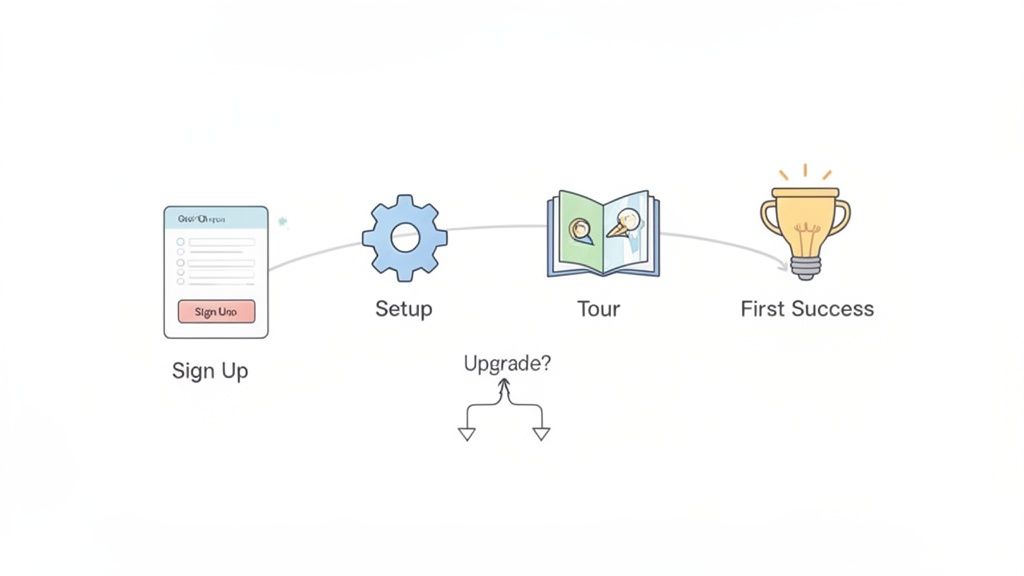
For SaaS businesses, the user onboarding flow is arguably the most important journey to map. This user flow diagram visualizes the critical steps a new user takes from the moment they sign up to the point where they experience the product's core value, often called the "Aha!" moment. A well-designed onboarding process is the difference between a lifelong customer and a user who churns after five minutes.
Mapping this flow helps teams understand activation rates, pinpoint friction in the setup process, and identify barriers to feature adoption that directly impact retention. It covers initial setup, feature discovery, and guiding the user to their first successful outcome.
Strategic Analysis
The primary goal of a SaaS onboarding flow is to drive user activation by demonstrating value quickly and clearly. Successful products like Slack don't just show users features; they guide them to perform key actions like sending their first message or creating a channel. This action-oriented approach helps users build momentum and form habits within the platform.
Another effective strategy is progressive disclosure, where features are introduced contextually rather than all at once. Overwhelming a new user with every possible function leads to confusion. Instead, the flow should focus on the one or two core actions that deliver immediate value, saving advanced features for later in the user's journey. This creates a focused, less intimidating initial experience.
Key Insight: Effective SaaS onboarding is not a passive product tour; it's an interactive guide that leads users to achieve a meaningful outcome. The flow must be designed to reduce time-to-value and build user confidence from the very first session.
Actionable Takeaways & Implementation
When creating your SaaS onboarding user flow diagram, focus on these actionable steps:
- Define Activation Milestones: Identify the key actions a user must take to be considered "activated" (e.g., creating their first project, inviting a team member). Use these as goals in your analytics.
- Segment Your Onboarding: Tailor the flow based on user roles or use cases identified during signup. A developer's "Aha!" moment is different from a project manager's.
- Use Checklists and Progress Bars: Guide users through setup tasks with clear visual cues. This gamifies the process and provides a sense of accomplishment.
Visualizing this entire experience is easier with the right software. You can find a comprehensive list of user journey mapping tools to help build and analyze these critical flows. Remember, this flow sets the foundation for the entire customer lifecycle.
3. Content Discovery and Navigation Flow
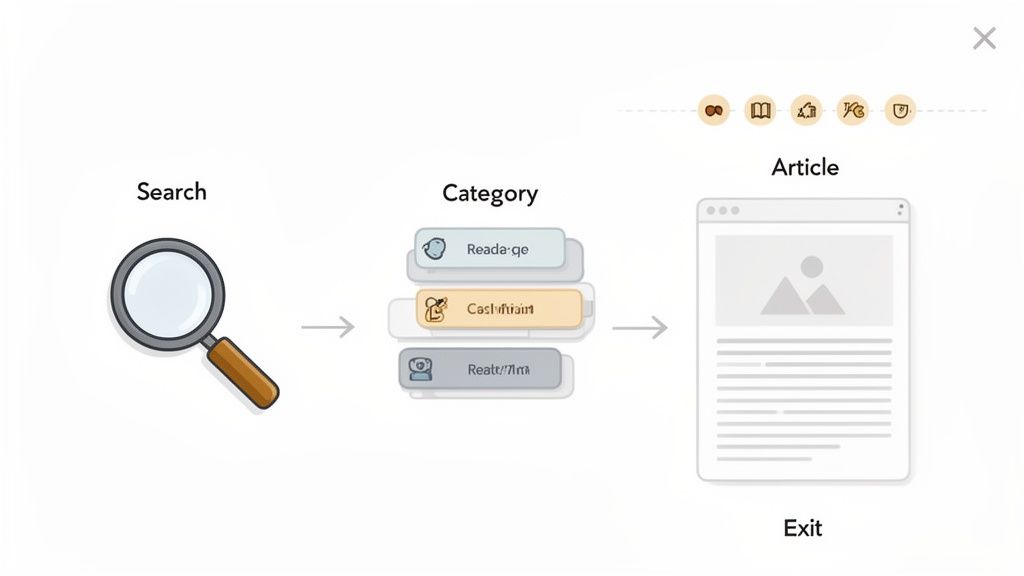
The content discovery flow maps how users find and consume information on a website or app. This type of user flow diagram is crucial for content-heavy platforms like blogs, news sites, and knowledge bases, as it visualizes the paths users take from a landing page to their desired article or resource. Understanding this journey is key to optimizing information architecture and increasing user engagement.
A typical content discovery flow charts actions like using a search bar, browsing through categories, applying filters, and clicking through to related content. By mapping these pathways, teams can identify popular navigation routes, uncover bottlenecks where users get lost, and strategically place calls-to-action to guide users toward conversion goals.
Strategic Analysis
The primary goal of a content discovery flow is to make information easily accessible and intuitive to find. Effective information architecture, seen on platforms like Medium or tech documentation sites like Stripe’s, guides users without overwhelming them. They achieve this by using clear categorization, a powerful search function, and contextual recommendations for related articles.
A key strategy is to understand and cater to different user intents. Some users arrive with a specific question and head straight for the search bar, while others prefer to browse categories to explore a topic. A well-designed flow accommodates both behaviors, ensuring every user can find value regardless of their entry point or initial intent. This user flow diagram example is fundamental for content strategy.
Key Insight: The best content experiences are not just about the quality of the content itself, but how effortlessly users can discover it. A seamless navigation flow transforms a library of information into a valuable, user-centric resource.
Actionable Takeaways & Implementation
When designing a content discovery and navigation flow, focus on clarity and user guidance:
- Optimize Your Search Function: Ensure search results are fast, relevant, and forgiving of typos. Implement filters to help users narrow down extensive results.
- Create Logical Categories: Group content into intuitive, clearly labeled categories. Use analytics to identify which categories are most popular and make them prominent.
- Use Internal Linking Strategically: Guide users to related, relevant content within your articles. This not only improves the user experience but also boosts SEO.
- Track Navigation Paths: Use a privacy-first tool like Swetrix to monitor top entry pages and track internal link clicks as custom events. This helps map user preferences and build funnels to visualize discovery paths from search to a specific article.
4. Example 4: The Lead Generation and Sales Pipeline Flow
The lead generation and sales pipeline flow visualizes the journey a potential customer takes from their first interaction with a brand, like a website visit, to becoming a qualified lead in the sales pipeline. This type of user flow diagram is crucial for B2B, SaaS, and service-based businesses where the sales cycle is longer and involves multiple touchpoints. It bridges the gap between marketing efforts and sales outcomes.
This flow typically maps stages such as visiting a landing page, engaging with content, submitting a form (like for a demo request or a whitepaper download), entering the CRM, and progressing through sales qualification stages. By mapping this process, marketing and sales teams can pinpoint bottlenecks, understand lead quality from different sources, and align their strategies to improve the entire acquisition funnel.
Strategic Analysis
The primary goal of a lead generation flow is to capture high-intent prospects efficiently and move them into the sales process without friction. Unlike e-commerce, the "conversion" isn't an immediate purchase but an expression of interest. Therefore, the strategy revolves around building trust and clearly communicating value in exchange for the user's contact information.
A common pitfall is asking for too much information upfront. Successful lead flows, like those used by HubSpot or Salesforce, often use progressive profiling or multi-step forms. They start by asking for just an email, then guide the user to provide more details later. This incremental approach reduces initial resistance and increases the likelihood of form completion. UTM tracking is also essential to attribute leads to specific campaigns, allowing teams to double down on high-performing channels.
Key Insight: An effective lead generation flow is a conversation starter. It’s not just about data collection; it’s about creating a seamless handoff from an anonymous visitor to a known prospect, setting the stage for a positive sales engagement.
Actionable Takeaways & Implementation
When designing your lead generation and sales pipeline flow, consider these actionable steps:
- Optimize Landing Pages: Ensure your landing page copy, design, and call-to-action (CTA) are perfectly aligned with the ad or content that brought the user there.
- Implement Smart Lead Nurturing: Use marketing automation to send relevant follow-up content based on the lead's initial action, keeping them engaged while the sales team prepares to connect.
- Use Analytics to Qualify Leads: Track user behavior before form submission, such as pages visited or time on site, to score leads and prioritize follow-up for the most engaged prospects.
Understanding this flow is a foundational element of improving business growth. For more strategies on turning visitors into leads, applying some conversion rate optimization best practices can directly enhance each stage of this critical user journey.
5. Mobile App Onboarding Flow
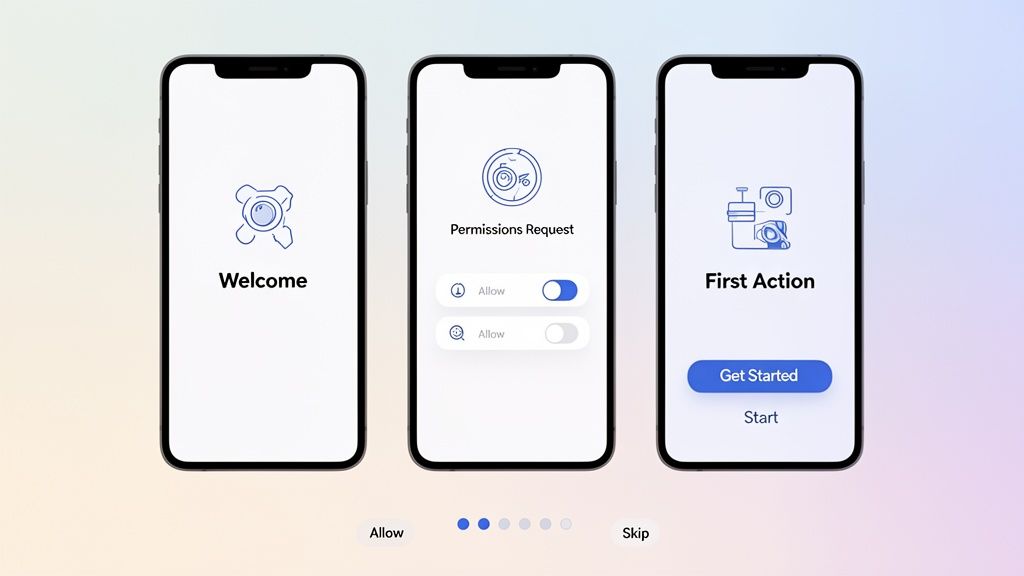
The mobile app onboarding flow is one of the most crucial user flow diagram examples for product teams, as it maps the user’s very first interaction with an application. This journey covers the steps from the initial launch after installation, through granting necessary permissions, setting up an account, and experiencing the app's core value for the first time. A well-designed onboarding flow directly impacts user retention and long-term engagement.
Mapping this flow helps teams pinpoint moments of friction or confusion that cause users to abandon the app before they even get started. Whether it's a fitness app guiding a user to log their first workout or a social media app encouraging profile completion, this initial experience sets the tone for the entire user lifecycle.
Strategic Analysis
The primary goal of an onboarding flow is to guide the user to their "Aha!" moment as quickly and smoothly as possible. This is the point where they understand the app's core benefit and feel motivated to return. A common strategy is progressive disclosure, where information and requests for permissions are presented contextually, rather than all at once on the first screen.
For instance, a messaging app should only ask for contact access when the user tries to start a conversation, explaining why it's needed at that moment. This just-in-time approach builds trust and increases the likelihood of permission grants. Another effective tactic is to offer an interactive tutorial or a skippable product tour that demonstrates value without feeling like a chore.
Key Insight: A great onboarding flow isn't just a series of instructions; it's a strategic process that reduces initial friction, builds trust, and quickly demonstrates the app's core value proposition to secure user buy-in.
Actionable Takeaways & Implementation
When diagramming and refining your mobile app onboarding, focus on these actionable steps:
- Prioritize the "Aha!" Moment: Identify the single most important action that showcases your app's value and design the flow to guide users there immediately.
- Contextualize Permission Requests: Never ask for permissions without explaining the benefit to the user. Use pre-permission prompts to explain why access to notifications, location, or contacts is needed.
- Offer Social Login and Skippable Steps: Reduce sign-up friction with one-click social logins (Google, Apple). Always allow users to skip optional steps like profile picture uploads to get to the main app faster.
To measure the effectiveness of your onboarding, you can create funnels in Swetrix to track completion rates for each step, from app install to first key action. By setting custom events for permission grants and tutorial completions, you can precisely identify where users drop off and A/B test improvements to boost your activation rate.
6. Account Management and Settings Configuration Flow
The account management flow maps the journey a registered user takes to modify their profile, manage subscriptions, or configure personal settings. This is a critical, yet often overlooked, user flow diagram example. While not as glamorous as onboarding, a smooth settings flow builds long-term trust and empowers users, reducing the burden on customer support.
This flow covers a wide range of actions, such as updating personal details, changing a password, managing notification preferences, and viewing billing history. Visualizing these paths helps teams identify areas of confusion, streamline complex configurations, and ensure users can easily control their experience. It’s a core component of user retention and satisfaction.
Strategic Analysis
The primary goal of an account settings flow is to provide clarity and control without overwhelming the user. A common pitfall is creating a "dumping ground" where all options are thrown together. Successful platforms, like project management tools or analytics platforms such as Swetrix, organize settings into logical, intuitive categories like "Profile," "Billing," and "Team Members."
This categorical approach helps users quickly find what they need. For instance, a user looking to add a team member shouldn't have to sift through billing options. By structuring the information architecture logically, you prevent user frustration and make the account management area a useful resource rather than a necessary evil.
Key Insight: A well-designed settings flow is an investment in user autonomy and product clarity. The easier it is for users to manage their own accounts, the more likely they are to remain engaged and the less they will rely on support channels.
Actionable Takeaways & Implementation
When designing your account management and settings flow, consider these actionable steps:
- Group Settings Logically: Use tabs or a sidebar menu to categorize settings into sections like "Security," "Notifications," and "Integrations."
- Prioritize Critical Actions: Make essential tasks like "Update Payment Method" or "Change Password" highly visible and easy to access.
- Provide Clear Feedback: After a user saves a change, provide immediate visual confirmation (e.g., a "Settings Saved" toast notification) to reassure them the action was successful.
By tracking how users interact with these settings, you can gain deep insights into feature adoption and user priorities. For example, tracking changes to specific settings as custom events can reveal which features your most active users value and configure the most.
7. API Integration and Developer Onboarding Flow
Unlike customer-facing applications, developer-focused products like APIs and SDKs have a unique user: the developer. The API integration and developer onboarding flow maps the highly technical journey a developer takes from discovering an API to making their first successful call and deploying it in their application. This is a critical user flow diagram example for any company offering a platform-as-a-service (PaaS) or API-based product.
This flow covers crucial steps such as exploring documentation, signing up for an API key, configuring a sandbox environment, running test calls, and troubleshooting errors. A poorly designed developer onboarding experience (DevX) can stop adoption in its tracks, as developers will quickly move to a competitor with clearer documentation and a smoother integration path.
Strategic Analysis
The primary goal of a developer onboarding flow is to get the developer to a "hello world" moment as quickly and painlessly as possible. This first successful API call builds momentum and confidence. Companies like Stripe excel at this by providing interactive documentation, copy-paste code snippets in multiple languages, and a pre-configured test environment right after signup.
A key strategy is to treat documentation as the core user interface. The flow isn't just about clicks in an app; it’s about navigating information, understanding parameters, and debugging. The user flow diagram must account for these non-linear paths, including trips to community forums, support tickets, and GitHub repositories. Optimizing this information architecture is paramount for reducing friction.
Key Insight: A successful developer onboarding flow minimizes the time-to-first-call (TTFC). Every step, from authentication to reading documentation, should be optimized to remove ambiguity and accelerate a developer's first "win" with the product.
Actionable Takeaways & Implementation
When mapping and designing a developer onboarding flow, focus on clarity and efficiency:
- Create Interactive "Get Started" Guides: Provide a step-by-step tutorial that walks a developer through generating keys, making their first request, and receiving a valid response.
- Offer Robust Sandbox Environments: Allow developers to test every feature of your API with test data and keys without any risk or financial commitment.
- Provide Clear Error Messaging: When API calls fail, return descriptive, human-readable error messages that link directly to relevant documentation for troubleshooting.
This type of flow is essential for understanding adoption barriers and improving developer engagement. For a visual guide on designing effective developer onboarding experiences, the talk below offers valuable insights into the developer's mindset.
8. Customer Support and Help Resource Flow
The customer support and help resource flow is a crucial, yet often overlooked, user flow diagram. It maps the journey a user takes when they encounter a problem, from seeking self-service help in a knowledge base to submitting a support ticket if they cannot find a solution. This flow is vital for reducing support costs, improving user satisfaction, and gathering valuable product feedback.
A well-designed support flow guides users toward self-service options first, such as FAQ pages, documentation, and community forums. This process helps teams understand how effective their resources are and identify gaps in their help content. Visualizing this journey is key to creating a support system that empowers users rather than frustrating them.
Strategic Analysis
The primary goal of a customer support flow is to resolve the user's issue as quickly and efficiently as possible, ideally without human intervention. Leading SaaS companies excel at this by integrating their help centers directly into the product experience, offering contextual help based on the user's current page or action. This preemptive support can solve problems before the user even thinks to search for an answer.
Another key strategy is analyzing the path users take before submitting a ticket. For instance, tracking which help articles a user viewed can provide support agents with immediate context, saving time for both parties. This data also highlights which articles are failing to resolve issues, pointing to content that needs improvement or clarification.
Key Insight: An effective customer support flow is a proactive feedback loop. It not only resolves user issues but also generates data that directly informs product improvements and documentation priorities.
Actionable Takeaways & Implementation
When designing or optimizing your own support flow, consider these actionable steps:
- Promote Self-Service: Make your help center, FAQs, and documentation highly visible and easily searchable from within your product and on your main website.
- Track Search Queries: Use analytics to monitor what terms users are searching for in your help documentation. Failed searches or common queries can guide your content creation strategy.
- Create a Support Funnel: Map the steps from a user encountering an issue to help search, article views, and eventual ticket submission. This helps pinpoint where users drop off or where self-service fails.
By treating your support system as an integral part of the user experience, you can turn potential moments of frustration into opportunities for engagement and learning. This is one of the most impactful user flow diagram examples for building a loyal and self-sufficient user base.
8 User Flow Diagrams Compared
| Flow | 🔄 Implementation Complexity | ⚡ Effort & Resources | 📊 Expected Outcomes | Ideal Use Cases | ⭐ Key Advantages / 💡 Tips |
|---|---|---|---|---|---|
| E-commerce Checkout Flow | 🔄 High — multiple payment methods, branching logic | ⚡ Dev + payment gateway integration, analytics, QA (medium–high) | 📊 Reduced cart abandonment; improved conversion & revenue attribution | Online retail, digital goods, SaaS paid checkout | ⭐ Pinpoints exact drop-offs; supports A/B testing. 💡 Track each checkout step as custom events |
| SaaS Onboarding & Feature Adoption Flow | 🔄 Medium — sequential flows with personalization branches | ⚡ Product, analytics, in-app messaging, content (medium) | 📊 Higher activation, retention, faster time-to-value | SaaS, freemium products, trial-to-paid funnels | ⭐ Reveals activation bottlenecks; enables personalization. 💡 Mark activation milestones as goals |
| Content Discovery & Navigation Flow | 🔄 Medium — complex taxonomy and many paths | ⚡ Content tagging, search analytics, editorial coordination (medium) | 📊 Improved information architecture and engagement metrics | Blogs, news sites, documentation portals | ⭐ Identifies popular navigation paths & orphaned content. 💡 Track internal link clicks and search queries |
| Lead Generation & Sales Pipeline Flow | 🔄 Medium–High — requires CRM handoffs and attribution | ⚡ Marketing analytics, CRM integration, UTM tracking (high) | 📊 Better lead quality insight, improved campaign ROI, fewer form drop-offs | B2B SaaS, agencies, lead-driven businesses | ⭐ Ties leads to revenue sources; surfaces form abandonment. 💡 Create goals for each pipeline stage and track UTMs |
| Mobile App Onboarding Flow | 🔄 Medium — platform-specific flows and permissions | ⚡ Mobile analytics SDKs, cross-platform tracking, dev coordination (medium–high) | 📊 Improved retention, permissions acceptance, OS-specific optimizations | Mobile-first apps (fitness, messaging, social) | ⭐ Detects permission denial and device-specific issues. 💡 Compare Android vs iOS funnels and track permission events |
| Account Management & Settings Flow | 🔄 Low–Medium — fewer users but sensitive actions | ⚡ Secure analytics, careful data handling, auth instrumentation (low–medium) | 📊 Prioritized settings development and fewer usability issues | Admin-heavy products, platforms with complex preferences | ⭐ Reveals which settings users use and where they struggle. 💡 Track settings changes as custom events |
| API Integration & Developer Onboarding Flow | 🔄 High — variable technical paths and long timelines | ⚡ Docs telemetry, sandbox environments, SDKs, support (high) | 📊 Faster time-to-first-successful-request and clearer doc gaps | APIs, developer platforms, tooling providers | ⭐ Identifies documentation gaps and preferred integration paths. 💡 Goal-track auth key generation and first API call |
| Customer Support & Help Resource Flow | 🔄 Low–Medium — search and ticketing paths with escalation | ⚡ Support analytics, ticket system integration, KB tagging (medium) | 📊 Better self-service, reduced ticket volume, prioritized docs | SaaS, e‑commerce, software vendors with support teams | ⭐ Measures help effectiveness and common issues. 💡 Funnel: issue → search → article → ticket; alert on traffic spikes |
Putting Your Flow Diagrams into Action
We've explored a wide array of user flow diagram examples, moving far beyond simple wireframes to dissect the strategic architecture behind successful digital experiences. From the streamlined efficiency of an e-commerce checkout to the nuanced guidance of a SaaS onboarding process, each diagram serves as a critical blueprint for user success and business growth. The core lesson is clear: a user flow is not merely a technical document but a strategic tool for empathy, allowing you to walk in your users' shoes before a single line of code is written.
By analyzing flows like content discovery, lead generation, and even complex API integrations, we've uncovered a universal truth. The most effective user journeys are intentional, intuitive, and meticulously planned. They anticipate user needs, remove friction before it appears, and guide users toward their goals with clarity and purpose. These diagrams are your first line of defense against confusion, drop-offs, and user frustration.
Key Takeaways and Strategic Synthesis
Reflecting on the diverse user flow diagram examples we've covered, several foundational principles emerge. Mastering these will transform how you approach product design and optimization.
- Clarity Over Complexity: The best user flows, even for intricate processes like account management or developer onboarding, prioritize simplicity. Each step should have a singular, clear purpose. If a node on your diagram feels convoluted, it’s a sign that the user experience will be, too.
- Context is King: The entry point dictates the entire journey. A user arriving from a targeted ad has different expectations than one navigating from your main dashboard. Your flows must account for these varied contexts to provide a relevant and seamless experience.
- Data-Driven, Not Data-Assumed: Assumptions are the enemy of effective design. Each example we analyzed thrives on a foundation of user data. Mapping out a flow is the first step; validating it with real-world analytics is what separates a good idea from a high-performing feature.
- Friction is a Conversion Killer: From unnecessary form fields in a lead gen flow to a confusing navigation path for customer support, friction causes users to abandon their tasks. Your primary goal when designing a user flow is to identify and systematically eliminate every point of unnecessary effort.
Your Actionable Next Steps
Theoretical knowledge is valuable, but its true power is unleashed through application. It's time to bridge the gap between the examples in this article and the reality of your own product or service.
- Choose One Critical Flow: Don't try to overhaul everything at once. Select a single, high-impact user journey from your own platform. Is it your onboarding sequence? Your checkout process? Your feature adoption path? Start with the flow that has the most significant potential impact on your key metrics.
- Map the "As-Is" Journey: Before you can improve it, you must understand it. Create a detailed user flow diagram of the current experience. Be brutally honest and include every step, every click, and every potential point of confusion.
- Identify Friction Points with Data: This is where analytics become indispensable. Use a tool to track user behavior through this specific flow. Where are users dropping off? Which steps take the longest? Are they clicking on elements that lead nowhere? This data will turn your assumptions into certainties.
- Design the "To-Be" Flow: Armed with insights, design your ideal user flow. Reference the user flow diagram examples we've discussed. How can you simplify steps? How can you provide clearer guidance? How can you reduce the cognitive load on your user?
- Implement, Test, and Iterate: Deploy your new flow and measure its performance against the old one. A/B testing is your best friend here. The goal isn't a one-time fix but a continuous cycle of improvement, always guided by user behavior and feedback.
By embracing this structured approach, you move from simply admiring effective user flows to architecting them yourself. This mastery is not just a UX skill; it's a fundamental business advantage that leads to higher conversion rates, increased customer retention, and a product that users genuinely love to use.
Ready to move from mapping flows to measuring them? The user flow diagrams you design are hypotheses; Swetrix provides the privacy-first data you need to test and validate them. Understand exactly where users drop off in your funnels and identify friction points with our powerful, GDPR-compliant analytics, all without compromising user privacy. Start your free trial with Swetrix today and turn your diagrams into data-driven results.