- Date
How to Track Websites Visited Ethically and Accurately
 Andrii Romasiun
People search for ways to track websites visited for two reasons. Parents configure home router DNS logs to monitor family web activity. Website owners deploy analytics tools to view visited pages. Track your site's visitors without invading their privacy or relying on invasive cookies. Modern, cookieless web analytics recover data lost to ad blockers while keeping your business compliant with international data laws. Replace heavy, non-compliant tracking scripts with lightweight alternatives.
The Two Sides of Tracking Websites Visited
Knowing how to track websites visited requires defining your role. Consumers and webmasters use different tools and protocols to monitor digital traffic.
Consumer vs. Webmaster Tracking
Home network administrators track visited websites at the infrastructure level. They log into a Wi-Fi router dashboard to review DNS request logs. A router records the domain name and the timestamp whenever a networked device requests a website. These logs provide a raw list of accessed URLs.
Website owners track visited pages at the application level. You embed a short snippet of JavaScript into your website's header. The browser executes this script and sends an event to an analytics server when a user loads a page. This infrastructure records page views, referral sources, and button clicks.
Configure your tracking method based on your objective. Use application-level analytics scripts to optimize digital properties. Network administrators handle infrastructure-level monitoring.
Why Website Owners Need Better Insights
Visitor attention spans remain short. Analysts at Contentsquare report that visitors spend an average of 54 seconds on a website cross-industry. Every second of data dictates how you structure your landing pages for maximum conversion.
Engagement varies by sector according to Contentsquare's benchmark data. Compare your site's engagement against your industry baseline to gauge performance.
Open your analytics dashboard today. Calculate your average session duration for the past 30 days. If your numbers fall below industry benchmarks, prioritize page speed optimizations and clearer calls to action over generating new traffic.
The Problem with Traditional Analytics
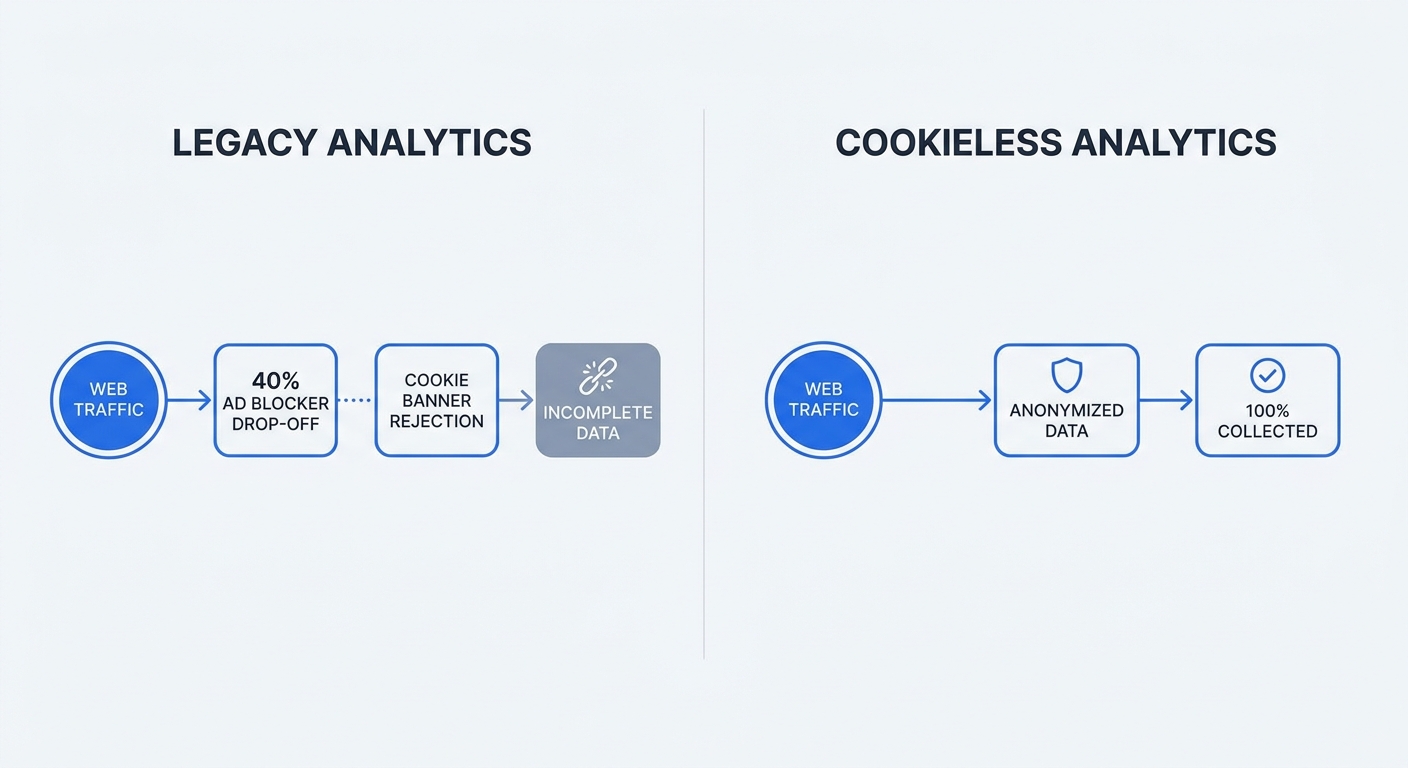
Legacy tracking tools provide an incomplete picture of your website traffic. They rely on outdated data collection models. Modern web browsers and privacy extensions block these tools by default.
Data Loss from Ad Blockers
Google Analytics commands a 78.4% market share among websites utilizing known traffic analysis tools. This dominance creates a single point of failure. Ad blockers and privacy tools use shared blocklists like EasyPrivacy to intercept and block network requests sent to known Google Analytics servers.
Roughly 30–42% of internet users run ad blockers or privacy extensions according to DataReportal. Traditional cookie-based analytics platforms miss a massive portion of visitor data, forcing marketing teams to make decisions based on an incomplete sample size. A campaign might drive thousands of visits, but your reports show a failed initiative if half those users run Brave browser or uBlock Origin.
Audit your current analytics setup. Review your server-side tracking versus client-side logs. You can compare the raw hits in your web server logs against the session counts in your legacy analytics dashboard. The discrepancy between those two numbers represents your blocked data.
The High Cost of Privacy Violations
Regulators enforce strict penalties for improper data collection. European regulators reported issuing significant GDPR fines and processing hundreds of data breach notifications daily in 2024 (DLA Piper / EDPB reporting). The Irish Data Protection Commission penalized Meta €1.2 billion for unlawful personal data transfers.
Legacy analytics tools expose you to compliance risks. They capture IP addresses, device identifiers, and cross-site tracking cookies. Regulators classify these data points as personal data under the GDPR (note that pseudonymised data remains personal data). Processing such data requires a lawful basis under GDPR—consent is one possible basis, alongside legitimate interests, contract performance, and others.
Review your data collection practices this week. Identify every tool on your website that sets a persistent cookie or captures an IP address. Remove third-party scripts that lack a clear mechanism for anonymous data collection.
How to Track Websites Visited Without Cookies
A shift toward cookieless analytics is reshaping marketing. Safari's Intelligent Tracking Prevention and Firefox's Enhanced Tracking Protection block third-party cookies by default. Adapt your tracking strategy to survive this transition.
Embracing Cookieless Analytics
Privacy-first platforms use aggregate, contextual data instead of persistent identifiers. Cookieless tools generate a hashed string based on the user's IP address and a daily changing salt when a visitor arrives. This hash produces pseudonymised identifiers with reduced linkability to track the user's journey through your site for a single day. The salt changes at midnight, limiting linkability across days, though such hashed IPs are likely still personal data under GDPR/EDPB guidance and ePrivacy/GDPR obligations can still apply.
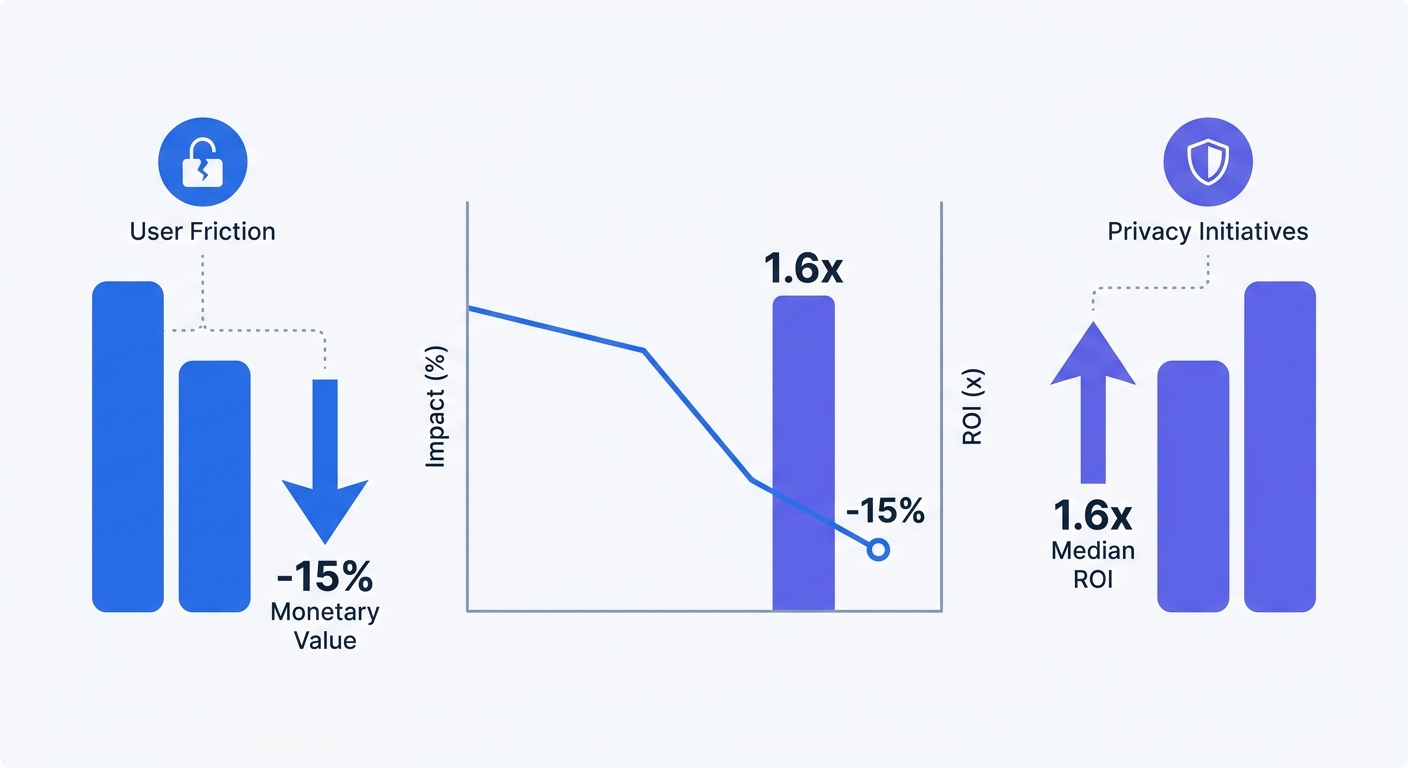
Respecting user privacy drives revenue. The Cisco Data Privacy Benchmark Study reports that 75–76% of consumers refuse to buy from providers that leave their data unprotected. Organizations prioritizing privacy see an average 1.6x return on investment from compliance initiatives.
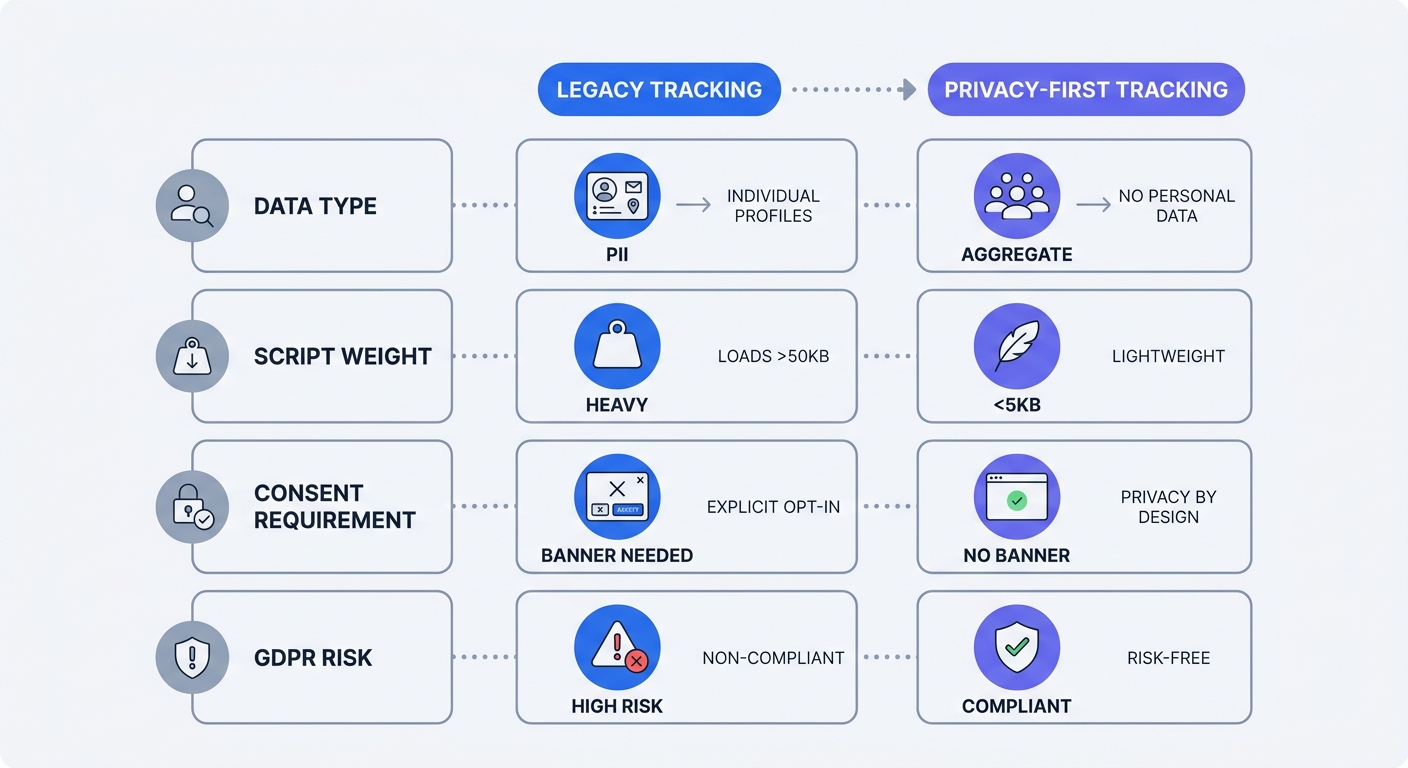
Swap legacy trackers for a privacy-first Google Analytics alternative. Implement analytics scripts weighing under 5KB. Heavy scripts inflate load times and degrade the user experience. Lightweight, cookieless scripts bypass ad blockers because they do not profile users across different domains.
Reducing the Need for Cookie Banners
Website owners must display a cookie consent banner when using tracking cookies to monitor behavior. These banners interrupt the user experience and reduce engagement rates. Many users click "Reject All," which blinds your legacy analytics tools to their visit.
Cookieless analytics platforms that avoid storing personal data or setting tracking cookies on the user's device may reduce the need for an ePrivacy or GDPR consent banner in some jurisdictions, depending on implementation. Note that cookieless analytics implementations can still involve personal data or device access. Marketers might collect data on more visitors without forcing them to interact with a popup, subject to ePrivacy/GDPR assessment and legal advice.
You may be able to remove or limit your cookie banner after implementing a compliant, cookieless tracking solution, subject to legal review. Verify your compliance status by reviewing standard ePrivacy checklist requirements and consulting with legal counsel.
| Feature | Legacy Analytics | Cookieless Analytics |
|---|---|---|
| Data Type | Personal Data | Aggregate & Pseudonymised |
| Script Weight | Heavy (Often >45KB) | Lightweight (<5KB) |
| Consent Requirement | Explicit Banner Required | May Reduce Banner Need* |
| Ad Blocker Impact | High Data Loss (~30–42%) | Minimal Data Loss |
*Subject to legal review and implementation details.
Key Metrics to Track Instead of Individuals
Marketers spent the last decade building hyper-targeted individual user profiles. Switch your focus to aggregate contextual trends to understand how visitors interact with your content today.
Tracking Context Over Identity
Contextual analytics measure the environment of a visit rather than the identity of the visitor. Monitor your top referrers to see which external domains send the highest volume of traffic. Track total dwell time across individual blog posts to identify your most engaging content.
Analyze conversion rates by device type or geographical region. Allocate your advertising budget to match performance if desktop users in Germany convert at double the rate of mobile users in France. You do not need a user's name or home address to optimize a campaign based on device and location data.
Build a custom SEO dashboard in your analytics platform. Configure widgets to track your highest-converting landing pages and your most frequent exit pages. Focus your optimization efforts on the pages where users abandon their sessions.
Monitoring User Frustration
User experience dictates revenue outcomes. Monitor frustration metrics to pinpoint friction in your conversion funnel and determine why visitors abandon your site.
Avoidable friction exists in many online user sessions. Slow page loads, JavaScript errors, and rage clicks reduce the overall monetary value of a visit. A rage click occurs when a user taps or clicks an element multiple times within a short timeframe. These behaviors indicate a broken button, a misleading design element, or a frozen interface.
Set up performance monitoring and error tracking. Identify the exact pages generating rage clicks. Fix the underlying layout issues or broken scripts to recover lost revenue.
Frequently Asked Questions (FAQ)
Can I track websites visited without using cookies?
Yes. Modern analytics platforms use server-side methodologies or lightweight, cookie-free scripts. These tools generate temporary, anonymized hashes to group page views into a single session. This infrastructure tracks the user's journey through your website without storing persistent tracking cookies on their browser.
Do I need a consent banner if I use cookie-free analytics?
It depends. The ePrivacy Directive and GDPR require consent banners when you store or access non-essential information on a user's device, or when processing personal data without another lawful basis. Some cookie-free analytics tools may reduce or eliminate the need for a banner, depending on their implementation and whether they process personal data. Marketers should consult legal counsel to assess their specific setup, as cookieless implementations can still involve personal data under GDPR/EDPB guidance.
Why do my analytics report fewer visitors than my server logs?
Roughly 30–42% of internet users utilize ad blockers or privacy-focused browsers like Brave (DataReportal). These tools block network requests to legacy analytics platforms like Google Analytics. This dynamic blinds you to a significant portion of your audience. Switching to a privacy-first, proxy-routed analytics tool recovers this missing data.
How do you track websites visited on a WiFi router?
Log into your router's administration panel via your web browser. Navigate to the system logs, security settings, or administrative logs section. Locate outgoing DNS requests or HTTP access logs. These sections display the domains requested by devices connected to your network. Website owners should avoid this method and implement application-level web analytics instead.
Start tracking your visitors today. Create an account with Swetrix to access open-source, cookie-free web analytics. Recover your blocked data, drop the cookie banner, and keep your website compliant with global privacy laws. Try Swetrix free for 14 days and review the difference in your data.