- Date
A Practical Guide on How to Track Website Visitors Ethically
 Andrii Romasiun
At its core, tracking website visitors means adding a small script from an analytics tool, like Swetrix, to your website. This script gathers anonymous or pseudonymized data about what people do—which pages they look at, how long they stick around, and where they came from. It's all about getting a clearer picture of your audience's behavior.
Why Modern Website Tracking Is About More Than Just Numbers

Let's be honest, tracking website visitors isn't as simple as it used to be. The old game of just chasing vanity metrics like raw page views is long over. Today, effective tracking is about understanding the why behind the clicks and scrolls, so you can actually make your user's experience better.
This demands a real shift in thinking. We're moving away from surveillance-style data hoarding and toward ethical, privacy-first methods that build trust. This isn't just a nice idea anymore; it’s a business necessity, especially with privacy laws and savvy consumers who know their rights.
Understanding Core Tracking Concepts
Before we get into the nitty-gritty of tools and tactics, let's nail down the basic metrics that actually give you something to work with. These are the building blocks for any meaningful analysis and will help you see beyond the surface.
You'll want to get comfortable with a few key ideas:
- Unique Visitors: This counts the number of distinct individuals who come to your site, no matter how many times they return. It's the truest measure of your audience's size.
- Session Duration: This is the average time a visitor spends on your site in a single visit. It’s a great indicator of how engaging your content really is.
- Bounce Rate: This one shows the percentage of visitors who land on a page and leave without doing anything else—no clicks, no navigation. They just... bounce.
One of the most foundational metrics is unique visitors, which separates individual users from the total number of visits. In a world with over 1.09 billion websites projected for 2025, knowing your true audience reach is critical for cutting through the noise. You can find more global website statistics on emailvendorselection.com.
Navigating Today's Tracking Challenges
The landscape for user data is constantly shifting, throwing new hurdles at website owners and marketers. Regulations like GDPR in Europe and CCPA in California have put strict rules in place, making explicit user consent non-negotiable.
The goal is no longer to collect as much data as possible. Instead, it’s to collect the right data, respectfully and transparently, to make informed decisions that benefit both the user and the business.
On top of that, major web browsers are getting rid of third-party cookies, which have been the backbone of digital advertising for years. This technical shift is pushing everyone toward first-party data strategies and privacy-friendly analytics.
This guide is designed to give you practical, step-by-step solutions to handle these challenges. You'll learn how to gather valuable insights ethically and effectively, without compromising user trust.
Setting Up Your Privacy-First Analytics Foundation
Choosing the right tool is your first real step toward tracking visitors ethically. Instead of grabbing a traditional analytics platform that often treats user data like a commodity, we're going to start with a privacy-first mindset. This way, you get the insights you need without crossing ethical lines or running into regulatory trouble.
I'll be using Swetrix as the main example here because it was built from the ground up for privacy. The core steps, however, are pretty much the same for most modern, privacy-respecting analytics platforms. The goal is simple: get a lightweight, powerful tracking script on your site and start understanding your audience.
Creating Your Account and Project
First things first, you'll need an account. Most privacy-focused tools, Swetrix included, have a dead-simple signup process, often without even asking for a credit card to get started. This gives you a chance to poke around and see if it's the right fit before you commit.
Once you’re in, you’ll create what’s called a "project." Just think of a project as a dedicated dashboard for a single website. If you're juggling multiple sites, you'll simply spin up a new project for each one to keep all the data separate and organized.
This usually just involves two quick inputs:
- Project Name: Give it a clear label, like "Main Company Blog" or "SaaS Product Site."
- Website Domain: The primary URL for the site you're tracking.
And that's it. This initial setup is all that's needed to generate your unique tracking script.
Installing the Tracking Script
This part sounds more technical than it actually is, I promise. The platform will give you a small snippet of JavaScript code. Your only job is to get this code into the HTML of your website.
The best spot for this script is inside the <head> section of your site's HTML. Putting it there makes sure the script loads right away on every single page, so you can accurately capture visitor data the moment someone lands on your site.
If you're using a common platform like WordPress, Webflow, or Shopify, you don't even need to touch the code files directly. Just look for a settings area labeled something like "Custom Code" or "Header/Footer Scripts." Copy the script from your analytics dashboard, paste it into the header box, and save.
My Two Cents: After you add the script, make sure to clear your website's cache if you're using one. This little step ensures that all new visitors get the fresh version of your site—the one with the tracking script included.
Configuring for Automatic Compliance
Here's the real beauty of using a privacy-first tool: a lot of the compliance heavy lifting is already done for you. These platforms are designed to avoid the kind of invasive tracking that gets companies into hot water, so you don't need to be a legal expert.
For example, Swetrix automatically anonymizes IP addresses and doesn't rely on persistent cookies for tracking. That means you're already in line with the core principles of regulations like GDPR right out of the box. You can get more details on what to look for by reading up on the fundamentals of privacy-friendly analytics tools.
This built-in compliance lets you get back to focusing on the insights, not on navigating complex legal rules.
Your First Look at the Analytics Dashboard
Once the script is live on your site, data will start trickling into your dashboard, usually within a few minutes. This is the fun part—where you start to see the story of your website traffic unfold.
Here’s a snapshot of what a clean, privacy-focused dashboard looks like. It’s all about giving you the metrics that actually matter, without the noise.
The idea is to give you a high-level overview of your site's health at a glance.
When you first log in, you'll probably see a few essential panels:
| Metric Panel | What It Tells You |
|---|---|
| Real-time Visitors | Shows you who's on your site right now and which pages they're viewing. |
| Top Pages | Lists your most popular content, highlighting what really connects with your audience. |
| Referral Sources | Reveals where your traffic is coming from—be it Google, social media, or another blog. |
| Device & Browser | Breaks down visitors by desktop vs. mobile and which browser they're using. |
Spending some time exploring these initial reports is the perfect way to start understanding who your visitors are and what they do on your site. From here, you're all set to dig deeper into user journeys and make smarter, data-driven decisions.
Measuring What Matters with UTMs and Custom Events
So, you've got your analytics set up. That’s a great first step, but just looking at overall traffic numbers is like knowing how many people walked past your store without knowing what brought them there. It tells you how many people showed up, but not why they came or which of your marketing efforts actually convinced them to visit.
This is where we get granular. We're going to tackle this in two ways. First, by using UTM parameters to pinpoint exactly where your visitors are coming from. Second, by setting up custom events to track the specific actions that really matter to your business, like a button click or a form submission.
Pinpointing Your Traffic Sources with UTM Parameters
If you're spending time and money on different marketing campaigns, you absolutely need to know which ones are pulling their weight. UTM parameters are just simple tags you add to the end of your URLs that tell your analytics tool how to categorize incoming traffic. Think of it as putting a nametag on every visitor that walks through your digital door.
A properly tagged URL tells a clear story, attributing every visitor to their precise origin. This simple habit stops all your hard-earned traffic from being dumped into those vague "Direct" or "Referral" buckets in your analytics reports.
The real magic of UTMs isn't just seeing which channel is performing best. It's about empowering you to make smarter decisions on where to invest your budget and time. When you know for a fact that your paid LinkedIn campaign is outperforming your email newsletter by a 3:1 ratio, you know exactly where to double down.
To get going, you just need to understand three core components:
- utm_source: This identifies where the traffic came from. Think of the specific website or platform, like
google,newsletter, orlinkedin. - utm_medium: This explains the type of traffic it is. Common examples are
cpc(for paid ads),email, orsocial. - utm_campaign: This gives your specific marketing effort a name, like
summer-sale-2024ornew-feature-launch.
Let's imagine you're promoting a new feature in your monthly newsletter. Instead of just linking to your homepage, you’d use a URL that looks something like this:
https://yourwebsite.com/new-feature?utm_source=newsletter&utm_medium=email&utm_campaign=july-update
Just like that, every click from that link is perfectly tagged. Your dashboard will show you precisely how many people came from your July newsletter campaign, letting you measure its impact directly. For a much deeper dive into this, check out our complete guide on using UTM parameters to really dial in your strategy.
Tracking User Actions with Custom Events
While UTMs tell you where visitors come from, custom events tell you what they actually do once they arrive. Page views are a decent starting point, but they don't capture the most important interactions on your site—those moments that signal real interest or lead directly to a conversion.
Custom event tracking lets you keep an eye on these specific, high-value actions. It’s how you find out if people are actually clicking on your new call-to-action button or engaging with key features.
Here are a few practical ideas for custom events you could track:
- Button Clicks: Keep tabs on clicks for critical calls-to-action like "Request a Demo," "Download eBook," or "Add to Cart."
- Form Submissions: Track every successful submission of a contact form, signup form, or lead magnet request.
- Video Plays: See how many visitors hit play on your embedded product videos and, more importantly, how many stick around to watch the whole thing.
Setting this up in a tool like Swetrix is pretty straightforward. You'll typically add a small snippet of code to the specific element you want to track. For instance, to track a "Request a Demo" button, you might add an onclick attribute to the button's HTML that tells the analytics script to fire an event you've named demo_request_click.
This level of detail is a total game-changer. You can finally build funnels that show the entire user journey: from a visitor clicking a utm_campaign link in an email, to landing on your page, and finally clicking that "Request a Demo" button. It creates a clear, unbroken line from a marketing touchpoint to a real business outcome, giving you the power to track website visitors in a way that actually moves the needle.
Uncovering User Behavior with Session Replays and Funnels
Quantitative data from your analytics dashboard is great for telling you what happened, but it often falls short of explaining why. To really get inside your visitors' heads, you need tools that show the human story behind the numbers. This is where qualitative methods like session replays and conversion funnels really shine.
These tools shift your perspective from spreadsheets and charts to the actual user journey, complete with all its clicks, scrolls, and hesitations. By watching how real people navigate your site, you can spot hidden friction points and opportunities that pure data would never reveal. It’s the closest you can get to looking over a user's shoulder.
Seeing Your Website Through Your Visitors' Eyes
Session replays are exactly what they sound like: video-like recordings of a visitor's entire journey on your site. They capture everything from mouse movements and clicks to rage clicks—when a user repeatedly smacks a button or link out of frustration. This raw, visual feedback is invaluable for diagnosing user experience (UX) issues.
Imagine you see a high drop-off rate on your pricing page. A session replay might show you that visitors are constantly hovering over a feature description, trying to click it for more information, but it isn't interactive. That's an immediate, actionable insight you’d never guess from a simple bounce rate metric.
Of course, ethical use is paramount here. Any good tool will automatically anonymize sensitive information like passwords or personal details entered into forms. The goal is to understand behavior, not to spy on individuals.
Visualizing the Path to Conversion with Funnels
While session replays are fantastic for micro-level analysis, conversion funnels give you the big-picture view. A funnel is a visual map of a multi-step journey you want users to take, like a checkout process or a signup flow.
You define the key steps, and the funnel shows you exactly how many people make it from one stage to the next—and more importantly, where they’re dropping off.
For example, a typical e-commerce checkout funnel might look like this:
- Viewed Product Page: The starting point for all potential buyers.
- Added to Cart: Shows initial purchase intent.
- Initiated Checkout: A stronger signal of commitment.
- Completed Purchase: The final conversion goal.
This visualization makes it painfully obvious where your process is breaking down. If 70% of users who add an item to their cart never even start the checkout, you know you have a major issue to investigate between those two specific steps. Is it a surprise shipping fee? A confusing button? Funnels point you directly to the problem area.
This is why clean, organized traffic data is so crucial. UTMs are the foundation for building accurate funnels, allowing you to segment user journeys by their origin.
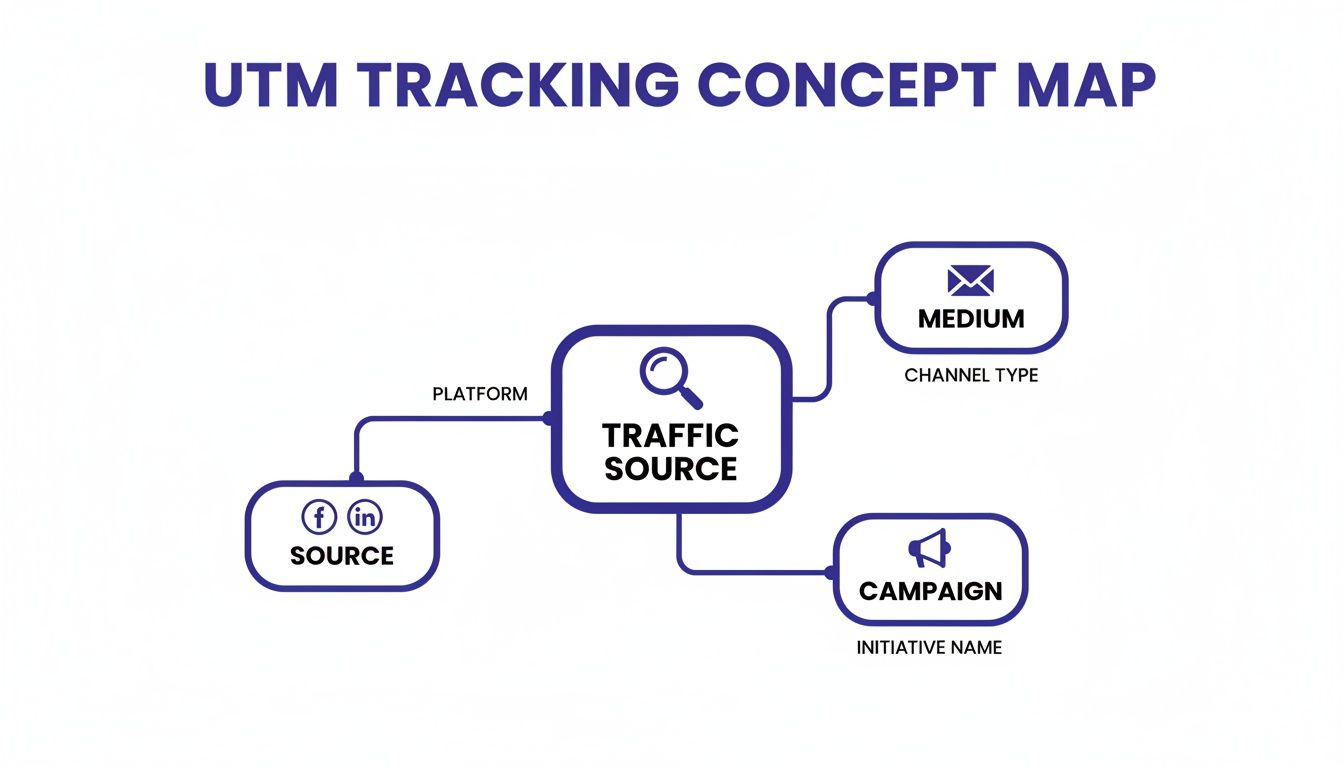
As this illustrates, tracking parameters like source, medium, and campaign categorize every visitor, providing clean data to feed into your funnels and giving you a clearer picture of which channels drive the most valuable actions.
Connecting Qualitative Insights to Key Metrics
Combining these qualitative tools with your core metrics creates a powerful feedback loop. For example, average session duration is a standard metric for gauging engagement. By 2025, optimal session times are expected to be over three minutes, but replays can show you why your times are shorter than expected. Often, you'll find that up to 84.6% of early exits are due to cluttered designs or confusing navigation, as highlighted in this research on key website traffic metrics on metricswatch.com.
By combining the "what" from funnels with the "why" from session replays, you create a complete picture. You don't just know that users are leaving your signup form; you can watch recordings of them struggling with a specific field and know exactly what to fix.
Understanding the why behind user behavior is a game-changer. Different tools offer different perspectives, helping you answer specific questions about the user experience.
Comparing Visitor Behavior Analysis Tools
| Analysis Tool | Primary Use Case | Key Question Answered |
|---|---|---|
| Session Replays | Diagnosing specific UX issues and friction points. | "Why are users getting stuck or frustrated on this page?" |
| Conversion Funnels | Identifying drop-off points in a multi-step user journey. | "Where are we losing potential customers in our conversion process?" |
| Heatmaps | Visualizing aggregate user attention and interaction. | "What are the most and least engaging elements on this page?" |
Each tool gives you a different piece of the puzzle. When used together, they provide a comprehensive view of how people actually experience your website.
This combined approach allows you to form data-backed hypotheses. You can say, "I believe our checkout drop-off is caused by the confusing 'Apply Coupon' field," and then watch session replays to validate that theory before investing a single minute of development time. It turns analytics from a passive reporting tool into an active, diagnostic one.
Getting a Truer Picture with Server-Side Tracking
Let's face it: client-side tracking, the kind we've mostly talked about so far, has its limits. Ad blockers are everywhere, and browsers are getting stricter by the day. When a browser or an extension blocks your analytics script, that visitor's data just vanishes. Poof. You're left with a big blind spot in your data.
This is where a more reliable, future-proof approach comes in: server-side tracking.
Instead of a visitor's browser sending data directly to your analytics tool, your own server gets involved. The browser makes a single request to your server, which then passes that information along to your analytics platform and anywhere else it needs to go. This simple shift—from the client's browser to your own server—is a huge deal for data quality.
Bypassing Ad Blockers and Browser Restrictions
The most obvious win here is resilience. Because the data request is coming from your server to the analytics provider, it's completely invisible to ad blockers and browser privacy tools. They're built to stop requests coming from a user's browser to a known analytics domain, but they have no idea what your server is doing.
This means you get to see a chunk of your traffic that was previously hidden. For an e-commerce store, where even a small percentage of conversions can make or break a campaign, this level of accuracy is a game-changer for understanding what's really working.
Server-side tracking isn't just a clever workaround. It’s about taking back control. When you route data through your own infrastructure first, you decide exactly what gets collected and where it goes. This is a massive plus for security and privacy.
As a nice bonus, moving this workload off the user's browser speeds up your site. Fewer third-party scripts running on the page means faster load times, which is great for your visitors and your SEO.
When Is It Time to Go Server-Side?
While it's incredibly powerful, setting up server-side tracking isn't as simple as dropping in a JavaScript snippet. A new blog probably doesn't need to worry about this on day one. But for some, it's a critical step.
You should seriously consider making the switch if you're in any of these boats:
- You run an e-commerce business. Your conversion data has to be rock-solid. Missing data from ad-blocking customers can skew your revenue numbers and make it impossible to judge ad spend effectiveness.
- You're in a heavily regulated industry. If you're in finance or healthcare, you need tight control over your data. Server-side tracking gives you a secure, central point to manage and audit every piece of information.
- Your numbers just don't add up. Seeing a big gap between what your analytics platform reports and what your backend sales or lead data shows? Ad blockers are almost certainly the cause.
The process usually involves setting up a dedicated endpoint on your server to receive the tracking data and then configuring it to forward that information to a service like Swetrix using its API. Yes, it takes some development work, but the payoff is rock-solid data integrity and a faster, more secure site. It’s the best way to ensure your tracking setup can withstand whatever comes next.
Building User Trust Through Legal Compliance
Let's be honest: great tracking isn't just about clever code. It's built on a foundation of transparency and trust. When you're learning how to track website visitors, the thought of navigating privacy laws like GDPR and CCPA can feel overwhelming, but you don't need a law degree to get it right. The core idea is simple: be straight with your users.
Being upfront about what you're collecting shows respect for your audience. It turns a legal checkbox into a genuine competitive advantage. In fact, research shows that a staggering 79% of consumers are more loyal to companies they trust with their data. That trust doesn't just feel good—it leads to better, more accurate insights from people who are happy to share.
Practical Steps for Privacy Compliance
Your first, most visible step is a clear consent banner. This isn't just a legal hoop to jump through; it's your first handshake with a visitor, a chance to show you care about their privacy. Steer clear of "dark patterns" or confusing language. Make it dead simple for users to understand what they're agreeing to and just as easy to say no.
Next, write a privacy policy that an actual human can read and understand. Lose the legalese. Clearly state what data you collect, why you're collecting it, and what you do with it. This kind of transparency demystifies the whole process and builds real confidence.
The golden rule of modern data collection is data minimization. Only collect what you absolutely need for a specific, legitimate purpose. If you don't need someone's precise location to see which blog posts are popular, then don't ask for it.
Turning Compliance into an Advantage
The real magic happens when you configure your tools to respect user choices. A privacy-first tool like Swetrix is designed for this from the ground up, but the principle holds true no matter what you use. Your systems must honor the consent choices people make on your banner.
Here’s a quick-and-dirty checklist:
- Cookie Banners: Use clear, straightforward language. "We use anonymous data to improve our website" is infinitely better than a wall of technical jargon.
- Privacy Policies: Structure them with simple headings. Use short sentences to explain how you handle data, where it's stored, and what rights your users have.
- Data Minimization: Make it a habit to audit the data you're collecting. If a piece of information isn't driving a clear business goal, stop collecting it.
At the end of the day, this isn't just about dodging fines. Embracing privacy builds a stronger, more sustainable relationship with your audience. For a more detailed breakdown, our guide to GDPR compliance for websites offers an actionable checklist. By putting user trust first, you’ll end up creating a better experience and gathering more meaningful data.
Common Questions About Tracking Website Visitors
Even with a great plan, you're bound to run into a few questions once you start tracking your website's visitors. Let's tackle some of the most common ones that come up.
Can I Really Track Visitors Without Using Cookies?
You absolutely can. Modern, privacy-first analytics tools have moved beyond cookies altogether. Instead, they use cleverer, less intrusive methods.
One popular technique is generating an anonymous ID by hashing a combination of browser and device data. Another is to simply analyze server logs. Both methods let you see unique visitor counts and map out user journeys without ever needing to drop a cookie, which is a huge win for complying with laws like GDPR.
The only real trade-off? Pinpointing a specific returning visitor over a very long time might be a bit less precise than with a persistent cookie, but for most analytics needs, it's more than enough.
What’s the Big Deal Between Google Analytics and a Privacy-First Tool?
It all boils down to two things: data ownership and privacy. When you use Google Analytics, you're feeding your visitor data into Google's massive ecosystem, which in turn powers its advertising network.
Privacy-first alternatives operate on a completely different model. With them, you own your data, period.
Their business is selling you a great piece of software, not selling your visitors' data. These tools typically skip cookies, anonymize visitor info from the get-go, and give you clean, focused dashboards that are easier to interpret.
How Do I Know if My Tracking Data Is Even Accurate?
Let's be clear: no tool is 100% perfect. But you can get pretty close. The biggest culprit for inaccurate numbers is usually ad blockers, which are notorious for stopping tracking scripts from ever loading.
A good way to spot a problem is to compare your analytics data with your raw server logs. Server logs capture every single request made to your server, so if you see a massive gap between what your server sees and what your analytics tool reports, you know something is being blocked.
The best fix for this is moving to server-side tracking, which we covered earlier. Since it runs on your server, it's invisible to ad blockers and browser privacy features, giving you a much more accurate picture of your traffic.
Ready for analytics that put privacy first and deliver insights you can actually use? Swetrix gives you powerful features like session analysis, real-user monitoring, and custom event tracking—all without a single cookie.
Start your 14-day free trial today and see the difference for yourself.