- Date
How To Delete A Google Analytics Account Safely
 Andrii Romasiun
Website owners inspect network tabs to diagnose slow page loads. Third-party tracking scripts block the main thread. Google Analytics dominates this request list. Learning how to delete a Google Analytics account solves multiple problems. Site administrators regain speed, stop unauthorized cross-border data transfers, and eliminate intrusive cookie consent banners.
Moving away from legacy analytics platforms requires planning. A hasty deletion risks losing years of historical marketing data. Site administrators must secure historical records, remove the platform from their infrastructure, and migrate to a cookie-free alternative.
Why Businesses Are Leaving Google Analytics
Google Analytics commands a massive market share, yet an industry-wide migration continues. Tech stack diversification defines 2026. Demand for privacy-first analytics capabilities grew by 156% year-over-year as users cite two primary categories of failure pushing them toward new platforms.
The Shift Toward Privacy and Compliance
European Data Protection Authorities enforce strict interpretations of user privacy. Following the Schrems II ruling, regulators in Austria, Italy, Denmark, and France examined standard Google Analytics implementations. The French privacy regulator CNIL ruled that transferring EU citizen data to US-based Google servers violates GDPR Chapter V.
Compliance dictates software choices. When adopting alternative analytics tools, B2B companies frequently name GDPR compliance requirements as their main motivator. By removing platforms that rely on IP tracking and cross-site identifiers, businesses bypass legal uncertainties. Organizations protect their revenue from fines and build trust with visitors who demand privacy.
Complex Interface and Data Limitations
Upgrading from Universal Analytics to Google Analytics 4 forced users into an unintuitive data model. For default configurations, benchmarks show marketers score GA4 a 4.8 out of 10 for satisfaction, though this ranges up to 8.1 for advanced custom implementations. The platform requires extensive configuration to yield basic insights.
Data retention limits compound the interface issues. The free tier of GA4 imposes a 14-month retention cap on user-level data. Year-over-year comparisons become impossible without paying for enterprise tiers or building cloud data warehouses. Marketing teams face data sampling in standard high-traffic reports. The platform estimates metrics instead of counting individual visitors.
What to Know Before You Hit Delete
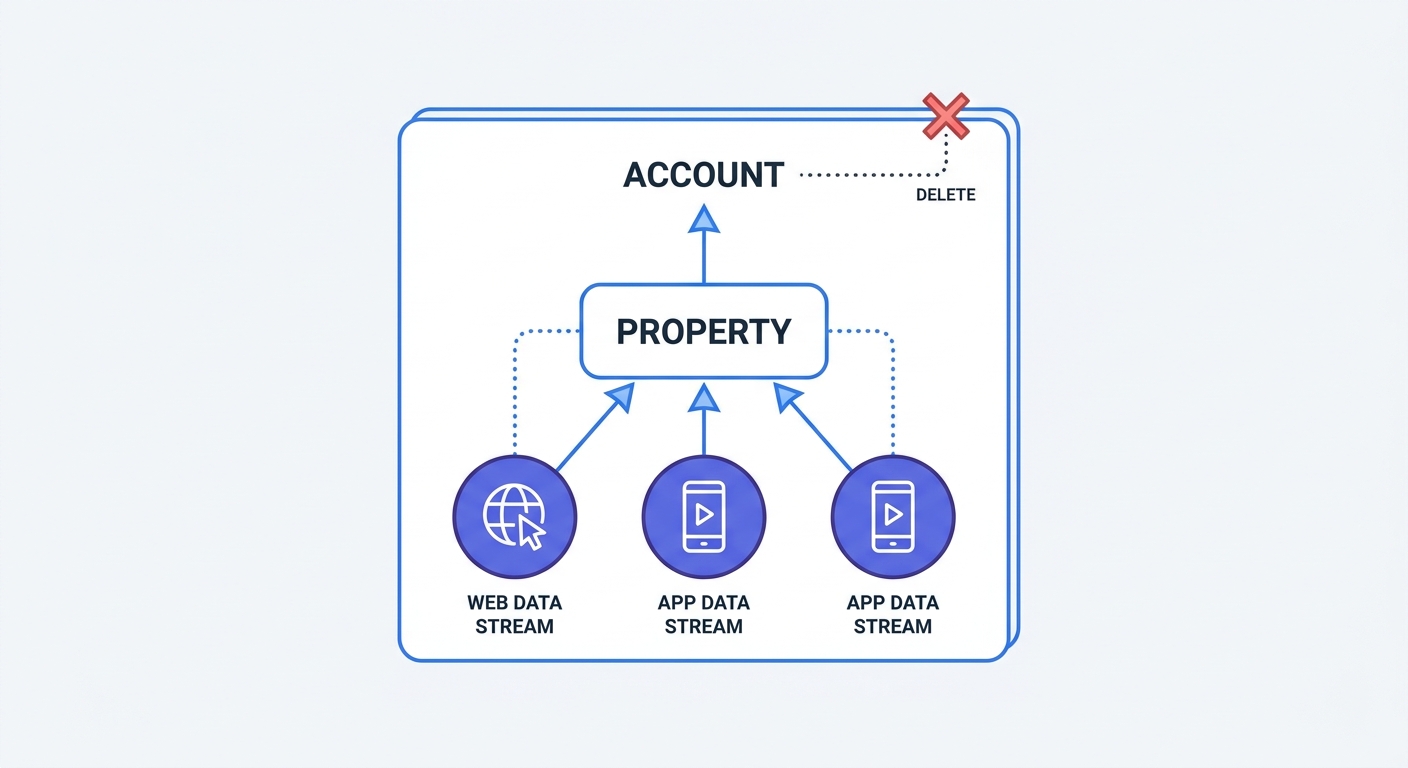
A wrong click in the admin panel wipes out data for every website your business owns. Google enforces a strict organizational structure. Administrators must audit their setups to avoid data loss.
Account vs. Property vs. Data Stream
Understanding the organizational hierarchy prevents mistakes. The platform divides tracking infrastructure into three distinct levels.
- Account: This represents the top-level business entity. Deleting the Account destroys every website profile, app profile, and piece of historical data associated with the company.
- Property: This represents a specific website or application. Deleting a Property removes all reporting data for that specific asset while leaving other websites in the Account intact.
- Data Stream: This represents the source of incoming data. Deleting a Data Stream stops new data collection but keeps historical data in the reports.
Audit all properties before taking action. Open the admin dashboard to review the Property column. Agency owners managing multiple client websites under one Account must target the specific Property for deletion to preserve other clients' data.
Exporting Historical Data
Administrators lose access to reports the moment a property enters the trash. Secure past marketing performance metrics first. Marketers rely on historical benchmarks to measure current campaign success.
Export basic reports via the standard interface. Navigate to the most visited reports, such as Traffic Acquisition or Pages and Screens dashboards. Adjust the date range to encompass the maximum available history. Click the "Share" icon in the top right corner and select "Download File" to save the data as a CSV. Repeat this process for all custom explorations.
Data engineers should connect the property to BigQuery for a raw data dump. The native BigQuery integration allows administrators to export event-level data to a Google Cloud warehouse. This process requires configuring a billing account in Google Cloud Platform.
Many Google Analytics alternative platforms offer import tools. Exporting data in standard CSV formats ensures marketers can populate new dashboards with historical context.
Step-by-Step: How to Delete a Google Analytics Account
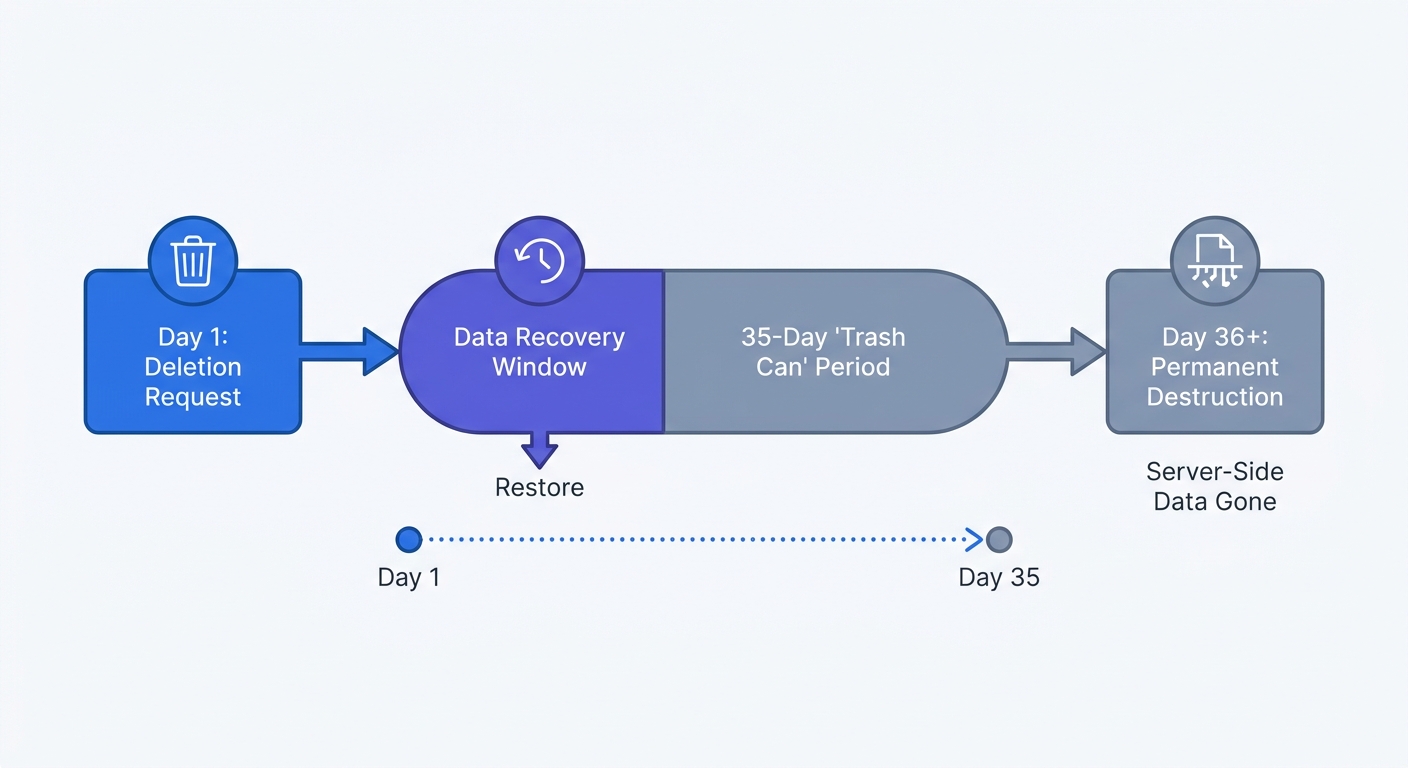
Google server logic places deleted assets into a temporary holding state. Executing a deletion sends the Account or Property into a 35-day trash can window. Site owners can restore the data during this grace period. On day 36, Google servers overwrite the storage blocks to destroy the data.
Deleting an Entire Account
Use this method to sever all ties with the platform and erase every website profile associated with the business.
- Open the analytics dashboard and sign in using an email address with Administrator permissions.
- Click the gear icon labeled "Admin" in the bottom left corner.
- Locate the "Account" column on the far left side of the admin panel.
- Click "Account Settings".
- Click the blue "Move to Trash Can" button positioned in the top right corner.
- Read the permanent deletion warning prompt.
- Click "Trash Account" to confirm the action.
Google sends an automated email confirming the countdown to permanent deletion. Every user granted access to the account receives the same notification.
Deleting a Specific Property
Use this method to remove tracking for a single website while maintaining analytics for other active projects.
- Click the "Admin" gear icon in the bottom left corner.
- Verify the correct overarching business name appears in the top-left dropdown menu.
- Locate the "Property" column in the middle of the admin panel.
- Select the specific website targeted for deletion from the Property dropdown menu.
- Click "Property Settings".
- Click the blue "Move to Trash Can" button in the top right corner.
- Confirm the deletion prompt.
A grayed-out or missing "Move to Trash Can" button indicates the user profile lacks sufficient permissions. Contact the property creator to request an upgrade to the Administrator role.
The Final Step: Removing the Tracking Code
Deleting the property in the dashboard tells Google servers to stop processing data. This action leaves the website infrastructure untouched. The web server continues serving tracking scripts to every visitor.
Leaving dead scripts on the website degrades performance. Browsers must download the payload, parse the JavaScript, and attempt to send HTTP requests to a tracking server rejecting the data.
Erasing gtag.js from Your Website
Open the website source code or tag management system. Locate the global site tag script block. This code sits within the <head> section of the HTML document.
Search for this specific script structure:
<!-- Google tag (gtag.js) -->
<script async src="https://www.googletagmanager.com/gtag/js?id=G-XXXXXXXXXX"></script>
<script>
  window.dataLayer = window.dataLayer || [];
  function gtag() {
    dataLayer.push(arguments);
  }
  gtag("js", new Date());

  gtag("config", "G-XXXXXXXXXX");
</script>
Delete the entire block of code. Save the file and deploy the changes to the live server.
Organizations using a tag management system must log into that interface. Pause and delete all tags associated with the deleted property. Publish a new container version to push the changes live. Developers can compare deployment mechanics in the Google Tag Manager vs Google Analytics documentation.
Deactivating CMS Plugins
Millions of content-driven websites deploy tracking scripts via third-party plugins. WordPress administrators must check the active plugin list. Deactivate and delete tools like Site Kit by Google, MonsterInsights, or ExactMetrics.
Shopify administrators execute a different removal process. Open the Shopify admin dashboard. Navigate to Settings, then click Customer Events. Locate the Google tag in the custom pixels list and click disconnect. Open the Online Store preferences to clear the measurement ID from the analytics configuration box.
Removing these plugins reduces database load. Fewer background processes run on the server. Site owners eliminate security vulnerabilities introduced by unpatched third-party extensions.
Switching to a Cookie-Free Analytics Alternative
Data collection remains a requirement for scaling a digital business. Deleting Google's platform creates a tracking void. Companies must deploy a replacement system to monitor traffic sources, measure campaign ROI, and track conversion rates.
Reclaiming Data Ownership
Modern digital marketing requires data sovereignty. Storing metrics on proprietary ad-tech servers subjects the business to external policy changes and mandatory feature deprecations. Implementing an open-source analytics platform grants full control over the reporting infrastructure.
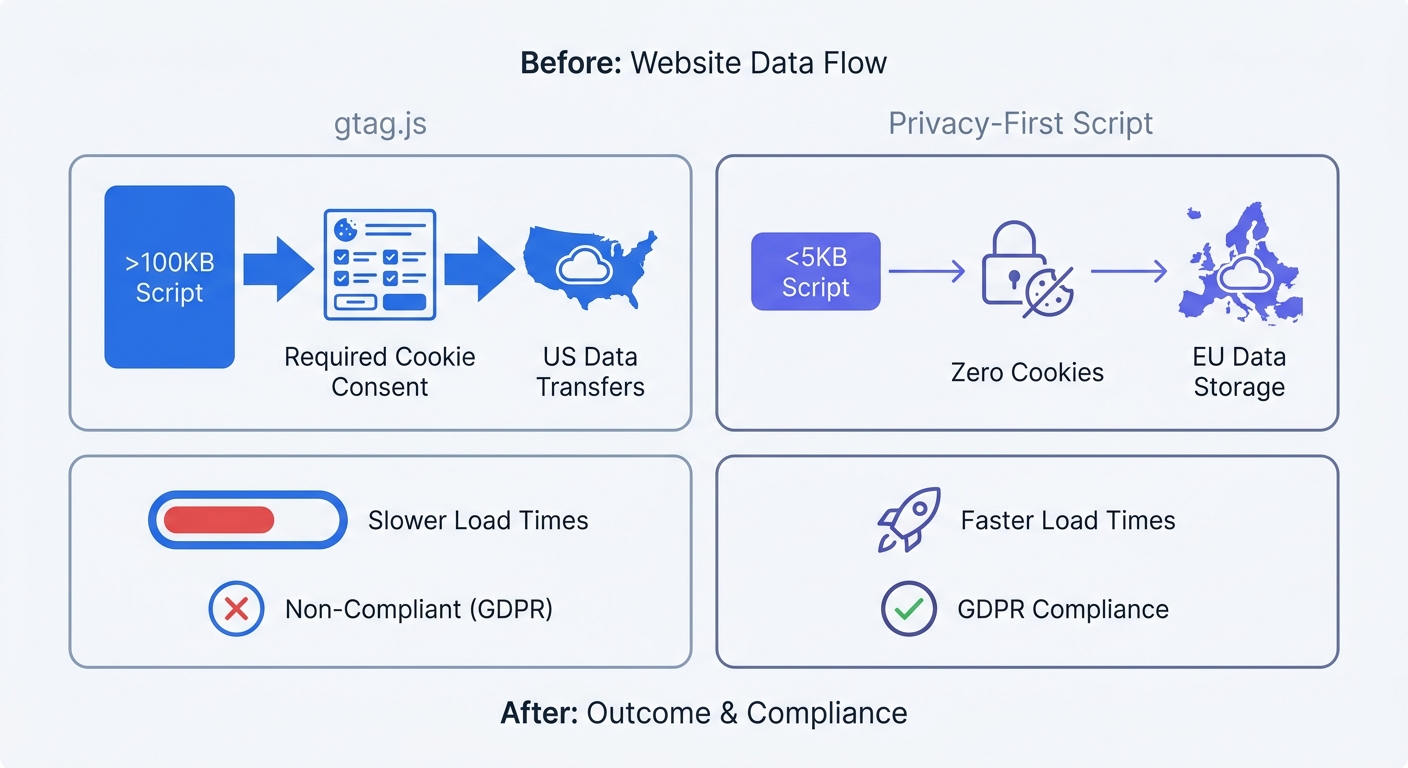
Privacy-first platforms operate without persistent cookies or fingerprinting techniques. This architecture changes compliance obligations. Reviewing GDPR banner examples reveals that cookie-free tracking eliminates the need for consent pop-ups. Visitors interact with the website without clicking through legal disclaimers.
Data accuracy improves upon removing consent banners. Banners cause artificial traffic drops when users decline tracking or ignore the prompt. Cookie-free systems log anonymous pageviews on the server side to provide a complete picture of traffic volume without violating user trust.
Faster Load Times with Swetrix
Performance dictates search engine rankings and e-commerce conversion rates. The standard gtag.js payload requires browsers to process heavy JavaScript execution tasks. Replacing this with a lightweight alternative transforms site speed metrics.
Swetrix provides a tracking script weighing less than 5KB. The browser downloads and executes this file in milliseconds. The script refuses to write data to local storage. This approach eliminates the performance penalties associated with legacy tracking software. Administrators monitor the impact of third-party scripts on load times using performance monitoring dashboards.
Switching to a lightweight platform streamlines daily workflows. Marketers configure custom events, track outbound links, and measure user engagement without writing complex regex or navigating nested configuration menus.
Start tracking website traffic without compromising user privacy or site speed. Implementing a clean, compliant reporting setup begins with a 14-day free trial at Swetrix.