- Date
Google Tag Manager Vs Google Analytics: A Privacy-First Guide
 Andrii Romasiun
Marketing teams request new tracking pixels every week. Developers hardcode these scripts into the website header, deploy the update, and wait for data to populate. This cycle delays campaigns. Google introduced Tag Manager and Analytics to organize this chaos.
Google Tag Manager acts as a delivery vehicle for code. Google Analytics 4 serves as a database for user behavior. Confusing them causes developers to deploy duplicate tracking scripts, bloating website code and skewing traffic reports.
Understanding the boundary between these systems prevents technical debt. Adding extra scripts to a website slows down page loads and increases legal liability. European courts hand down massive fines to companies that mishandle visitor tracking data.
Evaluate your current data stack. Audit your configuration to determine whether your business requires a complex tag management system or a streamlined web analytics platform.
The Core Differences Explained
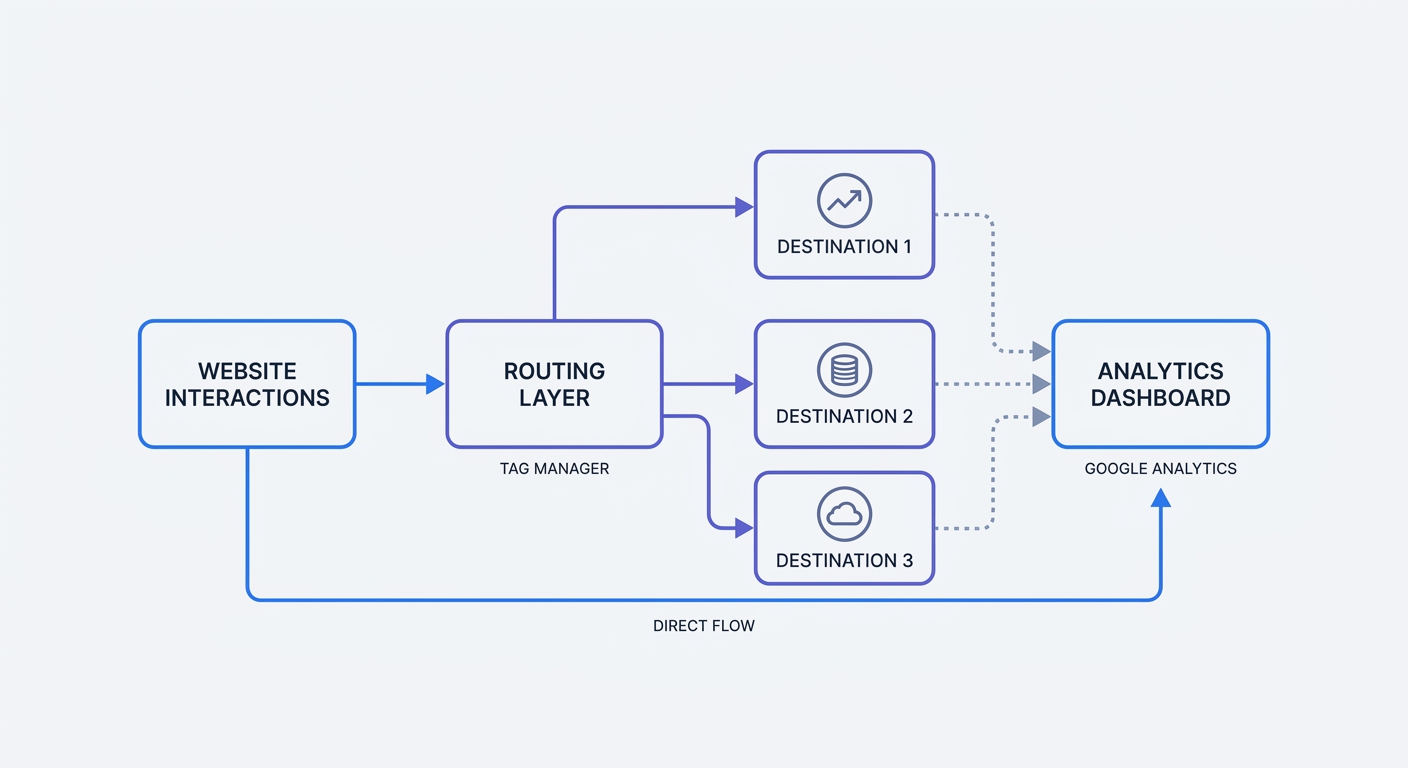
Connecting a website to a reporting dashboard requires two specific functions. The website must capture visitor interactions. A server must store and organize those interactions into visual reports.
Google splits these tasks across two distinct platforms.
What Is Google Tag Manager?
Google Tag Manager operates as a central control panel for marketing and analytics scripts. You install one master code snippet on your website. This master snippet creates an empty container. Marketers log into the Tag Manager interface to inject new tracking codes into that container without touching the website source code.
Tag Manager functions as a routing system rather than a database. The platform passes data to other tools without storing user behavior or generating traffic charts.
When a visitor clicks a specific button, Tag Manager detects the interaction. The platform evaluates rules configured by the administrator. If the rules match the click, Tag Manager fires the associated scripts. These scripts send data packages to external platforms like Facebook, LinkedIn, or Google Analytics.
Open your Tag Manager workspace today. Navigate to the Tags menu to count the active items. Review the triggers attached to each tag to understand when third-party code executes on your site.
What Is Google Analytics 4?
Google Analytics 4 ingests behavioral data, processes it through machine learning algorithms, and displays the output in a reporting interface. It requires an incoming data stream to function.
This platform tracks page views, measures scroll depth, and records event tracking actions like purchases or form submissions. You read these metrics to judge the performance of your marketing campaigns.
Analytics logic happens after the data leaves the website. The system categorizes users into demographics, attributes conversions to specific traffic sources, and calculates engagement times. You interact with Analytics to answer questions about user behavior.
Review your GA4 property settings. Check the Data Streams section to confirm the platform receives incoming data from your website.
The Destination vs. Delivery Analogy
Google Analytics 4 acts as the destination. Google Tag Manager serves as the delivery system.
Tag Manager packages the data on the website and ships it out. Analytics receives the package at the warehouse, opens the contents, and logs the inventory on a clipboard.
| Feature | Google Tag Manager | Google Analytics 4 |
|---|---|---|
| Primary Function | Deploys Javascript code | Analyzes behavior data |
| Data Storage | None | Stores user events |
| Reporting Interface | Diagnostic tools | Dashboards and charts |
| Interface User | Technical marketers | Analysts and executives |
You can use Analytics without Tag Manager by hardcoding the tracking script into your site layout. Deploying Facebook tracking pixels works in Tag Manager without Analytics. Most marketing agencies combine both tools.
Audit your analytics requirements. A standard blog or corporate site functions without a dynamic delivery system. Hardcoding a single analytics script eliminates an unnecessary middle layer and reduces failure points.
Why The Google Ecosystem Causes Website Bloat
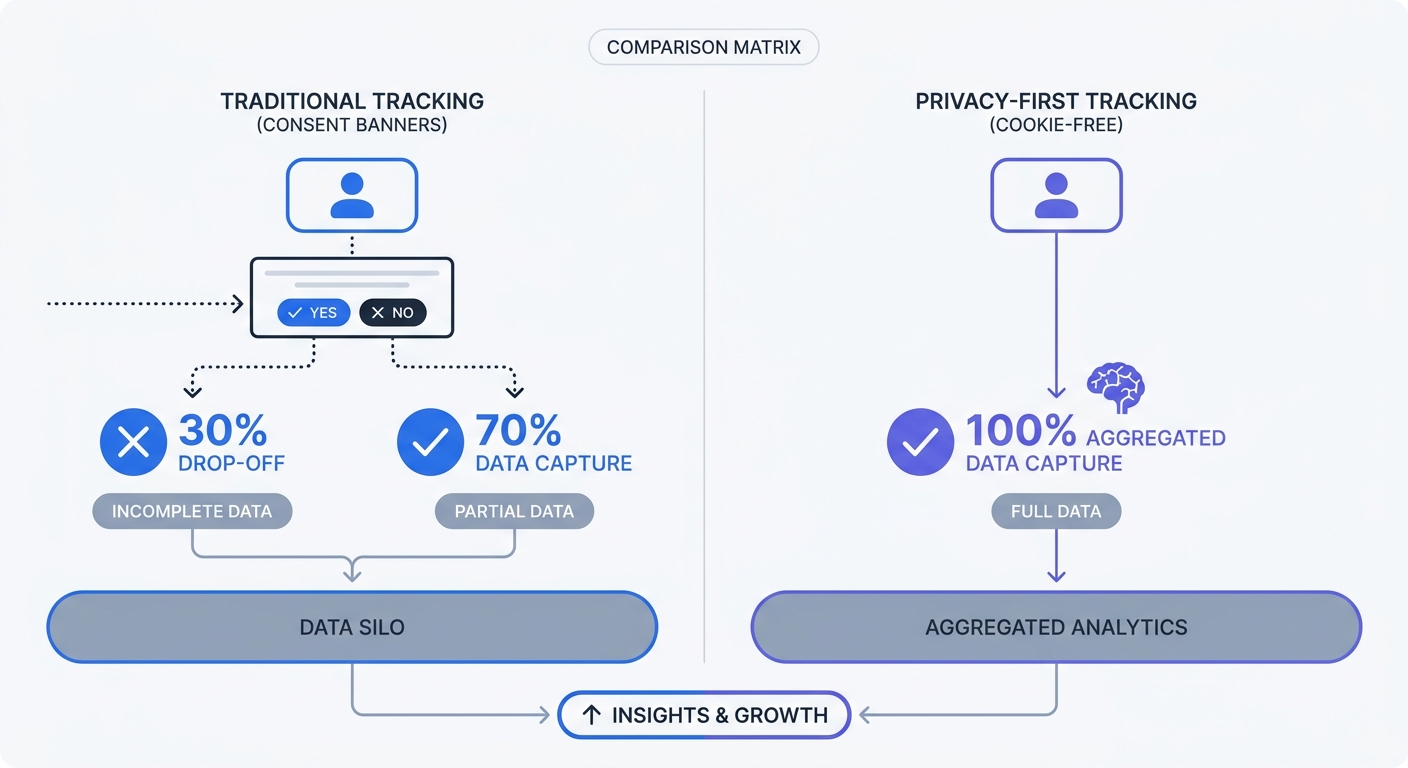
Modern marketing strategies demand extensive data collection. Teams stack analytics tools, heatmap generators, and advertising pixels on top of each other. Google Tag Manager makes adding these tools easy. This convenience destroys website performance.
The Performance Cost Of Heavy Tag Containers
Every script that Tag Manager fires forces the visitor's browser to pause rendering, download external code, and execute Javascript. This process blocks the main thread. Browsers cannot draw text or images on the screen while processing these marketing tags.
Top marketing websites deploy an average of 12 tracking tags via Google Tag Manager. This metric varies by industry, with e-commerce sites often loading more than 20 tags. These separate scripts compete for processing power on mobile devices. The screen stays blank for seconds.
Page load speed dictates user behavior. Visitors abandon sites that fail to render fast. Search engines penalize domains that score low on Core Web Vitals assessments. Google's search algorithm punishes websites that its own tag management product slows down.
Run a performance test on your website. Open Chrome Developer Tools, navigate to the Network tab, and filter the requests by "JS". Reload the page and look for requests initiated by gtm.js. Review the waterfall chart to see how many milliseconds the Tag Manager container delays your visual content.
Consolidate your tools to reclaim performance. Delete paused tags. Remove redundant analytics platforms to strip your container down to the minimum requirements.
Plunging Conversion Accuracy From Consent Banners
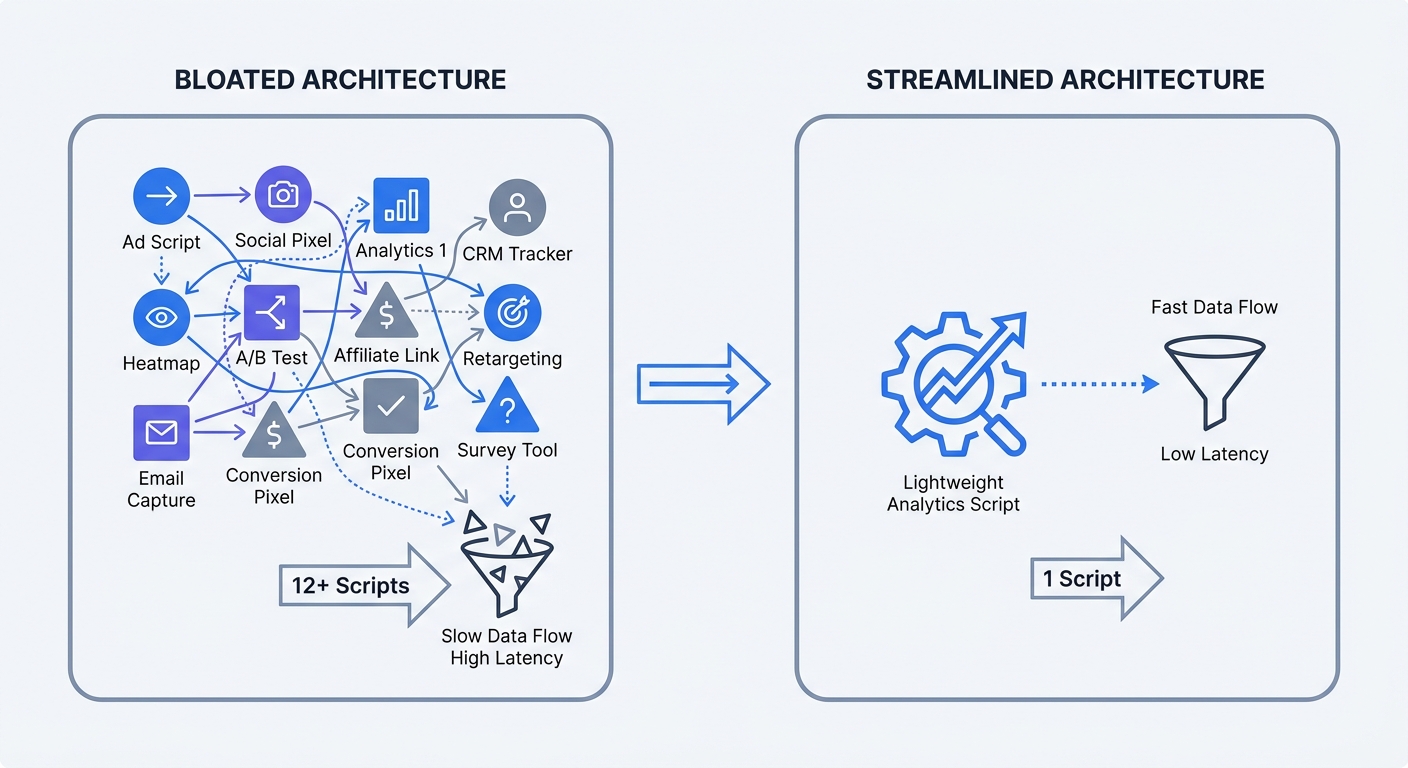
Privacy regulations require websites to ask for permission before loading tracking scripts. Websites implement cookie consent banners to comply. These banners disrupt the user experience and decimate data accuracy.
Google requires websites to use Consent Mode. This framework adjusts Tag Manager behavior based on the visitor's interaction with the consent banner. If a user clicks "Reject All," Consent Mode restricts tracking pixels from setting cookies.
This technical requirement creates data blind spots. Tracking accuracy drops significantly as users opt out of collection, depending on regional privacy laws and consent banner design. Up to half of your audience disappears from your reports. Your bounce rate metrics increase. Attribution models break down because returning visitors look like new users.
Calculate your data loss rate. Compare your internal database revenue against the revenue reported in Google Analytics over a thirty-day period. The gap between those numbers represents the traffic that your consent banner blocks.
Remove reliance on consent-dependent tools. Privacy-first tracking methods capture full audience behavior without triggering compliance blocks.
The Hidden Privacy Risks Of Google Tools
Web analytics platforms collect vast amounts of personal data. Legal rules surrounding this data shifted over the past five years. Default Google configurations expose website owners to severe legal penalties.
GDPR, Schrems II, And Cross-Border Data Transfers
European privacy law dictates strict rules for personal data processing. The General Data Protection Regulation (GDPR) restricts sending European citizen data to countries lacking equivalent privacy protections.
The United States operates sweeping surveillance programs. The Schrems II court ruling struck down the framework companies used to transfer data from Europe to the US. European Data Protection Authorities ruled that using Google Analytics violates the GDPR because it sends IP addresses to US-owned servers.
Data protection authorities issue million-euro GDPR fines to companies for improper Google Analytics use. Ignorance of data routing mechanics offers no legal defense.
Mitigate this risk by adjusting your platform settings. In your GA4 admin panel, navigate to Data Collection and Modification. Select Data Retention and change the default 14-month storage period to 2 months. This action limits your liability window.
Read our guide on how to comply with GDPR to review the specific legal requirements for consent collection.
The Threat Of Digital Fingerprinting
Regulators maintain a broad definition of personal data. An IP address serves as personal data. Screen resolution, operating system versions, and browser fonts combined create a unique digital signature.
Google Analytics collects these data points by default. The system builds detailed profiles of anonymous visitors. European authorities consider this combination of technical metrics to be digital fingerprinting. Fingerprinting requires explicit user consent, identical to tracking cookies.
Masking IP addresses does not eliminate the fingerprinting risk. The combination of other metadata still isolates individual devices. Deploying server-side Tag Manager hides the tracking requests from ad blockers, but it does not remove the legal obligation to secure consent before fingerprinting a user.
Audit the data points your website transmits. Open your browser's network tab. Inspect the payload sent to Google servers to spot browser dimensions, user agents, and location coordinates. Each metric increases your compliance burden.
Leaving Google Behind For Privacy-First Analytics
The market shifted away from invasive data collection. Adoption of privacy-first analytics tools continues to grow. Businesses recognize that heavy tag containers and missing data hurt profitability.
Modern tracking platforms aggregate trends to deliver marketing insights without harvesting personal profiles or introducing legal risk.
Ditching Cookie Banners
Cookieless analytics platforms change the data collection model. These systems generate temporary hashes rather than writing persistent tracking files to a user's hard drive.
A privacy-focused system reads incoming request data and applies a cryptographic function. This creates an anonymous identifier valid for a single day. The system deletes the hash at midnight. The platform tracks daily pageviews and session flow without knowing the user's identity.
This technical architecture eliminates the need for consent banners. The ePrivacy Directive and GDPR mandate banners when a site collects personal data or reads and writes tracking files to a device. Removing cookies removes the banner requirement.
Test a bannerless architecture on your site. Delete the Google Analytics tracking code and strip out the Tag Manager container. Implementing a Google Analytics alternative like Swetrix reveals the true volume of your traffic. Watch your tracked pageviews increase as the consent block disappears.
Clean Code And Faster Core Web Vitals
Replacing a bloated tag ecosystem transforms website performance. A standard Tag Manager container downloads hundreds of kilobytes of Javascript before firing tracking tags.
Privacy-first scripts weigh less than 5 kilobytes. Because the browser downloads the file in milliseconds, execution requires minimal processing power. Visual content renders without delay.
<!-- Example of a lightweight Swetrix tracking script -->
<script src="https://swetrix.org/swetrix.js" defer></script>
<script>
  document.addEventListener("DOMContentLoaded", () => {
    swetrix.init("YOUR_PROJECT_ID");
    swetrix.trackViews();
  });
</script>
Add the defer attribute to the script tag. This instructs the browser to continue parsing HTML while the analytics file downloads in the background. The script executes after the DOM tree finishes loading.
Faster sites rank higher in search results. Improved load times lower bounce rates. Delivering a seamless, uninterrupted browsing experience yields better marketing outcomes than collecting hyper-granular demographic data.
Review your tracking stack, identify unnecessary bloat, and deploy a leaner analytics solution to protect your users and your page speed.
Ready to clear out the tag bloat and track your traffic in compliance with privacy laws? Try Swetrix free for 14 days and see the speed difference of a cookie-free, privacy-first analytics platform.