- Date
Privacy-First Website Analytics For Nonprofits In 2026
 Andrii Romasiun
Open your Google Analytics account. Stare at a dashboard of unassigned traffic and complex event paths. Read the 2025 M+R Benchmarks study to confirm you share this frustration with the rest of your industry. Fifty-five percent of nonprofit leaders lack confidence in their website analytics tracking. Google engineers caused this confusion during the mandatory transition to Google Analytics 4.
You need clear data to secure funding and precise conversion metrics to run successful campaigns. You also face a mandate to protect donor privacy. You must balance tracking performance with respecting user consent when configuring website analytics for nonprofits. You achieve this balance without learning complex query languages or writing extensive tracking code.
The Current State of Nonprofit Data Tracking
The Analytics Confidence Gap
Google executives forced the migration to GA4, stripping marketing teams of their familiar Universal Analytics dashboards. Nonprofit teams operate without dedicated data science teams. Staff members struggle to extract fundraising insights from these new reports.
You track donations and visitor behavior with website analytics. Enterprise software vendors demand custom database queries and advanced event configurations. You waste hours building traffic reports instead of optimizing donor campaigns. Google developers hide core metrics behind multiple dropdown menus and nested navigation tabs.
Find answers in seconds to save resources. Your team wastes money every time they spend an hour formatting a traffic report for the board of directors. Track active sessions to fix this reporting bottleneck.
Run an audit on your current tracking setup by opening your website in a private browsing window. Right-click the page and select "Inspect" to open the developer tools. Click the "Network" tab, refresh the page, and type "google" or "facebook" into the filter bar. You will see large code payloads loading in the background. You slow down site load times with these scripts. Advertisers use them to harvest visitor information.
Ethical Data Ownership
Nonprofit founders build foundations on trust. Staff at a reproductive health clinic or legal aid charity serve individuals in crisis. You put these visitors at risk when you embed third-party trackers on your website.
Tech executives collect IP addresses and browsing habits across the web to build advertising profiles. You compromise organizational ethics when you feed donor behavior into these corporate databases. Visitors expect a safe environment from your organization.
Review your organization mission statement. Read your website privacy policy side-by-side with your mission values to note discrepancies between your stated values and your data collection practices. Update your privacy policy to reflect a commitment to donor protection. State your refusal to share visitor information with third-party advertisers. Protect your community by removing tracking pixels today.
Privacy Laws and Donor Experience
Do Privacy Laws Apply to Nonprofits?
Many organization leaders cause severe compliance failures by assuming tax-exempt status provides immunity from data privacy regulations. You process the personal data of residents residing in jurisdictions under the General Data Protection Regulation or the California Consumer Privacy Act. You must comply with these mandates.
You collect Personally Identifiable Information through standard analytics tools and social media pixels. Lawmakers include these common tracking elements in the legal definition of protected data:
- Visitor IP addresses
- Cross-site tracking cookies
- Precise geolocation coordinates
- Unique device identifiers
You accept legal liability when you deploy these tracking scripts without explicit user consent. Regulators issue fines based on the collection mechanism, regardless of your nonprofit status.
Check regional compliance requirements by identifying the geographic locations of your website visitors in your analytics dashboard. Consult your legal counsel to draft a compliant data retention policy. You build a stronger defense against audits by minimizing data collection from day one. Switch to anonymous tracking to eliminate liability.
The Cookie Banner Problem
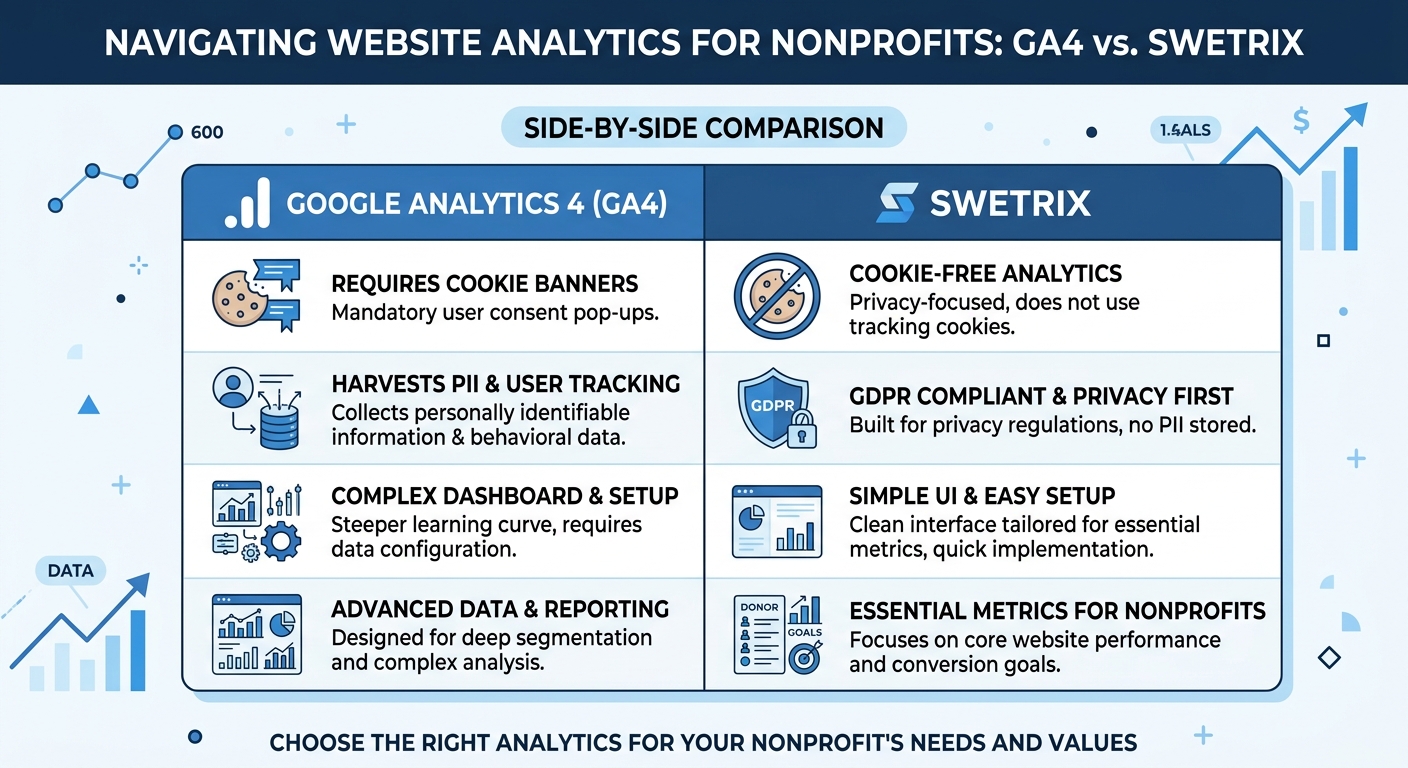
You must display a consent banner if you use tracking cookies. Visitors experience friction the moment they land on your homepage. They face a wall of confusing toggle switches and dense legal text. Mobile visitors abandon your site when you force them to navigate a consent banner covering half their smartphone screen.
You convert 1 percent of total visitors into donors on an average nonprofit website. You convert up to 22 percent of traffic on dedicated donation pages. Visitors experience an interrupted journey when they encounter consent banners. You lose conversions as users close the browser tab instead of navigating the consent options.
| Tracking Method | Requires Consent Banner | Impact on User Experience | Data Accuracy |
|---|---|---|---|
| Google Analytics 4 | Yes | High friction, interrupts journey | Lower (users decline tracking) |
| Meta Pixel | Yes | High friction, cross-site tracking | Lower (blocked by ad blockers) |
| Cookie-Free Analytics | No | Zero friction, clean interface | High (captures all anonymous traffic) |
You bypass the legal requirement for consent banners when you adopt cookie-free analytics platforms. You present a clean interface to your visitors. You track page views and referrers without collecting protected personal information, which protects your conversion pathways and respects the user experience. Check your current bounce rate on mobile devices to measure the impact of your existing banner.
Key Website Metrics Nonprofits Must Track
Traffic Sources and UTM Tracking
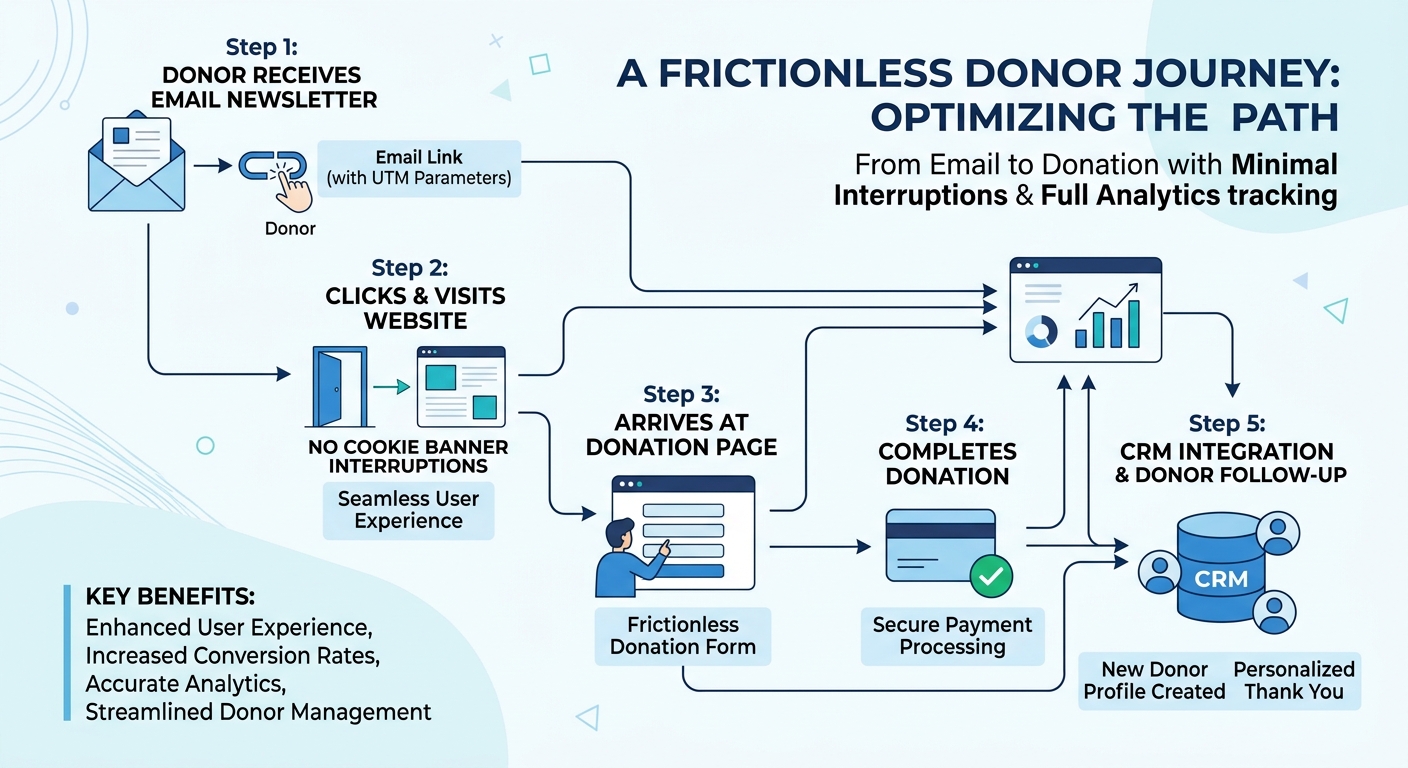
Marketing teams run successful email marketing programs. You achieve open rates between 28 and 34 percent on your newsletter campaigns. You must connect those email opens to actions on your website. You gain nothing from a click if you fail to track the subsequent page views and donation form submissions.
You use UTM parameters to label the origin of a link click. Categorizing your traffic by source, medium, and campaign name allows you to translate anonymous visits into a clear map of user acquisition.
Create a standardized naming convention for your URLs. Open a spreadsheet to document your tags. Use these three core parameters for every external link:
- utm_source: Identifies the platform (e.g., newsletter, facebook, partner_site).
- utm_medium: Identifies the format (e.g., email, cpc, organic_social).
- utm_campaign: Identifies the specific initiative (e.g., winter_appeal_2026, giving_tuesday).
You build a final link like this: https://yournonprofit.org/donate?utm_source=newsletter&utm_medium=email&utm_campaign=winter_appeal_2026.
Compare campaigns to make strategic budget decisions. Send a Tuesday morning appeal and a Thursday afternoon follow-up using utm_campaign=tuesday_appeal and utm_campaign=thursday_reminder. Check your dashboard on Friday. You find you generated fifty clicks and two donations from the Tuesday email, while the Thursday email yielded twenty clicks and five donations. You calculate a higher conversion rate for the Thursday send. Adjust your future broadcast schedule based on this evidence.
Actionable Engagement Metrics
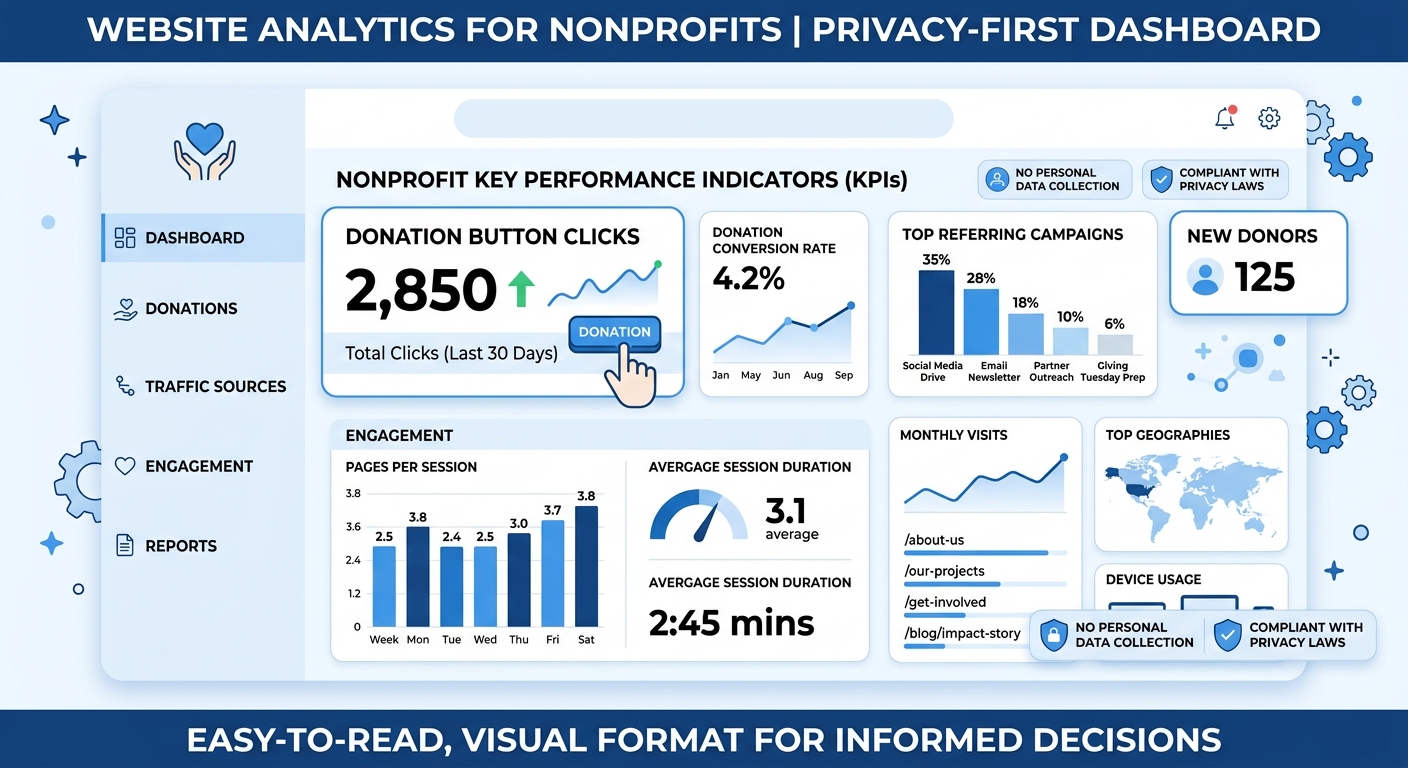
You gain zero strategic value from vanity metrics. You report total page views to the board, but you learn nothing about donor intent from this number. You must track metrics indicating an active interest in your mission.
Visitors bounce from nonprofit websites 60 percent of the time. Visitors who leave after viewing a single page decline to sign up for recurring donations. You identify a disconnect between your headline and your content when you see a high bounce rate on an impact story page.
Set a goal of two or more pages per session. Measure specific interactions to gauge engagement by configuring two custom events in your analytics dashboard:
- Clicks on the primary "Donate" button in your site header.
- Submissions of your volunteer application form.
Find the CSS class of your donation button. Right-click the button on your website and select "Inspect" to look for the class="donate-btn" attribute in the code. Enter this class name into your analytics event configuration. Track the number of people who initiate the giving process versus the number who complete the transaction. Use this data to identify bottlenecks and optimize your donation funnel for higher completion rates.
Building a Sustainable, Integrated Tech Stack
Integrating Analytics with CRM Systems
You create blind spots in your fundraising strategy when you separate your website data from your donor database. Fundraising teams combine website analytics with specialized Customer Relationship Management platforms to build a complete view of the donor journey.
Marketing directors using integrated measurement approaches report a 44 percent year-over-year increase in online donations. Track the initial website visit in your analytics tool while recording the completed transaction in your CRM. You need a mechanism to connect these two distinct data points.
Configure your donation forms to pass a unique transaction ID to your analytics platform upon a successful charge. Match this ID against the donor record in systems like Bloomerang or Blackbaud. Create a custom field in your donor database labeled 'Acquisition Source'. Configure your website donation plugin to populate this field with the UTM data from the user session.
You log the page view and the event in the analytics platform. You log the financial transaction and the source in the CRM. Generate an end-of-year report to prove your email marketing efforts acquired 40 percent of your new recurring donors. Share this report with your grant writers to secure tech infrastructure funding.
Predicting Donor Behavior
Read the 2025 M+R Benchmarks study to see a shift in online revenue. Fundraisers generate 31 percent of total digital fundraising through monthly recurring giving. Prioritize donor retention over single-gift acquisition. You secure predictable revenue for long-term project planning through a recurring donor program.
Use website engagement data to forecast future contributions. You notice a drop in visit frequency before a recurring donor cancels their subscription. Spot these patterns in advance to save the relationship. Fifty-eight percent of nonprofit directors incorporate artificial intelligence into their digital operations to predict these trends.
Export your analytics data into your donor management system to segment your audience based on website activity over the past 90 days. Send targeted re-engagement emails to past donors who cease visiting your site. Invite them to exclusive webinars or share specific impact reports to rekindle their interest. Track the open rates on these recovery emails to refine your retention strategy.
Switching to a Privacy-First Analytics Platform
The Best GA4 Alternatives
You need an analytics tool designed for privacy and simplicity. Remove Google Analytics to protect your donors and streamline your reporting. Search for alternatives that provide clear data without overwhelming your marketing team with technical jargon.
We built Swetrix to provide open-source, cookie-free web analytics. Access a clean dashboard focused on core metrics. Track page views, traffic sources, and conversion events without sacrificing visitor privacy. Eliminate the need for GDPR consent banners because you abstain from collecting protected personal data.
You process a hashed daily salt instead of permanent device identifiers with cookie-free tracking. Register a page view and a unique visitor for the day. Delete the temporary hash at midnight to protect visitors. You see accurate traffic numbers while leaving zero footprint on the user device.
Bypass the steep learning curve of enterprise analytics platforms by granting access to your entire team. Staff members review campaign performance and generate reports without learning custom query languages. You own your data and maintain the ability to export your records at any time.
Implementation Best Practices
Execute a clean migration to avoid data loss. Run your legacy analytics tool and your new privacy-first platform at the same time during a two-week transition period. You verify data accuracy through this brief overlap.
Follow this implementation plan to replace your tracking scripts:
- Register your domain in your new analytics dashboard to generate your specific tracking project ID.
- Paste the lightweight code snippet into the header of your website above the closing
<head>tag.
Open your content management system and locate the global header template to insert the script. Verify the incoming data in your new dashboard. Check the real-time traffic logs to confirm you capture your UTM parameters. Trigger your custom events on your live site to ensure you record the actions. Click your own donation button and watch the event counter increase in your analytics panel.
Delete the Google Analytics tag from your website header. Remove the cookie consent banner from your homepage. Publish an announcement to your email subscribers highlighting your transition to a privacy-first data model. Position this operational change as a commitment to ethical standards and donor protection. Turn a technical update into a marketing asset to build trust with your community.
Stop forcing your marketing team to fight with complex GA4 reports. Start tracking your nonprofit campaigns with clear, ethical data. Try Swetrix with our 14-day free trial and see the benefits of privacy-first analytics.