- Date
Master React Feature Flags for Privacy-First Web Analytics
 Andrii Romasiun
A developer merges a pull request on a Friday afternoon. Although the build succeeds, the new checkout flow breaks for mobile users within minutes. Reverting the commit requires twenty minutes of deployment downtime.
React feature flags prevent this panic. Wrap the experimental component in a boolean toggle. Turn the flag off in the dashboard, and the broken code disappears from the live environment. This approach eliminates the need for rollbacks.
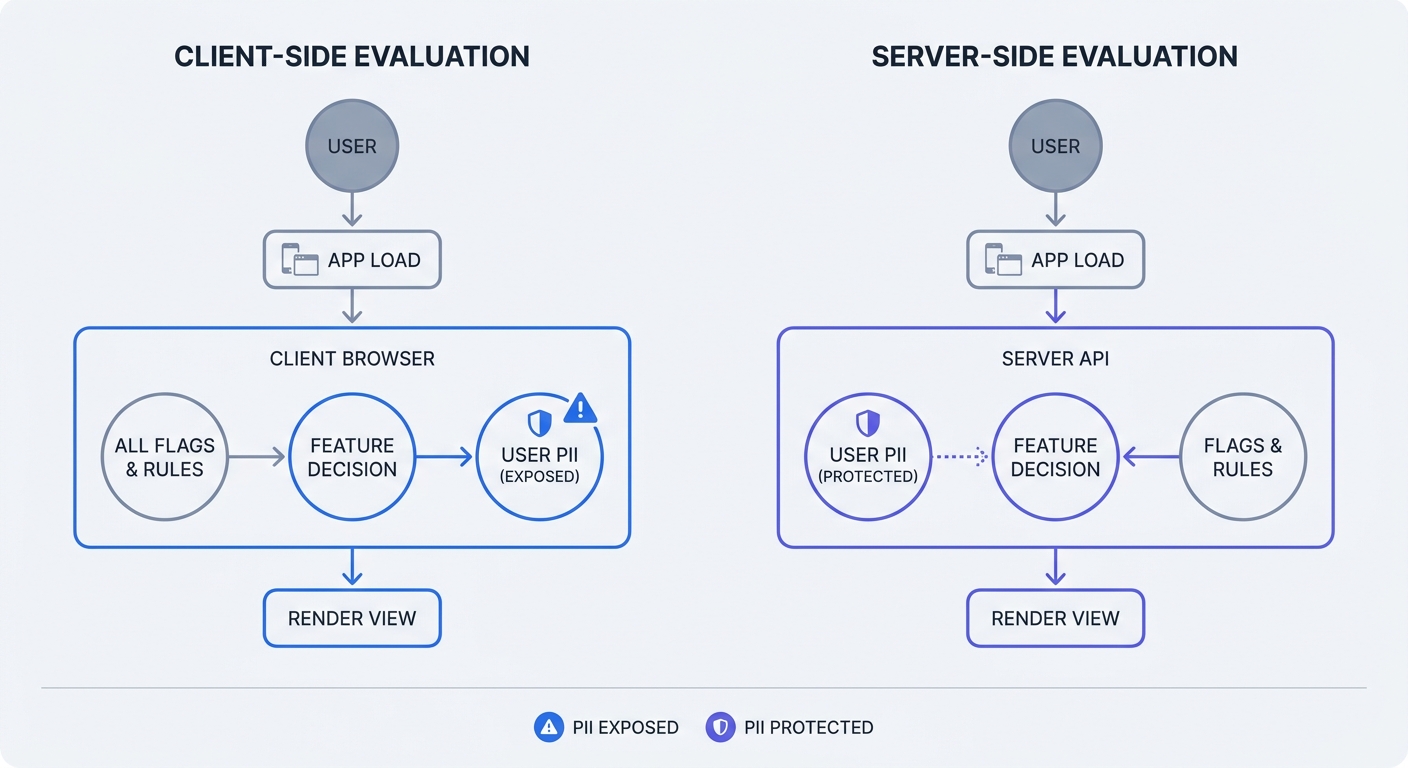
Implementation dictates success. Expose the wrong data to the feature management API, and the React application becomes a privacy liability. Evaluating flags on the client side risks leaking user identifiers to the browser.
The Rise of Feature Management in Modern Web Development
The Business Case for React Toggles
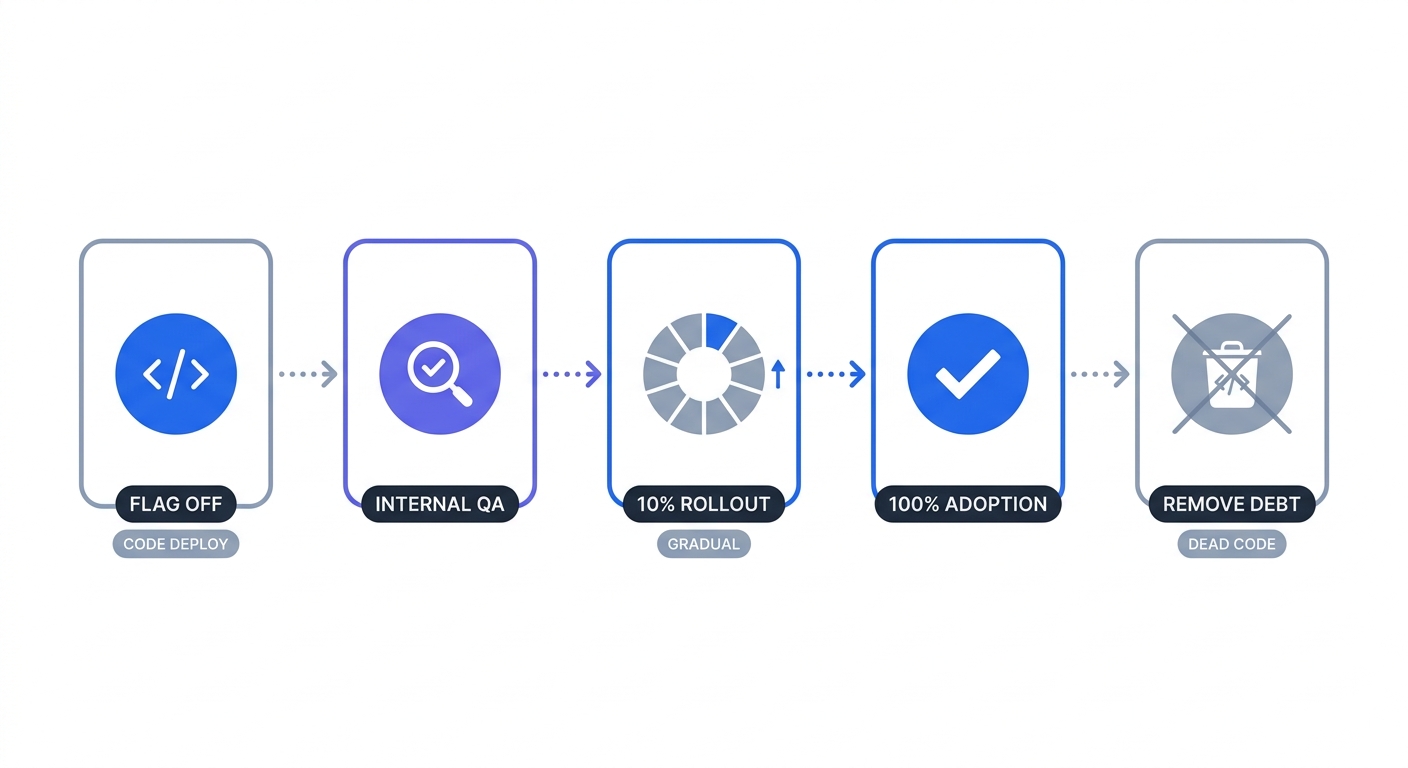
Feature flags decouple code deployment from feature release. After writing new components, engineers push code to production upon repository completion. They hide the interface behind a toggle until the marketing team approves the launch.
Long-lived feature branches cause massive merge conflicts. Instead of building out new components, developers spend hours resolving divergent code. Feature flags allow the team to merge incomplete work into the main branch every day. Because the toggle remains off, the application ignores the unfinished code.
This separation accelerates development cycles. In a 2022 LaunchDarkly report, researchers found 60 percent of organizations adopted flags over the past twelve months. Surveyed engineers reported that 84 percent saw an improvement in software delivery speed and 98 percent achieved a return on investment for enterprise applications.
Switching to trunk-based development requires instant feedback loops. Engineering teams set up internal testing environments where specific users see the new variations. Product managers evaluate the changes in production without exposing the general public to unstable interfaces.
Managing Privacy and Security Hurdles
Adding third-party evaluation SDKs introduces major risk. To determine which users receive the new feature, the platform needs context. Sending an email address or user ID to an external service violates core data minimization principles.
Researchers at Radboud University tracked data leakage in popular frontend frameworks. They found that React applications leak sensitive inputs into readable DOM attributes when developers handle state using insecure methods alongside external scripts. Exposing personal identifiers to a feature flag vendor compromises user privacy.
Compliance introduces strict requirements. Security professionals often face data security challenges when adopting cloud-based feature management platforms for consumer data. Sending user coordinates or names across the network triggers GDPR and CCPA obligations.
Start by auditing the current flag provider for data exposure. Open the network tab in the browser developer tools to monitor outgoing requests. This panel reveals the exact payload the React application sends to the feature management API. Replace identifiable attributes with anonymous session hashes or internal organizational IDs. Keeping personal data locked inside an internal database protects web privacy.
Best Strategies for Implementing React Feature Flags
Using Context Providers and Custom Hooks
Global state management keeps component code predictable. Wrap the root component in a standard Context Provider. This structure passes the current flag state down the component tree without prop drilling.
Developers should define the provider at the highest level of the application. The context stores a dictionary of flag keys and boolean values.
- Create a
FlagsContextusing React native Context API. - Fetch the active toggles from the management platform during the initial application load.
- Store the response in local state within the
FlagsProvidercomponent. - Render the
childrenprop inside the provider wrapper.
Accessing these values requires a custom hook. Build a useFeatureFlag function that consumes the context and accepts a flag key as an argument. Invoking the hook returns a boolean.
const isNewCheckoutEnabled = useFeatureFlag("experiment-checkout-redesign-v2");

if (isNewCheckoutEnabled) {
  return <NewCheckoutFlow />;
}
return <LegacyCheckout />;
String-based keys cause silent failures. A typo in the string forces the hook to return an undefined value. Migrating toggles to strict TypeScript interfaces solves this problem. Generate type definitions for the available flags so the compiler catches invalid keys before the code reaches the browser.
Standardizing with OpenFeature
Vendor lock-in wastes engineering hours. Changing feature management platforms forces teams to rewrite custom hooks and provider logic across the entire codebase. A unified standard prevents this rework.
The Cloud Native Computing Foundation introduced OpenFeature to solve API fragmentation. This open specification standardizes feature flag management. React developers build their application against the OpenFeature API rather than a specific vendor SDK.
Switching from a legacy provider to an open-source alternative requires changing one line of configuration. The core application code remains untouched. Implementing the OpenFeature web provider in a React application secures the infrastructure against breaking changes. Teams can choose a feature flag service based on pricing and performance rather than migration costs.
The Shift to Server-Side Evaluation
Client-side evaluation hurts performance and privacy. The browser downloads the entire list of user rules, plus the vendor SDK, before rendering the component. Network latency delays the interface.
Moving flag evaluation to the server improves load times. React Server Components and Next.js allow engineers to resolve conditions before sending HTML to the browser. The server makes the API call to the feature management platform.
Server evaluation protects user context. Backend services check the database for the user subscription tier or geographic region. Passing this data to the local flag SDK instance keeps it secure. The server processes the logic and returns a boolean to the client component. Browsers do not process the raw user attributes.
Next.js App Router changes the feature testing paradigm. Developers fetch flag states in a Server Component before the UI renders.
import { getFeatureFlag } from '@/lib/flags';
import { NewHero } from '@/components/NewHero';
import { LegacyHero } from '@/components/LegacyHero';

export default async function HomePage() {
  const showNewHero = await getFeatureFlag('experiment-homepage-hero-v2', {
    userId: 'anonymous-session-hash'
  });

  return (
    <main>
      {showNewHero ? <NewHero /> : <LegacyHero />}
    </main>
  );
}
This architecture removes the feature flag SDK from the client bundle. The client downloads zero evaluation logic. Unused fallback code stays on the server, offering significant performance gains over client-side tracking.
Integrating Privacy-First Analytics with Swetrix
Ethical A/B Testing Without Tracking Cookies
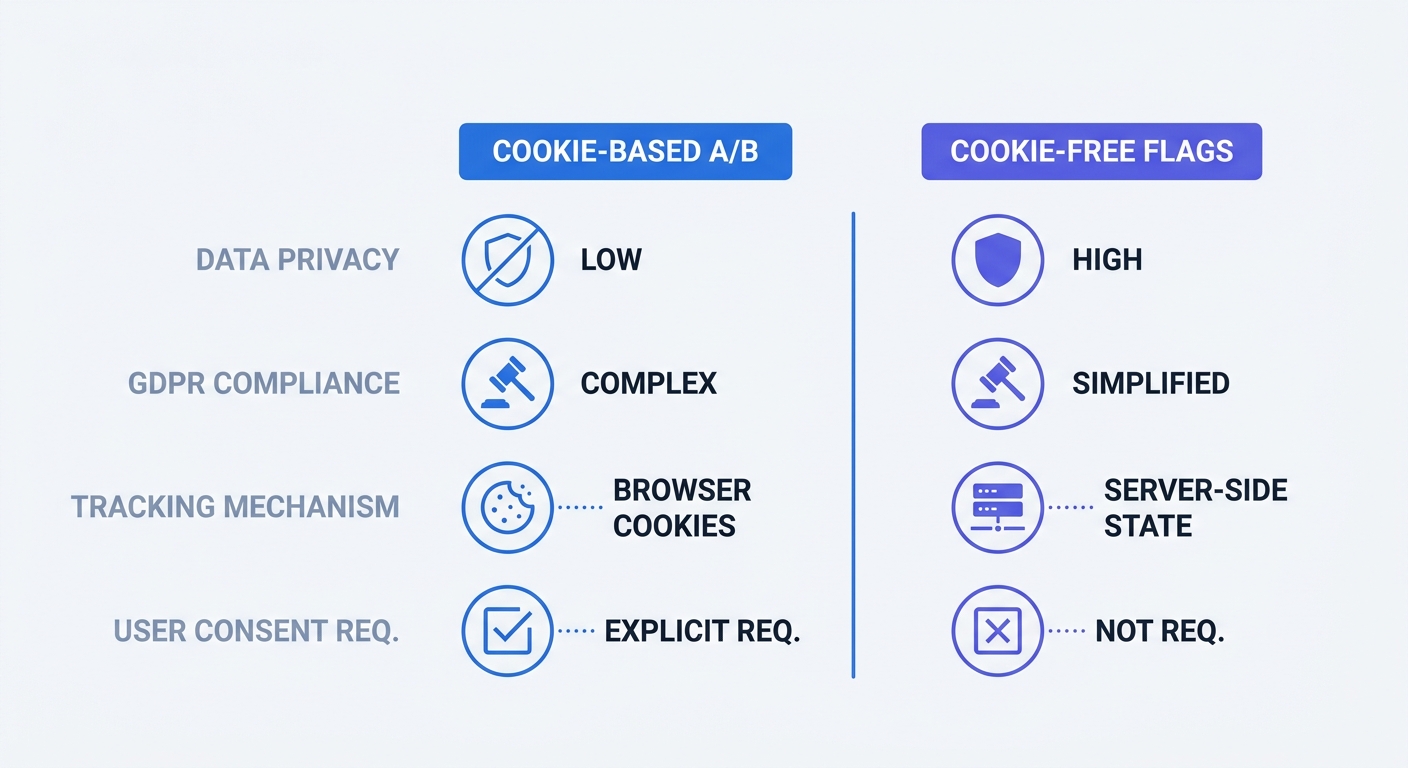
Traditional experimentation tools track users across sessions. Platforms drop third-party cookies into the browser to remember which variant the user saw on Monday. These intrusive methods require massive consent banners and degrade the user experience.
Combine React feature flags with cookie-free analytics. Engineers assign a user to a specific variant using anonymous session parameters or backend logic. The client renders the assigned component.
Track the variant performance using Swetrix. Trigger a custom event when the component mounts. Include the active flag name as an event dimension to segment the data.
import { track } from "swetrix";

useEffect(() => {
  track({
    ev: "checkout_viewed",
    meta: { variant: isNewCheckoutEnabled ? "v2" : "v1" },
  });
}, [isNewCheckoutEnabled]);
Analyze the conversion rates in the Swetrix dashboard. Compare the conversion events between the v1 and v2 dimensions. This setup can operate without cookies and may reduce consent-banner requirements, depending on jurisdiction and implementation details. Product teams retain strong visibility into product performance while aligning with GDPR principles.
Validating Feature Adoption Rates
Releasing code behind a toggle reduces technical risk. Analytics reduce business risk. Measuring engagement determines if the new component solves the underlying customer problem.
Industry benchmarks put the average core B2B product feature adoption rate at 24.5 percent, though this varies by industry, ranging from 22.6 percent in FinTech to 31 percent for HR software. Compare the new React component against this baseline before rolling it out to the entire user base.
Set the feature flag to target 10 percent of active traffic. Monitor error rates and adoption metrics in Swetrix for one week.
If adoption hits 30 percent with zero performance errors, increase the rollout to 50 percent. Low engagement signals the team to turn the flag off. Use the gathered data to redesign the component. Pushing a failing feature to full deployment damages the user experience. Testing in production requires hard data to justify permanent repository changes.
Managing Flag Debt and Development Workflows
Adopting Strict Naming Conventions
Vague flag names cause confusion. Developers forget what test-new-button controls three weeks after creating it. Generic names force engineers to search the entire repository to understand the purpose of the toggle.
Engineering leaders must enforce a strict naming structure across the organization. Every flag needs to include the flag type, the affected module, and a descriptive action.
Compare these approaches:
| Bad Flag Name | Good Flag Name | Reason |
|---|---|---|
test1 | experiment-pricing-annual-toggle | Defines the scope and component. |
new-ui | release-dashboard-sidebar-v3 | Indicates a progressive rollout rather than a test. |
fix-bug | killswitch-payment-stripe-api | Clarifies the flag exists for emergency outages. |
Categorize toggles by their lifespan. Release flags exist for days. Experiments span several weeks. Killswitches remain in the codebase to disable external integrations during third-party outages. Prefixing the key with the type tells developers when the code requires cleanup.
Planning for Failures and Cleaning Up Code
Network requests fail. Applications must handle timeouts when connecting to the feature management service.
Build robust fallback user interfaces. Default every useFeatureFlag hook to a safe boolean value. An API returning a 500 error triggers the hook to return the default state.
const showBetaFeature = useFeatureFlag("release-beta-feature") ?? false;
The safe default is the legacy control variant. Presenting the old, stable interface protects the user experience. Exposing a broken beta component costs the business customers.
Aggressive cleanup prevents technical debt. Once an experiment concludes or a release hits 100 percent deployment, the flag becomes obsolete. Stale flags bloat the React bundle. They introduce dead code paths that confuse new engineers.
Teams should schedule a mandatory cleanup task the moment a feature reaches full deployment.
- Delete the flag definition in the external management platform.
- Remove the
useFeatureFlaghook from the React component. - Delete the legacy fallback component.
- Strip the conditional logic, leaving the winning component structure intact.
Treat flag cleanup as part of the initial feature ticket. The branch remains incomplete until the temporary logic disappears from the repository.
Stop compromising user privacy to run A/B tests. Swetrix provides open-source, cookie-free analytics that pair well with server-side feature flags. Sign up for a free trial to measure component adoption and conversion rates without invasive tracking.