- Date
Discover pixel tags and web beacons: A practical guide to analytics and privacy
 Andrii Romasiun
Pixel tags and web beacons act like invisible spies, quietly tracking how people interact with your content. Each time a page or email loads, these tiny 1×1 images send a quick ping to a server—no visible footprint, but powerful insights.
They’re essentially a stealth sensor for analytics, helping teams understand engagement without adding any visible assets.
Understanding Pixel Tags And Web Beacons
For marketers and developers, pixel tags reveal the paths users take—without altering the look of a page.
- Logs each visit by loading a 1×1 pixel on page render
- Records timestamps, IP addresses, and user agent strings
- Offers both client-side and server-side collection for different scenarios
Imagine sending an email newsletter: as soon as a reader opens it, their email client fetches a hidden beacon. You get an almost instantaneous “open” event tied to the right campaign.
Core Terminology
Before moving on, let’s unpack the key terms you’ll encounter:
- Pixel Tag: A 1×1 image that triggers a server request when rendered
- Web Beacon: A snippet of code or tiny graphic that invisibly tracks views
- 1×1 GIF: The classic format for embedding a beacon in HTML or email
Although often used interchangeably, each term hints at subtle differences in implementation and protocol.
Summary Of Pixel Tag Features
Here’s a quick glance at the main attributes that define pixel tags and web beacons:
| Attribute | Description | Impact |
|---|---|---|
| Size | Invisible 1×1 pixel | Negligible load effect |
| Data Captured | Timestamps, IP, user agent | Detailed session insights |
| Implementation | Image or code beacon | Rapid setup and testing |
That table shows how pixel tags strike a balance between simplicity and rich data capture.
Tracking Scope
Pixel tags can operate on both the client and server side, giving you flexible data collection:
Key Insight: Server-side beacons can slip past many ad blockers, preserving critical metrics.
Client-side pixels depend on the browser’s request, so ad blockers can intercept them. Server-side calls—triggered by events like email opens or form submissions—bypass some of those filters.
In large-scale web crawls, these trackers appear on 94.51% of domains and account for 35.66% of all third-party image requests. For a deeper dive, check out the details on web beacon prevalence on Wikipedia.
Why They Matter
As traditional cookies face more restrictions, pixel tags offer an alternative route to essential signals:
- Email open tracking to gauge engagement rates
- Ad attribution that connects clicks with conversions on social channels
- Cross-domain session stitching to map the entire user journey
These pixel-based events feed dashboards and reporting tools, delivering precise timing and demographic breakdowns.
Next Steps
Now that you’ve grasped the fundamentals, it’s time to audit your existing tags. Ensure each pixel aligns with your privacy policy and consent requirements.
Looking Ahead
Privacy regulations keep evolving, and pixels will adapt too. Expect to see:
- Consent-driven pixel firing mechanisms
- Hybrid tracking models combining first-party data
- Real-time compliance monitoring tools
Key Takeaways
- Pixels send invisible requests to capture user engagement
- Server-side beacons help maintain data flow around ad blockers
- Email and ad platforms lean heavily on pixel tags
- Using clear terminology prevents implementation errors
- Privacy compliance drives how and when pixels fire
Maintaining pixel tags in your toolkit ensures reliable insights—even as browser restrictions on cookies tighten.
How Pixel Tags Work Behind The Scenes
Pixel tags act like tiny scouts, slipping into an email or webpage and firing off a lightweight request the moment content loads. This simple handshake between browser and server surfaces details you might not expect.
Under the hood, the client either renders a 1×1 image or runs a small JavaScript snippet that points to a beacon URL. As that request travels, it carries browser headers, cookies, and metadata all in one go.
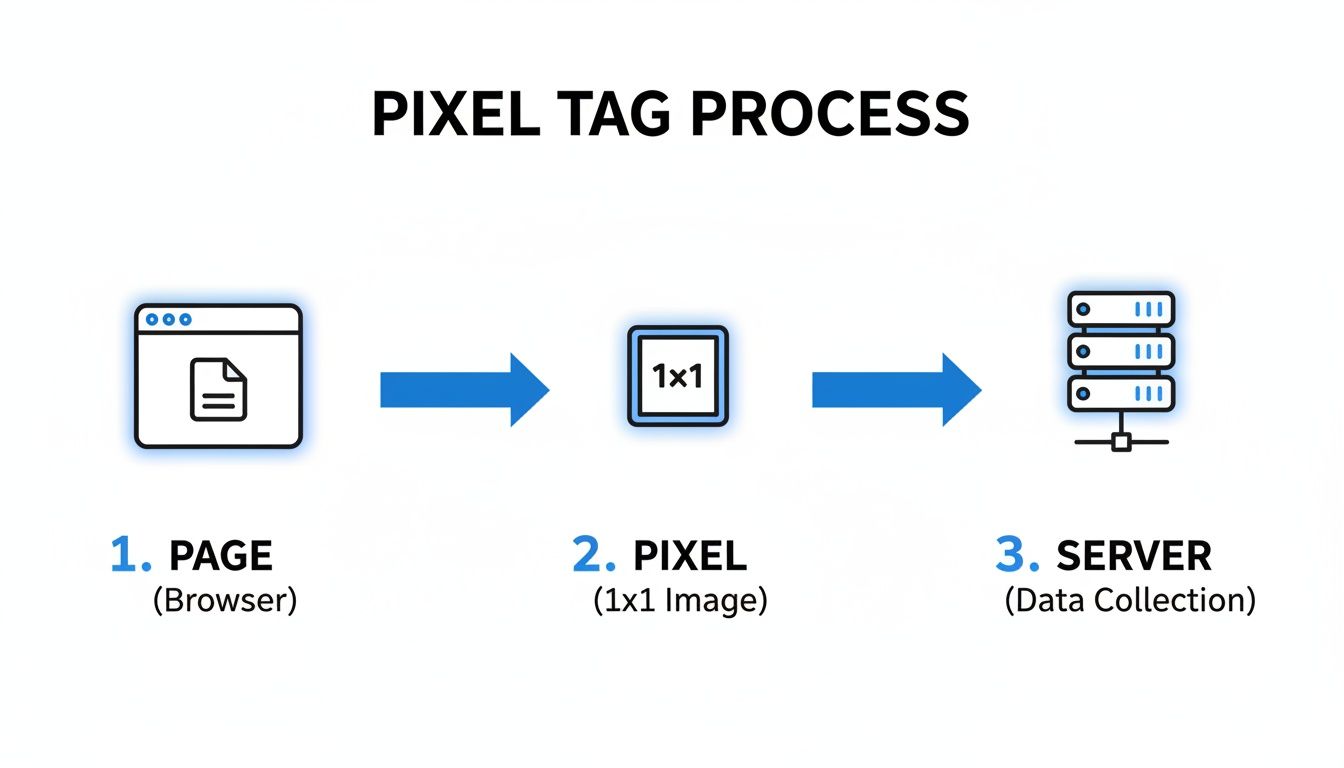
That flow breaks down into three core phases:
- Page Rendering – User’s browser loads the HTML and linked pixel
- Pixel Fetch – The beacon call fires, gathering context along the way
- Server Logging – Incoming data lands in logs or databases for analysis
HTTP Request And Headers
When a pixel fires, it issues an HTTP GET to the beacon URL. Standard headers include:
- Host
- User-Agent
- Accept
- Referer
On top of that, developers often tack on query parameters—like campaignId or sessionId—so you can map a specific pixel load back to an ad click or email send.
Server Logs And Data Collection
Once the request hits your server, it’s routed into logs, a database, or a processing pipeline. Typical fields captured:
- IP address
- Timestamp
- User-Agent string
From there, analysts reconstruct browsing paths, spot bot traffic, or chart engagement spikes. For instance, you might discover that most email opens happen around 9 AM on weekdays.
A recent analysis of 1,000 domains uncovered 12,444 third-party beacons versus just 350 first-party calls. In other words, 97% of detected tags originated from external providers. Dive deeper into the research paper.
JavaScript Pixel Integration
Beyond a tiny image, you can embed pixels via JavaScript to fire on events such as:
- Button clicks
- Form submissions
- Scroll depth
This dynamic approach lets you capture context—think button IDs or form field values—to enrich your analytics model.
Optimizing Tag Performance
Nobody likes a slow page. To keep pixel calls swift:
- Minimize redirects
- Host beacons on a CDN
- Load scripts asynchronously
- Preload pixel URLs
These tweaks reduce latency and ensure every beacon reaches your server before users navigate away.
Debugging Pixel Journeys
When something breaks, you need to pinpoint it fast. Try:
These tools reveal request timings, status codes, and payload details so you can spot bottlenecks or failures.
Server Side Pixel Calls
For critical metrics—like conversions—you can bypass the browser altogether. Server-side pixels fire through your backend HTTP library, which:
- Evades ad blockers
- Guarantees delivery
- Simplifies CORS issues
Whatever route you choose, keeping URL naming consistent and documenting each pixel makes teamwork a breeze.
Applying this knowledge helps you optimize Swetrix analytics for clarity today.
Comparing Pixel Tags With Other Tracking Methods
Pixel tags and web beacons fire off hidden requests, sidestepping strict cookie rules. They quietly record page hits without leaning on local storage.
To pick the right tracker, define your core criteria:
- Data Persistence: How long does the identifier last?
- Cross-Site Scope: Can it span multiple domains?
- Implementation Effort: How much setup and upkeep is required?
Key Differences Of Tracking Methods
Pixel tags rely on a tiny 1×1 image that calls your server each time it loads. Cookies live in the browser as small text files, perfect for session management on a single domain.
Local storage holds larger key/value pairs until manually cleared, but it’s locked to one origin. Device fingerprinting gathers browser details—from fonts to headers—creating a unique profile, though it often triggers privacy alarms.
Key Insight Fingerprinting appears in 97% of audited privacy reports as invasive.
Practical Scenario With Fingerprinting
Picture a fraud team tracking bots by checking installed fonts and plugins. It catches suspicious activity but can erode user trust when too many traits are logged.
Tracker Technology Comparison
The following table breaks down how each method works and where it shines:
| Tracker Type | Mechanism | Persistence | Cross-Site Scope | Primary Use Cases |
|---|---|---|---|---|
| Pixel Tags | 1×1 image requests | Session | Full cross-domain | Analytics and email |
| Cookies | Browser-stored text files | 1 week to year | Limited third-party | Session state and ads |
| Local Storage | Client-side key/value pairs | Until cleared | None | Preferences and UI state |
| Device Fingerprinting | Browser attribute scraping | Variable | Cross and returnable | Fraud detection and identity |
This snapshot clarifies which tracker fits your project—whether you need simple session tracking or deep cross-domain attribution.
Implementation varies by developer skills and platform support. Cookies are built into browsers, while pixel tags often need custom scripts. Server-side pixel calls dodge ad blockers but require stable APIs and backend work.
Public blocklists can still catch known pixel URLs, so keep your patterns up to date. In large-scale tests, batching pixel calls cut load time by 40%.
Performance Trade Offs And Support
Each pixel adds an HTTP request, which can slow down page loads. Batching these requests through a CDN helps smooth performance.
- Minify pixel URLs and remove redirects to skip extra DNS lookups.
- Load trackers asynchronously so they don’t block rendering on busy pages.
- Always test in a staging environment to spot errors before going live.
When weighing options, balance the depth of data you need against user privacy and browser compatibility. You might be interested in learning more about cross-site tracking in our article on cross-site tracking.
https://swetrix.com/blog/cross-site-tracking
Pixel Tags Use Cases In Email Analytics And Advertising
Marketers often turn to pixel tags and web beacons when they need a clear picture of audience engagement. These tiny, invisible trackers slip into emails and web pages, unobtrusively capturing opens, clicks, and conversions.
Think of a pixel tag as a silent observer. The moment someone opens your newsletter, that 1×1 image signals “I’m here,” and you get an instant update on open rates.
- Email Open-Rate Measurement uses a 1×1 pixel that fires on load to log each view.
- Conversion Attribution ties ad clicks back to purchases by storing referral details.
- Retargeting Audiences collects lists of visitors for follow-up ads on social networks.
- Multi-Vendor Setup orchestrates several pixels at once, avoiding duplicate calls.
Email Engagement And ROI Tracking
Imagine every open as a tiny handshake. When an email client requests that tiny image, it confirms a reader’s attention. Specialized beacons—like the first-party Facebook pixel—then record page visits and conversion events on your website.
For a deeper dive, check out the comprehensive tracking pixels guide on PrescientAI.
Key Insight: Pixels feed real-time open-rate dashboards and push conversion data straight into ad platforms.

This snapshot illustrates how pixel tags fire upon email opens, capturing timestamps that power campaign reports.
Ad Attribution And Retargeting Strategies
In display and social campaigns, page-view beacons relay conversion events back to Google Ads and Facebook Ads. Marketers stick conversion pixels on product pages to calculate Return on Ad Spend (ROAS) down to the last cent.
Here’s how it usually unfolds:
- A user taps an Instagram ad and lands on your product page.
- The Facebook pixel records that page view, tagging it with a session ID.
- Upon checkout, a conversion-event pixel sends revenue details back to the ad account.
- Your dashboard updates with attribution data, guiding your next budget decision.
Below is a breakdown of the most common metrics captured by these tiny trackers.
Metrics Captured by Tracking Pixels
| Metric | Description | Use Case |
|---|---|---|
| Open Rate | Number of emails opened via pixel fetch | Gauging email campaign success |
| Click Rate | Total link clicks recorded after load | Measuring content engagement |
| Page View | Hits captured by ad-platform pixels | Allocating ad budget effectively |
| Conversion | Purchase or signup events logged | Calculating ROAS and optimization |
| Session ID | Unique identifier assigned per session | Stitching user journeys across touchpoints |
Use this table as a quick reference when deciding which metrics matter most for your goals.
Performance Tips For Tag Management
Too many pixel calls can slow page loads and frustrate visitors. A lightweight tag manager or server-side container brings those requests under one roof.
- Route pixel endpoints through a dedicated CDN to cut latency.
- Merge query parameters into single GET requests whenever possible.
- Watch real-user monitoring (RUM) stats to track average pixel load times.
Pro Tip: Batching pixel requests reduces load time by 40%.
Follow these steps to keep tracking efficient and pages zippy:
- Drop pixel code into your email templates and webpage headers.
- Group vendor tags with a tag manager to eliminate duplicates.
- Load tracking snippets asynchronously so your content isn’t held up.
- Verify data accuracy with test sends and browser debug modes.
By sticking to these tried-and-true practices, your team will maintain reliable cross-channel reporting and drive stronger ROI.
Privacy Considerations And Blocking Techniques

Pixel tags and web beacons often trigger GDPR and ePrivacy safeguards when they handle any personal information. If your site serves users in the European Economic Area, you need clear, opt-in consent before activating an individual-specific beacon.
- Consent Requirement: Users must choose to opt in prior to any pixel tag firing.
- Clear Disclosure: Update banners and policies to list every tracking tool in use.
- Consent Logging: Keep secure records of each opt-in for at least one year.
Browser Blocking Techniques
Browsers and email clients step in to limit unwanted tracking by blocking remote images by default. For instance, Gmail and Apple Mail won’t load pictures until a user clicks “Display images below,” stopping many pixels from ever sending data.
Blocklists like EasyList, uBlock Origin, and Privacy Badger cover over 50,000 known tracker domains. You can slot these lists into corporate firewalls or browser extensions to prevent requests to pixel servers.
Consent Management Platforms, such as OneTrust or Cookiebot, hold off on loading tracking scripts until you get the user’s go-ahead. This ensures no hidden 1×1 beacons slip through unnoticed.
Key Insight
Waiting for consent cuts legal risks and boosts transparency by making sure no tracking starts without user OK.
Detection Techniques
A quick way to find stealthy 1×1 images is via the DevTools Network panel. Filter requests for .gif or .png assets under 10×10 pixels and you’ll spot suspicious beacons fast.
Alternatively, dive into server logs. Scan your HTTP access logs for repeat hits on external endpoints, then apply pattern matching or regex to flag tracker URLs.
- Open the Network tab in DevTools and reload your page.
- Filter requests smaller than 1 KB or with minimal dimensions.
- Review request URLs for known tracking domains or odd parameters.
Blocking Strategies
On the server side, deploy a reverse proxy—nginx, for example—with a custom blocklist to drop any call to unwanted pixel URLs. That way, those requests die before leaving your network.
Meanwhile, on your own site, audit templates and CMS plugins regularly. An automated scan that flags <img> tags set to width="1" and height="1" helps catch deprecated beacons. Integrate checks into your CI/CD pipeline to keep new pixels from slipping in unnoticed.
Learn more about cookie-less tracking in our article on Swetrix: Read our guide on cookie-less tracking.
Below is a comprehensive audit checklist to keep your site compliant and avoid hidden tracking pitfalls:
- Verify the consent banner intercepts all pixel requests across every page.
- Review network logs monthly for new beacon domains and unknown endpoints.
- Confirm that CMP logs are archived and accessible for at least one year.
- Test email templates with images disabled to ensure no beacons fire automatically.
- Update blocklists quarterly and validate firewall rules against them.
Best Practices and Privacy Friendly Alternatives
Building analytics without sacrificing user trust starts with thoughtful choices. Moving event tracking off the browser and into your servers can give you more control and reliability.
Server Side Event Collection
Instead of firing a pixel in the browser, your backend makes direct HTTP calls to the analytics endpoint. That lets you strip out personal identifiers and bundle dozens of events into a single request for efficiency.
- Generate unique IDs on the server, keeping sensitive user details out of your logs.
- Always send data over HTTPS/TLS to keep it encrypted in transit.
- Build in retry logic so if a request fails, it’s retried automatically but never recorded twice.
All told, this approach avoids client-side blockers and frees up user devices from extra processing.
First Party Tracking Proxy
Think of a proxy as a mailroom: it takes all third-party tracking requests, wraps them with your domain, and forwards them on. Since browsers see these calls as first-party, most privacy tools let them slip through.
- Channel every vendor pixel and script through your own proxy domain.
- Periodically switch proxy subdomains to keep fingerprints from forming.
Expert Insight
Proxying improves reliability and cuts third-party image calls by 100%.
Under the hood, this cut in external requests speeds up pages and gives users one less external call to worry about.
Zero Party Data Collection
Zero party pulls data straight from the source: your visitors. Widgets like preference centers or quick surveys let users opt in explicitly.
- Provide simple checkboxes or toggles so users can choose what topics or alerts matter to them.
- Keep these settings in your own database or localStorage so they stay under your control.
- Leverage that feedback to tailor content, without resorting to invisible scripts.
When users see exactly what you’re asking for and why, trust goes up, and your data stays crystal clear.
Minimal Data Pipelines
Not every field you collect helps you make better decisions. Only pull in metrics you really need, then throw away or anonymize any extra bits.
- Set up rules that automatically delete outdated data after a set period.
- Try open source analytics like Plausible or Matomo to keep control in your hands.
- Encrypt stored data with strong, well-known ciphers.
Pair these steps with techniques like k-anonymity or salted hashing on user IDs to block direct reidentification.
Best Practices You Need To Know
- Set precise goals about which data points truly matter.
- Use a solid Consent Management Platform to track opt-ins.
- Keep an eye on real-user monitoring logs for sudden surges.
- Maintain a clear registry of events and how long you’ll keep them.
- Audit your tracking tags each month to spot slow calls or hiccups right away.
Regular reviews and up-to-date docs stop your analytics from turning into a data swamp.
Key Takeaway
Limiting data fields reduces compliance burden and storage costs.
By sticking to these privacy-first tactics, you get the insights you need without crossing any ethical lines. Dive deeper into privacy-first analytics with our Privacy Friendly Analytics Guide.
FAQ About Pixel Tags And Web Beacons
This FAQ walks you through the nuts and bolts of pixel tags and web beacons, guiding you on detection, removal, and privacy-first alternatives.
You’ll also find links to practical resources that help you respect user privacy while keeping your analytics sharp.
Common Pixel Tag Questions
What Are Pixel Tags And Web Beacons
Think of these as tiny 1×1 images or snippets of code that fire when someone visits a page or opens an email. In an instant, they report back details like user agent, IP address, and timestamp to a server endpoint.How Can I Detect Hidden Tracking Pixels
Open your browser’s DevTools, head to the Network tab, and filter for .gif or .png files under 10×10 pixels. You can also scan your server logs for odd third-party beacon URLs and cross-check them against blocklists like EasyList or uBlock Origin.
“Regularly scanning network calls and log entries is the simplest way to spot those stealthy 1×1 beacons.”
Blocking And Alternatives
How Do I Block Or Remove Pixel Tags
A solid ad-blocker—uBlock Origin or Privacy Badger—catches most pixel calls before they load. On the backend, you can proxy image requests through your own domain or strip out hidden<img width="1" height="1">tags in your CMS templates.What Are Privacy-Friendly Tracking Alternatives
Shift to server-side analytics that batch and anonymize events before sending. Or lean on first-party tracking proxies and zero-party feedback forms to collect data with explicit consent and fewer external dependencies.
Additional Resources
Learn Cookie-Less Tracking
Dive into blocking and replacing third-party tags in our Cookie-Less Tracking Guide.Explore Privacy-Friendly Analytics
Find self-hosted, GDPR-compliant solutions in the Privacy Friendly Analytics Guide.Deep Dive Into Consent Management
Check out best-practice banners and audit checklists from OneTrust or Cookiebot.
Ready to upgrade your analytics while respecting user privacy? Discover how Swetrix delivers clear, actionable insights without cookies. Start Your 14-Day Free Trial