- Date
Why Open Source User Behavior Analytics Is The Future
 Andrii Romasiun
Browser privacy updates block third-party trackers by default. Visitors reject consent banners upon landing on a new domain. Marketers stare at reporting dashboards showing a fraction of real traffic, making attribution impossible. Open source user behavior analytics solves this data gap. Capturing visitor interactions without browser storage restores visibility while maintaining alignment with international data protection laws.
The Shift Away From Traditional Analytics
The Cost of Cookie Reliance
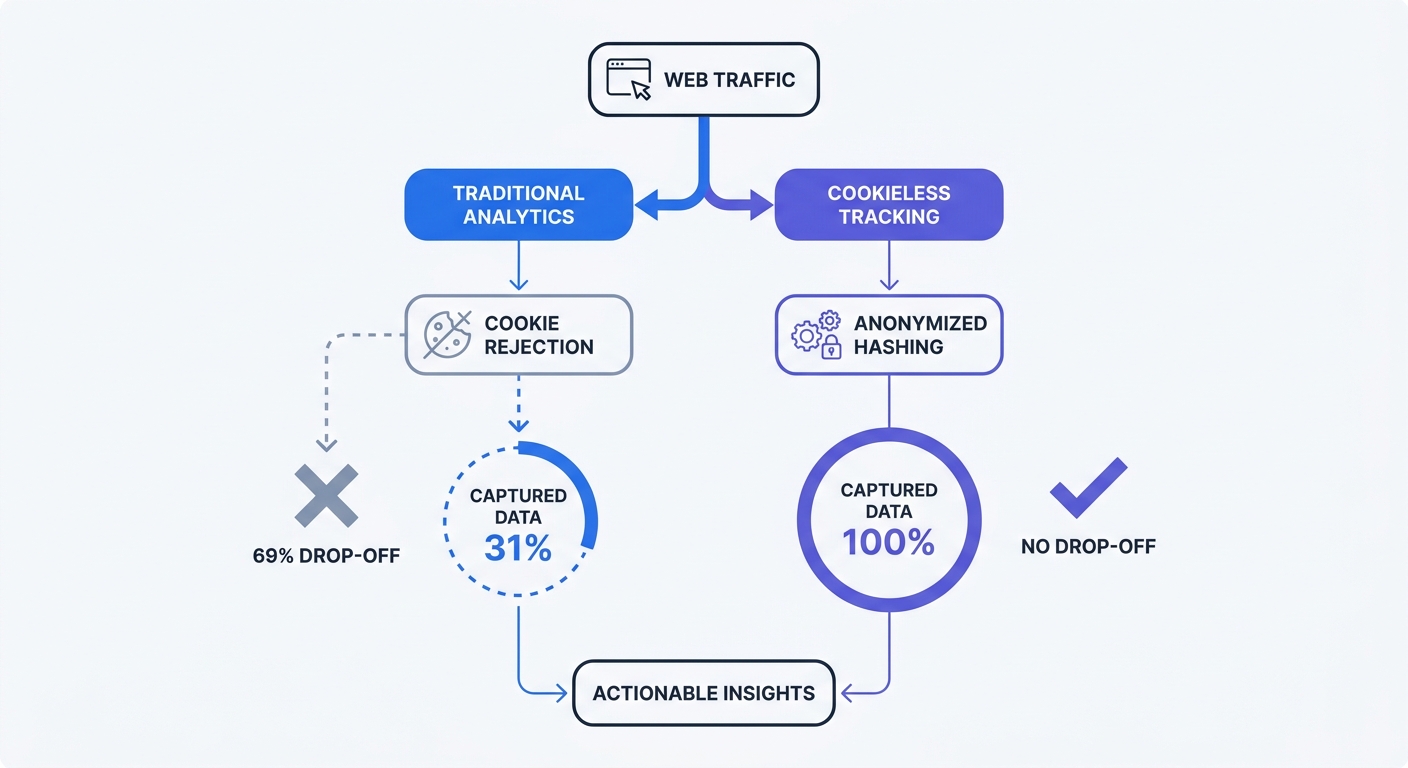
Marketers build budgets around conversion metrics. Missing data ruins those calculations. When seven out of ten visitors decline tracking, standard platforms go dark for most traffic.
A campaign driving 10,000 visitors might log 3,100 sessions in the dashboard. Dividing ad spend by 3,100 visitors creates an inflated cost-per-acquisition. Marketers turn off profitable campaigns due to incomplete reporting. Open source cookieless tracking captures all 10,000 visitors by bypassing client-side storage requirements.
Calculate the gap in the current reporting stack.
- Log into the primary advertising platform.
- Note the total clicks for a defined 30-day window.
- Open the website analytics dashboard.
- Isolate the sessions attributed to those campaigns.
- Find the difference between platform clicks and recorded sessions.
Differences exceeding 15 percent indicate cookie-blocker data loss.
Escalating Privacy and GDPR Fines
Ignoring user consent choices carries direct financial risk. European data protection authorities issue regular penalties for improper processing and invisible third-party data transfers. Cumulative GDPR fines exceed €4 billion. Researchers at the University of Amsterdam found 65 percent of EU websites ignore rejection requests and continue tracking data in the background. Regulators deploy automated scanning tools to catch these specific violations. Using closed-source American platforms exposes European companies to data transfer violations under current frameworks.
Review network requests to test compliance.
- Open the website in an incognito browser window.
- Open Developer Tools and navigate to the Network tab.
- Click "Reject All" on the consent banner.
- Browse three different pages on the site.
- Search the Network tab for tracking pixels or analytics tags.
If requests fire to external marketing platforms after rejection, the site violates GDPR consent rules.
What Is Open Source User Behavior Analytics?
Defining Open Source and Data Sovereignty
Proprietary platforms operate as black boxes. Administrators install a script, and a corporation handles the processing logic. Open source software exposes the codebase to public scrutiny. Security researchers audit these repositories to guarantee the software performs specific actions without data harvesting.
Data sovereignty dictates who controls the storage hardware. Advertising networks consolidate website data to build user profiles. Self-hosting an analytics tool, or using an independent European cloud provider like Swetrix, ring-fences behavioral data. Companies gain complete ownership over the resulting database.
Compare the structures before choosing a vendor.
| Evaluation Metric | Legacy Platforms | Open Source Cookieless |
|---|---|---|
| Code Transparency | Hidden / Proprietary | Open to Public Audit |
| Data Ownership | Vendor Terms Apply | Total Ownership |
| Visitor Identification | Persistent Client Files | Anonymous Hashes |
| ePrivacy Status | Requires User Consent | Exempt from Consent |
How Cookieless Tracking Works
Measuring user journeys across multiple pageviews requires an identifier. Traditional tools place a persistent text file on the hard drive. Cookieless architecture replaces that file with an anonymized cryptographic hash.
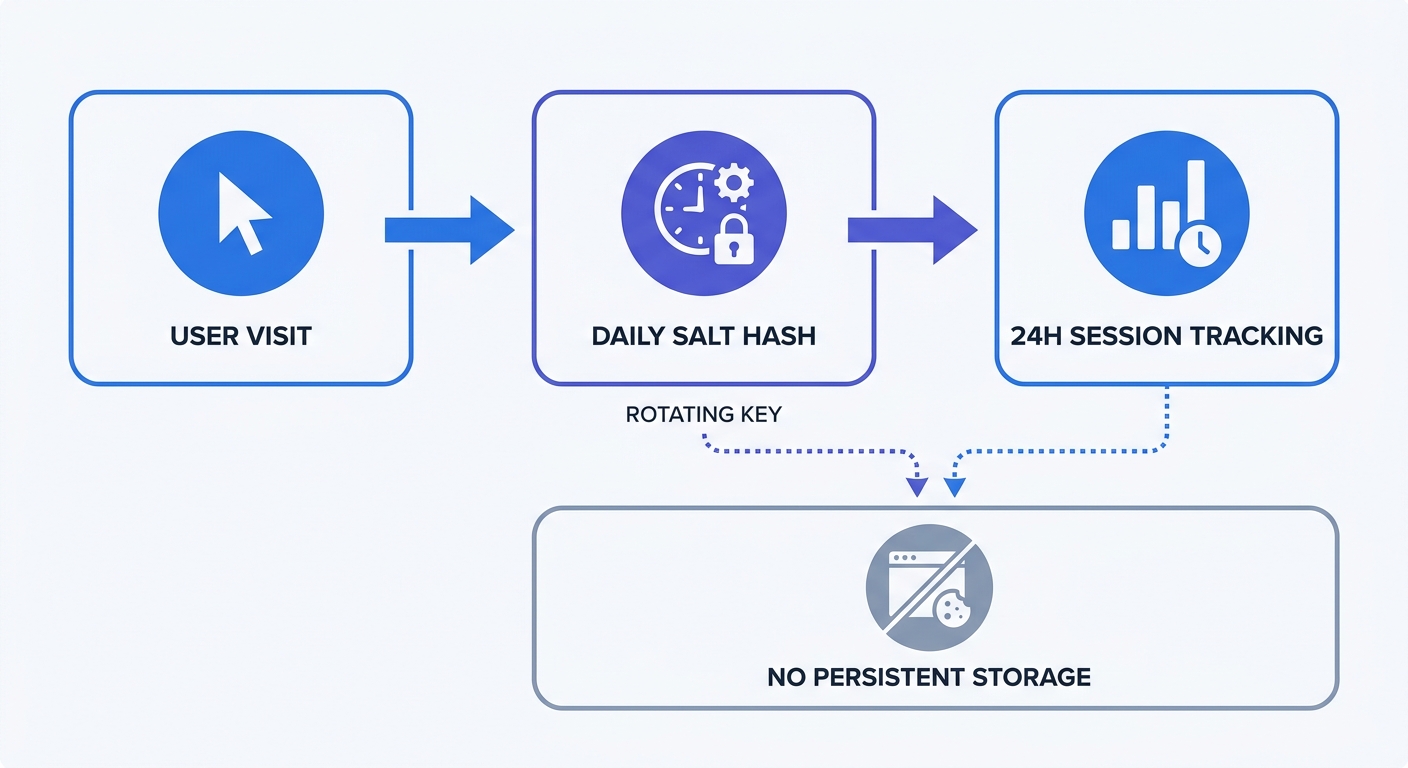
When a visitor arrives, the server captures the IP address and User Agent string. The system generates a random string of characters, called a salt. The server combines the visitor details with the salt and hashes the output into a unique identifier.
Engineers cannot reverse-engineer the resulting string to reveal the original IP address. At midnight, the system discards the salt and generates a new one. A visitor returning the next day receives a fresh hash.
Test this mechanism in a staging environment.
- Deploy an open source analytics instance.
- Visit the homepage from two different devices on the same WiFi network.
- Check the real-time reporting dashboard.
- Verify the system logs two unique visitors despite the shared public IP address.
Because the User Agent differs between devices, the resulting hashes remain distinct. Administrators capture session data without building long-term user profiles.
Key Metrics To Track Without Cookies
Re-evaluating Bounce Rates by Industry
Marketing teams misinterpret bounce rates. High percentages trigger panic. Context determines whether a single-page session represents a failure or a success.
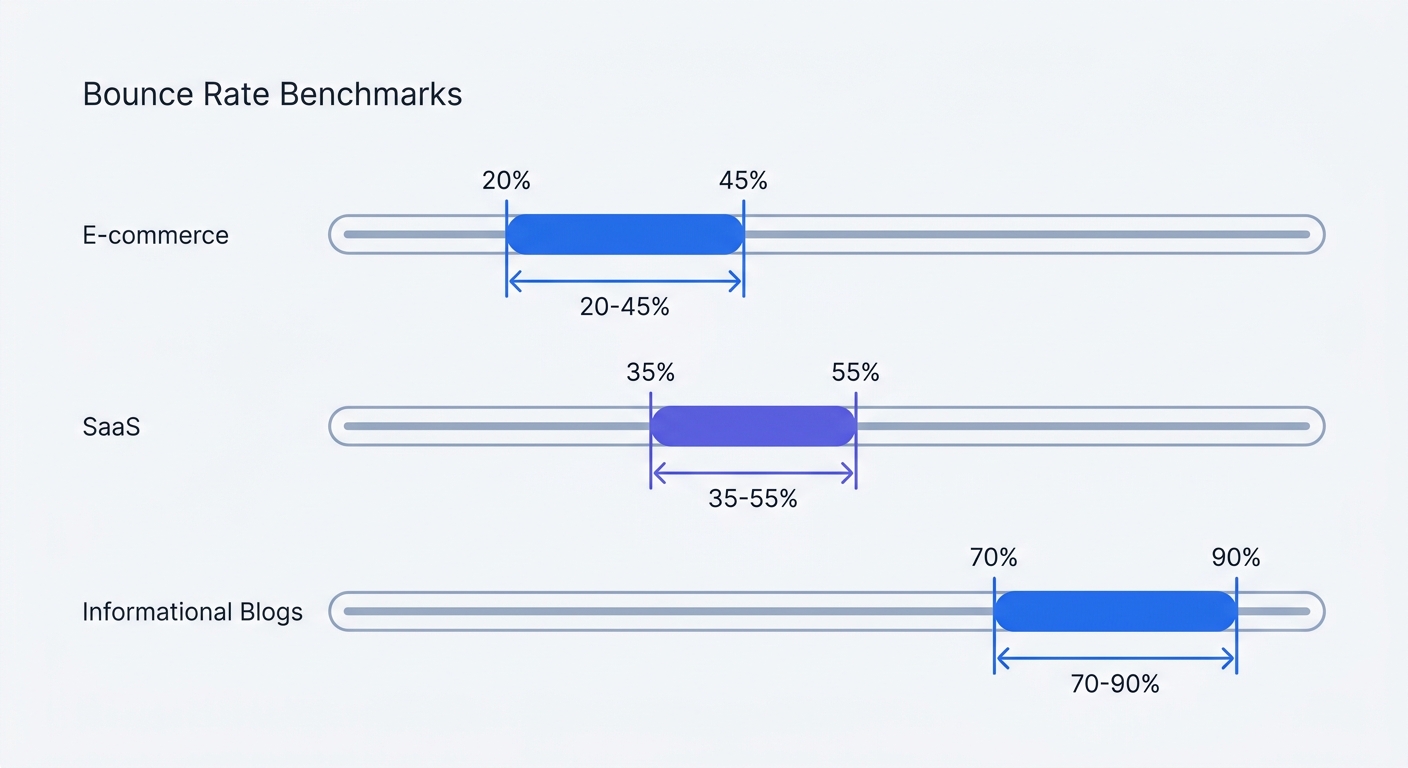
A Prospeo benchmark report establishes average e-commerce bounce rates between 20 and 45 percent. Informational blogs experience rates between 70 and 90 percent. Readers spend ten minutes on a recipe blog, cook the meal, and close the tab. The platform records a bounce.
Stop reporting site-wide averages to stakeholders. Break the metrics down by intent.
- E-commerce product pages require clicks to the cart. High bounce rates signal pricing or design issues.
- Documentation pages solve immediate problems. High bounce rates indicate successful resolution.
- Landing pages aim for form submissions. Segment these URLs to isolate conversion bottlenecks.
Calculate engagement based on active time spent on the page. Configure the tracking code to measure scroll depth instead of relying on subsequent page loads.
Defining Success with Custom Events
Relying on URL changes provides incomplete data. Modern web applications load dynamic content without page refreshes. Visitors interact with five different tabs within a single-page application, yet standard tools log a single pageview.
Custom event tracking measures intent. Define specific actions as conversion points.
- Identify three core actions on the landing page.
- Assign clear names to these actions (e.g.,
form_submit,video_play). - Add the event tracking snippet to the corresponding buttons.
- Measure the volume of these events against total sessions.
Measuring distinct actions clarifies user engagement. Marketing teams stop optimizing broad session duration metrics and start fixing the buttons driving revenue.
Capturing Traffic Attribution Through UTMs
Paid advertising demands precise return-on-investment calculations. Removing cookies eliminates cross-site retargeting files without destroying traffic attribution. UTM parameters carry the required context.
Every promotional link needs source data embedded in the URL. Append parameter tags to the destination address. The analytics server parses the query string on page load and files the visit under the correct campaign row.
Standardize naming conventions to avoid fragmented reports.
- Open a shared spreadsheet for the marketing team.
- Define lowercase formatting for all parameters.
- Route every ad link through a UTM generator before deployment.
- Append
utm_source,utm_medium, andutm_campaignto every external link.
One uppercase letter splits campaign data into two distinct rows. Consistency ensures the cookieless tracking dashboard attributes revenue to the intended marketing channel.
Implementing Privacy-First Analytics
Removing the Cookie Banner
Consent banners interrupt the user experience. They clutter mobile screens and delay content interaction. The European ePrivacy Directive mandates these pop-ups for any technology storing information on user terminal equipment.
Removing persistent storage from the analytics stack activates a legal exemption. When a platform uses transient memory, the consent requirement drops. Developers gain the operational freedom to delete the banner from the codebase.
Audit remaining marketing tags before removing the pop-up.
- Identify all third-party scripts firing in Google Tag Manager.
- Remove retargeting pixels requiring third-party tracking files.
- Transition to contextual advertising networks.
- Delete the cookie consent plugin from the content management system.
Removing the banner yields faster page loads while enabling data collection on total site traffic.
Building Consumer Trust
Aggressive data harvesting damages brand reputation. Customers understand their personal information holds value, and they penalize companies exploiting it.
A Pew Research Center survey shows 52 percent of internet users have abandoned a product due to concerns over data collection. Silence on privacy issues breeds suspicion. Promote the adoption of ethical analytics to the audience.
Rewrite the privacy policy to reflect the updated technology stack.
- Create a dedicated section titled "Website Analytics."
- State the use of privacy-focused, cookieless tracking software.
- Specify that no personal data undergoes cross-site profiling.
- Confirm the company does not sell visitor metrics to advertising networks.
Transparency turns a compliance requirement into a competitive advantage by building trust in digital environments.
Expanding the Technical Setup
Implementing Server-Side Logging
Client-side tracking faces vulnerabilities beyond browser privacy settings. Ad blockers intercept network requests originating from the browser window. Visitors with active blockers leave the dataset, regardless of the cookieless architecture.
Server-side tracking bypasses browser-level restrictions. The web server handles data logging before delivering the page. Ad blockers cannot read backend communication between the server and the analytics database.
Routing data through a reverse proxy consolidates the infrastructure.
- Set up a custom subdomain for analytics traffic.
- Configure a Caddy reverse proxy on the primary server.
- Route incoming requests from the tracking script to the backend.
- Forward the payload to the analytics database.
Tracking requests originate from the host domain. Browsers treat these as first-party requests. First-party server communication ensures data capture across all devices and browser configurations.
Monitoring Application Errors
Teams extend analytics past marketing metrics into technical performance. Silent failures cost revenue. A broken checkout button leaves zero trace in standard pageview reports, obscuring the root cause of conversion drop-offs.
Logging frontend errors bridges the gap between marketing and development. Capture JavaScript exceptions alongside user behavior metrics to map technical failures to user sessions.
Configure error tracking within the workspace.
- Open the project settings.
- Enable the exception tracking module in the tracking snippet.
- Re-deploy the website code.
- Review the dedicated error dashboard.
Check the error logs first when conversions dip. A spike in console errors on a specific browser explains revenue drops without requiring session replays.
Swetrix offers a privacy-focused open source web analytics platform that tracks visitors without cookies. Regain lost marketing data while respecting user privacy boundaries. Start a free trial today to capture accurate website traffic.