- Date
How To Track Email Campaign Performance Without Using Cookies
 Andrii Romasiun
Marketing teams spend hours crafting newsletters, formatting HTML templates, and segmenting subscriber lists. After hitting send, the waiting game begins. A week later, the dashboard displays a 45% open rate alongside a 2% conversion rate. Exporting the PDF report to management feels like a win.
These metrics fail to reflect true performance. Apple inflates the open rate, while consent requirements block conversion data. Email platforms register credit for actions that never happened. Web analytics tools fail to track sales driven by campaigns.
Rebuilding broken attribution requires a shift in measurement tactics. Stop relying on hidden tracking pixels inside the email client. Move the tracking strategy to the click itself and capture landing page sessions with privacy-compliant tools.
Why Traditional Email Metrics Are Becoming Obsolete
For two decades, marketers measured campaign success through a 1x1 transparent image embedded at the bottom of HTML payloads. When a subscriber opened the message, their mail client downloaded the image from a server. The server logged the download, prompting the marketing platform to record an open event. Changing privacy standards disabled this mechanism.
The Death of the Open Rate
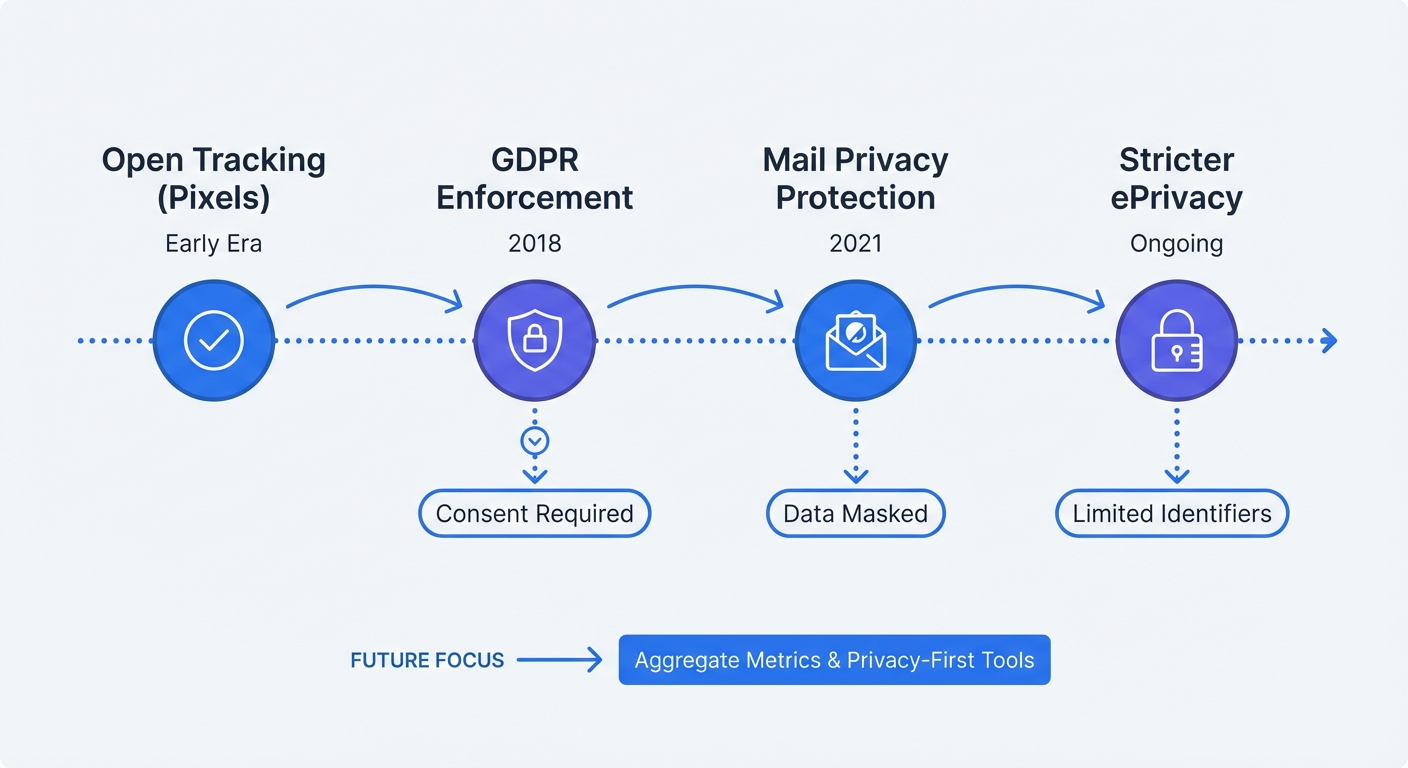
Apple broke the tracking pixel model by introducing Mail Privacy Protection. When an iOS or macOS user receives a campaign, Apple intercepts the payload. Proxy servers download all remote content in the background before the recipient views the notification.
This automated fetch triggers the tracking pixel. The email platform registers a successful open event. Subscribers delete messages without reading subject lines, yet reports show high engagement. Apple Mail accounts for over half of all email clients in use. Industry analysis of email metrics indicates up to 75% of reported opens represent automated server fetches rather than human actions.
Tracking failures severely damage automated email sequences. Marketers build retention funnels to trigger secondary messages if a user ignores the initial outreach. Because Apple opens every message, marketing software assumes subscribers read the content. Retention sequences stop, leaving unengaged leads cold.
Stop reporting open rates as a primary metric. Remove this column from client reports. Audit automated workflows inside the email marketing settings. Change trigger conditions from "opened previous email" to "clicked link in previous email" to ensure accuracy.
Stricter Regulations on Tracking Pixels
European regulators view hidden tracking pixels as a privacy violation. The ePrivacy Directive classifies invisible pixels alongside browser cookies because both technologies access information stored on user hardware.
Accessing device data requires explicit, informed consent. Senders cannot drop pixels into an inbox without prior permission. Software vendors bury tracking authorizations deep within broad terms of service agreements, a practice regulatory bodies reject.
Sending commercial emails with tracking pixels to European Union citizens creates massive compliance risks. Fines for violating data processing rules reach into the millions. B2B marketing teams running cold outreach face high exposure levels. Scraping public email addresses to send pixel-loaded pitches violates core tenets of the directive.
Audit email service provider compliance settings. Segment European Union subscribers into a dedicated list. Disable open-tracking features for this entire segment to protect the business from regulatory action. Losing open-rate data carries no penalty because the metric lacks accuracy.
How to Track Email Campaign Performance Today
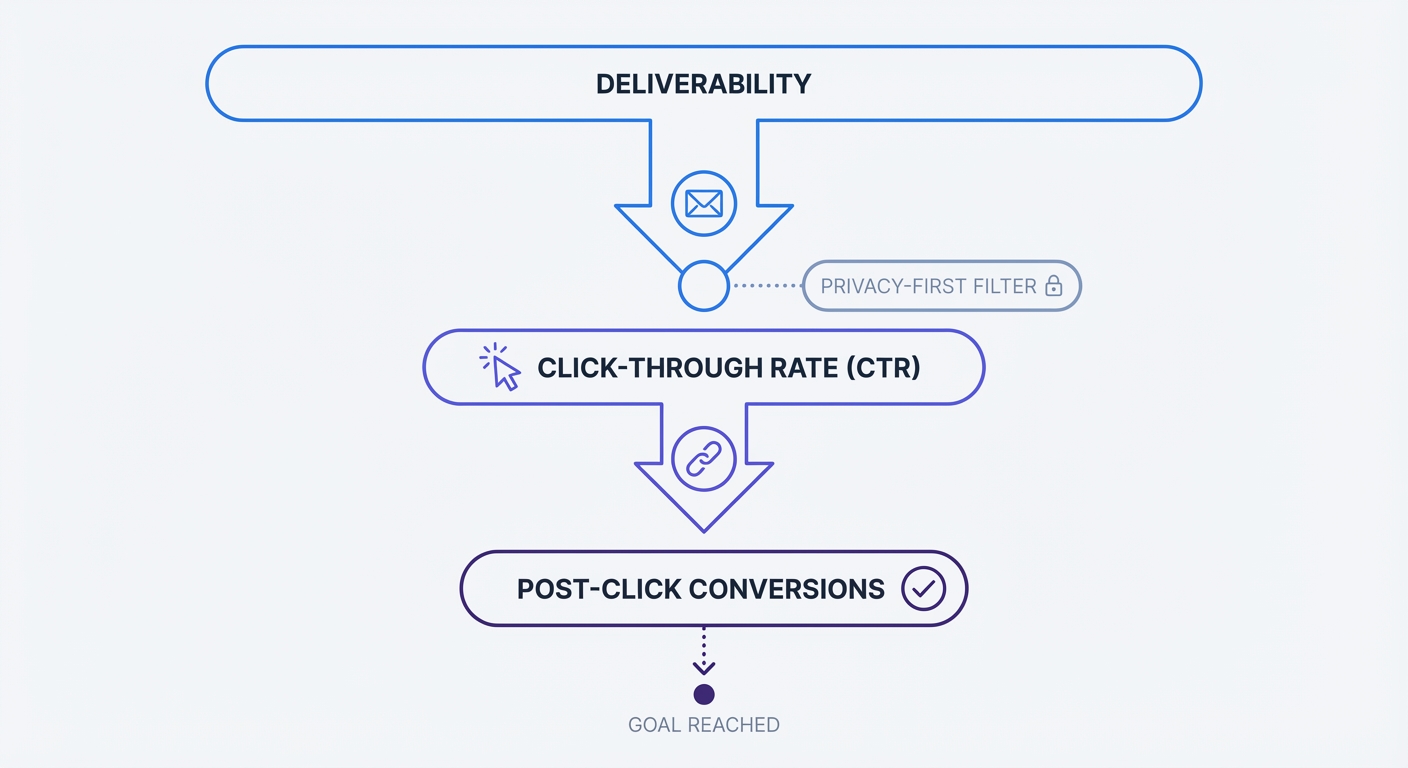
Abandoning the open rate forces marketing teams to measure definitive engagement. Subscribers reading subject lines generate zero revenue. Clicking a link and navigating to a website creates direct opportunities for conversion.
Prioritizing Click-Through Rates (CTR)
The click-through rate measures the percentage of delivered emails generating at least one link click. This metric requires human interaction. Proxy servers fetch images without clicking hyperlinks.
Average CTR falls between 2.0% and 3.2% for standard newsletters, though rates vary by industry and content type. High-performing automated sequences like abandoned cart reminders exceed 5%. Achieving these numbers requires deliberate design choices within the email body.
Design templates around a single primary action. Multiple competing buttons confuse readers and split click volume. Use contrasting colors for the main call-to-action button. Ensure touch targets measure at least 44 by 44 pixels to accommodate mobile device users.
Test subject lines against clicks and conversions, not just opens. Keep the value proposition clear, check how the line displays on mobile, and compare variants with similar audiences before choosing a preferred length.
Evaluate internal link structures. Text links placed in the first paragraph generate higher engagement than buttons buried at the bottom of long newsletters. Test layouts by moving primary links above the mobile fold.
Deliverability vs. Delivery Rate
Sent emails take one of three paths: bouncing, landing in the spam folder, or reaching the inbox. Marketing teams confuse the delivery rate with deliverability. This distinction defines campaign success.
Delivery rate measures the absence of a bounce. Email software hands the message to the receiving server. If the server accepts the message without returning an error code, the software records a successful delivery. The message might go straight to the spam folder while maintaining a 100% delivery rate.
Deliverability measures inbox placement by tracking the percentage of emails landing in the primary inbox. Reaching this destination requires technical configuration and domain reputation management.
Configure domain authentication protocols before sending another campaign. Set up Sender Policy Framework (SPF) records in DNS settings to authorize email software to send messages on the domain's behalf. Add DomainKeys Identified Mail (DKIM) signatures to prevent tampering during transit. Implement Domain-based Message Authentication, Reporting, and Conformance (DMARC) policies to instruct receiving servers on handling unauthorized messages.
Monitor bounce rates. Senders must keep bounce rates below 2% for cold outreach and below 1% for opted-in newsletters to avoid penalties. High bounce volumes signal poor list hygiene practices to inbox providers. Gmail and Outlook route future campaigns to the spam folder under these conditions.
Clean subscriber lists every quarter. Identify addresses producing soft bounces after three consecutive attempts and remove them from active sending lists. Delete hard bounces. Track this performance trend by utilizing bounce rate analytics alongside email platform metrics.
AI Sentiment Scoring for Replies
B2B campaigns rely on direct replies rather than website clicks. Sales teams measure success by the number of meetings booked from cold outreach sequences. Tracking traditional clicks fails to capture this specific buyer intent.
Modern outreach platforms use Natural Language Processing text models to read inbound replies. Software categorizes the text into specific intent buckets. Prospects typing "Send me some times for Tuesday" register as positive intent markers. Prospects typing "Take me off your list" register as negative intent markers.
This system removes manual data entry from the sales process. Marketing teams see the exact volume of positive replies generated by specific subject lines. Route inbound campaign replies to an automated sentiment scoring tool. Calculate the cost per positive reply to measure the financial efficiency of the outbound motion.
The Privacy-Friendly Post-Click Journey
Email service providers finish their job the moment a subscriber clicks a link. Web analytics platforms take over the session. The handoff between these two systems causes major data gaps in marketing analytics.
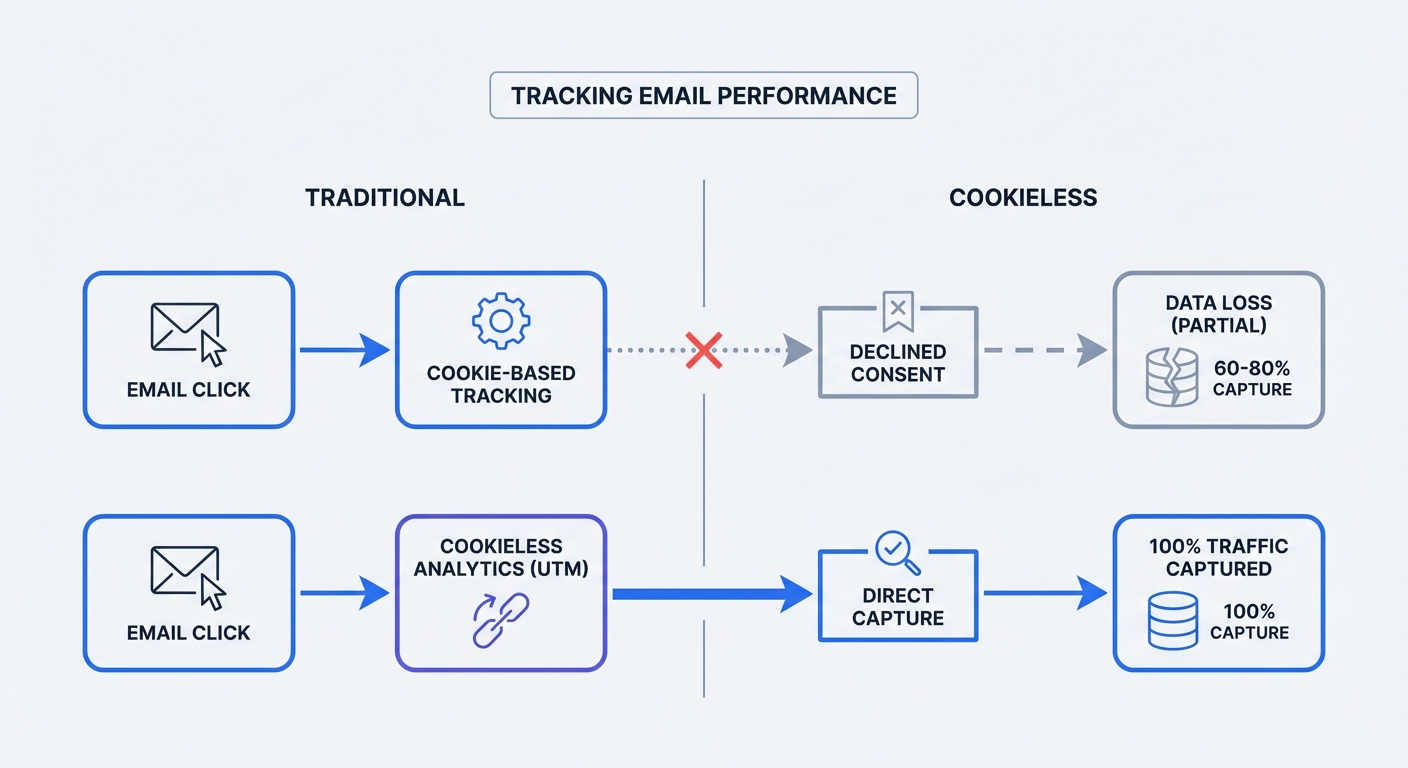
Clicking an untagged link in an email opens the destination URL in the browser. Analytics software records a visitor arriving without a referring domain and categorizes this session as "Direct Traffic." The email campaign receives zero credit for the visit.
Standardizing UTM Parameters
Urchin Tracking Module (UTM) parameters solve the referral gap. These text strings attach to the end of a URL, carrying contextual data from the email client to the web browser. Web analytics platforms parse URLs, read tags, and file sessions under correct marketing channels.
Tag every link in the campaign. A single missed link ruins conversion attribution.
Five parameters exist in the UTM framework. Marketers must use the first three for every campaign:
| Parameter | Purpose | Example Value |
|---|---|---|
utm_source | Identifies the specific platform sending traffic. | newsletter_list, onboarding_sequence |
utm_medium | Identifies the marketing channel or medium. | email, cpc, social |
utm_campaign | Identifies the specific promotion or product launch. | spring_sale_2026, feature_announcement |
utm_term | Identifies the specific link clicked (used for paid keywords). | header_logo, bottom_button |
utm_content | Differentiates variations in A/B testing. | red_button_variant, text_link_variant |
Build standardized URL strings before dropping links into the email builder. A complete link format appears below:
https://yourwebsite.com/pricing?utm_source=onboarding_sequence&utm_medium=email&utm_campaign=day_three_checkin
Inconsistent naming conventions break analytics reports. Typing utm_source=Email creates a separate traffic row from utm_source=email inside the analytics platform. Case sensitivity fragments the data.
Create a shared spreadsheet for the marketing team listing approved variations for sources and mediums. Force all team members to use lowercase letters and underscores. Never insert spaces into a UTM parameter. Use a dedicated UTM code builder to ensure formatting precision across the organization.
The Cookie Banner Data Loss Problem
UTM parameters carry data to the website, while legacy analytics tools drop the package at the front door. Platforms like Google Analytics 4 rely on client-side cookies to track user sessions.
Privacy regulations mandate cookie consent banners for these legacy tools. Subscribers clicking tagged email links land on the website and face consent popups. UTM parameters sit in the URL bar waiting for the analytics script to read them.
Users clicking "Decline" on the banner block the analytics script. These visitors browse the site, add products to carts, and complete purchases. Backend databases record the revenue. Marketing analytics platforms record nothing.
Email campaigns drive these sales. Data exists in the URL. Cookie banners prevent analytics scripts from recording the event.
Measure acceptance and rejection rates on your own cookie banner. Compare recorded email conversions with backend orders or CRM leads to estimate the reporting gap. Keep definitions and attribution windows consistent before changing campaign budgets.
Fix this blind spot by measuring return on investment using tools that do not require invasive client-side storage.
Achieving 100% Tracking Accuracy with Swetrix
Eliminating the data loss problem requires replacing the tracking mechanism. Counting page views does not require dropping tracking files onto a user's hard drive. Measure the post-click journey through anonymous session hashing.
Cookieless Analytics and First-Party Data
Cookieless web analytics relies on first-party data collection. When a subscriber clicks a tagged email link and lands on the site, the server receives a request. Analytics scripts read the incoming HTTP request, noting the referring URL, browser user agent, and attached UTM parameters.
Systems hash this information into an anonymous string. This string identifies the active session for a short time window. Users navigating to the checkout page trigger a hash confirmation, verifying they match the visitor who landed on the homepage.
This process requires no persistent cookies. Processing stores no Personally Identifiable Information (PII) and accesses no terminal equipment on the device.
Respecting user privacy by default bypasses the consent requirements of the GDPR and the ePrivacy Directive. Running this script requires no cookie banner.
Removing the cookie banner allows the analytics script to fire on every page load. UTM parameters pass from the email click into the reporting dashboard. Systems record 100% of the traffic. Completing a purchase ties the conversion back to the exact email campaign initiating the session.
This setup creates complete visibility into the sales funnel. Marketers see the accurate performance of retention sequences. Budget allocation relies on complete data sets rather than sampled estimates.
Creating Tech Stack Harmony
Email platforms excel at sending messages. Web analytics platforms excel at measuring website behavior. Avoid forcing one tool to perform the job of the other.
Delegate list segmentation, message delivery, and bounce rate monitoring to the Email Service Provider. Use the ESP to track the initial click-through rate.
Assign conversion tracking to the web analytics platform. Integrate conversion events into the tracking dashboard. Set up specific goals for newsletter signups, product purchases, and form submissions.
Open the web analytics dashboard and navigate to the campaign reports. Filter traffic by utm_medium=email. Review total sessions, average time on page, and the goal completion rate for each specific campaign source.
Export this conversion data and merge it with ESP send metrics in a spreadsheet. Divide the total revenue tracked in the analytics dashboard by the total cost of the email send to calculate profitability.
Email marketing generates high returns when measured correctly. Prove this value to the executive team by capturing every conversion. Stop relying on fake open rates or losing data to cookie banners. Build a tracking system that respects subscriber privacy and delivers complete mathematical truth.
Start tracking email campaign performance with precise, cookieless data. Try the Swetrix free trial today and capture every conversion without invasive tracking.