- Date
How to Comply with PECR Cookie Rules in 2026
 Andrii Romasiun
A UK business sets analytics cookies without a consent banner. The ICO issues a preliminary enforcement notice. Maximum penalty: £17.5 million or 4% of global turnover. The company scrambles to audit every tracking script, rewrite its banner, and document consent records while facing potential enforcement action.
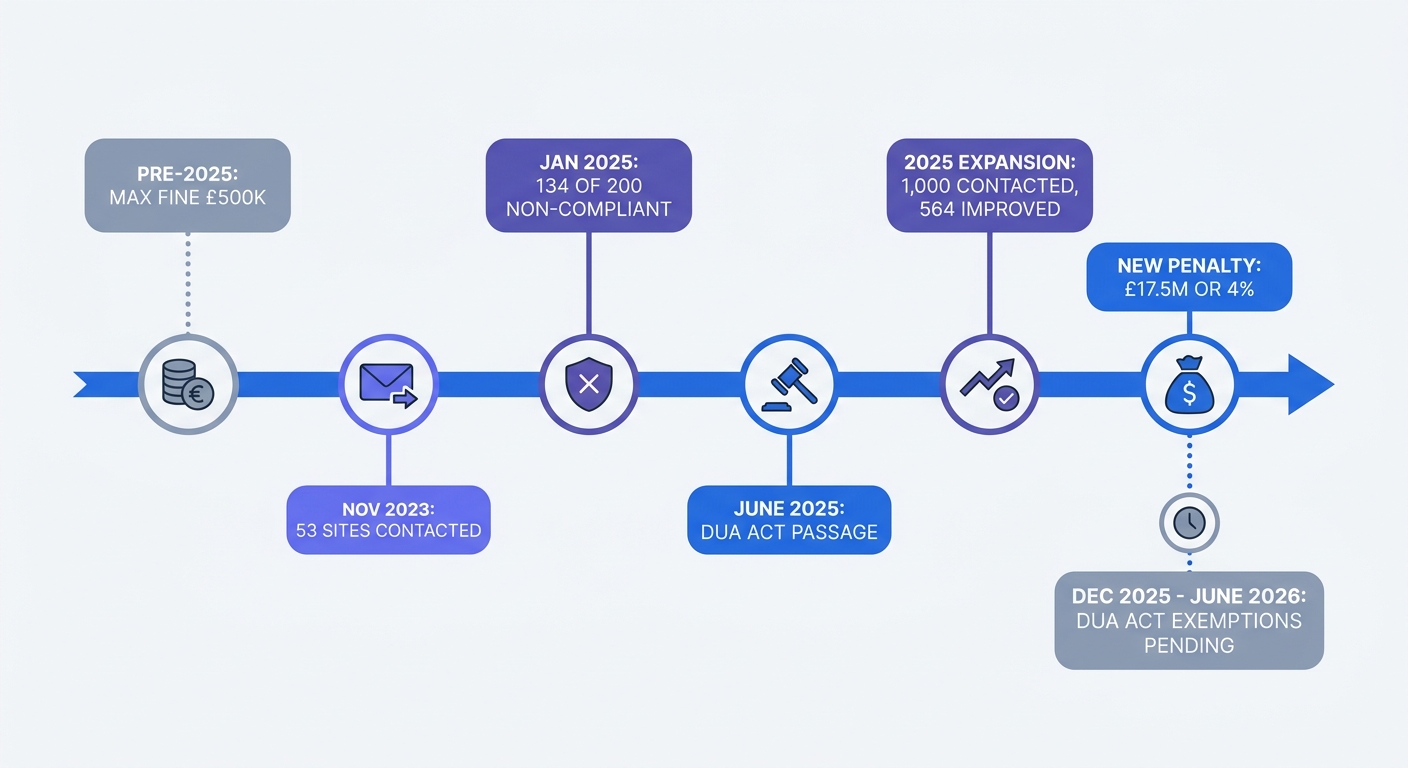
PECR—the Privacy and Electronic Communications Regulations 2003—sits alongside UK GDPR and governs how websites use cookies and similar tracking technologies. The Data Use and Access Act raised maximum fines from £500,000 to £17.5 million or 4% of annual global turnover in June 2025, aligning PECR penalties with GDPR enforcement levels.
The ICO issued £4.63 million in PECR fines since March 2022 and sent compliance letters to 1,000 websites after assessing the top 200 UK websites and communicating concerns to 134 of those organisations.
Compliance requires more than adding a banner. Scripts must stay blocked until users consent. Accept and Reject buttons need equal visual prominence. Analytics cookies—despite common assumptions—require consent like advertising trackers. This guide walks through the technical and legal requirements that keep your site compliant and your data complete.
Understanding PECR Cookie Requirements
What PECR Is and Why It Matters
PECR applies to any technology that stores or accesses information on a user's device. Cookies, pixels, HTML5 local storage, fingerprinting scripts, and mobile app SDKs all fall under these rules. The regulations work alongside UK GDPR but impose separate obligations. A site can have valid GDPR consent for processing email addresses yet still violate PECR by setting marketing cookies without separate consent.
The ICO's guidance clarifies that PECR applies even when no personal data is processed. An anonymous analytics cookie tracking page views still requires consent if it's not needed to deliver the service the user requested. GDPR focuses on personal data processing, while PECR governs device access regardless of whether the data identifies individuals.
Which Cookies Require Consent
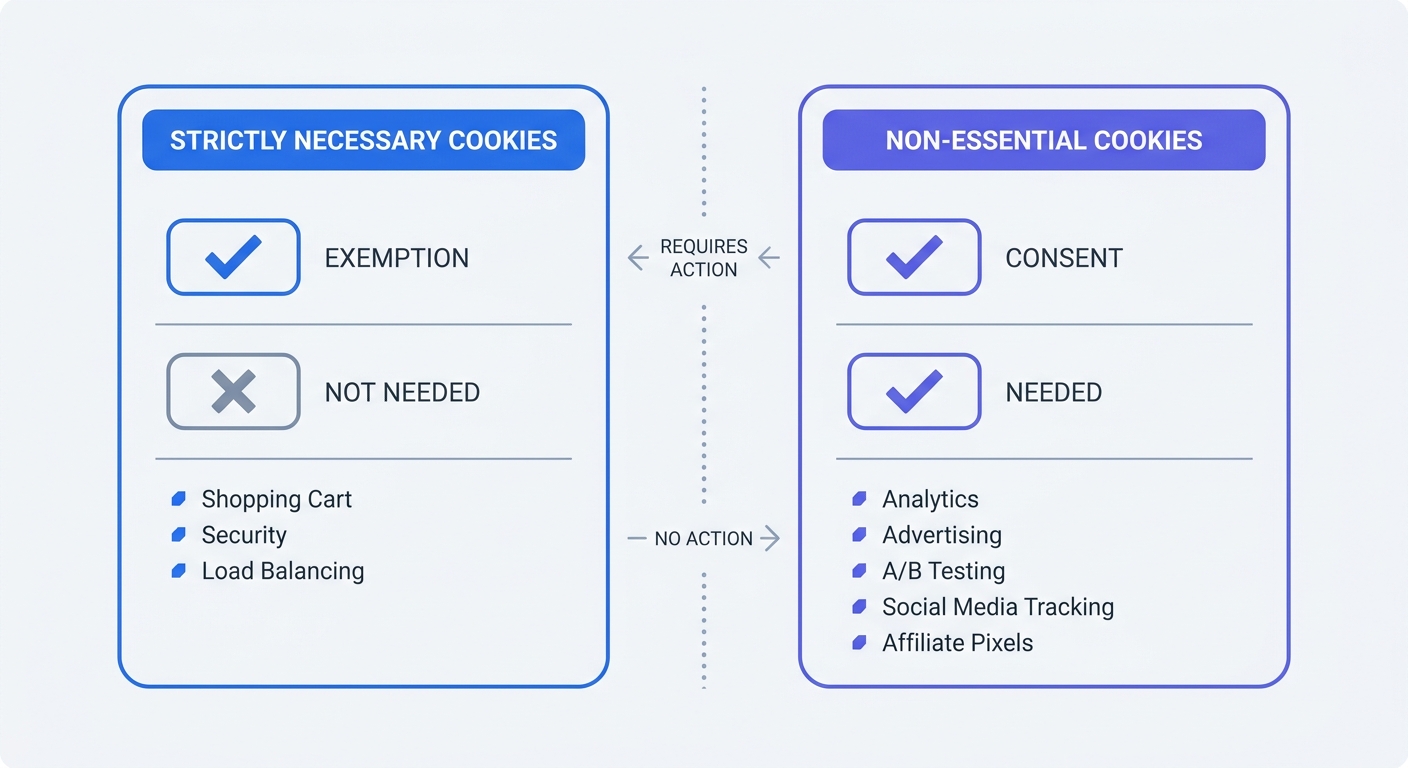
Only "strictly necessary" cookies are exempt from consent requirements. These include session cookies that remember shopping cart contents, authentication tokens that keep users logged in, and load balancing cookies that distribute traffic across servers. The exemption applies when the cookie is needed to provide a service the user requested.
Analytics cookies do not qualify as strictly necessary. Users can access your service whether analytics runs or not. Measuring traffic patterns benefits your business but isn't needed to deliver the page the user asked for. The same logic applies to A/B testing cookies, advertising trackers, social media pixels, and affiliate marketing scripts. All require consent before they fire.
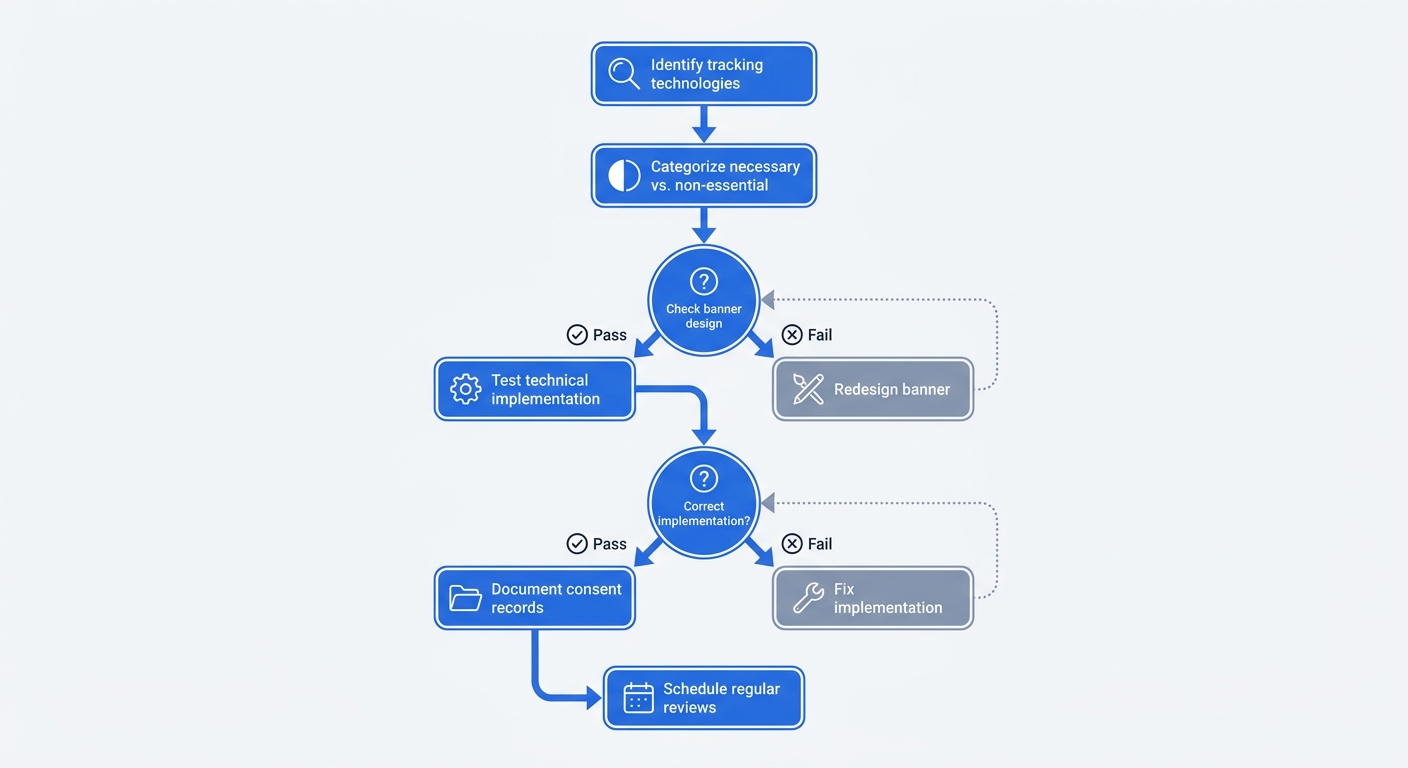
Check your current cookie inventory. Open your browser's developer tools, go to the Application or Storage tab, and list every cookie your site sets. Tag each one as strictly necessary or non-essential. If you're unsure whether a cookie qualifies for the exemption, it doesn't—seek consent.
The New Penalty Environment
Before June 2025, the ICO could fine organisations up to £500,000 for PECR violations. The Data Use and Access Act increased this ceiling to £17.5 million or 4% of annual global turnover, whichever is higher. Serious breaches now carry the same financial risk as GDPR violations.
The ICO's enforcement campaign demonstrates active monitoring. After contacting 53 of the UK's top 200 websites in November 2023 and giving them 30 days to ensure compliance , the regulator expanded its sweep to 1,000 sites by 2025. Compliance letters led to improvements at 564 websites , but a January 2025 audit found 134 of 200 reviewed sites still using non-compliant banners. The ICO is developing AI tools to identify violations at scale, making manual reviews of individual sites unnecessary for enforcement.
Complaints drive investigations. The ICO received 1,753 cookie-related complaints in 2022/23. Sixty percent involved users being denied the option to reject non-essential tracking. Each complaint creates a paper trail that can trigger formal enforcement action.
Meeting ICO Consent Standards
The Four Pillars of Valid Consent
UK GDPR defines consent as freely given, specific, informed, and unambiguous. Each element carries technical and design implications for cookie banners.
Freely given means users face a genuine choice without detriment. Blocking access to content unless users accept all cookies violates this standard. Consent isn't free if rejecting tracking prevents site usage. Specific means consent covers defined purposes. A single "Accept All" button that enables analytics, advertising, and social media tracking without granular controls fails the specificity test. Users must be able to accept analytics while rejecting advertising.
Informed consent requires clear information about what each cookie does, how long it persists, and which third parties receive the data. A vague statement like "We use cookies to improve your experience" doesn't meet this threshold. List the specific cookies, their purposes, and their durations in plain language accessible from the first layer of your banner.
Unambiguous consent demands a clear affirmative action. Pre-ticked boxes, continued browsing, and scrolling do not constitute valid consent under ICO guidance. Users must click a button, toggle a switch, or take another positive action that signals agreement.
Why 'Continue to Browse' Doesn't Work
Implied consent mechanisms fail all four pillars. A banner stating "By continuing to use this site, you consent to cookies" assumes agreement from inaction. Users might not see the banner, might not understand the implications, or might have no alternative to continuing their visit. The ICO rejects implied consent as non-compliant.
The same logic invalidates pre-ticked boxes. If a consent form loads with toggles enabled, the user hasn't taken affirmative action. Clicking "Save Preferences" on a form with pre-selected options doesn't constitute unambiguous consent because the default state grants permission.
Audit your current banner. If users can trigger non-essential cookies without clicking an explicit "Accept" button, your mechanism fails the unambiguous action test. If the banner doesn't explain which specific cookies will fire and what data they collect, it fails the informed consent test. If users can't reject advertising cookies while accepting analytics, it fails the specific consent test.
What Happens If Users Don't Interact
Non-interaction is not consent. If a user closes the banner, goes away, or ignores it, no non-essential cookies should fire. The absence of a decision means the absence of consent.
Configure your site to block all non-essential scripts until explicit consent is recorded. This requires technical implementation, not banner design. Tag management systems like Google Tag Manager can gate script execution based on consent state. If you're loading analytics or advertising scripts in your HTML, wrap them in conditional logic that checks for consent before execution.
Test this behavior. Open your site in a private browsing window, dismiss the banner without interacting, and check your browser's developer tools. If analytics or advertising cookies appear in the storage tab, your implementation is non-compliant. Scripts are firing before consent, which violates PECR regardless of how well-designed your banner appears.
Designing a Compliant Cookie Banner
Equal Prominence for Accept and Reject
ICO Deputy Commissioner Stephen Bonner stated in June 2023 that sites without a "Reject All" button are breaking the law . The button must appear on the first layer of the banner with equal visual prominence to the "Accept" button. Equal prominence means matching size, color contrast, position, and accessibility.
A green "Accept All" button next to a gray "Reject All" link violates the equal prominence requirement even if both options are present. Use identical button styling for both actions.
Position matters. Placing "Accept All" in the center with "Reject All" tucked in a corner creates visual hierarchy that nudges users toward acceptance. Center both buttons or place them side by side with equal spacing. Ensure both are accessible via keyboard in the same tab order.
The Two-Layer Information Approach
The first layer of your banner should explain what cookies you want to set and why, then offer immediate Accept All and Reject All options with equal prominence. Users who want granular control can access a second layer—a preferences center or settings modal—that lists cookie categories with individual toggles.
The second layer provides detailed information: specific cookie names, their purposes, durations, and the third parties that set them. Group cookies by category (analytics, advertising, functional, social media) with separate toggles for each category. Default all toggles to the off position. Users who click "Accept All" on the first layer enable everything; users who open preferences see all categories disabled until they make selections.
Include information about withdrawal of consent in the second layer. Users should be able to revisit their preferences at any time through a visible control, a "Cookie Settings" link in the footer or a floating button.
Blocking Scripts Until Consent
Banner design means nothing if scripts fire before consent. Implement technical controls that prevent non-essential cookies from loading until the user grants permission.
If you use Google Tag Manager, configure consent mode to block tags until consent signals are received. Create a consent state variable that tracks user decisions, then add firing triggers to your analytics and advertising tags that check this variable. Tags should only fire when the variable indicates consent for their category.
For direct script implementations, wrap your tracking code in conditional statements. Check for the presence of a consent cookie or localStorage flag before executing analytics or advertising scripts. If the flag is absent or set to false, skip script execution.
Test your implementation by rejecting all cookies and verifying that no non-essential scripts load. Use your browser's network tab to confirm that requests to analytics platforms, advertising networks, and social media domains are blocked. Check the storage tab to verify that no cookies appear beyond strictly necessary ones. If any non-essential cookie appears after rejection, trace the script that set it and add proper consent gating.
Conducting a Cookie Audit
Identifying All Tracking Technologies
PECR covers more than HTTP cookies. HTML5 local storage, session storage, IndexedDB, pixels, fingerprinting scripts, and any technology that stores or accesses information on a device falls under the regulations. Mobile apps using SDKs that read device identifiers or store data locally must comply with the same rules.
Start your audit by cataloging every technology your site uses. Open your browser's developer tools and go to the Application tab (Chrome) or Storage tab (Firefox). Check the Cookies section, Local Storage, Session Storage, and IndexedDB. Note every entry, its domain, and when it was set.
Run a network trace while loading your site. Filter requests by domain to identify third-party scripts. Common culprits include analytics platforms (Google Analytics, Mixpanel, Amplitude), advertising networks (Google Ads, Facebook Pixel, LinkedIn Insight Tag), session replay tools (Hotjar, FullStory), and social media widgets (Twitter embeds, Facebook Like buttons). Each third-party script sets its own cookies or accesses device information.
Check your site's JavaScript files for fingerprinting techniques. Search for references to canvas fingerprinting, WebGL fingerprinting, or browser feature detection used for tracking purposes. These techniques don't set traditional cookies but still fall under PECR because they access device information to create persistent identifiers.
Testing Your Banner Like a Regulator
The ICO tests compliance by visiting sites and checking whether non-essential scripts fire before consent. Replicate this process for your own site.
Open a private browsing window and go to your homepage. Before interacting with the banner, open developer tools and check the storage tabs. If any non-essential cookies appear, your implementation is non-compliant. Dismiss the banner without accepting or rejecting. Verify that no additional cookies load. Go to other pages on your site. Confirm that non-essential tracking remains blocked across all pages.
Return to the homepage and click "Reject All." Check storage again. Only strictly necessary cookies should remain. Move through your site and verify that analytics and advertising scripts stay blocked. Check the network tab for requests to tracking domains—these should not appear after rejection.
Clear your browser data and reload the site. This time, click "Accept All." Verify that analytics and advertising cookies now load. Check that your consent choice persists across page loads and browser sessions. Test the withdrawal mechanism by opening your preferences center and switching categories off. Confirm that the corresponding cookies are deleted and scripts stop firing.
Compare the visual prominence of your Accept and Reject buttons. Take a screenshot and measure button dimensions, color contrast ratios, and spacing. If Accept is larger, brighter, or more centrally positioned, adjust your design to achieve parity.
Documenting Consent Records
Keep records of user consent decisions to demonstrate compliance during ICO investigations. Store the timestamp of consent, the specific categories or cookies the user accepted, the version of your cookie policy they agreed to, and an identifier that links the consent record to the user's session or account.
If you use a consent management platform, it handles record-keeping. If you built a custom solution, implement a consent logging system that writes decisions to a database. Include fields for consent date, consent scope (which categories were accepted), policy version, and user identifier.
Retention periods for consent records should align with your data retention policy. The ICO expects organisations to demonstrate that consent was obtained, but you don't need to store consent records indefinitely. A retention period of 2-3 years provides sufficient evidence for compliance audits while respecting data minimisation principles.
Document your cookie audit findings in a spreadsheet. List every cookie, its purpose, its category (strictly necessary or non-essential), its duration, and the third party that sets it. Update this inventory whenever you add new tracking technologies or third-party scripts. This documentation serves as evidence that you've assessed your cookies and made informed decisions about consent requirements.
The Cookie-Free Analytics Alternative
Why Analytics Cookies Aren't Exempt
Many site owners assume analytics cookies qualify as strictly necessary because understanding traffic patterns seems needed to run a website. The ICO disagrees. Analytics measure performance for your benefit, not to deliver the service the user requested. A visitor can read your blog post, complete a purchase, or submit a form whether analytics runs or not.
The ICO's position is explicit: analytics cookies require consent. This applies to Google Analytics, Matomo, Mixpanel, Amplitude, and every other analytics platform that uses cookies or similar tracking technologies. Privacy-friendly configurations—like IP anonymisation or disabling advertising features—don't change the consent requirement. If the tool stores information on the user's device or accesses device information to track behavior, PECR applies.
How Cookieless Tracking Works
Cookie-free analytics platforms track visits without storing identifiers on user devices. Instead of setting a cookie with a unique ID, these tools generate session identifiers from server-side data like IP address, user agent, and timestamp. The identifier exists only in server memory or logs, never on the user's device.
A visitor loads a page, and the analytics script sends a request to the platform's server. The server extracts the IP address and user agent from the request headers, hashes these values with a rotating salt, and uses the resulting hash as a session identifier. This approach tracks unique visitors and sessions without accessing or storing information on the device, which means PECR doesn't apply.
Platforms like Plausible, Pirsch, and Fathom use variations of this technique. Swetrix implements cookieless tracking with additional privacy protections: IP addresses are hashed before storage, no personal data is collected, and all data is aggregated to prevent individual user tracking. The platform provides page view counts, traffic sources, device types, and geographic data without requiring consent banners.
Compliance and Data Quality Benefits
Cookie-free analytics solves two problems: compliance risk and data loss from rejected consent. When you implement a proper consent banner with equal Accept and Reject options, 50-60% of users reject non-essential cookies. Your analytics platform loses visibility into half your traffic, which skews conversion rates, bounce rates, and attribution data.
Sites with compliant banners see 40-70% fewer tracking data points compared to sites that force acceptance or use dark patterns. This data loss compounds over time. Monthly traffic reports show declining visitor counts not because traffic decreased but because more users exercise their right to reject tracking. Marketing attribution breaks when half your conversions lack source data. A/B test results become unreliable when treatment and control groups have different opt-in rates.
Cookieless analytics eliminates this data loss. Every visitor is tracked because no consent is required. Your reports reflect traffic patterns rather than the subset of users who accepted cookies. Conversion rates, bounce rates, and attribution data remain accurate across your entire audience.
Compliance becomes simpler. No consent banner means no risk of ICO enforcement for banner design violations. No cookies means no obligation to document consent records or implement script-blocking mechanisms. Your privacy policy still needs to disclose analytics usage, but the legal risk and technical complexity drop.
Swetrix offers a 14-day free trial at https://swetrix.com/signup. The platform tracks page views, sessions, traffic sources, devices, and geographic data without cookies, fingerprinting, or personal data collection. Paid plans start at 100,000 events per month for $19/month, scaling by volume. For sites that need detailed analytics without consent friction or data loss, cookie-free tracking provides a practical compliance path.
Preparing for Future PECR Changes
Data Use and Access Act Exemptions
The Data Use and Access Act introduces exemptions for certain low-risk cookies, including those used for statistical purposes to improve services, system security and fraud detection, enhancing functionality or tailoring interfaces, software updates, and detecting technical errors. These exemptions would eliminate the consent requirement for many analytics cookies.
The catch: these provisions aren't yet in force as of May 2026. The Act received Royal Assent in June 2025, but the cookie exemptions require secondary legislation and updated ICO guidance before they take effect. The government indicated these changes would come within six months to a year of Royal Assent, but no specific implementation date has been announced.
Organisations should continue seeking consent for analytics cookies until the exemptions take effect with clear ICO guidance. Implementing the exemptions prematurely creates enforcement risk. If the ICO investigates your site before the new rules are in force, you'll be judged against current requirements—which mandate consent for analytics.
What to Do Until New Rules Take Effect
Maintain current compliance practices while monitoring for updates. Subscribe to ICO email alerts and check the regulator's guidance page for announcements about the DUA Act implementation timeline. When secondary legislation is published, review it to understand which cookies qualify for exemptions and what conditions apply.
The exemptions will include restrictions. Low-risk analytics might be exempt, but advertising cookies, cross-site tracking, and user profiling will still require consent. The ICO may impose conditions like data minimisation, purpose limitation, or transparency requirements even for exempt cookies. Read the final regulations and guidance before changing your implementation.
If your analytics setup requires consent, consider whether switching to cookie-free analytics makes sense regardless of future exemptions. Even if analytics cookies become exempt in the UK, cookie-free tracking offers advantages: no data loss from rejected consent, simpler compliance for multi-jurisdiction sites, and reduced technical complexity. The exemptions might reduce legal risk, but they won't solve the data quality problem that consent banners create.
Multi-Jurisdiction Considerations
UK regulatory changes don't affect obligations to EU or EEA visitors. If your site attracts traffic from European countries, you must comply with the EU ePrivacy Directive regardless of UK exemptions. The Directive requires consent for non-essential cookies, including analytics and advertising trackers.
The EU's proposed ePrivacy Regulation, which would have modernized these rules, was withdrawn in February 2025 after years of stalled negotiations. The existing ePrivacy Directive remains in force, and enforcement varies by member state. Some countries impose strict requirements similar to the UK's current rules; others take a more lenient approach.
If your site serves a global audience, the strictest applicable law determines your compliance baseline. A UK-based business with EU customers must implement consent banners that meet both UK PECR and EU ePrivacy requirements. Cookie-free analytics simplifies this multi-jurisdiction compliance by eliminating consent requirements across all regions.
Check your traffic sources in your current analytics platform. If more than 10% of your visitors come from EU countries, plan for continued ePrivacy compliance even after UK exemptions take effect. If your traffic is UK-based, you'll have more flexibility to adjust your approach once the DUA Act exemptions are implemented.
PECR compliance requires technical implementation, not legal review. Audit your cookies, test your banner, block scripts until consent, and document your decisions. The ICO's enforcement campaign shows that regulators are monitoring compliance and issuing fines for violations.
Cookie-free analytics offers an alternative: track visitor behavior without consent requirements, data loss, or enforcement risk. Swetrix provides privacy-focused, cookieless analytics with a 14-day free trial. Start tracking your traffic while staying compliant at https://swetrix.com.