- Date
Cookie Consent Example: Why Banners Cause Massive Data Loss
 Andrii Romasiun
Visitors land on your website and hit a wall. A pop-up blocks the screen, prompting them to click "Reject All" to clear the view. Your legacy analytics platform drops the session and records zero pageviews.
You need a GDPR-compliant cookie consent example to meet privacy regulations. Building a legal banner checks the compliance box, yet it introduces an analytics blind spot. Standard consent workflows hide most of your traffic. Replacing legacy tracking with cookieless analytics fixes this data gap and removes the pop-up requirement.
The Anatomy of a Legal Cookie Consent Example
A compliant banner presents specific choices before tracking scripts load. European regulators define clear boundaries between legal consent requests and deceptive interfaces.
Accept vs. Reject All Options
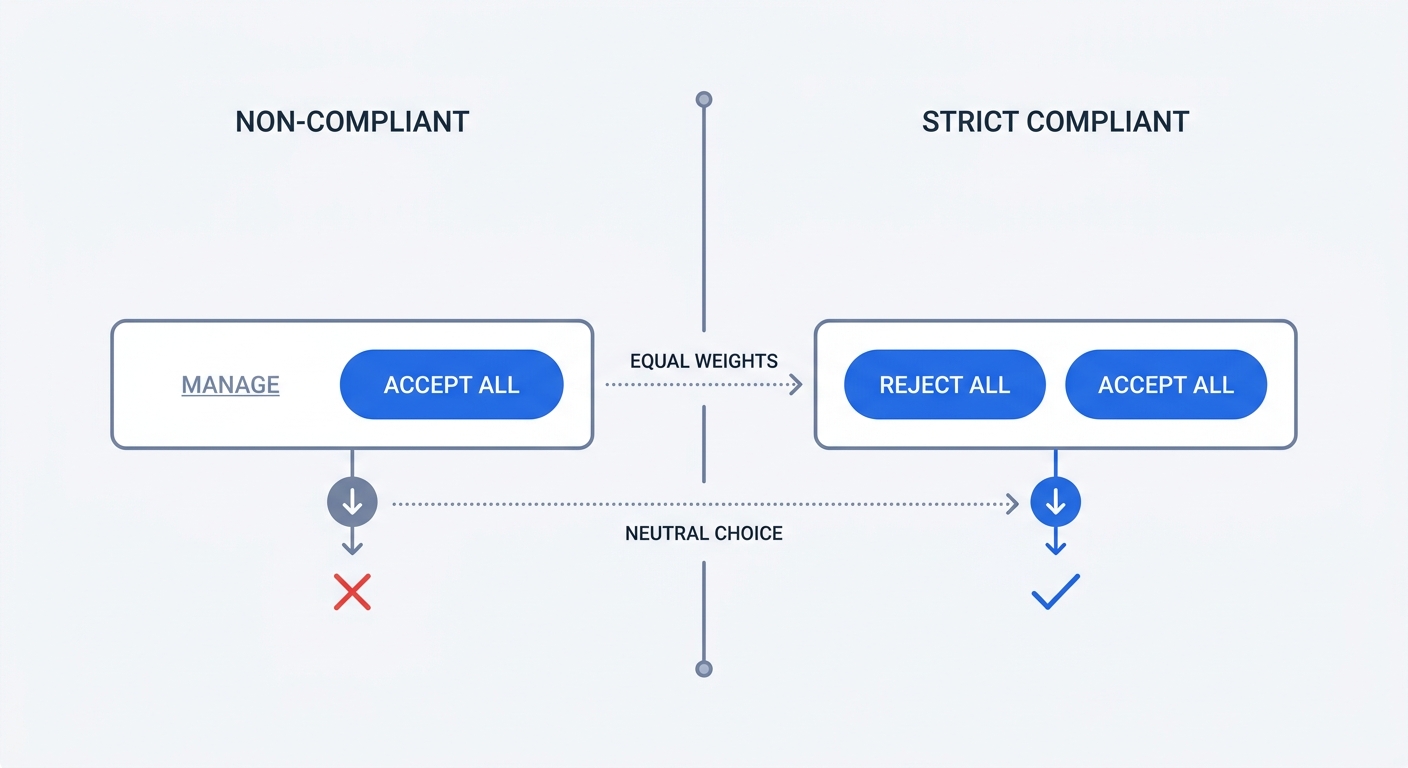
Every valid cookie consent example provides equal choices on the first layer. Users must see a "Reject All" button next to the "Accept All" button the moment the banner appears.
Banners fail compliance checks when they hide the rejection option behind a "Settings" or "Customize Choices" link. The European Data Protection Board requires website owners to offer a rejection option that takes the exact number of clicks as accepting.
Open your website in an incognito window. Count the clicks required to accept tracking, then count the clicks needed to reject it. If the second number exceeds the first, your setup violates privacy guidelines. Review instructions on how to comply with GDPR regulations to map out your specific legal strategy.
The Danger of Dark Patterns
Designers use color and contrast to manipulate user behavior. Regulators classify these tactics as dark patterns. Privacy advocacy groups target these deceptive interfaces for litigation.
A common dark pattern uses a bright, high-contrast color for the "Accept" button while formatting the "Reject" option as gray text. This visual hierarchy tricks users into clicking the dominant button. Compliant designs assign equal visual weight to both choices.
| Element | Non-Compliant Dark Pattern | Strict GDPR Compliance |
|---|---|---|
| First Layer Options | "Accept All" and "Settings" | "Accept All" and "Reject All" |
| Button Colors | High-contrast Accept, gray text Reject | Identical contrast for both buttons |
| Pre-ticked Boxes | Active tracking categories | Empty checkboxes requiring manual selection |
| Close Button (X) | Interpreted as active consent | Interpreted as refusal of consent |
Update your banner CSS. Match the padding, font weight, and background color for all primary decision buttons to eliminate visual bias.
Granular Opt-In Requirements
Regulators demand specific consent for distinct processing activities. Grouping all tracking scripts under a single "Accept" action violates the mandate for informed, explicit choice.
Divide your cookies into distinct categories. Standard frameworks require separate classifications for functional, statistical, and marketing purposes.
Functional cookies enable basic website operations like shopping carts and language preferences, meaning you can load them without prior consent. Statistical cookies power legacy analytics platforms. Marketing cookies build audience profiles for retargeting campaigns. Both statistical and marketing categories require explicit opt-in before execution.
Provide a settings panel that lists these categories with clear descriptions. Leave the toggles for statistical and marketing cookies unchecked by default. Forcing users to manually activate these toggles reduces opt-in rates while ensuring strict legal adherence.
Why a Compliant Banner Destroys Your Data
Deploying a legal banner creates a data crisis. When given a fair choice, visitors decline tracking.
The Banner Ghosting Effect
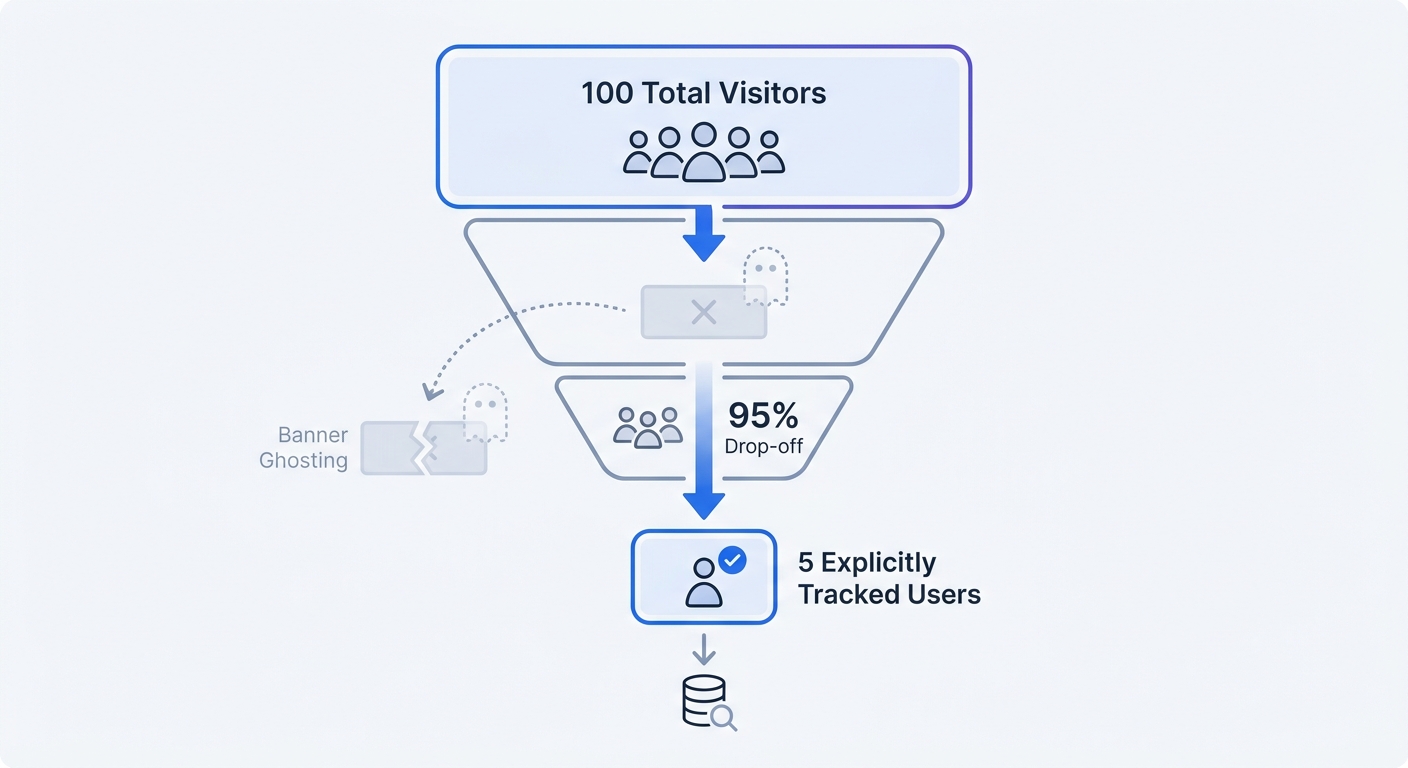
Many users experience decision avoidance when facing a consent prompt. They read the content beneath the pop-up and ignore the buttons.
Without explicit interaction, tracking scripts remain blocked. Research on cookie ghosting found that almost half of all website visitors bypass consent prompts without making a choice, a behavior that typically ranges from 40 to 60 percent depending on the audience. Combine these users with the percentage who reject tracking, and legacy platforms lose visibility into massive portions of active traffic.
Verify this gap in your own systems. Compare the order volume in your e-commerce backend against the conversion count in your legacy analytics platform. The resulting discrepancy represents your ghosted traffic.
Skewed Conversion Metrics
Partial data corrupts your marketing decisions. The visitors who accept tracking do not represent a statistical average of your total audience.
Privacy-conscious users exhibit different browsing habits and purchasing patterns than those who click "Accept All." When you optimize campaigns based on the small fraction of users who accept cookies, you optimize for a biased sample.
Industry tests on Google Analytics 4 indicate that strict compliance can render over 90 percent of traffic invisible, though this data loss generally ranges from 60 to 90 percent depending on regional rejection rates. Making budget allocation decisions on such a small fraction of your traffic guarantees poor resource distribution.
The Business Cost of Data Attrition
Marketing budgets rely on accurate attribution. When traffic ghosting hides the source of incoming visits, paid channels look less effective than their real-world impact.
A campaign might generate fifty conversions. If your tracking platform records ten of them due to consent rejections, your cost-per-acquisition metrics break. You calculate a CPA five times higher than the accurate figure.
This distortion forces marketing teams to pause profitable campaigns. They shift budgets away from high-performing channels because the tracking infrastructure fails to report the success. Fixing the data pipeline means abandoning tools that demand user consent.
Google Consent Mode v2 and Consent Fatigue
Regulatory changes enforce strict data collection rules for major advertising platforms. Google Consent Mode v2 became mandatory for advertisers operating in the European Economic Area.
Machine Learning Instead of Reality
When a user rejects cookies, Google Analytics 4 enters "Advanced Consent Mode." The platform stops writing local cookies and sends cookieless pings to Google servers.
GA4 applies mathematical models to these pings to estimate user behavior. The system fills reporting gaps by guessing what the untracked users did based on the behavior of tracked users. Website owners stop viewing raw data and begin viewing algorithm-generated estimates.
Check your GA4 property settings under Admin > Data Display > Reporting Identity. If you see "Blended" selected, the platform incorporates modeled data into your primary reports. You view synthetic numbers rather than definitive visitor actions.
The False Promise of Server-Side Tagging
Many teams attempt to bypass ad blockers by moving their tracking deployment to a server-side container. They route telemetry data through a custom subdomain before sending it to analytics providers.
If a user rejects tracking in your consent banner, you must respect that choice across all environments. Firing server-side tags for users who opted out violates data protection laws. Both server-side and client-side tracking require explicit consent when utilizing persistent identifiers. Shifting the processing from the browser to the server offers no legal loophole.
The Psychological Toll on Users
Web users face consent pop-ups on every domain they visit. This constant interruption causes consent fatigue.
Visitors install ad blockers and privacy extensions to bypass these banners. Network-level blockers prevent the consent management platform from loading in the browser. When the CMP fails to load, the default "no consent" state persists, and your legacy tracking scripts never execute.
Stop fighting user preferences with complex pop-ups. Respecting their desire for frictionless browsing requires shifting how you measure site performance.
The Best Cookie Consent Example is No Banner
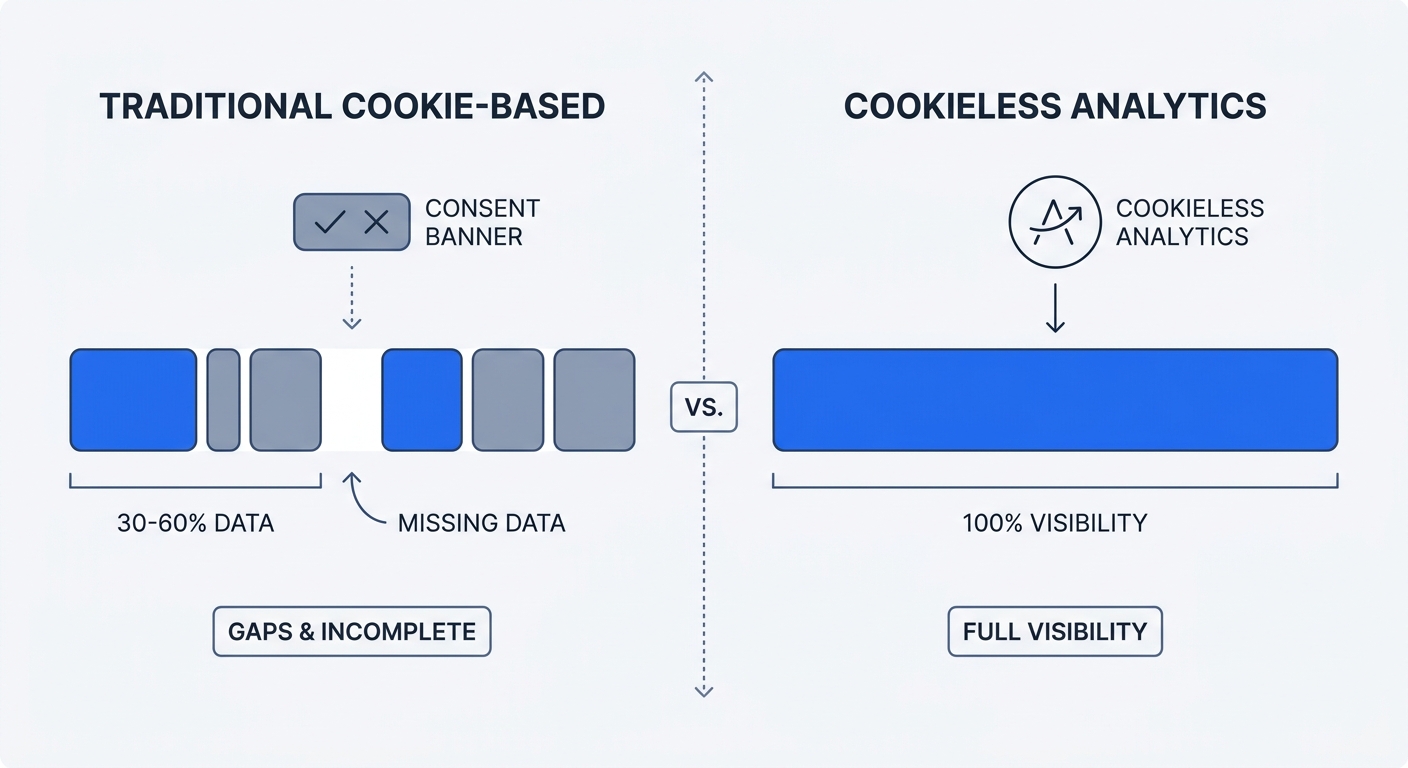
You eliminate data loss by removing the requirement for consent. Moving to cookieless analytics allows you to track website metrics without degrading the user experience.
Transitioning to Cookieless Analytics
Swetrix offers a privacy-focused analytics platform that operates without storing tracking identifiers on user devices. The system measures pageviews, sessions, and custom events using temporary, hashed strings.
The server generates a daily rotating hash based on the visitor IP address and user agent. This salt expires at midnight. You cannot track a user across multiple days or build long-term behavioral profiles.
Because the platform writes zero data to local storage and anonymizes all connection data, it falls outside the scope of ePrivacy Directive cookie rules. You capture complete traffic volume without displaying a consent prompt.
Claiming GDPR Legitimate Interest
The GDPR offers six lawful bases for processing personal data. Explicit consent represents one of these options.
Website optimization and basic traffic measurement qualify under Article 6(1)(f): Legitimate Interest. By keeping data anonymized and restricting its use to aggregate statistical analysis, you balance your business need for metrics with the privacy rights of the user.
To claim Legitimate Interest, update your privacy policy. Add a dedicated section explaining your tracking infrastructure.
- Name the analytics provider (e.g., Swetrix).
- State that the service uses cookieless technology.
- Explain the data collected (anonymized IPs, page URLs, referrers).
- Detail the processing purpose (website performance monitoring, traffic analysis).
- Confirm that data remains unshared with advertising networks.
Publish this update to establish the legal foundation for tracking all visitors by default.
Data Ownership and Export Control
Legacy analytics platforms silo your data. You face strict API limits and complex export processes when trying to query your historical records.
Swetrix operates as an open-source platform. Customers own their metrics. You can export complete datasets for offline analysis or connect external visualization tools.
If your business requires absolute control over data residency, you can self-host the analytics infrastructure. Organizations subject to strict regional regulations install the tracking server within their own cloud environment. This setup prevents third-party data access and guarantees sovereign control over customer insights.
How to Optimize Your Website for a Cookieless Future
Gaining complete visibility into your traffic requires a system audit and a clean implementation.
Auditing Your Current Tracking Scripts
Identify every third-party tag executing on your domain. Marketing teams stack multiple tracking tools over several years, creating massive compliance liabilities.
Open Chrome Developer Tools on your homepage. Navigate to the 'Application' tab. Inside the left sidebar, expand the 'Cookies' section and note every domain listed in the storage table.
Repeat this process for your 'Local Storage' and 'Session Storage' menus. If you spot domains related to advertising networks, legacy analytics providers, or social media pixels, you must wrap those scripts in a consent manager or delete them.
Audit your Google Tag Manager container. Pause any non-critical marketing tags. Every eliminated tag reduces your reliance on a compliance banner.
Implementing a Privacy-First Platform
Replacing your legacy tracking requires a clean slate. Remove the Google Analytics snippet from your website header. For WordPress users, delete the Site Kit plugin or clear the GA4 measurement ID from your theme settings.
Create a Swetrix account and add your website domain to the dashboard. The platform generates a lightweight tracking script.
Paste this script into the <head> section of your website:
<script src="https://swetrix.org/swetrix.js" defer></script>
<script>
  document.addEventListener("DOMContentLoaded", () => {
    swetrix.init("YOUR_PROJECT_ID");
    swetrix.trackViews();
  });
</script>
This single code block captures all standard traffic metrics. Because the script defers execution, it prevents page rendering delays. You monitor metrics in real time via the performance monitoring dashboard. The interface populates with live visitors within seconds of deployment.
Handling Third-Party Conversions
Tracking conversions from paid campaigns remains a priority. You can accomplish this data attribution without deploying invasive cookies.
Use UTM parameters for all inbound marketing links. When a visitor clicks a tagged link, Swetrix reads the URL and assigns the session to the correct campaign.
Generating consistent campaign URLs requires a standardized process. Build links using a UTM generator to capture the source, medium, and campaign variables.
When the visitor completes a purchase or submits a lead form, fire a custom event to the Swetrix API.
swetrix.track({
  ev: "checkout_complete",
  meta: {
    revenue: 150.0,
    currency: "USD",
  },
});
Unlike complex Google Analytics event tracking setups, firing events in a cookieless environment requires minimal code. You associate revenue directly with the referring campaign. This setup provides accurate return on investment calculations without relying on third-party cookie syncs.
Measure user engagement by monitoring external traffic patterns. Configure scripts to track outbound link clicks and file downloads. The system logs these interactions alongside standard pageviews.
If you maintain advertising pixels for retargeting, isolate them. Run those specific pixels through a minimal consent manager. Users who reject tracking block the advertising pixel, but your baseline analytics script continues recording the pageview. You maintain an accurate count of total site visitors while keeping specific retargeting functions legal.
The Hidden Costs of Consent Management
Enterprise consent management platforms charge recurring monthly fees based on pageviews or domain counts. You pay hundreds of dollars annually for software designed to suppress your data collection.
Engineering teams spend hours configuring script blocking, testing banner triggers, and maintaining consent logs. Whenever marketing adds a new tool, developers must integrate the new script into the CMP logic. This creates a continuous maintenance cycle.
Dropping the banner eliminates this technical debt. You cancel the CMP subscription and reassign developer time to building product features.
Stop losing your analytics data to consent blockers. Start your free Swetrix trial today and gain 100% visibility into your traffic with a platform that respects user privacy by design.